



Introduction
In this project, you will learn how to access MySQL, import data, and query information about countries with a population exceeding 1 billion. You will gain hands-on experience in working with MySQL databases and writing SQL queries to retrieve specific data.
👀 Preview
🎯 Tasks
In this project, you will learn:
- How to access MySQL using the
sudocommand without a password - How to import data from a SQL file into a MySQL database
- How to write a SQL query to retrieve data from the
citytable and filter for countries with a population exceeding 1 billion - How to sort the query results in ascending order by population
🏆 Achievements
After completing this project, you will be able to:
- Manage MySQL databases, including importing data and running SQL queries
- Understand how to filter and sort data in SQL based on specific criteria
- Apply your SQL knowledge to solve real-world data analysis problems
- Gain practical experience in working with large datasets and extracting meaningful insights
Access MySQL and Import the Data
In this step, you will learn how to access MySQL using the sudo command without any password, and import the data from /home/labex/project/world.sql into the world database.
- Start the MySQL service:
sudo service mysql start
- Access MySQL without a password:
sudo mysql
- Import the data from the
world.sqlfile:
SOURCE /home/labex/project/world.sql;
- Switch to the
worlddatabase:
USE world;
Now you have successfully imported the data and switched to the world database.
Query Countries with Population Exceeding 1 Billion
In this step, you will learn how to query information about countries with a population exceeding 1 billion from the city table and sort the results in ascending order of population.
- Add the following SQL query to the file
getBigPopulation.sql.
SELECT CountryCode AS 'Country Code', SUM(Population) AS 'Population'
FROM city
GROUP BY CountryCode
HAVING SUM(Population) > 100000000
ORDER BY SUM(Population) ASC;
This query will:
- Select the
CountryCodeand the sum ofPopulationfor each country code - Group the results by
CountryCode - Filter the results to only include country codes with a total population exceeding 1 billion (100,000,000)
- Order the results in ascending order by the total population
- Save and close the file.
Run the SQL Script
In this step, you will learn how to run the getBigPopulation.sql script in MySQL.
- In the MySQL prompt, run the script:
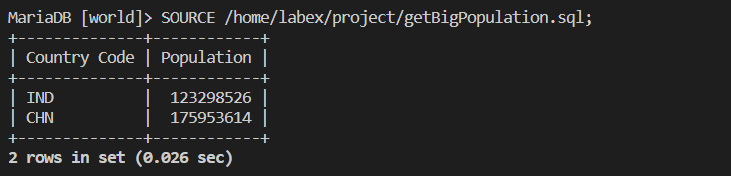
SOURCE /home/labex/project/getBigPopulation.sql;
This will execute the SQL script and display the results:
+--------------+--------------+
| Country Code | Population   |
+--------------+--------------+
| IND          |  123298526   |
| CHN          |  175953614   |
+--------------+--------------+
2 rows in set (0.009 sec)
The output shows the country code and total population for the countries with a population exceeding 1 billion, sorted in ascending order by population.
Congratulations! You have successfully completed the project to retrieve data on countries with a population exceeding 1 billion.
Summary
Congratulations! You have completed this project. You can practice more labs in LabEx to improve your skills.