はじめに
この実験では、円の面積と円周を計算する C プログラムを作成します。このシンプルなプログラムは、変数宣言、ユーザー入力の処理、数学的な計算、および書式付き出力の表示など、いくつかの基本的なプログラミング概念を示しています。
以下の数学的な公式を使用します。
- 円の面積 = π × 半径²
- 円の円周 = 2 × π × 半径
この実験の終わりまでに、ユーザー入力を受け取り、これらの公式を使用して計算を行う完全な C プログラムを作成することができるようになります。
プログラムファイルの作成と基本構造
まず、C プログラムファイルを作成し、基本構造を設定しましょう。~/project/circle_program ディレクトリに circle.c という名前のファイルを作成します。
プロジェクトディレクトリに移動します。
cd ~/project/circle_programWebIDE エディタを使用して、
circle.cという名前の新しいファイルを作成します。WebIDE の上部にある「File」メニューをクリックし、「New File」を選択します。または、ファイルエクスプローラーパネルで右クリックし、「New File」を選択することもできます。ファイル名を
circle.cとし、~/project/circle_programディレクトリに保存します。次に、C プログラムの基本構造をファイルに追加しましょう。
#include <stdio.h>

int main() {
    // We will add our code here

    return 0;
}
上記のコードでは、
#include <stdio.h>は、コンパイラに標準入出力ライブラリ(printf()やscanf()などの関数を提供する)をインクルードするように指示するプリプロセッサディレクティブです。int main()は、すべての C プログラムのエントリポイントであるメイン関数を定義します。- 中括弧
{ }は、メイン関数の本体の開始と終了を示します。 return 0;は、プログラムが正常に実行されたことを示します。
- Ctrl+S を押すか、「File」メニューを使用して「Save」を選択して、ファイルを保存します。
変数と定数の宣言
基本的なプログラム構造ができたので、計算に必要な変数と定数を追加しましょう。
エディタで
circle.cファイルを開きます(まだ開いていない場合)。いくつかの変数が必要になります。
- 円の半径を格納する変数
- π(パイ)の値を格納する定数
- 計算された面積と円周を格納する変数
コードを以下のように更新します。
#include <stdio.h>

int main() {
    // Declare variables and constants
    float radius;         // to store the radius of the circle
    const float PI = 3.14159; // the mathematical constant π (pi)
    float area;           // to store the calculated area
    float circumference;  // to store the calculated circumference

    return 0;
}
変数宣言について理解しましょう。
float radius;- 半径は小数になる可能性があるため、floatデータ型を使用します。const float PI = 3.14159;- プログラムの実行中に値が変わらないように、PI を定数として定義します。constキーワードがこれを保証します。float area;とfloat circumference;- これらの変数は計算結果を格納しますが、結果は小数になる可能性があります。
C プログラミングでは、通常、関数の冒頭ですべての変数を宣言します。このやり方により、プログラムがより整理され、理解しやすくなります。
- ファイルを保存します(Ctrl+S)。
ユーザー入力の取得
次に、ユーザーに円の半径を入力してもらい、その入力を読み取るコードを追加しましょう。
エディタで
circle.cファイルを開きます(まだ開いていない場合)。ユーザーに入力を促し、その入力を読み取るコードを追加します。
#include <stdio.h>

int main() {
    // Declare variables and constants
    float radius;         // to store the radius of the circle
    const float PI = 3.14159; // the mathematical constant π (pi)
    float area;           // to store the calculated area
    float circumference;  // to store the calculated circumference

    // Prompt user for radius
    printf("Please enter the radius of the circle: ");

    // Read the radius value from user input
    scanf("%f", &radius);

    // Validate input (optional but good practice)
    if (radius <= 0) {
        printf("Error: Radius must be a positive number\n");
        return 1;  // Exit with error code
    }

    return 0;
}
追加した部分を理解しましょう。
printf("Please enter the radius of the circle: ");- これは、ユーザーに半径を入力するように促すメッセージを表示します。scanf("%f", &radius);- これは、ユーザーから浮動小数点数値を読み取り、それをradius変数に格納します。%fは浮動小数点数の書式指定子です。&radiusはradius変数のメモリアドレスを渡し、scanf()がその値を変更できるようにします。
- 円の半径はゼロまたは負の値にはできないため、半径が正の値であることを確認する簡単なバリデーションチェックを追加しました。
scanf() 関数は、標準入力(キーボード)から書式付き入力を読み取るために使用されます。正しい書式指定子(浮動小数点数の場合は %f)を使用し、& 演算子を使って変数のアドレスを渡すことが重要です。
- ファイルを保存します(Ctrl+S)。
面積と円周の計算
半径がわかったので、公式を使って円の面積と円周を計算することができます。
エディタで
circle.cファイルを開きます(まだ開いていない場合)。計算コードを追加します。
#include <stdio.h>

int main() {
    // Declare variables and constants
    float radius;         // to store the radius of the circle
    const float PI = 3.14159; // the mathematical constant π (pi)
    float area;           // to store the calculated area
    float circumference;  // to store the calculated circumference

    // Prompt user for radius
    printf("Please enter the radius of the circle: ");

    // Read the radius value from user input
    scanf("%f", &radius);

    // Validate input
    if (radius <= 0) {
        printf("Error: Radius must be a positive number\n");
        return 1;  // Exit with error code
    }

    // Calculate the area of the circle
    area = PI * radius * radius;

    // Calculate the circumference of the circle
    circumference = 2 * PI * radius;

    return 0;
}
計算部分を理解しましょう。
area = PI * radius * radius;- これは、公式 π × r²(r は半径)を使って面積を計算します。circumference = 2 * PI * radius;- これは、公式 2 × π × r を使って円周を計算します。
C 言語では、乗算演算子は * です。r² を計算するには、単に半径をそれ自身と掛け算します(radius * radius)。より複雑な数学的な演算を行う場合は、math.h ライブラリの関数を使いますが、今回の計算はそれを使わずに十分簡単です。
- ファイルを保存します(Ctrl+S)。
結果の表示とプログラムのテスト
結果を表示するコードを追加してプログラムを完成させ、コンパイルして実行し、正しく動作するか確認しましょう。
エディタで
circle.cファイルを開きます(まだ開いていない場合)。結果を表示するコードを追加します。
#include <stdio.h>

int main() {
    // Declare variables and constants
    float radius;         // to store the radius of the circle
    const float PI = 3.14159; // the mathematical constant π (pi)
    float area;           // to store the calculated area
    float circumference;  // to store the calculated circumference

    // Prompt user for radius
    printf("Please enter the radius of the circle: ");

    // Read the radius value from user input
    scanf("%f", &radius);

    // Validate input
    if (radius <= 0) {
        printf("Error: Radius must be a positive number\n");
        return 1;  // Exit with error code
    }

    // Calculate the area of the circle
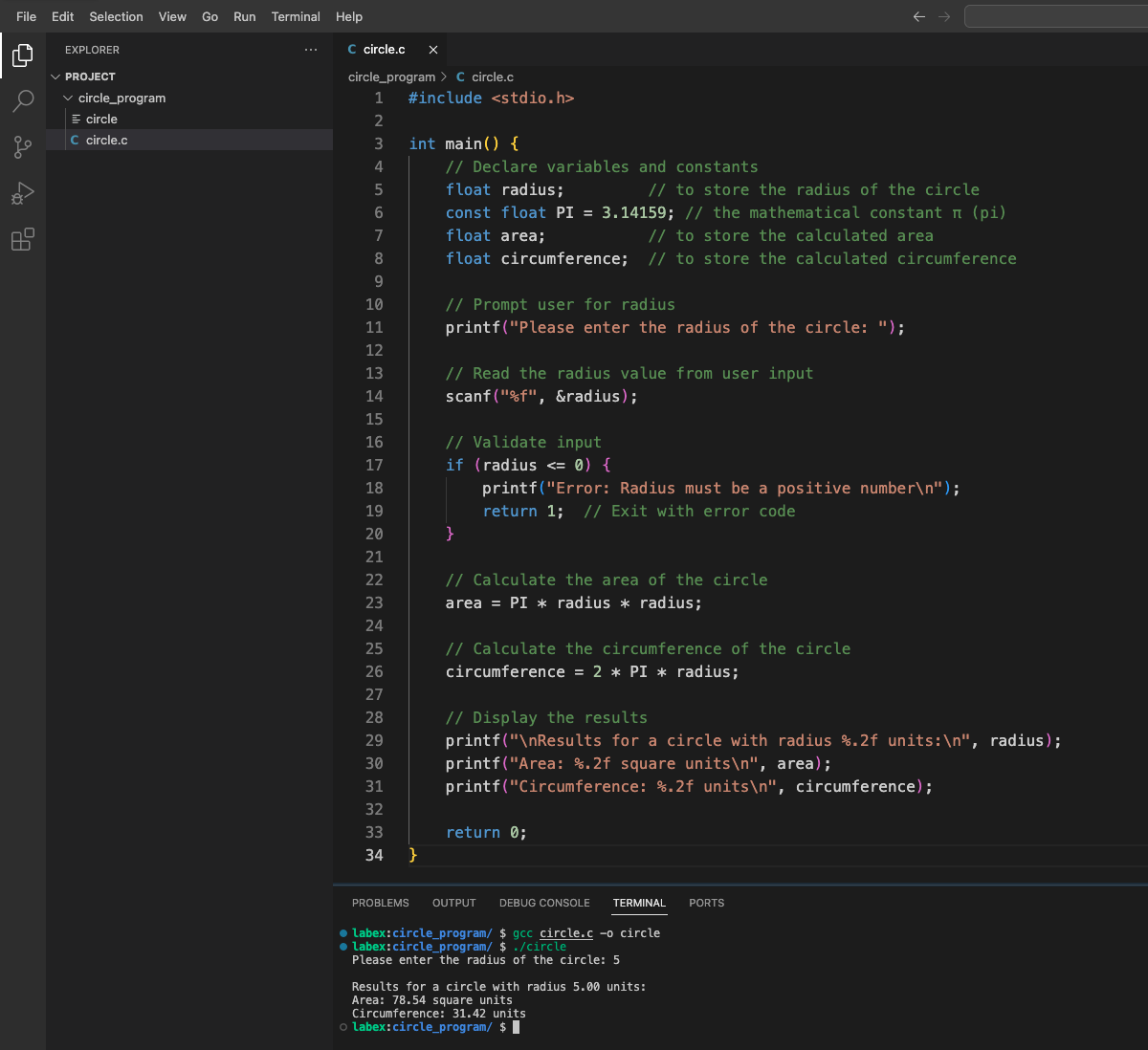
    area = PI * radius * radius;

    // Calculate the circumference of the circle
    circumference = 2 * PI * radius;

    // Display the results
    printf("\nResults for a circle with radius %.2f units:\n", radius);
    printf("Area: %.2f square units\n", area);
    printf("Circumference: %.2f units\n", circumference);

    return 0;
}
出力コードを理解しましょう。
printf("\nResults for a circle with radius %.2f units:\n", radius);- これは、半径を小数点以下 2 桁で表示します。printf("Area: %.2f square units\n", area);- これは、計算された面積を小数点以下 2 桁で表示します。printf("Circumference: %.2f units\n", circumference);- これは、計算された円周を小数点以下 2 桁で表示します。
%.2f 書式指定子は、printf() に浮動小数点数を小数点以下 2 桁で表示するよう指示し、出力をより読みやすくします。
ファイルを保存します(Ctrl+S)。
次に、プログラムをコンパイルしましょう。ターミナルでプロジェクトディレクトリに移動し、
gccコンパイラを使用します。cd ~/project/circle_program gcc circle.c -o circle-o circleオプションは、コンパイラにcircleという名前の実行可能ファイルを作成するよう指示します。コンパイルが成功したら、次のコマンドでプログラムを実行できます。
./circle入力を求められたら、半径の値(例えば 5)を入力し、Enter キーを押します。次のような出力が表示されるはずです。
Please enter the radius of the circle: 5

Results for a circle with radius 5.00 units:
Area: 78.54 square units
Circumference: 31.42 units
異なる半径の値でプログラムを再度実行し、正しく動作することを確認してみましょう。
おめでとうございます!ユーザーの入力に基づいて円の面積と円周を計算して表示する C プログラムを正常に作成しました。
まとめ
この実験では、以下の機能を持つ C プログラムを正常に作成しました。
- ユーザーに円の半径の入力を促す
- ユーザーの入力を読み取り、検証する
- 公式 π × r² を使用して円の面積を計算する
- 公式 2 × π × r を使用して円の円周を計算する
- 計算結果を適切な書式で表示する
この過程で、いくつかの重要な C プログラミングの概念を学びました。
#includeを使用してヘッダーファイルをインクルードする- 変数と定数を定義し、使用する
scanf()を使用してユーザー入力を読み取る- 数学的な計算を行う
printf()を使用して書式付きの出力を表示する- C プログラムをコンパイルし、実行する
これらの基本的なスキルは、より複雑な C プログラムの基礎を形成します。この知識を拡張して、ユーザーとの対話や数学的な計算を含む、より高度なアプリケーションを作成することができます。