
Introduction
In this lab, we will explore how to determine if a given string is a valid date string in the simplified extended ISO format (ISO 8601). We will use the Date constructor and its associated methods to create a Date object from the string and check its validity. By the end of the lab, you will have a better understanding of how to work with dates in JavaScript and how to validate them using the ISO format.
Understanding ISO Date Format and JavaScript Date Objects
Before we start coding, let us understand what the ISO 8601 date format is and how JavaScript handles dates.
The ISO 8601 Date Format
The ISO 8601 format is an international standard for representing dates and times. The simplified extended ISO format looks like this:
YYYY-MM-DDTHH:mm:ss.sssZ
Where:
YYYYrepresents the year (four digits)MMrepresents the month (two digits)DDrepresents the day (two digits)Tis a literal character separating the date and timeHHrepresents hours (two digits)mmrepresents minutes (two digits)ssrepresents seconds (two digits)sssrepresents milliseconds (three digits)Zindicates UTC timezone (Zulu time)
For example, 2023-05-12T14:30:15.123Z represents May 12, 2023, at 2:30:15.123 PM UTC.
The JavaScript Date Object
JavaScript provides a built-in Date object for working with dates and times. When you create a new Date object, you can pass an ISO-formatted string to it:
const date = new Date("2023-05-12T14:30:15.123Z");
Let us open the terminal and practice working with Date objects:
- Open the Terminal by clicking on the Terminal menu at the top of the WebIDE
- Type
nodeand press Enter to start the Node.js interactive shell - Create a new Date object for the current time:
const now = new Date();
console.log(now);
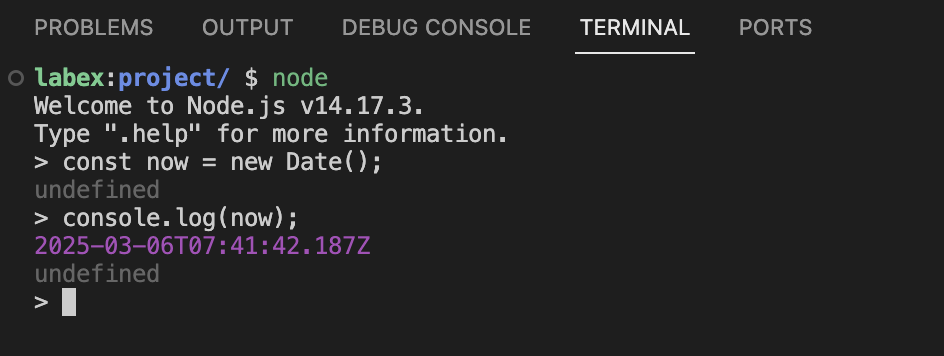
- Convert this Date object to an ISO string:
const isoString = now.toISOString();
console.log(isoString);
You should see output similar to:
2023-05-12T14:30:15.123Z
- Create a Date from an ISO string:
const dateFromIso = new Date("2023-05-12T14:30:15.123Z");
console.log(dateFromIso);
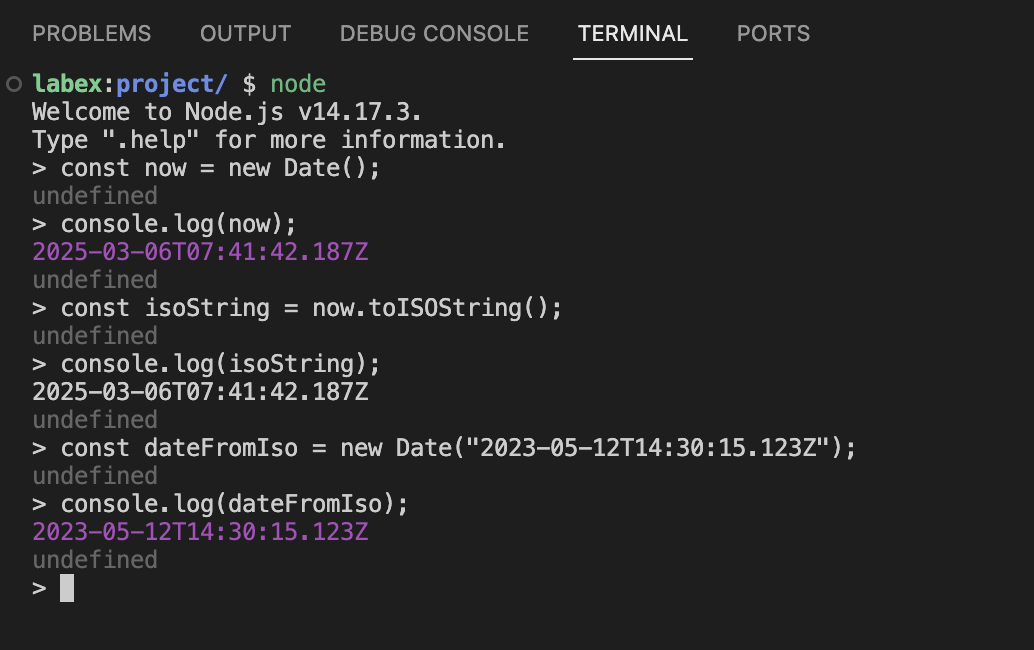
This demonstrates how JavaScript can parse and create Date objects from ISO formatted strings.
Creating a Function to Validate ISO Formatted Date Strings
In this step, we will create a JavaScript function that checks if a given string is in valid ISO 8601 format.
Creating the Validation Function
Let us create a new JavaScript file for our ISO date validator:
- In the WebIDE, click on the Explorer icon in the left sidebar
- Right-click in the file explorer and select "New File"
- Name the file
isISODate.jsand press Enter - Add the following code to the file:
/**
 * Checks if a string is a valid ISO 8601 formatted date string
 * @param {string} val - The string to check
 * @return {boolean} - Returns true if the string is in ISO format, false otherwise
 */
const isISOString = (val) => {
  // Create a Date object from the input string
  const d = new Date(val);

  // Check if the date is valid (not NaN) and if the ISO string matches the original
  return !Number.isNaN(d.valueOf()) && d.toISOString() === val;
};

// Export the function so we can use it elsewhere
module.exports = isISOString;
Let us examine how this function works:
new Date(val)creates a Date object from the input stringd.valueOf()returns the numeric timestamp value (milliseconds since January 1, 1970)Number.isNaN(d.valueOf())checks if the date is invalid (NaN means "Not a Number")d.toISOString() === valverifies that converting the Date back to an ISO string matches the original input
Testing Our Function
Now, let us create a simple test file to try our function:
- Create another file named
testISO.js - Add the following code:
// Import our isISOString function
const isISOString = require("./isISODate");

// Test with a valid ISO formatted date
console.log("Testing a valid ISO date:");
console.log("2020-10-12T10:10:10.000Z");
console.log("Result:", isISOString("2020-10-12T10:10:10.000Z"));
console.log();

// Test with an invalid format
console.log("Testing a non-ISO date:");
console.log("2020-10-12");
console.log("Result:", isISOString("2020-10-12"));
- Run the test file using Node.js:
node testISO.js
You should see output similar to:
Testing a valid ISO date:
2020-10-12T10:10:10.000Z
Result: true

Testing a non-ISO date:
2020-10-12
Result: false
This shows our function correctly identifies that "2020-10-12T10:10:10.000Z" is a valid ISO formatted date, while "2020-10-12" is not.
Testing with Various Date Formats
Now that we have our basic validation function, let us test it with different date formats to understand how it behaves with various inputs.
Creating a Test Suite
Let us create a comprehensive test suite to examine different date formats:
- Create a new file named
dateTester.js - Add the following code:
// Import our isISOString function
const isISOString = require("./isISODate");

// Function to test different date strings
function testDate(description, dateString) {
  console.log(`Testing: ${description}`);
  console.log(`Input: "${dateString}"`);
  console.log(`Is ISO Format: ${isISOString(dateString)}`);
  console.log("-----------------------");
}

// Valid ISO date examples
testDate("Standard ISO date with timezone Z", "2023-05-12T14:30:15.123Z");
testDate("ISO date with zero milliseconds", "2020-10-12T10:10:10.000Z");

// Invalid or non-ISO format examples
testDate("Date only (no time component)", "2023-05-12");
testDate("Date and time without milliseconds", "2023-05-12T14:30:15Z");
testDate(
  "Date with time zone offset instead of Z",
  "2023-05-12T14:30:15+01:00"
);
testDate("Invalid date (month 13 does not exist)", "2023-13-12T14:30:15.123Z");
testDate("Non-date string", "Hello World");
- Run the test suite in the terminal:
node dateTester.js
You should see output showing which strings are valid ISO dates and which are not.
Understanding the Results
Let us analyze what makes each test case valid or invalid:
2023-05-12T14:30:15.123Z- This is valid because it follows the complete ISO 8601 format with the UTC timezone indicator (Z).2020-10-12T10:10:10.000Z- This is also valid, with milliseconds explicitly set to 000.2023-05-12- This is a valid date, but not in ISO format because it's missing the time component.2023-05-12T14:30:15Z- This appears to be ISO format but is missing the milliseconds, which are required in the strict ISO format.2023-05-12T14:30:15+01:00- This uses a timezone offset (+01:00) instead of 'Z'. While this is valid according to ISO 8601, our function requires the exact format produced bytoISOString(), which always uses 'Z'.2023-13-12T14:30:15.123Z- This is an invalid date (month 13 does not exist), sonew Date()will create an invalid Date object.Hello World- This is not a date at all, sonew Date()will create an invalid Date object.
Our validation function specifically checks two conditions:
- The string must parse to a valid date (not NaN)
- When that date is converted back to an ISO string, it must exactly match the original input
This approach ensures we are validating the exact ISO format produced by JavaScript's toISOString() method.
Handling Edge Cases and Improving Our Function
In this final step, we will improve our isISOString function to handle edge cases and make it more robust.
Common Edge Cases
When validating data in real applications, you need to handle various unexpected inputs. Let us examine some edge cases:
- Empty strings
- Non-string values (null, undefined, numbers, objects)
- Different timezone representations
Enhancing Our Function
Let us update our isISODate.js file to handle these edge cases:
- Open the
isISODate.jsfile in the WebIDE - Replace the existing code with this improved version:
/**
 * Checks if a string is a valid ISO 8601 formatted date string
 * @param {string} val - The string to check
 * @return {boolean} - Returns true if the string is in ISO format, false otherwise
 */
const isISOString = (val) => {
  // Check if input is a string
  if (typeof val !== "string") {
    return false;
  }

  // Check if string is empty
  if (val.trim() === "") {
    return false;
  }

  try {
    // Create a Date object from the input string
    const d = new Date(val);

    // Check if the date is valid and if the ISO string matches the original
    return !Number.isNaN(d.valueOf()) && d.toISOString() === val;
  } catch (error) {
    // If any error occurs during validation, return false
    return false;
  }
};

// Export the function
module.exports = isISOString;
This improved function now:
- Checks if the input is a string before processing
- Handles empty strings
- Uses a try-catch block to handle any errors that might occur
- Still performs our core validation logic
Testing Our Improved Function
Let us create one final test file to verify our improved function with edge cases:
- Create a new file named
edgeCaseTester.js - Add the following code:
// Import our improved isISOString function
const isISOString = require("./isISODate");

// Function to test and display results
function testCase(description, value) {
  console.log(`Testing: ${description}`);
  console.log(`Input: ${value === "" ? "(empty string)" : value}`);
  console.log(`Type: ${typeof value}`);
  console.log(`Is ISO Format: ${isISOString(value)}`);
  console.log("-----------------------");
}

// Test with various edge cases
testCase("Valid ISO date", "2023-05-12T14:30:15.123Z");
testCase("Empty string", "");
testCase("Null value", null);
testDate("Undefined value", undefined);
testCase("Number value", 12345);
testCase("Object value", {});
testCase("Current date as ISO string", new Date().toISOString());
- Run the test file:
node edgeCaseTester.js
Real-World Application
In a real application, our isISOString function could be used in scenarios like:
- Validating user input in a date field
- Checking dates received from external APIs
- Ensuring consistent date format in a database
- Data validation before processing
For example, in a form validation function:
function validateForm(formData) {
  // Other validations...

  if (formData.startDate && !isISOString(formData.startDate)) {
    return {
      valid: false,
      error: "Start date must be in ISO format"
    };
  }

  // More validations...

  return { valid: true };
}
The improved function is now robust enough to handle unexpected inputs and provide reliable validation for ISO formatted date strings.
Summary
In this lab, you have learned how to validate if a string is in the simplified extended ISO format (ISO 8601). Here is what you accomplished:
- Learned about the ISO 8601 date format and its structure
- Understood how JavaScript Date objects work with ISO formatted strings
- Created a function to validate if a string is in the exact ISO format
- Tested the function with various date formats
- Improved the function to handle edge cases and make it more robust
This skill is particularly useful when working with APIs, databases, or any system where consistent date formatting is important. The ISO 8601 format is widely used because it avoids ambiguity and provides a standardized way to represent dates and times.
Key takeaways from this lab:
- The ISO 8601 format follows a specific pattern:
YYYY-MM-DDTHH:mm:ss.sssZ - JavaScript's
Date.prototype.toISOString()method always outputs dates in this format - Validating dates requires checking both validity and format
- Proper error handling makes validation functions more robust
You can now apply this knowledge to build more reliable applications that correctly handle date and time data.