




Introduction
In this lab, you will explore fundamental Redis list operations. You'll learn how to manage and manipulate list data using commands like LTRIM, LINSERT, LPOP, RPOP, and BLPOP.
Specifically, you'll practice trimming lists to specific ranges with LTRIM, inserting elements before or after existing elements using LINSERT, removing elements from the beginning and end of lists with LPOP and RPOP respectively, and blocking until an element is available to pop with BLPOP. These operations are essential for efficiently managing data stored in Redis lists.
Trim a List with LTRIM
In this step, you'll learn how to trim a Redis list using the LTRIM command. LTRIM allows you to specify a range of elements within a list, effectively removing all elements outside that range. This is useful for managing list size and focusing on specific portions of your data.
First, connect to the Redis server using the redis-cli command in your terminal:
redis-cli
Now, let's create a list named mylist and populate it with some values. Execute the following command within the redis-cli:
RPUSH mylist "one" "two" "three" "four" "five"
You should see the following output:
(integer) 5
This indicates that five elements have been added to the list.
Now, let's use LTRIM to keep only the elements from index 1 to index 3 (inclusive). Remember that Redis list indexes are zero-based. Execute the following command:
LTRIM mylist 1 3
The output will be:
OK
This means the LTRIM operation was successful.
To verify the result, let's retrieve the entire list using LRANGE. Execute the following command:
LRANGE mylist 0 -1
You should see the following output:
1) "two"
2) "three"
3) "four"
As you can see, only the elements at indices 1, 2, and 3 ("two", "three", and "four") remain in the list. The elements "one" and "five" have been removed.
Finally, exit the redis-cli by typing exit and pressing Enter. This ensures that your commands are logged.
exit
LTRIM is a powerful tool for managing the size and content of your Redis lists. By specifying the desired range, you can efficiently remove unwanted elements and focus on the data that matters most.
Insert Elements with LINSERT
In this step, you'll learn how to insert elements into a Redis list using the LINSERT command. LINSERT allows you to insert a new element either before or after an existing element in the list. This is useful for maintaining the order of elements and adding new items at specific positions.
Continuing from the previous step, we should have a list named mylist with the following elements: "two", "three", and "four".
Connect to the Redis server using the redis-cli command:
redis-cli
Now, let's insert the element "one" before the element "two" in the list. We use the BEFORE option with LINSERT. Execute the following command:
LINSERT mylist BEFORE "two" "one"
You should see the following output:
(integer) 4
This indicates that the list now has 4 elements.
To verify the result, let's retrieve the entire list using LRANGE. Execute the following command:
LRANGE mylist 0 -1
You should see the following output:
1) "one"
2) "two"
3) "three"
4) "four"
As you can see, the element "one" has been inserted before "two".
Next, let's insert the element "five" after the element "four" in the list. We use the AFTER option with LINSERT. Execute the following command:
LINSERT mylist AFTER "four" "five"
The output will be:
(integer) 5
This means the LINSERT operation was successful, and the list now has 5 elements.
Let's retrieve the entire list again using LRANGE. Execute the following command:
LRANGE mylist 0 -1
You should see the following output:
1) "one"
2) "two"
3) "three"
4) "four"
5) "five"
As you can see, the element "five" has been inserted after "four".
Finally, exit the redis-cli by typing exit and pressing Enter. This ensures that your commands are logged.
exit
LINSERT provides precise control over where new elements are added to your Redis lists, allowing you to maintain the desired order and structure of your data.
Pop Elements with LPOP and RPOP
In this step, you'll learn how to remove and retrieve elements from a Redis list using the LPOP and RPOP commands. LPOP removes and returns the first element (leftmost) of the list, while RPOP removes and returns the last element (rightmost) of the list. These commands are useful for implementing queue-like or stack-like behavior with Redis lists.
Continuing from the previous step, we should have a list named mylist with the following elements: "one", "two", "three", "four", and "five".
Connect to the Redis server using the redis-cli command:
redis-cli
Now, let's use LPOP to remove and retrieve the first element of the list. Execute the following command:
LPOP mylist
You should see the following output:
"one"
This indicates that the element "one" has been removed from the list and returned.
To verify the result, let's retrieve the remaining elements using LRANGE. Execute the following command:
LRANGE mylist 0 -1
You should see the following output:
1) "two"
2) "three"
3) "four"
4) "five"
As you can see, the element "one" is no longer in the list.
Next, let's use RPOP to remove and retrieve the last element of the list. Execute the following command:
RPOP mylist
The output will be:
"five"
This means the element "five" has been removed from the list and returned.
Let's retrieve the remaining elements again using LRANGE. Execute the following command:
LRANGE mylist 0 -1
You should see the following output:
1) "two"
2) "three"
3) "four"
As you can see, the element "five" is no longer in the list.
Finally, delete the mylist list, and exit the redis-cli by typing exit and pressing Enter. This ensures that your commands are logged.
DEL mylist
exit
LPOP and RPOP are fundamental commands for managing Redis lists as queues or stacks. They provide a simple and efficient way to remove and retrieve elements from either end of the list.
Block and Pop with BLPOP
In this step, you'll learn how to use the BLPOP command, which is a blocking version of LPOP. BLPOP allows a client to wait (block) until an element is available in a list before attempting to pop it. This is particularly useful for building reliable message queues or task queues where consumers need to wait for new items to be added.
For this step, you'll need to open two terminal windows. In both terminals, connect to the Redis server using the redis-cli command:
redis-cli
Keep the first terminal connected to Redis. In the second terminal, we'll execute the blocking pop command.
First, make sure the mylist list is deleted in the previous steps. If not, execute the following command:
DEL mylist
In the second terminal, execute the following command:
BLPOP mylist 100
This command will block for a maximum of 100 seconds, waiting for an element to become available in the list mylist. If no element is added within 100 seconds, the command will time out and return nil.
Now, switch back to the first terminal. Let's add an element to the mylist list. Execute the following command:
RPUSH mylist "hello"
Immediately after executing the RPUSH command in the first terminal, you should see the BLPOP command in the second terminal return with the following output:
1) "mylist"
2) "hello"
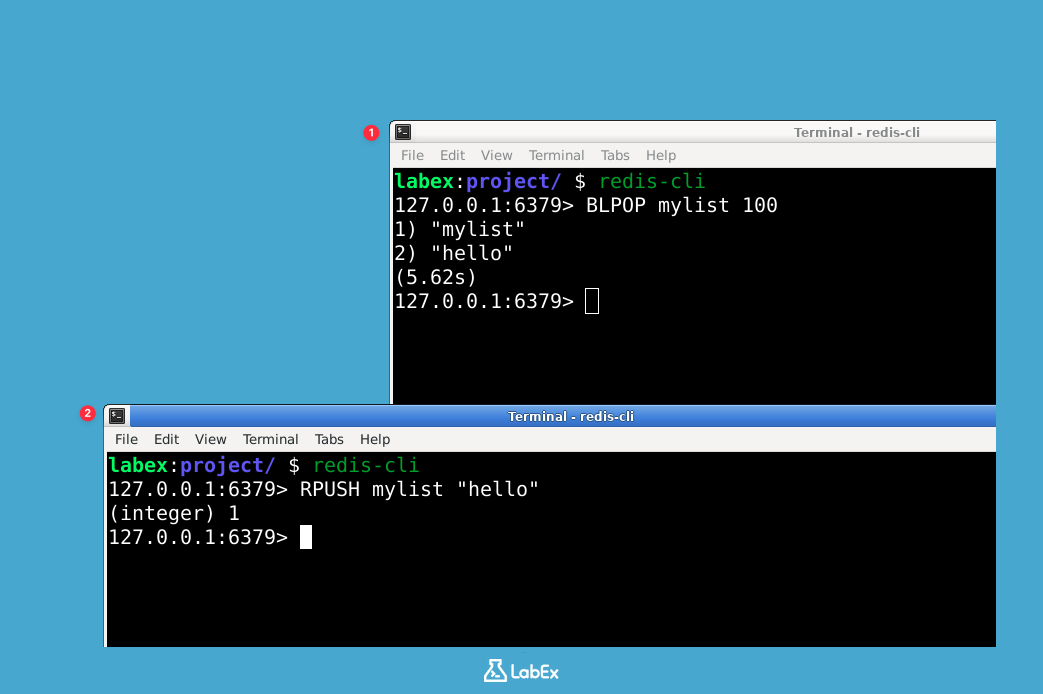
This indicates that the BLPOP command successfully popped the element "hello" from the list mylist. The first element of the returned array is the key of the list, and the second element is the value that was popped.
If you didn't add the element quickly enough, the BLPOP command in the second terminal might have timed out and returned nil. If this happens, simply re-run the BLPOP command in the second terminal and then quickly add an element to the list in the first terminal.
Now, let's try BLPOP with multiple lists. In the second terminal, execute the following command:
BLPOP mylist anotherlist 100
This command will block, waiting for an element to become available in either mylist or anotherlist.
Switch back to the first terminal and add an element to anotherlist. Execute the following command:
RPUSH anotherlist "world"
You should see the BLPOP command in the second terminal return with the following output:
1) "anotherlist"
2) "world"
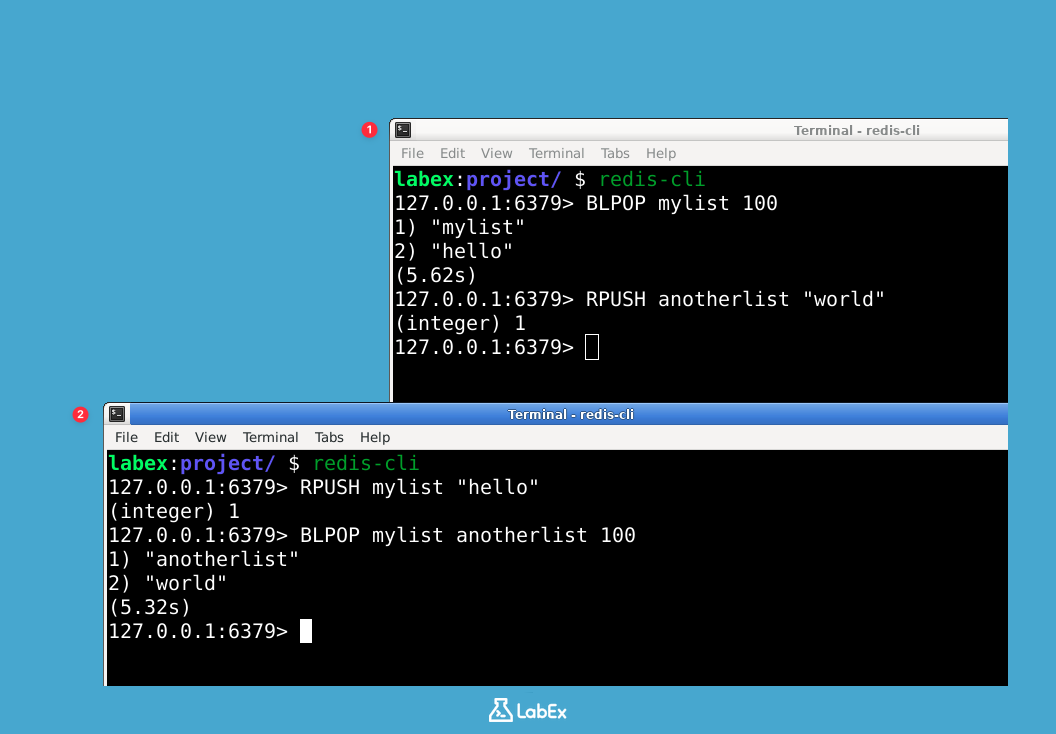
This demonstrates that BLPOP can wait for elements in multiple lists and returns the list from which the element was popped.
Finally, exit the redis-cli in both terminals by typing exit and pressing Enter. This ensures that your commands are logged.
exit
BLPOP is a crucial command for building robust and scalable applications that rely on asynchronous communication and task processing. It allows consumers to efficiently wait for new data without constantly polling the Redis server.
Summary
In this lab, you explored fundamental Redis list operations. You learned how to manage and manipulate list data using commands like LTRIM, LINSERT, LPOP, RPOP, and BLPOP.
You practiced trimming lists to specific ranges with LTRIM, inserting elements before or after existing elements using LINSERT, removing elements from the beginning and end of lists with LPOP and RPOP respectively, and blocking until an element is available to pop with BLPOP. These operations are essential for efficiently managing data stored in Redis lists.

