

Introduction
In this challenge, you will design and create an employee_contacts table in PostgreSQL to store employee contact details, ensuring data integrity through appropriate data types and constraints. You'll be working within a pre-configured environment where an employees table already exists.
Your task involves connecting to the PostgreSQL database as the postgres user using psql and then executing SQL commands directly to create the employee_contacts table. The table should include columns for contact_id (primary key, auto-incrementing), employee_id (foreign key referencing the employees table), phone_number (unique), and email (not null).
Create Employee Table
Design a table to store employee contact details, ensuring data integrity through appropriate data types and constraints.
employees table has been created for you. If you did not see it, you can create it using the following command:
CREATE TABLE employees (
    employee_id SERIAL PRIMARY KEY,
    first_name VARCHAR(50) NOT NULL,
    last_name VARCHAR(50) NOT NULL
);
Tasks
- Create a table named
employee_contactsin PostgreSQL. The table should include columns forcontact_id(primary key),employee_id(foreign key referencing theemployeestable),phone_number(unique), andemail(not null). - Ensure that the
employee_idcolumn correctly references theemployee_idcolumn in theemployeestable.
Requirements
- The
contact_idcolumn must be an auto-incrementing primary key. - The
phone_numbercolumn must be unique. - The
emailcolumn must not allowNULLvalues. - The
employee_idcolumn must be a foreign key referencing theemployeestable. - Execute the SQL commands using
psql.
Examples
The employees and employee_contacts table should have the following structure:
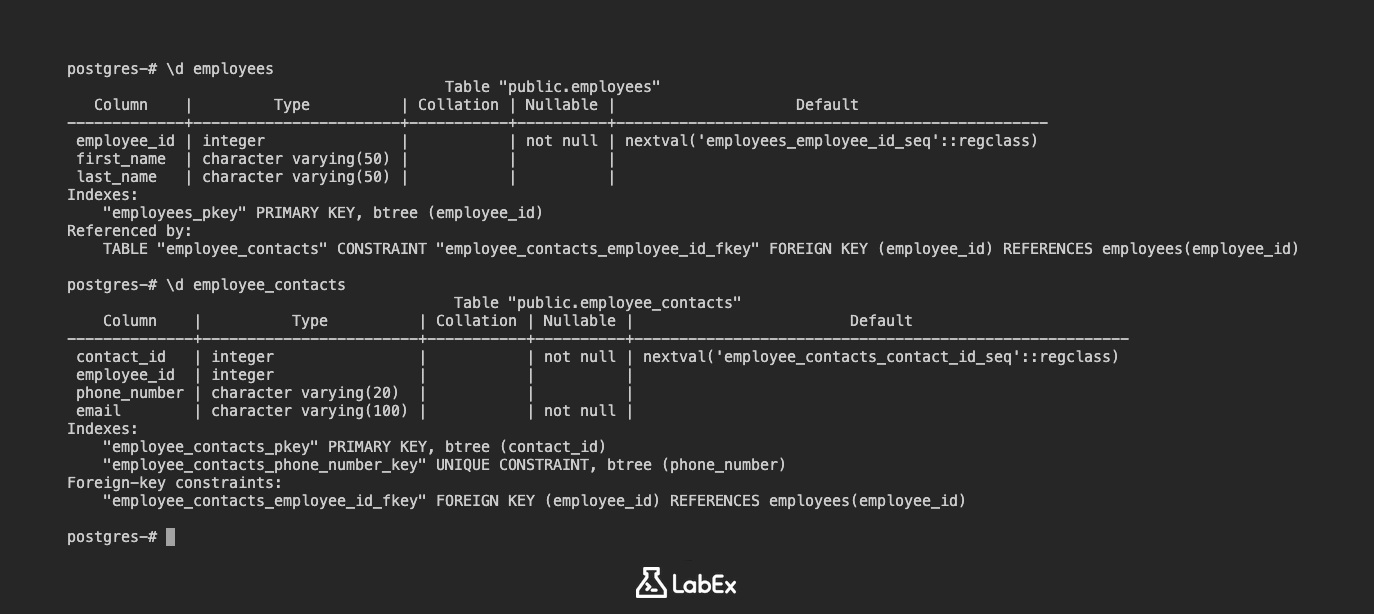
                                          Table "public.employees"
   Column    |         Type          | Collation | Nullable |                    Default
-------------+-----------------------+-----------+----------+------------------------------------------------
 employee_id | integer               |           | not null | nextval('employees_employee_id_seq'::regclass)
 first_name  | character varying(50) |           |          |
 last_name   | character varying(50) |           |          |
Indexes:
    "employees_pkey" PRIMARY KEY, btree (employee_id)
Referenced by:
    TABLE "employee_contacts" CONSTRAINT "employee_contacts_employee_id_fkey" FOREIGN KEY (employee_id) REFERENCES employees(employee_id)
                                      Table "public.employee_contacts"
     Column     |          Type          | Collation | Nullable |                     Default
----------------+------------------------+-----------+----------+--------------------------------------------------
 contact_id     | integer                |           | not null | nextval('employee_contacts_contact_id_seq'::regclass)
 employee_id    | integer                |           |          |
 phone_number   | character varying(20)  |           |          |
 email          | character varying(100) |           | not null |
Indexes:
    "employee_contacts_pkey" PRIMARY KEY, btree (contact_id)
    "employee_contacts_phone_number_key" UNIQUE CONSTRAINT, btree (phone_number)
Foreign-key constraints:
    "employee_contacts_employee_id_fkey" FOREIGN KEY (employee_id) REFERENCES employees(employee_id)
Hints
- Use the
CREATE TABLEstatement to create the table. - Use the
SERIALdata type for thecontact_idcolumn to automatically generate unique integer values. - Use the
PRIMARY KEYconstraint to define the primary key. - Use the
UNIQUEconstraint to ensure that thephone_numbercolumn contains unique values. - Use the
NOT NULLconstraint to ensure that theemailcolumn does not containNULLvalues. - Use the
FOREIGN KEYconstraint to create a foreign key relationship between theemployee_idcolumn in theemployee_contactstable and theemployee_idcolumn in theemployeestable. - Remember to connect to the PostgreSQL database using
sudo -u postgres psqlbefore executing the SQL commands.
Summary
In this challenge, the task is to create a PostgreSQL table named employee_contacts within a specified environment. This involves designing the table structure with columns for contact_id (primary key, auto-incrementing), employee_id (foreign key referencing the employees table), phone_number (unique), and email (not null).
The solution requires connecting to the PostgreSQL database as the postgres user using psql and then executing the necessary SQL commands directly to define the table and its constraints, ensuring data integrity and proper relationships between tables.