




Introduction
Welcome to the world of data analysis with Python! In this lab, you will be introduced to Pandas, the most popular and powerful open-source library for data manipulation and analysis in Python.
Before starting this course, you should have basic Python programming skills and ensure that Python is properly configured in your system PATH. If you haven't learned Python yet, you can start from our Python Learning Path. Additionally, you should have NumPy installed as it is an essential prerequisite for Pandas operations. If you need to learn NumPy, you can explore our NumPy Learning Path.
Pandas provides high-performance, easy-to-use data structures and data analysis tools. The two primary data structures of Pandas are Series (1-dimensional) and DataFrame (2-dimensional).
In this lab, you will learn the absolute basics to get you started. You will:
- Verify that Pandas is installed in your environment.
- Import the Pandas library into a Python script.
- Create your first Pandas
Seriesobject. - Access data within the
Series. - Inspect basic properties of the
Series.
This lab is designed for beginners, and no prior knowledge of Pandas is required. Let's get started!
Install Pandas using pip
In this step, we will verify that pandas is correctly installed in the environment. The LabEx environment comes with Python and Pandas pre-installed to save you time. You can confirm this and check its version.
To check the details of an installed Python package, you can use the pip show command. pip is the package installer for Python.
Open a terminal and run the following command to display information about the installed pandas package:
pip show pandas
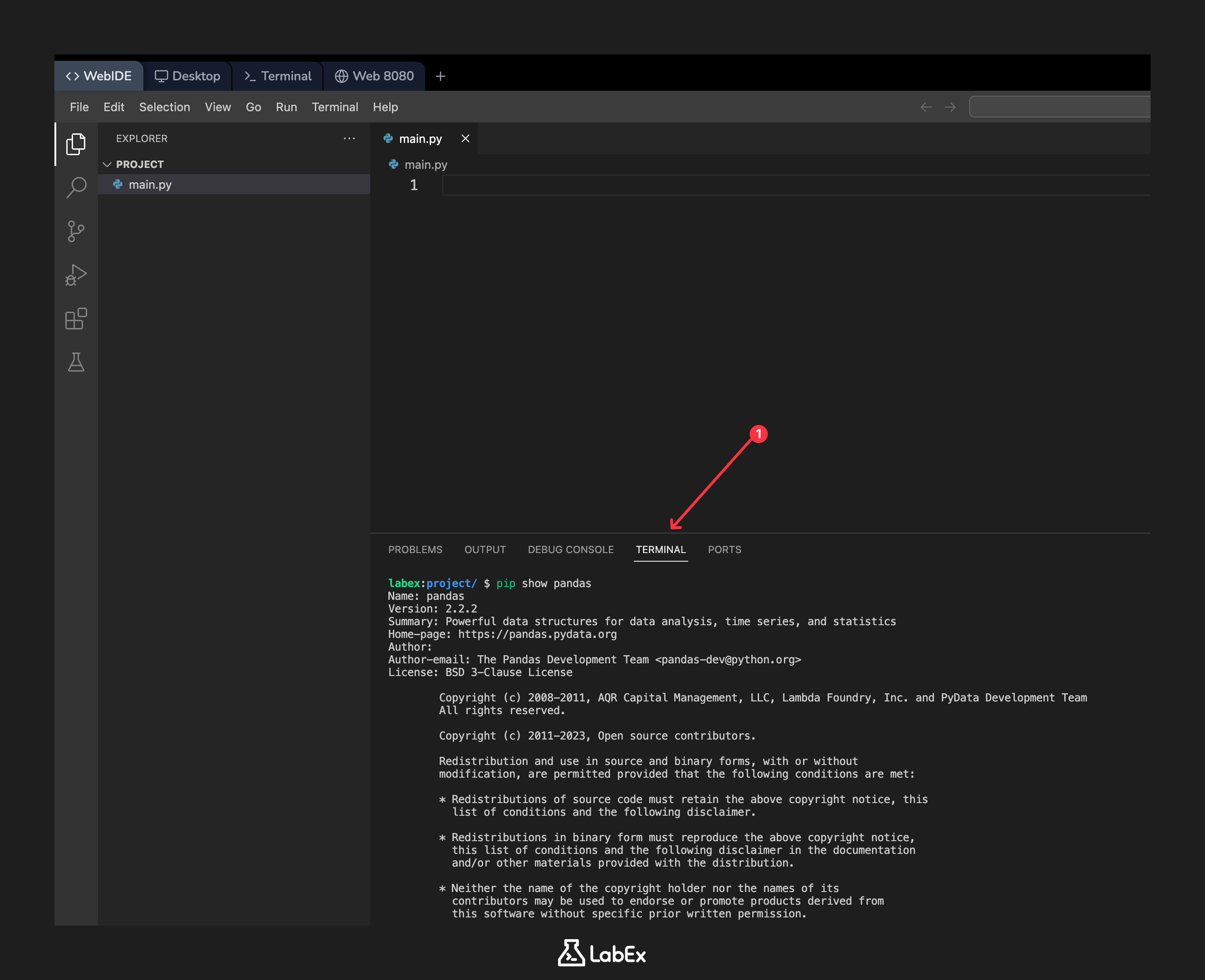
You should see an output detailing the package's name, version, summary, and location. The version should be 2.2.2 or similar.
Name: pandas
Version: 2.2.2
Summary: Powerful data structures for data analysis, time series, and statistics
Home-page: https://pandas.pydata.org
Author: The Pandas Development Team
Author-email: pandas-dev@python.org
License: BSD-3-Clause
Location: /usr/local/lib/python3.10/dist-packages
Requires: numpy, python-dateutil, pytz, tzdata
Required-by:
This confirms that pandas is ready to be used in your Python scripts.
Import Pandas as pd
In this step, you will write your first line of Python code to import the Pandas library. By convention, Pandas is imported with the alias pd. This makes the code shorter and more readable.
In the left-hand file explorer of the WebIDE, you will see a file named main.py. This file has been created for you. Click on it to open it in the editor.
Now, add the following code to main.py to import pandas and print a confirmation message:
import pandas as pd

print("Pandas imported successfully!")
import pandas as pd: This line tells Python to load the Pandas library and give it the aliaspd. From now on, you can access Pandas functions and objects usingpd..print(...): This is a standard Python function to display output to the terminal.
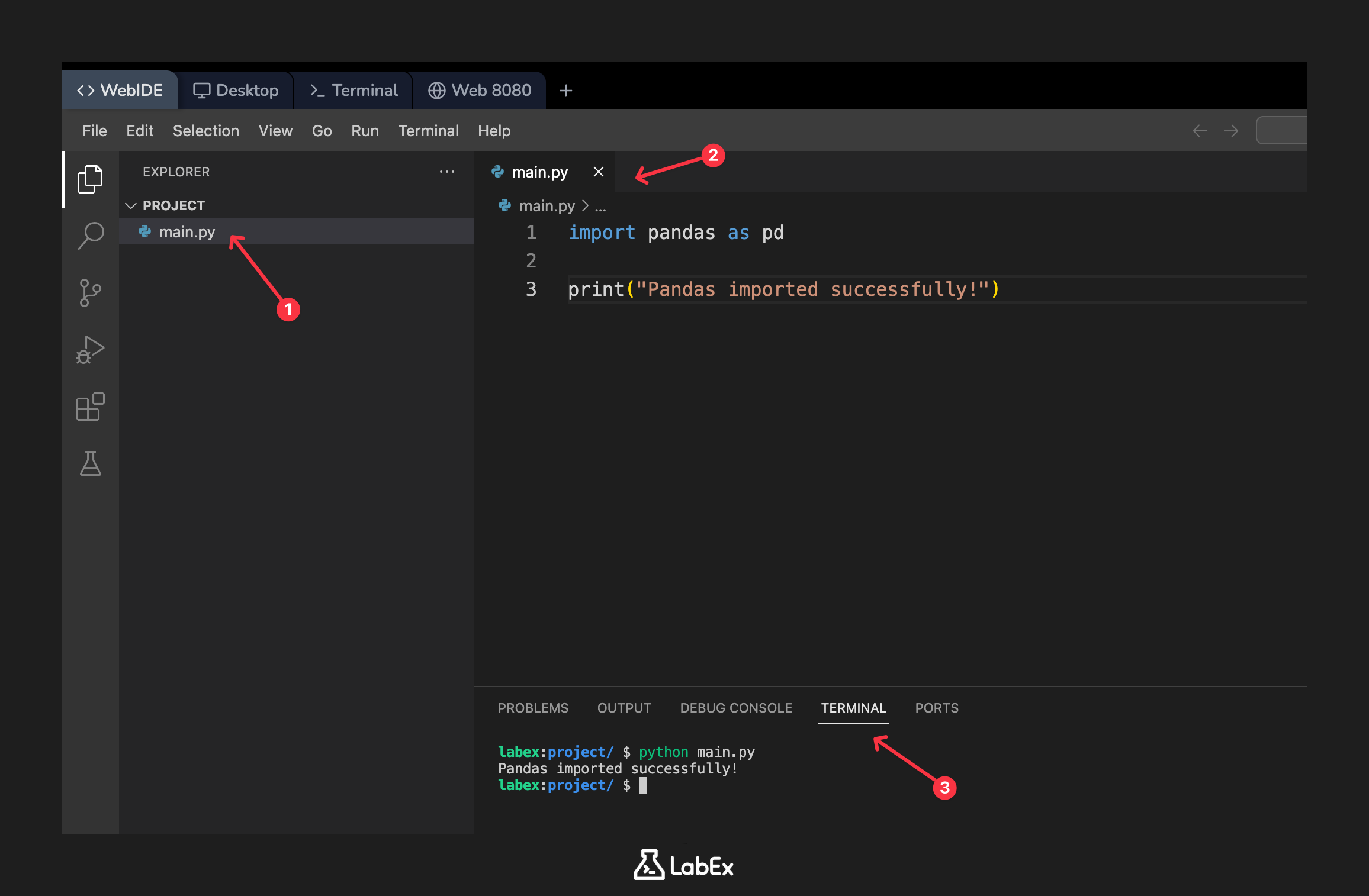
To run your script, go to the terminal and execute the following command:
python main.py
You should see the confirmation message printed to the terminal:
Pandas imported successfully!
This confirms that your Python script can successfully import and use the Pandas library.
Create a simple Series from a list
In this step, you will create your first Pandas Series. A Series is a one-dimensional array-like object that can hold any data type, such as integers, strings, or floats. It is the fundamental building block of data in Pandas.
You can create a Series by passing a Python list to the pd.Series() constructor.
Modify your main.py file. Replace the previous print statement with the following code to create and print a Series:
import pandas as pd

## A Python list of numbers
data = [10, 20, 30, 40, 50]

## Create a Pandas Series from the list
s = pd.Series(data)

## Print the Series
print(s)
Suggestion: You can copy the above code into your code editor, then carefully read each line of code to understand its function. If you need further explanation, you can click the "Explain Code" button 👆. You can interact with Labby for personalized help.
data = [...]: We first define a simple Python list of integers.s = pd.Series(data): We call theSeriesconstructor from thepd(Pandas) library, passing our list to it. This creates theSeriesobject.
Now, run the script again from the terminal:
python main.py
The output will display your Series. Notice that it has two columns: the index on the left (0-4) and the values on the right (10-50). Pandas automatically creates a default integer index if one is not specified.
0    10
1    20
2    30
3    40
4    50
dtype: int64
Access elements in the Series by index
In this step, you will learn how to access individual elements or a subset of elements from the Series you created. Accessing data is a fundamental operation in data analysis. You can access elements in a Series using their index, similar to how you would with a Python list.
Let's modify main.py to access and print specific elements. We will access the first element (at index 0) and a slice of elements.
Update your main.py file with the following code. Add the new print statements after the line that prints the whole series.
import pandas as pd

data = [10, 20, 30, 40, 50]
s = pd.Series(data)

print("The full Series:")
print(s)

## Access the first element (at index 0)
print("\nFirst element:", s[0])

## Access a slice of elements (from index 1 up to, but not including, 3)
print("\nElements from index 1 to 2:")
print(s[1:3])
s[0]: This retrieves the value at index0, which is10.s[1:3]: This is called slicing. It retrieves the elements starting from index1up to (but not including) index3. This will give you the elements at index1and2.
Run the script to see the result:
python main.py
Your output should now show the full Series, followed by the specific elements you accessed.
The full Series:
0    10
1    20
2    30
3    40
4    50
dtype: int64

First element: 10

Elements from index 1 to 2:
1    20
2    30
dtype: int64
Print the Series data type and shape
In this step, you will learn how to inspect two important properties of a Series: its data type (dtype) and its shape. Understanding these attributes is crucial for debugging and data validation.
dtype: This attribute tells you the data type of the values stored in theSeries(e.g.,int64for integers,float64for floating-point numbers,objectfor strings).shape: This attribute returns a tuple representing the dimensions of theSeries. For aSeries, which is 1-dimensional, it will be a tuple with a single value,(n,), wherenis the number of elements.
Let's update main.py to print these two attributes. Add the following lines to the end of your script:
import pandas as pd

data = [10, 20, 30, 40, 50]
s = pd.Series(data)

## ... (previous print statements can be removed or kept)

## Print the data type of the Series
print("\nData type:", s.dtype)

## Print the shape of the Series
print("Shape:", s.shape)
Now, run the script one last time:
python main.py
The output will now include the data type and shape of your Series.
Data type: int64
Shape: (5,)
This tells you that your Series contains 64-bit integers and has 5 elements.
Summary
Congratulations! You have successfully completed this introductory lab on Pandas.
In this lab, you have learned the fundamental first steps of working with this powerful library. You have:
- Verified the
pandasinstallation in your environment. - Imported the
pandaslibrary into a Python script using the standard aliaspd. - Created a basic one-dimensional
Seriesfrom a Python list. - Accessed elements from the
Seriesusing indexing and slicing. - Inspected the
dtypeandshapeattributes to understand theSeries's structure and data type.
These are the essential building blocks you will need as you move on to more complex data structures like DataFrame and perform more advanced data analysis tasks. Keep practicing!


