Introduction
Welcome to the world of HTML! Every web page you see on the internet is built upon a foundational structure. Understanding this structure is the first and most crucial step in web development.
In this lab, you will learn how to create the basic skeleton of an HTML document. We will cover the essential components that every HTML page must have:
- The
<!DOCTYPE html>declaration - The root
<html>element - The
<head>element for metadata - The
<body>element for visible content
By the end of this lab, you will have built a complete, valid, and simple HTML page from scratch.
Create the DOCTYPE declaration
In this step, you will add the DOCTYPE declaration, which is the very first thing in your HTML document. This declaration tells the web browser that the page is written in HTML5. It is a standard practice and ensures the browser renders the page correctly.
First, locate the index.html file in the file explorer on the left side of your WebIDE. Click on it to open it in the editor.
The file is currently empty. Add the following line of code to the very top of the index.html file:
<!DOCTYPE html>
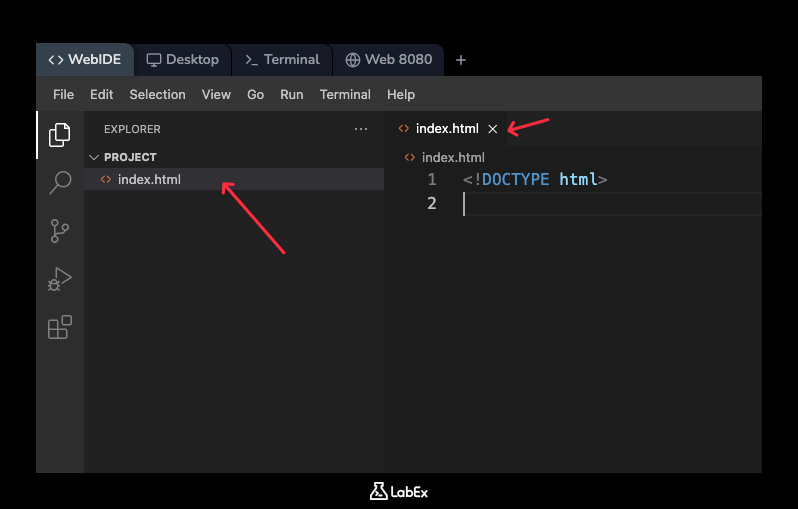
Your index.html file should now look like this:
<!DOCTYPE html>
This single line is the starting point for every modern web page.
Add the html root element with lang attribute
In this step, you will add the <html> element. This element is the root container for all other HTML elements on the page (except for the <!DOCTYPE> declaration).
It's also a best practice to include the lang attribute inside the opening <html> tag. This attribute specifies the language of the document's content, which helps search engines and screen readers. For English, we use lang="en".
In your index.html file, add the <html> and </html> tags right after the <!DOCTYPE html> declaration.
<!DOCTYPE html>
<html lang="en"></html>
All other elements of your webpage will go between these two tags.
Insert the head element with title tag
In this step, you will add the <head> element. The <head> section contains metadata about the HTML document, such as its title, character set, styles, and scripts. This information is not displayed on the web page itself but is used by the browser.
The most important piece of metadata for a beginner is the <title> tag. The text inside the <title> tag is what appears on the browser tab or in the window's title bar.
Inside your <html> element, add a <head> section. Within the <head> section, add a <title> tag with the text "My First Web Page".
Update your index.html file to look like this:
<!DOCTYPE html>
<html lang="en">
  <head>
    <title>My First Web Page</title>
  </head>
</html>
Add the body element for content
In this step, you will add the <body> element. This is where all the visible content of your web page goes, such as headings, paragraphs, images, links, and more. The <body> element should be placed after the <head> element, but still inside the <html> element.
Let's add a main heading to our page to make it visible in the browser. We'll use the <h1> tag, which stands for "Heading 1".
In your index.html file, add a <body> section. Inside the <body>, add an <h1> element with the text "Hello, World!".
Your complete index.html file should now look like this:
<!DOCTYPE html>
<html lang="en">
  <head>
    <title>My First Web Page</title>
  </head>
  <body>
    <h1>Hello, World!</h1>
  </body>
</html>
This is a complete and valid HTML document structure.
Save and open the HTML file in a browser
In this step, you will view the web page you just created. The WebIDE automatically saves your changes, so you don't need to manually save the file.
A simple web server is already running in the background for you. To see your page, you just need to open the correct tab in the LabEx interface.
Click on the Web 8080 tab, which is located at the top left of your screen, next to the "Terminal" tab.
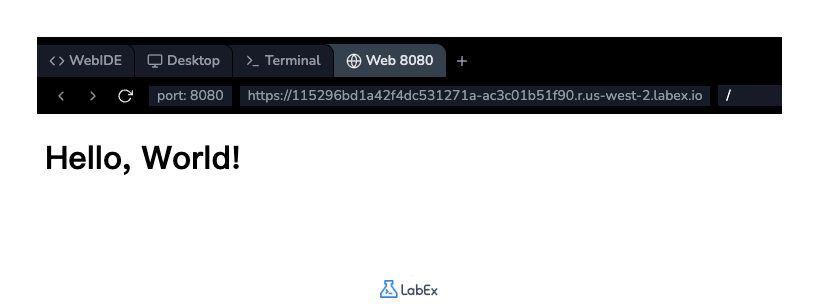
When you switch to the Web 8080 tab, you should see your web page. It will display:
- The text "Hello, World!" as a large heading in the main content area.
- The browser tab will show the title "My First Web Page".
If you don't see this, please go back to the previous steps and ensure your index.html code matches the example exactly.
Summary
Congratulations! You have successfully created your first valid HTML document. You have learned the fundamental building blocks that form the skeleton of every web page.
In this lab, you have learned:
<!DOCTYPE html>: The declaration that defines the document as HTML5.<html>: The root element that wraps all content on the page.<head>: The container for metadata, like the page title, which isn't visible on the page itself.<title>: The tag that sets the title of the browser tab.<body>: The container for all visible content, such as headings and paragraphs.
This basic structure is the foundation upon which you will build all future web projects.