




Introduction
When developing software, it is crucial to ensure your code works correctly across different environments. For example, a Node.js library should be tested on multiple versions of Node.js (e.g., v18, v20, v22).
Instead of creating separate jobs for each version, GitHub Actions provides a Matrix Strategy. This allows you to define a set of variables, and GitHub Actions will automatically create a job for each combination of these variables.
In this lab, you will update your workflow to run your tests across three different versions of Node.js in parallel.
This lab builds on the repository you created in the previous labs. You will work with the github-actions-demo repository.
Modify the workflow to include strategy matrix
The strategy keyword is used to configure the build matrix. We will define a matrix with a single key node-version.
- On your GitHub repository page for
github-actions-demo, click the green Code button. - Ensure the HTTPS tab is selected and copy the URL. It should look like
https://github.com/your-username/github-actions-demo.git. - Open the terminal in the LabEx environment. The default path is
~/project. - Use the
git clonecommand to download the repository. Replaceyour-usernamewith your actual GitHub username.
cd ~/project
git clone https://github.com/your-username/github-actions-demo.git
Example Output:
Cloning into 'github-actions-demo'...
remote: Enumerating objects: X, done.
remote: Counting objects: 100% (X/X), done.
remote: Total X (delta 0), reused 0 (delta 0), pack-reused 0
Receiving objects: 100% (X/X), done.
- Navigate into the cloned repository:
cd ~/project/github-actions-demo
Create a new workflow file
.github/workflows/matrix-build.ymlusing the WebIDE editor. You can find the file in the file explorer on the left side underproject/github-actions-demo/.github/workflows/.Start by creating the basic workflow structure. Add the workflow name and trigger:
name: Matrix Build

on: [push]
- Now add the jobs section with a basic build job structure:
jobs:
  build:
    runs-on: ubuntu-latest
- Add the matrix strategy. This is the key part that enables running the job with multiple Node.js versions:
strategy:
  matrix:
    node-version: [18, 20, 22]
This defines a matrix variable node-version with three values. GitHub Actions will create a separate job for each value.
- Add the steps section. First, add the checkout step:
steps:
  - uses: actions/checkout@v4
- Add the Node.js setup step. Notice how we use
${{ matrix.node-version }}to reference the current matrix value:
- name: Use Node.js
  uses: actions/setup-node@v4
  with:
    node-version: ${{ matrix.node-version }}
- Add the step to install dependencies:
- name: Install dependencies
  run: npm install
- Add the build step that creates the artifact directory:
- name: Build project
  run: |
    mkdir dist
    echo "This is the build artifact" > dist/build.txt
- Add the test step:
- name: Run tests
  run: npm test
- Finally, add the upload artifact step. Notice how the artifact name includes the matrix version to make each artifact unique:
- name: Upload build artifact
  uses: actions/upload-artifact@v4
  with:
    name: build-assets-${{ matrix.node-version }}
    path: dist
Your complete file should now look like this:
name: Matrix Build

on: [push]

jobs:
  build:
    runs-on: ubuntu-latest

    strategy:
      matrix:
        node-version: [18, 20, 22]

    steps:
      - uses: actions/checkout@v4
      - name: Use Node.js
        uses: actions/setup-node@v4
        with:
          node-version: ${{ matrix.node-version }}
      - name: Install dependencies
        run: npm install
      - name: Build project
        run: |
          mkdir dist
          echo "This is the build artifact" > dist/build.txt
      - name: Run tests
        run: npm test
      - name: Upload build artifact
        uses: actions/upload-artifact@v4
        with:
          name: build-assets-${{ matrix.node-version }}
          path: dist
Explanation
strategy: Defines the build strategy.matrix: Defines the matrix variables.node-version: This is a variable name we chose. We assigned it an array of values[18, 20, 22]. GitHub Actions will run thebuildjob three times, once for each value.${{ matrix.node-version }}: This syntax allows you to access the current matrix value in your steps.
Save the file (Ctrl+S or Cmd+S) after making changes.
Update setup-node and artifact name to use matrix context
Defining the matrix is only half the battle; we also need to tell the steps to use the current value from the matrix. We do this using the ${{ matrix.node-version }} context.
We also need to ensure that artifacts uploaded by each parallel job have unique names, otherwise they will overwrite each other.
- In
.github/workflows/matrix-build.yml, verify that theUse Node.jsstep uses the matrix variable:
- name: Use Node.js
  uses: actions/setup-node@v4
  with:
    node-version: ${{ matrix.node-version }}
- Verify that the
Upload build artifactstep includes the matrix version in the artifact name:
- name: Upload build artifact
  uses: actions/upload-artifact@v4
  with:
    name: build-assets-${{ matrix.node-version }}
    path: dist
- Your complete workflow file should look like this:
name: Matrix Build

on: [push]

jobs:
  build:
    runs-on: ubuntu-latest

    strategy:
      matrix:
        node-version: [18, 20, 22]

    steps:
      - uses: actions/checkout@v4
      - name: Use Node.js
        uses: actions/setup-node@v4
        with:
          node-version: ${{ matrix.node-version }}
      - name: Install dependencies
        run: npm install
      - name: Build project
        run: |
          mkdir dist
          echo "This is the build artifact" > dist/build.txt
      - name: Run tests
        run: npm test
      - name: Upload build artifact
        uses: actions/upload-artifact@v4
        with:
          name: build-assets-${{ matrix.node-version }}
          path: dist
Save the file (Ctrl+S or Cmd+S).
Commit, push, and observe parallel jobs
Let's see the matrix in action by committing your changes to GitHub.
- Ensure you are in the repository directory:
cd ~/project/github-actions-demo
- Stage the changes:
git add .
- Commit the changes:
git commit -m "Add matrix strategy for Node.js versions"
- Push the changes to the remote repository on GitHub:
git push
Note on Authentication:
When you run git push, the WebIDE will automatically prompt you to authenticate. Follow these detailed steps:
- A popup will appear with the message: "The extension 'GitHub' wants to sign in using GitHub." Click Allow.
- A new notification will appear. Click "Copy&Continue to GitHub", then click "Open" in the next prompt.
- Log in to your GitHub account in the browser window that opens, and enter the authorization code that was copied. After confirming the authorization, the page will automatically close.
- Wait a few seconds, and you will see the terminal successfully complete the push operation.
Privacy Note: The WebIDE will request full access to your GitHub account for authentication purposes. You don't need to worry about privacy concerns - the LabEx VM will be immediately destroyed after you complete the current lab, and your credentials and authorization information will not be retained.
This authentication process does not require manual configuration of username or Personal Access Token.
Verify on GitHub
- Visit your repository on GitHub in a web browser.
- Click on the Actions tab.
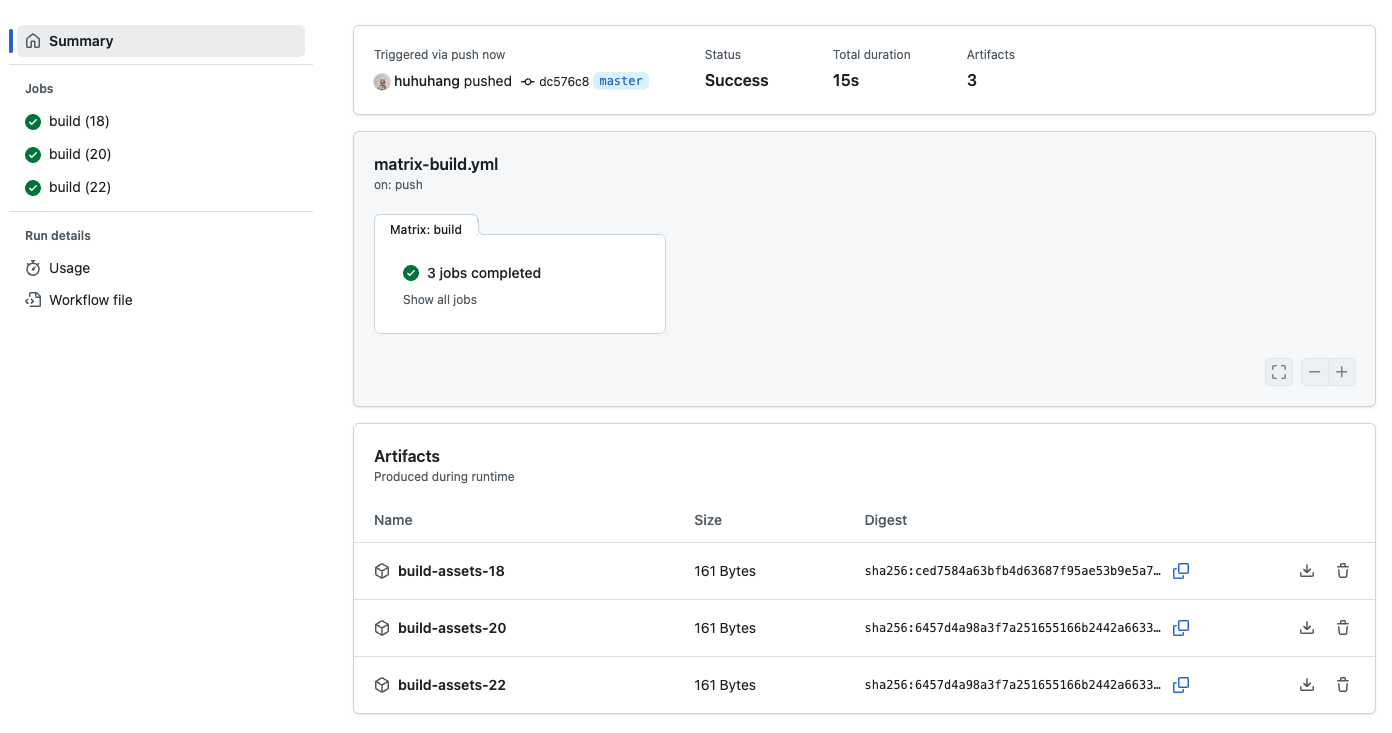
- Click on the latest workflow run.
- On the left sidebar (or in the main graph view), you will now see three separate jobs listed under the
buildgroup:build (18)build (20)build (22)
- They will run in parallel (or almost parallel). You can click on each one to see that
Use Node.jsset up the specific version requested.
Summary
In this lab, you learned how to use the Matrix Strategy in GitHub Actions. You:
- Defined a matrix with multiple Node.js versions using
strategy: matrix. - Updated your workflow steps to dynamically use the version from the matrix context (
${{ matrix.node-version }}). - Ensured artifact names were unique for each matrix job.
This powerful feature allows you to validate your project against a wide range of configurations with very little code duplication.


