



Introduction
In this project, you will learn how to perform various SQL queries on a student course database. The database consists of three tables: Student table (S), Course table (C), and Student Course table (SC). You will learn how to retrieve and manipulate data from these tables to accomplish different tasks.
👀 Preview
🎯 Tasks
In this project, you will learn:
- How to list the names of all students who have not taken courses taught by the "Daniel" teacher
- How to list the student numbers and names of students who have failed (grade < 60) in two or more courses
- How to list the names of all students who have taken both course "11" and course "12"
- How to list the student numbers of all students whose grades in course "11" are higher than those in course "12", and sort them in ascending order
- How to list the names of all students who are older than "John Davis"
- How to list the student number of the student with the highest grade among all students who have taken course "12"
- How to list the names of all students, along with their selected course IDs and grades
- How to list the student numbers and total grades (alias as: SG) of students who have taken four or more courses, sorted in descending order of total grades
🏆 Achievements
After completing this project, you will be able to:
- Understand how to write complex SQL queries to retrieve and manipulate data from a relational database
- Apply various SQL techniques, such as subqueries, joins, aggregations, and sorting, to solve real-world data analysis problems
- Develop SQL skills that are essential for data-driven decision making and problem-solving
Start MySQL and Import Data
In this step, you will learn how to start the MySQL service and import the necessary data into the database.
- Start the MySQL service using the
sudocommand without any password:
sudo service mysql start
- Access the MySQL client using the
sudocommand without any password:
sudo mysql
- Import the data from the provided
personnel.sqlscript into the MySQL database:
SOURCE /home/labex/project/initdb.sql
Add Query Code
In this step, you will learn how to list the names of all students who have not taken courses taught by the "Daniel" teacher. Follow the steps below to complete this step:
Open the
answer.sqlfile in the/home/labex/projectdirectory.Add the SQL statement below the comment:
Locate the comment
-- List the names of all students who have not taken courses taught by the "Daniel" teacher.SELECT s.sname FROM S s WHERE NOT EXISTS ( SELECT 1 FROM SC sc JOIN C c ON sc.cno = c.cno WHERE c.tname = 'Daniel' AND sc.sno = s.sno );This SQL statement first selects the
snamecolumn from theStable. It then uses aNOT EXISTSclause to check if there are any records in theSCtable that have a course ID (cno) that matches a course taught by the "Daniel" teacher, and the student ID (sno) matches the current student. If no such records exist, the student's name will be included in the result.Locate the comment
-- List the student numbers and names of students who have failed (grade < 60) in two or more courses.SELECT s.sno, s.sname FROM S s JOIN SC sc ON s.sno = sc.sno WHERE sc.grade < 60 GROUP BY s.sno, s.sname HAVING COUNT(sc.sno) >= 2;This SQL statement first joins the
SandSCtables to get the student information and their course grades. It then filters the records where the grade is less than 60, groups the results by student number and name, and finally selects only the students who have failed in two or more courses using theHAVINGclause.Locate the comment
-- List the names of all students who have taken both course "11" and course "12".SELECT s.sname FROM S s JOIN SC sc ON s.sno = sc.sno WHERE sc.cno IN (11, 12) GROUP BY s.sno HAVING COUNT(DISTINCT sc.cno) = 2 ORDER BY s.sno;This SQL statement first joins the
SandSCtables to get the student information and their course IDs. It then filters the records where the course ID is either 11 or 12, groups the results by student number, and selects only the students who have taken both courses using theHAVINGclause. Finally, it orders the results by student number.Locate the comment
-- List the student numbers of all students whose grades in course "11" are higher than those in course "12", and sort them in ascending order.SELECT sc11.sno FROM SC sc11 JOIN SC sc12 ON sc11.sno = sc12.sno AND sc12.cno = 12 WHERE sc11.cno = 11 AND sc11.grade > sc12.grade ORDER BY sc11.sno;This SQL statement first joins the
SCtable with itself to get the grade information for both course 11 and course 12. It then filters the records where the course ID is 11 and the grade is higher than the grade for course 12, and selects the student number. Finally, it orders the results by student number.Locate the comment
-- List the names of all students who are older than "John Davis".SELECT s.sname FROM S s, (SELECT sage FROM S WHERE sname = 'John Davis') AS zs WHERE s.sage > zs.sage;This SQL statement first selects the
sagevalue for the student with the name "John Davis" and stores it in a subqueryzs. It then selects thesnamefrom theStable where the student's age (sage) is greater than the age of "John Davis".Locate the comment
-- List the student number of the student with the highest grade among all students who have taken course "12".SELECT sc.sno FROM SC sc WHERE sc.cno = 12 AND sc.grade = ( SELECT MAX(grade) FROM SC WHERE cno = 12 );This SQL statement first selects the
snofrom theSCtable where the course ID is 12 and the grade is equal to the maximum grade among all students who have taken course 12. This will give us the student number of the student with the highest grade in course 12.Locate the comment
-- List the names of all students, along with their selected course IDs and grades.SELECT s.sname, sc.cno, sc.grade FROM S s LEFT JOIN SC sc ON s.sno = sc.sno;This SQL statement performs a left join between the
SandSCtables, which will include all students from theStable, even if they have no records in theSCtable. This will ensure that all student names are included in the result, along with their course IDs and grades (if they have any).Locate the comment
-- List the student numbers and total grades (alias as: SG) of students who have taken four or more courses, sorted in descending order of total grades.SELECT sc.sno, SUM(sc.grade) AS SG FROM SC sc GROUP BY sc.sno HAVING COUNT(sc.cno) >= 4 ORDER BY SG DESC;This SQL statement first groups the
SCtable by student number (sno) and calculates the sum of the grades for each student (aliased asSG). It then filters the results to include only the students who have taken four or more courses using theHAVINGclause. Finally, it orders the results by the total grades in descending order.
Run the SQL Script
In this final step, you will run the SQL script you created in the previous steps.
- In the MySQL client, run the following command to execute the
answer.sqlscript:
SOURCE /home/labex/project/answer.sql
This will execute the SQL queries in the answer.sql file and display the results.
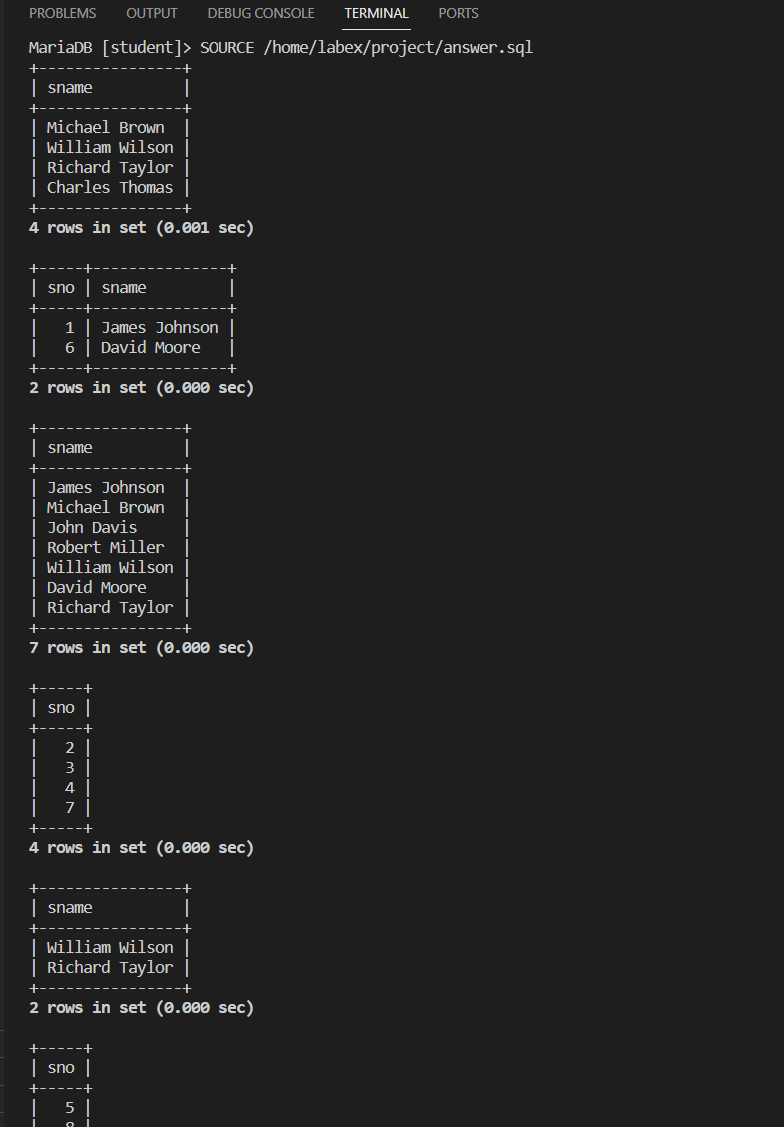
Congratulations! You have completed the project. You should see the following output:
MariaDB [student]> SOURCE /home/labex/project/answer.sql
+----------------+
| sname          |
+----------------+
| Michael Brown  |
| William Wilson |
| Richard Taylor |
| Charles Thomas |
+----------------+
4 rows in set (0.013 sec)

+-----+---------------+
| sno | sname         |
+-----+---------------+
|   1 | James Johnson |
|   6 | David Moore   |
+-----+---------------+
2 rows in set (0.000 sec)

+----------------+
| sname          |
+----------------+
| James Johnson  |
| Michael Brown  |
| John Davis     |
| Robert Miller  |
| William Wilson |
| David Moore    |
| Richard Taylor |
+----------------+
7 rows in set (0.000 sec)

+-----+
| sno |
+-----+
|   2 |
|   3 |
|   4 |
|   7 |
+-----+
4 rows in set (0.001 sec)

+----------------+
| sname          |
+----------------+
| William Wilson |
| Richard Taylor |
+----------------+
2 rows in set (0.013 sec)

+-----+
| sno |
+-----+
|   5 |
|   8 |
+-----+
2 rows in set (0.000 sec)

+-----------------+------+-------+
| sname           | cno  | grade |
+-----------------+------+-------+
| James Johnson   |   11 |    50 |
| James Johnson   |   12 |    80 |
| James Johnson   |   13 |    50 |
| James Johnson   |   14 |    50 |
| James Johnson   |   15 |    50 |
| Michael Brown   |   11 |    70 |
| Michael Brown   |   12 |    65 |
| Michael Brown   |   15 |    70 |
| John Davis      |   11 |    90 |
| John Davis      |   12 |    70 |
| John Davis      |   14 |    80 |
| John Davis      |   15 |    90 |
| Robert Miller   |   11 |    80 |
| Robert Miller   |   12 |    50 |
| Robert Miller   |   13 |    70 |
| Robert Miller   |   14 |    62 |
| Robert Miller   |   15 |    80 |
| William Wilson  |   11 |    40 |
| William Wilson  |   12 |    90 |
| William Wilson  |   13 |    60 |
| William Wilson  |   15 |    61 |
| David Moore     |   11 |    30 |
| David Moore     |   12 |    50 |
| David Moore     |   13 |    40 |
| David Moore     |   14 |    30 |
| David Moore     |   15 |    35 |
| Richard Taylor  |   11 |    90 |
| Richard Taylor  |   12 |    80 |
| Richard Taylor  |   13 |    80 |
| Richard Taylor  |   15 |    80 |
| Joseph Anderson |   12 |    90 |
| Joseph Anderson |   14 |    70 |
| Joseph Anderson |   15 |    95 |
| Charles Thomas  | NULL |  NULL |
+-----------------+------+-------+
34 rows in set (0.001 sec)

+-----+------+
| sno | SG   |
+-----+------+
|   4 |  342 |
|   7 |  330 |
|   3 |  330 |
|   1 |  280 |
|   5 |  251 |
|   6 |  185 |
+-----+------+
6 rows in set (0.000 sec)
Summary
Congratulations! You have completed this project. You can practice more labs in LabEx to improve your skills.


