Introduction
Jenkins supports two Pipeline styles. Declarative Pipeline uses a structured pipeline { ... } block, while Scripted Pipeline uses Groovy code with node, stage, and step calls. Scripted Pipeline is useful when a workflow needs more direct Groovy control flow.
In this lab, you will create a Pipeline job named scripted-pipeline-demo, run a simple scripted pipeline, then update it with an if condition and a try/finally cleanup block.
Write a Basic Scripted Pipeline
In this step, you will write the first version of a Scripted Pipeline. The node block asks Jenkins to allocate an executor and workspace. Inside it, stage names a visible part of the workflow, and sh runs a shell command.
Create /home/labex/project/scripted-pipeline.groovy:
cat > /home/labex/project/scripted-pipeline.groovy <<'GROOVY'
node {
    stage('Prepare') {
        echo 'Preparing scripted pipeline'
        sh 'pwd'
    }

    stage('Build') {
        echo 'Building with scripted syntax'
        sh 'echo Compiling scripted pipeline demo'
    }
}
GROOVY
Print the file with line numbers so you can review the structure:
nl -ba /home/labex/project/scripted-pipeline.groovy
You should see a node block containing Prepare and Build stages.
Create a Pipeline Job from the Script
In this step, you will create a Jenkins Pipeline job that stores the Groovy script inline. Jenkins Pipeline jobs are saved as XML under /var/jenkins_home/jobs. Python will XML-escape the Groovy script before writing the job config so characters such as quotes and braces are preserved safely.
Generate the Pipeline job config:
python3 - <<'PY'
from html import escape
from pathlib import Path

script = Path("/home/labex/project/scripted-pipeline.groovy").read_text()
config = f"""<?xml version='1.1' encoding='UTF-8'?>
<flow-definition plugin="workflow-job">
  <actions/>
  <description>Run a Jenkins scripted Pipeline example.</description>
  <keepDependencies>false</keepDependencies>
  <properties/>
  <definition class="org.jenkinsci.plugins.workflow.cps.CpsFlowDefinition" plugin="workflow-cps">
    <script>{escape(script)}</script>
    <sandbox>true</sandbox>
  </definition>
  <triggers/>
  <disabled>false</disabled>
</flow-definition>
"""
Path("/home/labex/project/scripted-pipeline-config.xml").write_text(config)
PY
Copy the job config into Jenkins and reload:
docker exec jenkins mkdir -p /var/jenkins_home/jobs/scripted-pipeline-demo
docker cp /home/labex/project/scripted-pipeline-config.xml jenkins:/var/jenkins_home/jobs/scripted-pipeline-demo/config.xml
/home/labex/project/reload-jenkins.sh
Confirm that Jenkins can load the Pipeline job:
curl -fsS http://localhost:8080/job/scripted-pipeline-demo/api/json | grep -o '"name":"scripted-pipeline-demo"'
Run the Scripted Pipeline
In this step, you will trigger the Pipeline job and inspect the result. Jenkins protects POST requests with a crumb, so the first command requests a crumb and reuses the matching cookie jar.
Trigger the first build:
CRUMB=$(curl -fsS -c /tmp/jenkins-scripted-build.cookies 'http://localhost:8080/crumbIssuer/api/xml?xpath=concat(//crumbRequestField,":",//crumb)')
curl -fsS -b /tmp/jenkins-scripted-build.cookies -H "$CRUMB" -X POST http://localhost:8080/job/scripted-pipeline-demo/build
Wait until build #1 finishes:
until curl -fsS http://localhost:8080/job/scripted-pipeline-demo/1/api/json >/tmp/scripted-build-1.json 2>/dev/null && grep -q '"building":false' /tmp/scripted-build-1.json; do
  echo "Waiting for scripted pipeline build #1..."
  sleep 3
done
Check the build result:
curl -fsS http://localhost:8080/job/scripted-pipeline-demo/1/api/json | grep -o '"result":"SUCCESS"'
The successful result proves Jenkins accepted the Scripted Pipeline syntax and executed the shell steps.
Add Groovy Control Flow
In this step, you will update the Scripted Pipeline with Groovy control flow. The if block decides whether the Test stage should run. The try/finally block makes sure the cleanup message runs even if a stage fails.
Replace the pipeline script with a richer version:
cat > /home/labex/project/scripted-pipeline.groovy <<'GROOVY'
node {
    def runTests = true

    try {
        stage('Prepare') {
            echo 'Preparing scripted pipeline'
            sh 'pwd'
        }

        stage('Build') {
            echo 'Building with scripted syntax'
            sh 'echo Compiling scripted pipeline demo'
        }

        if (runTests) {
            stage('Test') {
                echo 'Tests enabled by Groovy condition'
                sh 'echo Running scripted pipeline tests'
            }
        }
    } finally {
        echo 'Pipeline cleanup complete'
    }
}
GROOVY
Regenerate the job config and reload Jenkins:
python3 - <<'PY'
from html import escape
from pathlib import Path

script = Path("/home/labex/project/scripted-pipeline.groovy").read_text()
config = f"""<?xml version='1.1' encoding='UTF-8'?>
<flow-definition plugin="workflow-job">
  <actions/>
  <description>Run a Jenkins scripted Pipeline example.</description>
  <keepDependencies>false</keepDependencies>
  <properties/>
  <definition class="org.jenkinsci.plugins.workflow.cps.CpsFlowDefinition" plugin="workflow-cps">
    <script>{escape(script)}</script>
    <sandbox>true</sandbox>
  </definition>
  <triggers/>
  <disabled>false</disabled>
</flow-definition>
"""
Path("/home/labex/project/scripted-pipeline-config.xml").write_text(config)
PY
docker cp /home/labex/project/scripted-pipeline-config.xml jenkins:/var/jenkins_home/jobs/scripted-pipeline-demo/config.xml
/home/labex/project/reload-jenkins.sh
Confirm that the updated job config contains the new Test stage text:
docker exec jenkins grep -n 'Tests enabled by Groovy condition' /var/jenkins_home/jobs/scripted-pipeline-demo/config.xml
Inspect the Updated Pipeline Log
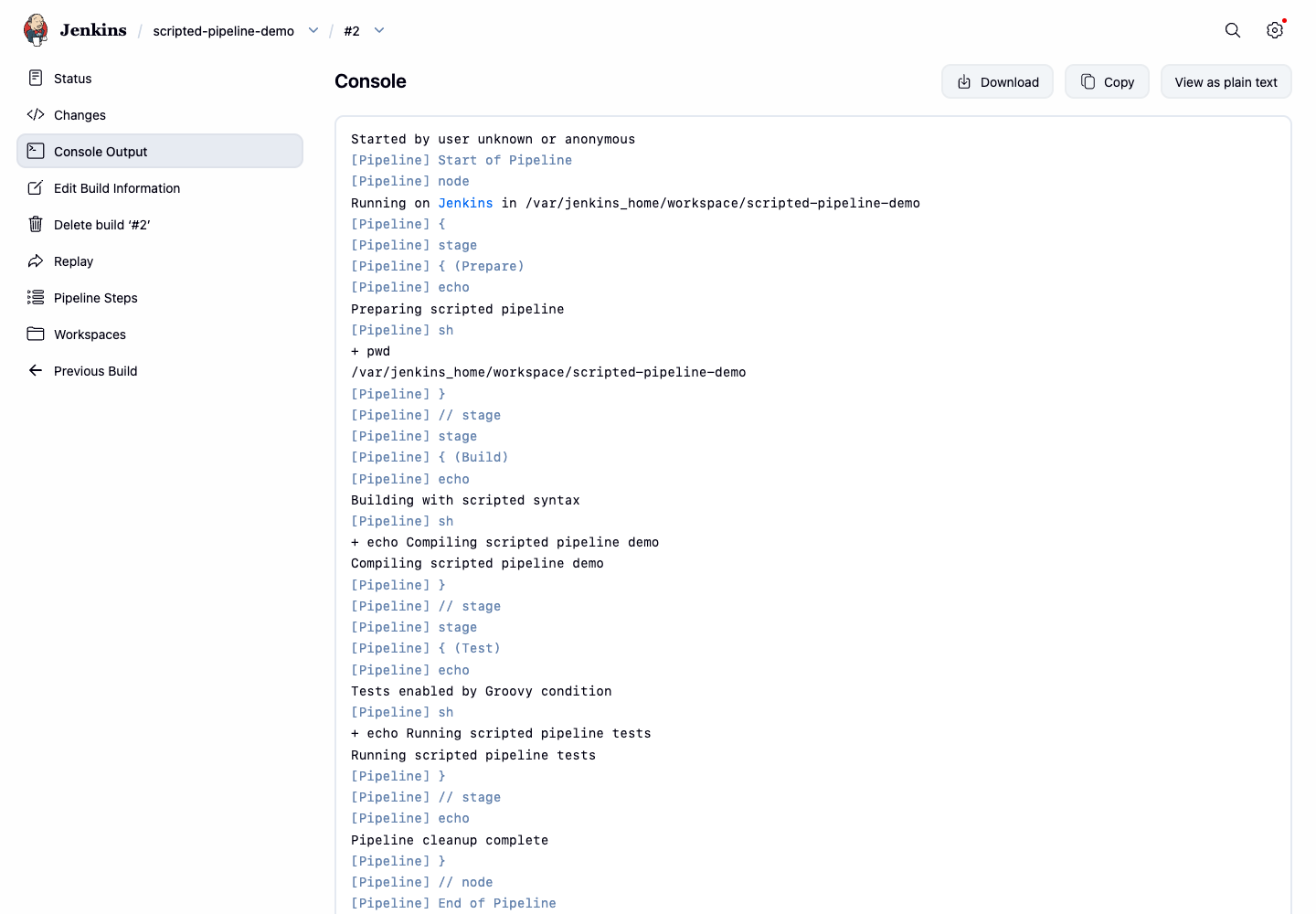
In this step, you will run the updated Scripted Pipeline and inspect the console output. The log should show the conditional Test stage message and the cleanup message from the finally block.
Trigger the second build:
CRUMB=$(curl -fsS -c /tmp/jenkins-scripted-build.cookies 'http://localhost:8080/crumbIssuer/api/xml?xpath=concat(//crumbRequestField,":",//crumb)')
curl -fsS -b /tmp/jenkins-scripted-build.cookies -H "$CRUMB" -X POST http://localhost:8080/job/scripted-pipeline-demo/build
Wait until build #2 finishes:
until curl -fsS http://localhost:8080/job/scripted-pipeline-demo/2/api/json >/tmp/scripted-build-2.json 2>/dev/null && grep -q '"building":false' /tmp/scripted-build-2.json; do
  echo "Waiting for scripted pipeline build #2..."
  sleep 3
done
Print the important console lines:
curl -fsS http://localhost:8080/job/scripted-pipeline-demo/2/consoleText | grep -E 'Tests enabled|Running scripted pipeline tests|Pipeline cleanup complete|Finished: SUCCESS'
Open Firefox from the Desktop interface and visit http://localhost:8080/job/scripted-pipeline-demo/2/console. The console page should show the Test stage output and the cleanup message.
Summary
You wrote a Jenkins Scripted Pipeline with node, stage, echo, and sh steps, ran it as a Pipeline job, then added Groovy if and try/finally control flow. You verified both Pipeline versions through Jenkins build results and console output.