Introduction
Webhook integrations let source control systems notify Jenkins when a repository changes. A real GitHub or GitLab webhook sends an HTTP request to Jenkins. For a reliable lab, you will simulate that request locally with curl instead of depending on an external service.
In this lab, you will create a local Git repository, configure a Jenkins Freestyle job that accepts webhook-style branch and commit parameters, send a local webhook request, and inspect the triggered build log.
Prepare a Local Source Repository
In this step, you will create a small Git repository that acts as the source control system. A webhook normally carries the branch and commit that changed, so you will save those values for later steps.
The git init -b main command creates a repository with a main branch. The git config commands set an author identity so the commit can be created without prompts.
cd /home/labex/project
mkdir -p webhook-repo
cd webhook-repo
git init -b main
git config user.email "labex@example.com"
git config user.name "LabEx Webhook"
Create a file and commit it:
echo "webhook demo build" > app.txt
git add app.txt
git commit -m "Add webhook demo app"
Save the branch and short commit id in an environment file. The tee command writes the values to a file and also prints them so you can inspect them.
COMMIT=$(git rev-parse --short=12 HEAD)
BRANCH=$(git branch --show-current)
printf 'WEBHOOK_BRANCH=%s\nWEBHOOK_COMMIT=%s\n' "$BRANCH" "$COMMIT" | tee /home/labex/project/webhook-values.env
The output should look similar to this:
WEBHOOK_BRANCH=main
WEBHOOK_COMMIT=...
The Jenkins job will run inside the Jenkins Docker container. Copy the repository into /var/jenkins_home/webhook-repo so the build process can read it from inside that container:
docker exec jenkins rm -rf /var/jenkins_home/webhook-repo
docker cp /home/labex/project/webhook-repo jenkins:/var/jenkins_home/webhook-repo
docker exec -u root jenkins chown -R jenkins:jenkins /var/jenkins_home/webhook-repo
Create a Parameterized Jenkins Job
In this step, you will create a Jenkins Freestyle job named webhook-trigger-demo. The job will accept two string parameters: WEBHOOK_BRANCH and WEBHOOK_COMMIT. This mirrors the important data that a source control webhook sends.
Create the Jenkins job configuration XML. The shell command in the job prints the branch and commit, then checks that the commit exists in the local Git repository.
cat > /home/labex/project/webhook-trigger-demo-config.xml <<'XML'
<?xml version='1.1' encoding='UTF-8'?>
<project>
  <actions/>
  <description>Build triggered by a local webhook payload.</description>
  <keepDependencies>false</keepDependencies>
  <properties>
    <hudson.model.ParametersDefinitionProperty>
      <parameterDefinitions>
        <hudson.model.StringParameterDefinition>
          <name>WEBHOOK_BRANCH</name>
          <description>Branch name from the webhook payload.</description>
          <defaultValue>main</defaultValue>
          <trim>true</trim>
        </hudson.model.StringParameterDefinition>
        <hudson.model.StringParameterDefinition>
          <name>WEBHOOK_COMMIT</name>
          <description>Commit id from the webhook payload.</description>
          <defaultValue></defaultValue>
          <trim>true</trim>
        </hudson.model.StringParameterDefinition>
      </parameterDefinitions>
    </hudson.model.ParametersDefinitionProperty>
  </properties>
  <scm class="hudson.scm.NullSCM"/>
  <canRoam>true</canRoam>
  <disabled>false</disabled>
  <blockBuildWhenDownstreamBuilding>false</blockBuildWhenDownstreamBuilding>
  <blockBuildWhenUpstreamBuilding>false</blockBuildWhenUpstreamBuilding>
  <triggers/>
  <concurrentBuild>false</concurrentBuild>
  <builders>
    <hudson.tasks.Shell>
      <command>set -e
echo "Webhook branch: $WEBHOOK_BRANCH"
echo "Webhook commit: $WEBHOOK_COMMIT"
echo "Source repository: /var/jenkins_home/webhook-repo"
git -C /var/jenkins_home/webhook-repo rev-parse --verify "$WEBHOOK_COMMIT^{commit}"
git -C /var/jenkins_home/webhook-repo show --no-patch --format='Commit subject: %s' "$WEBHOOK_COMMIT"</command>
      <configuredLocalRules/>
    </hudson.tasks.Shell>
  </builders>
  <publishers/>
  <buildWrappers/>
</project>
XML
Copy the job into Jenkins and reload the controller with the helper created during setup:
docker exec jenkins mkdir -p /var/jenkins_home/jobs/webhook-trigger-demo
docker cp /home/labex/project/webhook-trigger-demo-config.xml jenkins:/var/jenkins_home/jobs/webhook-trigger-demo/config.xml
/home/labex/project/reload-jenkins.sh
Confirm that Jenkins can see the job:
curl -fsS http://localhost:8080/job/webhook-trigger-demo/api/json | grep -o '"name":"webhook-trigger-demo"'
The expected output is:
"name":"webhook-trigger-demo"
Create a Webhook Payload File
In this step, you will create a JSON file that looks like a small source control webhook payload. Real webhook payloads contain many fields. This lab keeps only the fields needed for the build: ref for the branch and after for the commit id.
Load the saved branch and commit values, then write the JSON payload:
cd /home/labex/project
source webhook-values.env
cat > local-webhook-payload.json <<JSON
{
  "ref": "refs/heads/${WEBHOOK_BRANCH}",
  "after": "${WEBHOOK_COMMIT}",
  "repository": {
    "full_name": "labex/webhook-demo"
  }
}
JSON
Use Python's JSON formatter to confirm the file is valid and readable:
python3 -m json.tool /home/labex/project/local-webhook-payload.json
You should see the refs/heads/main branch reference and the commit id from your Git repository.
Send the Webhook Request with curl
In this step, you will simulate the webhook delivery. Jenkins uses a crumb token to protect POST requests, so the command first requests a crumb and stores the matching cookie jar. Then it sends the branch and commit as build parameters to buildWithParameters.
Extract the branch and commit from the JSON payload into a shell environment file:
python3 - <<'PY' > /tmp/webhook-trigger.env
import json
from pathlib import Path

payload = json.loads(Path("/home/labex/project/local-webhook-payload.json").read_text())
branch = payload["ref"].split("/")[-1]
commit = payload["after"]
print(f"WEBHOOK_BRANCH={branch}")
print(f"WEBHOOK_COMMIT={commit}")
PY
source /tmp/webhook-trigger.env
Now send the Jenkins build request:
CRUMB=$(curl -fsS -c /tmp/jenkins-webhook-build.cookies 'http://localhost:8080/crumbIssuer/api/xml?xpath=concat(//crumbRequestField,":",//crumb)')
curl -fsS -b /tmp/jenkins-webhook-build.cookies -H "$CRUMB" \
  --data-urlencode "WEBHOOK_BRANCH=${WEBHOOK_BRANCH}" \
  --data-urlencode "WEBHOOK_COMMIT=${WEBHOOK_COMMIT}" \
  -X POST http://localhost:8080/job/webhook-trigger-demo/buildWithParameters
Wait until build #1 is complete:
until curl -fsS http://localhost:8080/job/webhook-trigger-demo/1/api/json >/tmp/webhook-build-1.json 2>/dev/null && grep -q '"building":false' /tmp/webhook-build-1.json; do
  echo "Waiting for webhook build #1..."
  sleep 3
done
Confirm that the build succeeded:
curl -fsS http://localhost:8080/job/webhook-trigger-demo/1/api/json | grep -o '"result":"SUCCESS"'
Inspect the Triggered Build Log
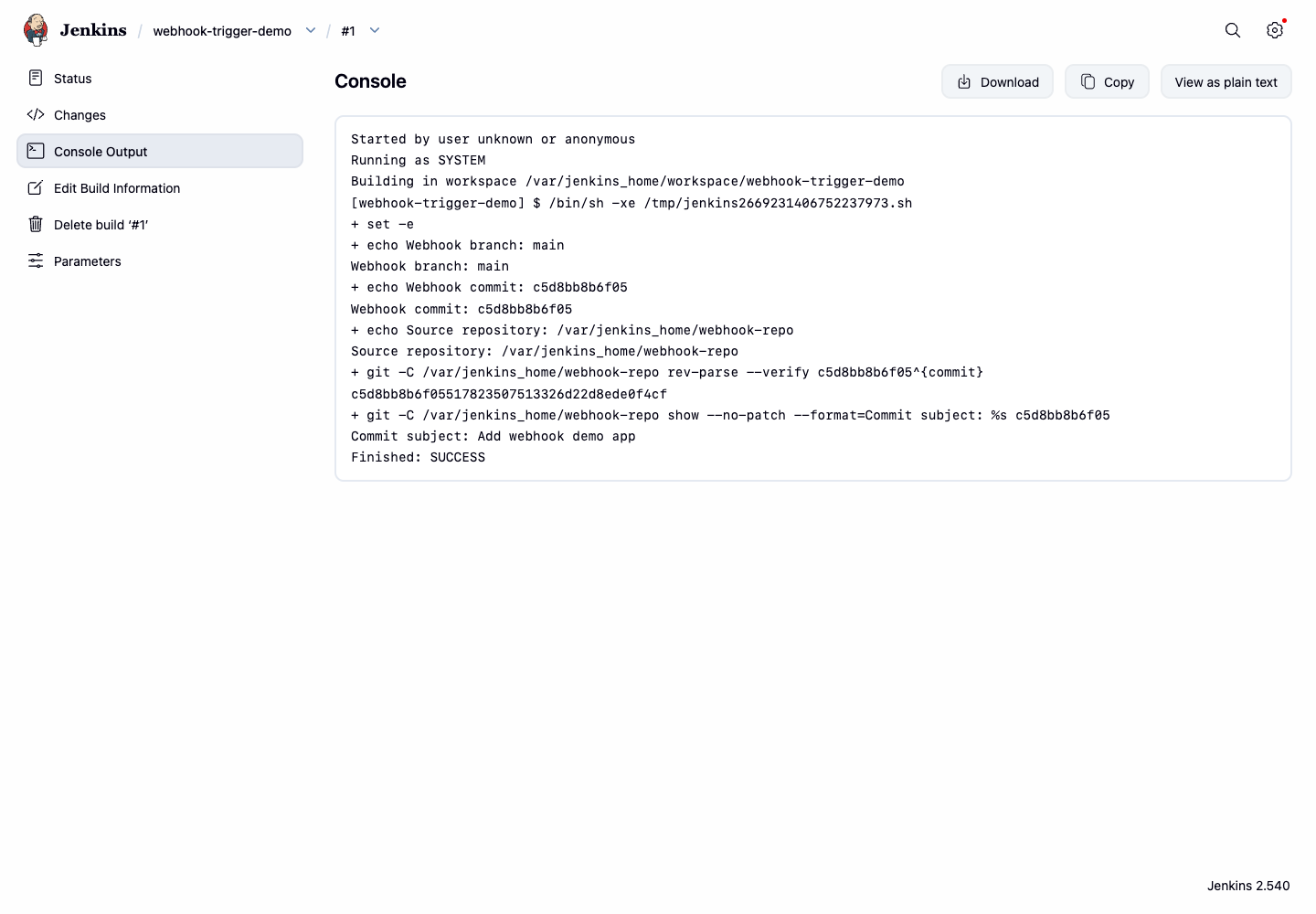
In this step, you will inspect the Jenkins console output. The build log is the most direct evidence that the webhook payload reached the job because it shows the branch, commit id, and commit subject.
Print the relevant console lines:
curl -fsS http://localhost:8080/job/webhook-trigger-demo/1/consoleText | grep -E 'Webhook branch|Webhook commit|Commit subject'
The output should include the main branch and the commit subject:
Webhook branch: main
Webhook commit: ...
Commit subject: Add webhook demo app
Open Firefox from the Desktop interface and visit http://localhost:8080/job/webhook-trigger-demo/1/console. The Console Output page should show the webhook branch, commit id, and commit subject in the build log.
Summary
You created a local Git repository, configured a Jenkins job to accept webhook-style build parameters, sent a local webhook request with curl, and verified the branch and commit evidence in the Jenkins build log. This is the same core flow used by source control systems when they notify Jenkins about repository changes.