



Introduction
The Lantern Festival has working services in each area, but staff cannot yet retrieve the other area's programme. You will restore a narrow path between separate networks while keeping the broadcast room available.
You should already recognize IPv4 addresses, a simple /24 range, client/server roles and ports, and be able to enter terminal commands and view addresses with ip addr. The prepared Linux nodes share one kernel; they are network namespaces, not separate physical machines. No programming, firewall, dynamic routing or subnet arithmetic is required.
Use Area Plan for real programme requests, Area A and Area B for their clients, and West Router and East Router for routing changes. Each terminal keeps its own directory and network state. Opening a tab does not reset progress. This lab starts independently. Times are author estimates, including reading and ordinary mistakes, without a beginner timing study.
Restore the Path to Workshop
In this step, you will establish a working local example before investigating a remote destination. Begin in Area Plan. On the Main Stage card, select Request from Area A. Expect the opening set and lantern parade, ending with Request received from: 10.71.0.10. Return using the browser's Back button. On Broadcast Room, select Request from Area A: its cue is also available. These are protected working services.
Switch to Area A. Its terminal is already in /home/labex/project/festival-routes/a. pwd prints that directory. ip -4 addr show displays IPv4 addresses; dev eth0 selects the course interface.
pwd
ip -4 addr show dev eth0
Expect 10.71.0.10/24. In this plan, /24 means addresses beginning with 10.71.0 are local. Workshop uses another subnet, 10.72.0.0/24. A router forwards packets between networks; it does not change their original addresses.
HTTP is the request/response protocol used by the prepared programme service. curl requests an HTTP resource. --noproxy '*' bypasses proxy settings for all destinations; the quotes keep * literal. -f treats HTTP errors as failures, -s hides the progress meter, and -S still shows errors. --max-time 3 limits the whole attempt to three seconds. Port 8080 is the prepared programme service.
curl --noproxy '*' -fsS --max-time 3 http://10.71.0.10:8080/programme.txt
Read the complete local programme, including its source address. Now try Workshop. This next request is expected to fail; it does not damage the network.
curl --noproxy '*' -fsS --max-time 3 http://10.72.0.10:8080/programme.txt
Expect a connection failure rather than a programme. Immediately read its native exit status: $? holds the last command's status, and echo prints it.
echo $?
A nonzero status means this attempt failed. Connection failure (often 7), timeout (28), and HTTP refusal (22 with -f) describe different observations; none alone identifies every root cause. A refused port can mean the host was reached but no listener accepted it. First check the exact tab, address and port if you mistype a request, then repeat it. Do not reset the VM.
The local service and third network work. The next question is which path West Router would use for Workshop.
Read the Router Decision
In this step, you will distinguish a client's default gateway from a router's specific destination path. Begin in Area A. ip route reads the live routing table; ip route get asks the kernel which path it would choose without sending a programme request.
ip route
ip route get 10.72.0.10
Expect via 10.71.0.1 dev eth0: the next hop is the adjacent West Router. via identifies that neighbor; dev identifies the outgoing interface. This does not prove West Router knows the rest of the path.
Switch to West Router, whose course workspace ends in /west. Read its interfaces and routes:
ip -4 addr show
ip route
ip route get 10.72.0.10
Expect RTNETLINK answers: No route to host for the final lookup. The LAN interface is 10.71.0.1/24; transit is 172.22.0.1/24. The adjacent East Router uses 172.22.0.2/24 and connects Workshop at 10.72.0.1/24. Broadcast Room is on West Router's broadcast interface, 10.73.0.1/24.
The prepared unreachable default metric 32760 is a deliberate default route: unmatched destinations are rejected inside this isolated exercise. A normal default route can instead use a gateway. Preserve this default here. metric 32760 is its preference among routes with the same prefix; a lower metric is preferred in that comparison. A destination route for 10.72.0.0/24 is more specific than a default and changes only that area's path. Do not replace the default or flush the table.
In Area Plan, expand West Router · live routing table to compare the same native table. The map describes structure; the programme requests test real communication. East Router's return route is already prepared in this first lab. You only need the missing West Router destination route.
Add the Scoped Path
In this step, you will add one destination route and retrieve the complete remote resource. Begin in West Router. This terminal already has administrative rights inside the course namespace. ip route add adds a live route; 10.72.0.0/24 is the destination range, via 172.22.0.2 is the adjacent router, and dev transit selects the link to that neighbor.
ip route add 10.72.0.0/24 via 172.22.0.2 dev transit
Success normally prints nothing. Read the decision again:
ip route get 10.72.0.10
Expect via 172.22.0.2 dev transit. The reported src here belongs to a request originating on this router; forwarded Area A traffic keeps its own address. Switch to Area A and make the real client request:
curl --noproxy '*' -fsS --max-time 3 http://10.72.0.10:8080/programme.txt
Expect Workshop, the paper lantern workshop and rhythm circle, and Request received from: 10.71.0.10.
Save the Programme and Preserve Other Paths
In this step, you will save the remote resource and retain the local and broadcast paths. Begin in Area A. -o remote-programme.txt saves the received bytes in this terminal's directory. cat reads the saved file.
curl --noproxy '*' -fsS --max-time 3 -o remote-programme.txt http://10.72.0.10:8080/programme.txt
cat remote-programme.txt
Check the protected broadcast path too:
curl --noproxy '*' -fsS --max-time 3 http://10.73.0.10:8080/programme.txt
In Area Plan, return to the home page and select Workshop's Request from Area A. Read the same programme and original source address. Use the browser Back button to request Main Stage and Broadcast Room again. The route-table disclosure must still show the original default and connected routes.
If add reports File exists, read ip route in West Router. replace adds or updates only the named prefix:
ip route replace 10.72.0.0/24 via 172.22.0.2 dev transit
If you accidentally added 10.72.1.0/24, it does not match this destination. Remove only that mistaken entry with ip route del 10.72.1.0/24, then use the shown correct route. For any other typing error, read the table and remove only the extra prefix you added. Never use flush. Keep addresses, all original routes, links and services. Repeat the same download if a failed attempt left no complete file. These routes are live for this session; reboot persistence is outside this lab.
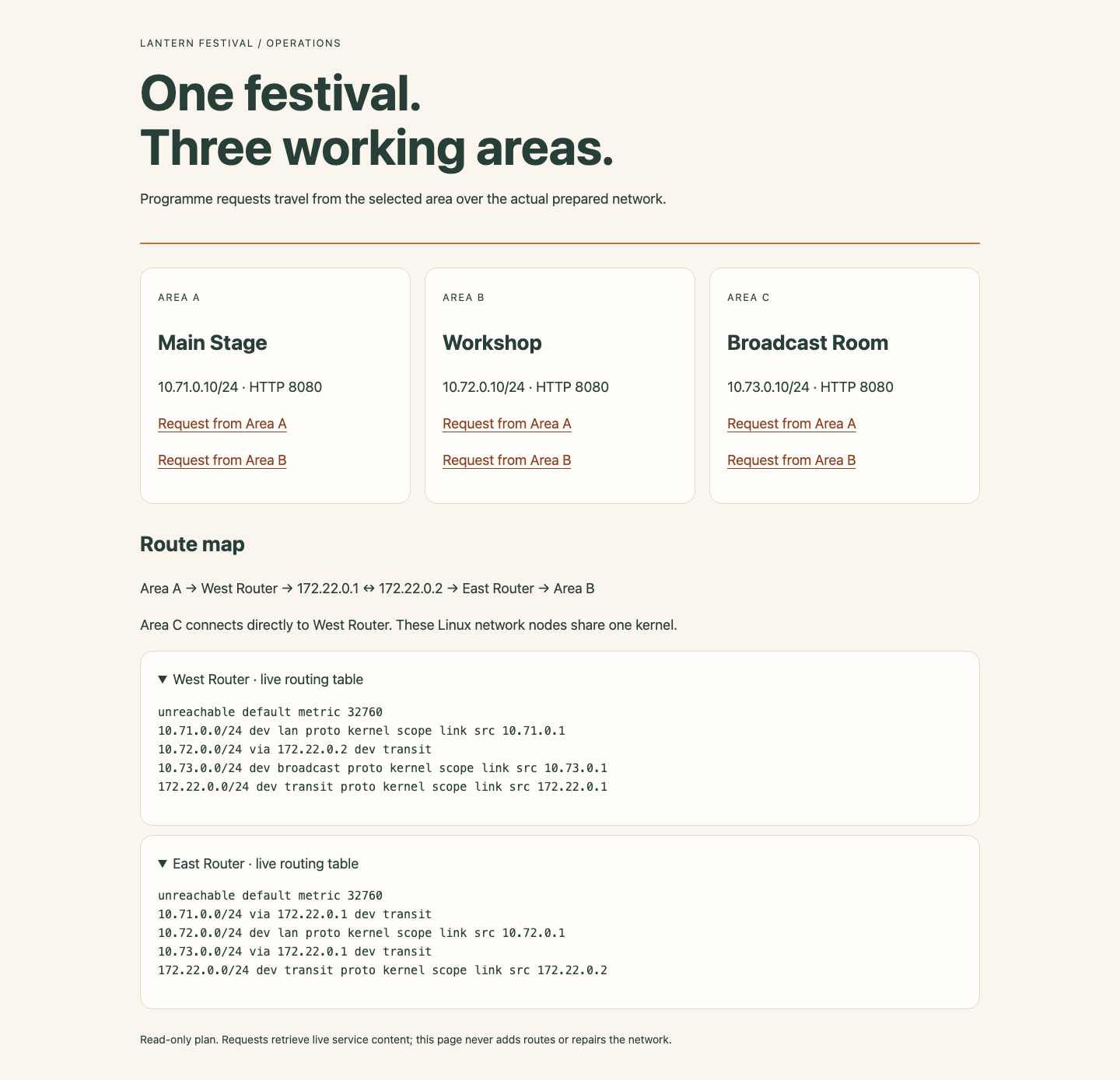
Use the route map to locate the two transit neighbors, then compare the destination rows with the retained defaults. The expanded tables show actual kernel routes in the working lab.
Summary
You used actual destination lookups and scoped routes to deliver festival programmes while preserving original addresses and unrelated paths. A client gateway is only the first hop; every router needs a usable next decision.


