



Introduction
Willow Games is ready for a new heat. The score desk needs responsive interactions; the media desk needs a complete rehearsal audio delivery. Both links work, but the starting route sends both jobs over one link.
You will repeat short measurements in a fresh prepared environment, choose separate destination routes, and send the new score and full audio. Complete Measure What Each Event Task Needs first, or bring equivalent ping, iperf3 and scoped IPv4 route skills. No programming or media encoding is required.
Use Event Client for commands and Event Receipts to view and play actual received content. Only the two named destination routes and your new submissions are editable. The 45-minute duration is an author estimate; the isolated nodes share a kernel and represent wired virtual paths, not public supplier measurements.
Choose by the Stated Workload
In this step, you will measure the prepared links and choose one for each job. Begin in Event Client, already in /home/labex/project/event-links. This lab has its own new network and files. It assumes the delay and throughput tools from Measure What Each Event Task Needs, plus basic destination-route reading; no files or running processes carry over.
First see the normal function you must preserve. The score desk already has a warmup record. curl --noproxy '*' bypasses proxies, -fsS fails on HTTP errors while showing error messages, and --max-time 35 limits the transfer:
curl --noproxy '*' -fsS --max-time 35 http://10.205.10.10:8080/reference
Expect the preserved warmup score of 1–1. Switch to Event Receipts. The two main cards await heat-7 and opening-sound.wav; the page does not treat the warmup as a completed new job. Return to Event Client.
The score desk needs short interactions: choose the link with consistently low RTT, comfortably below an 80 ms sample-average planning budget. The media team needs bulk upload capacity: choose the path with receiver throughput comfortably above 10 Mbps in this prepared scene. These broad budgets guide your decision; they are not an Internet service guarantee. Do not try to tune either link to reach them.
Read the supplied link identities and new score content. cat prints each file:
cat links.tsv
cat source/score.json
The two business destinations are 10.205.10.10 for scores and 10.205.10.20 for media, both on HTTP port 8080. Initially both /32 routes use lane1. Measure the same media target from this same client through each link, one test at a time. ip route replace changes only that destination; via identifies the next hop and dev the interface. ip route get confirms what the kernel selects before you send traffic.
ip route replace 10.205.10.20/32 via 10.205.1.1 dev lane1
ip route get 10.205.10.20
ping -n uses numeric addresses, -c 4 stops after four requests, and -W 2 caps each reply wait at two seconds. Read the RTT average and spread in milliseconds:
ping -n -c 4 -W 2 10.205.10.20
iperf3 -c connects to the prepared receiver's port 5201; -t 5 runs a five-second TCP data test. The default direction uploads from client to receiver, matching the media work. Read the final receiver bitrate. Mbps means millions of bits per second; divide by eight for approximate MB/s before overhead.
iperf3 -c 10.205.10.20 -t 5
Wait for completion. Now change only the media route and repeat:
ip route replace 10.205.10.20/32 via 10.205.2.1 dev lane2
ip route get 10.205.10.20
ping -n -c 4 -W 2 10.205.10.20
iperf3 -c 10.205.10.20 -t 5
Restore the starting media route after the experiment:
ip route replace 10.205.10.20/32 via 10.205.1.1 dev lane1
ip route get 10.205.10.20
You should see a large contrast: lane1 roughly 11 ms RTT and about 1.9 Mbps, lane2 roughly 180 ms and tens of Mbps. First-use neighbor discovery and scheduling can affect one sample. If a result is close or a test says the server is busy, let the finite test finish, confirm the route and repeat the same sample serially. Do not overlap tests or change shaping. A printed report cannot replace real traffic, and iperf test bytes do not deliver either new business task.
Change Only the Destination Routes
In this step, you will turn the measured workload decision into two specific routes. Begin in Event Client. Lane1 provides the low RTT needed by the small score interaction. Lane2 provides the upload capacity needed by the large sound-check file. Both links must remain usable.
Read the full table before editing:
ip route show
Keep the course default and the reference destination 10.205.10.30 unchanged. You may replace only the 10.205.10.10/32 and 10.205.10.20/32 routes. /32 means exactly one IPv4 address; a broader network route would affect other destinations. The platform network is outside this task.
Make the score route explicit, using the same already-taught replace, via and dev form:
ip route replace 10.205.10.10/32 via 10.205.1.1 dev lane1
ip route replace 10.205.10.20/32 via 10.205.2.1 dev lane2
Check each actual kernel selection:
ip route get 10.205.10.10
ip route get 10.205.10.20
Expect score traffic via 10.205.1.1 dev lane1 src 10.205.1.2 and media traffic via 10.205.2.1 dev lane2 src 10.205.2.2. If one is wrong, repeat only its complete replace command with the correct next hop and interface. Do not flush the table or change the default.
Preserve the independent reference route with an actual request:
curl --noproxy '*' -fsS --max-time 35 http://10.205.10.30:8080/reference
Expect the original warmup, 1–1, preserved response. This exercise separates traffic by two different destination addresses. It does not distinguish applications sharing one target address, configure policy routing, combine links, or select a public ISP.
Deliver New Scores and Media
In this step, you will deliver the new work through the chosen routes and compare the complete received media. Begin in Event Client. The new score is match heat-7, home 3, away 1. The new media task is opening-sound.wav, an original 48-second synthetic rehearsal sound-check tone. Its valid mono PCM WAV bytes are prepared; you do not encode or edit them.
Read the supplied score before sending it:
cat source/score.json
JSON names and string values use double quotes; scores are numbers. -H supplies the JSON content type, and --data-binary @source/score.json reads the exact file and performs POST. The -w string adds elapsed seconds after the receipt: \n makes a new line and %{time_total} is curl's total time. This includes connection setup, not just RTT.
curl --noproxy '*' -fsS --max-time 35 -H 'Content-Type: application/json' --data-binary @source/score.json -w '\nseconds=%{time_total}\n' http://10.205.10.10:8080/scores
Expect the correct match and scores, local_ip of 10.205.10.10, and peer_ip of 10.205.1.2. The peer is the source the receiver actually observed. The receipt is evidence of this delivery, not a prediction from the current route.
-T uploads the given file with PUT to the media service. It can take several seconds; wait for its result:
curl --noproxy '*' -fsS --max-time 35 -T source/opening-sound.wav -w '\nseconds=%{time_total}\n' http://10.205.10.20:8080/media/opening-sound.wav
Expect the new filename, byte count, content digest, local_ip of 10.205.10.20 and peer_ip of 10.205.2.2. A success response for the demo file would not complete this task.
A POST with the same match ID replaces that match; a PUT with the same media name replaces that media task. If you delivered on the wrong path, correct the route and send that same task again. Changing the route after a delivery does not change its old receipt. Never edit the receipt store or source files to simulate a result.
Read the receivers independently with GET:
curl --noproxy '*' -fsS --max-time 35 http://10.205.10.10:8080/receipts
curl --noproxy '*' -fsS --max-time 35 http://10.205.10.20:8080/receipts
Download the received media, rather than copying the local source. -o saves the response, cmp compares every byte, and sha256sum prints a digest for each named file:
curl --noproxy '*' -fsS --max-time 35 -o received/opening-sound.wav http://10.205.10.20:8080/media/opening-sound.wav
cmp source/opening-sound.wav received/opening-sound.wav
sha256sum source/opening-sound.wav received/opening-sound.wav
Expect cmp to print nothing and both digest strings to match. An empty file or a file with different content will not match the prepared audio. Renaming a file does not change its bytes or hash. If comparison fails, read the media receipt, repeat the PUT of the unchanged source to the correct destination, download again and compare.
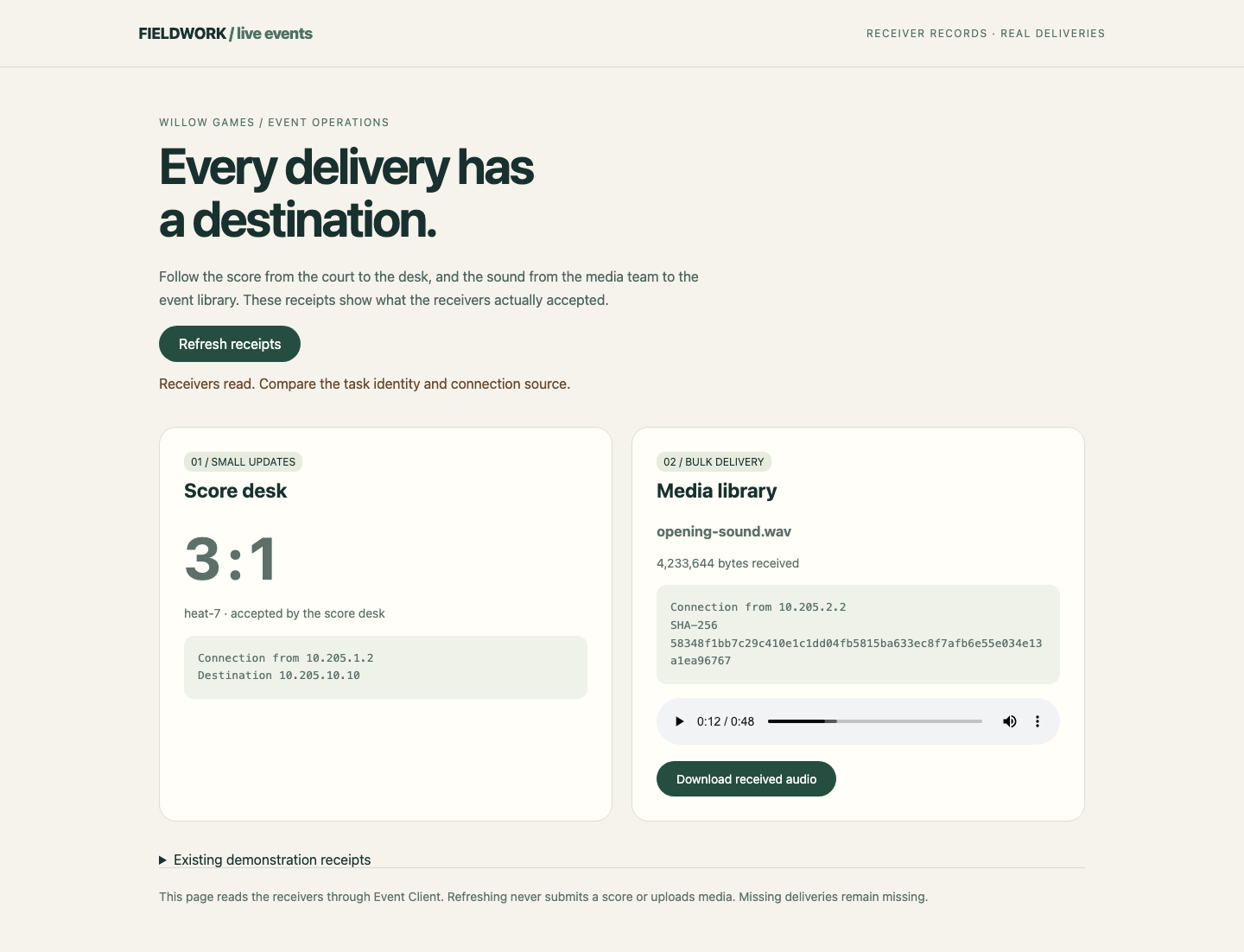
Switch to Event Receipts, select Refresh receipts, and look for heat-7 with 3 : 1, the new media filename and the different connection sources. Play the Received event audio control and use Download received audio to retrieve the receiver's bytes. Your browser may be muted or lack a sound device; the control's duration and advancing playback still confirm that it decodes the received WAV. Start playback explicitly; the page does not autoplay.
In the final view below, compare the two Connection from values beside the new score and received audio. The audio control shows the real decoded duration and lets you choose a playback position.
If curl cannot connect (exit 7) or times out (exit 28), return to Event Client and recheck the matching ip route get result and exact URL. An HTTP rejection (exit 22) is different: compare the exact endpoint path and supplied JSON/body file. The -f option omits an HTTP error response body; do not tune the network to fix a business-format error. The page's refresh only reads receivers and cannot complete missing work.
Return to Event Client and confirm the preserved reference once more:
curl --noproxy '*' -fsS --max-time 35 http://10.205.10.30:8080/reference
You have delivered two different workloads through appropriate paths while retaining both links, source bytes, prepared shaping, reference data and unrelated routes. Assessment reads existing business records and native network facts before its limited GET probes; it never posts scores, uploads files or repairs a path.
Summary
You chose paths by workload, changed only two destination routes, and delivered a new score and complete playable media. Receiver connection sources prove where those deliveries arrived; changing a route afterward cannot rewrite them. You also preserved the existing reference and both prepared links.


