



Introduction
Maple Hall shares cables between visitor devices and staff equipment. Visitors read the programme; staff read desk instructions. You will place two new devices in their intended wired local area network (LAN) groups, while preserving the working reference devices.
You need basic terminal input, paths, tab switching, and an understanding of interfaces, MAC addresses, IPv4 addresses and same-subnet communication. Virtual LAN (VLAN) commands are introduced here. One Linux instance contains isolated network namespaces acting as software switches and endpoints; they share a kernel and are not separate VMs. This is temporary wired segmentation, without Wi-Fi, inter-VLAN routing or a complete security guarantee.
The Switch A console changes only its prepared ports. Client Checks sends real requests and bounded ARP broadcasts. LAN Groups displays the device plan and live membership and offers real client requests. Do not change endpoint IP addresses, services, firewalls, bridges or platform networking. The 40-minute duration is an author estimate including reading and ordinary errors.
Place the New Devices in Their LAN Groups
In this step, you will use the working example, then place the new access ports in their intended groups. Open LAN Groups, then Open device plan. The visitor group uses VLAN 10; staff uses VLAN 20. LAN means Local Area Network. A VLAN (Virtual LAN) is a logical LAN inside shared switching equipment. Its broadcast frames stay within that group.
Select Request service on visitor-reference. Read the complete visitor programme, including the Community talk. The protected staff-reference should return staff desk instructions with Radio channel: 4. These are actual HTTP requests from those named clients. New visitor and staff devices are not ready yet; their requests are expected to time out.
Switch to Switch A. The console begins in /home/labex/project/lan-groups; commands in this tab operate on the course switch, not the platform network. cat reads the supplied table. bridge vlan show reads VLAN membership without modifying it:
cat ports.tsv
bridge vlan show
Match each device to its switch port. v-local and s-local lead to business servers; v-ref and s-ref lead to working reference clients. Preserve those four ports. The new ports visitor and staff initially belong to VLAN 1, an intentionally incomplete default group.
Switch to Client Checks. This console observes named endpoints; it does not change their configuration. The prepared Python helper's request action sends an actual request from the named namespace. local selects that group's server on the same switch:
python3 /opt/labex/lan-groups/checks.py request visitor-reference local
Now observe a real broadcast. ARP (Address Resolution Protocol) asks which MAC address owns an IPv4 address. Its request uses Ethernet destination ff:ff:ff:ff:ff:ff, meaning broadcast. The broadcast helper starts bounded captures before sending two genuine ARP requests toward an unused course address. It neither changes addresses nor relies on an existing neighbor cache:
python3 /opt/labex/lan-groups/checks.py broadcast visitor-reference
Read the actual tcpdump lines. visitor-local receives matching requests; staff-local and staff-reference show zero. The unconfigured visitor port also misses this reference broadcast. MAC addresses identify frame endpoints; IP addresses identify network-layer destinations. Different IP subnets alone would not prove that a broadcast stayed in its VLAN.
A zero count alone is inconclusive: the positive same-group capture proves the frame was sent and captured. If all counts are zero, repeat once and inspect the reference request before changing anything. Do not turn off a service to make a negative test look successful.
Assign the Access Ports
Now you will make the two new access ports match their intended groups. Begin in Switch A. An access port connects an ordinary endpoint that sends frames without VLAN tags. The port's PVID (Port VLAN ID) classifies such incoming frames into a VLAN. untagged removes that VLAN tag on frames sent back to the endpoint. These are different directions of the same port relationship.
bridge vlan del removes the named membership; add installs one. dev names the port and vid gives the VLAN ID. Remove only the stale VLAN 1 from visitor, then add its intended visitor membership:
bridge vlan del dev visitor vid 1
bridge vlan add dev visitor vid 10 pvid untagged
Apply the staff plan to the other new port:
bridge vlan del dev staff vid 1
bridge vlan add dev staff vid 20 pvid untagged
Successful changes normally print nothing. Read the effective table:
bridge vlan show
The visitor row must show 10 PVID Egress Untagged; staff must show 20 PVID Egress Untagged. The four protected ports retain their original rows. No endpoint address needs changing: visitor is already 10.60.10.21/24, staff 10.60.20.21/24.
If a port name was mistyped, the error identifies a missing device. Reread ports.tsv and retry on the intended port. If a wrong VLAN was added, use the same del dev ... vid ... form to remove that exact row, then add the intended row above. Repeating a deletion after it already succeeded can report a missing entry; read the table before repeating. Never flush all memberships or delete the bridge.
Check Both Groups and the Broadcast Boundary
In this step, you will prove useful service and separate broadcast domains together. Switch to Client Checks, and send both actual local requests:
python3 /opt/labex/lan-groups/checks.py request visitor local
python3 /opt/labex/lan-groups/checks.py request staff local
Read all four programme lines and all four staff desk lines. A connection error means no usable path or listener; it does not prove isolation. These successful positive paths show that both groups still work.
Capture visitor and staff broadcasts separately:
python3 /opt/labex/lan-groups/checks.py broadcast visitor
python3 /opt/labex/lan-groups/checks.py broadcast staff
For each sender, its own group's server and reference client receive real broadcast requests, while every other-group endpoint receives zero matching frames. Endpoint capture lines contain ARP without 802.1Q; the access port delivers untagged Ethernet. No replies are expected for the deliberately unused target address.
Return to LAN Groups, reload, and select Request service on both new clients and both reference clients. Each must return its intended complete resource. Open the live membership and compare it with the plan. If a group is wrong, return to Switch A and correct only that port using the previous step's deletion/addition pattern. Then repeat both requests and both captures.
The final check reads native membership and performs bounded probes. It never changes VLANs or repairs a path. Probe traffic can naturally update neighbors and the FDB (Forwarding Database), the switch's learned MAC-to-port table and append ordinary HTTP access logs; it does not change your port configuration.
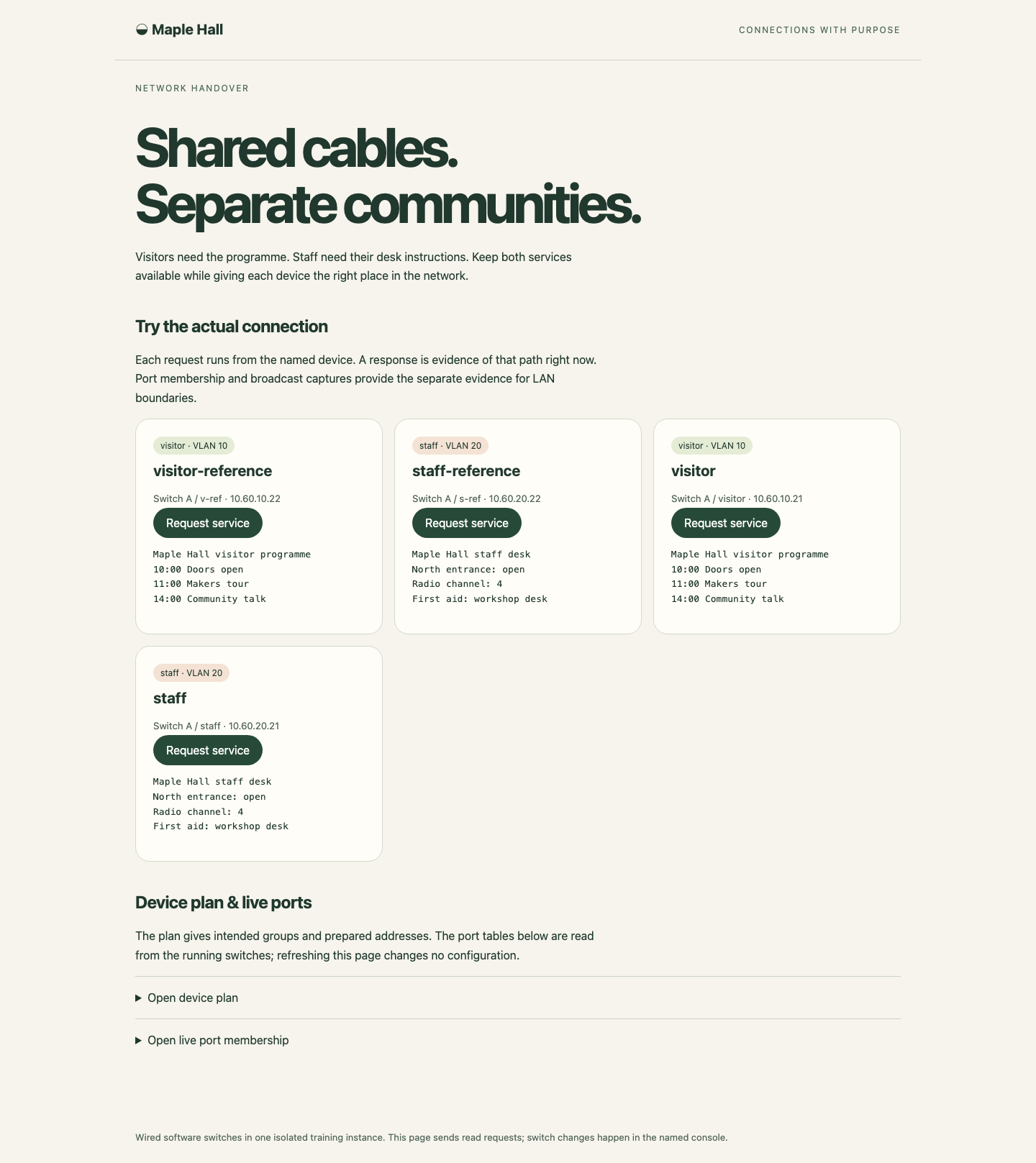
Read the full response under each device button; group labels describe the plan, while successful requests and live port tables show the actual result.
Summary
You used a working reference, assigned access PVID and untagged egress, and kept both business groups usable. Actual same-group ARP delivery and absent other-group copies established the broadcast boundary. This temporary single-switch result does not yet demonstrate a tagged uplink; the next lab prepares an independent two-switch scene.


