



Introduction
Willow Commons is moving its website to a new server address. The community must keep using site.community.test, and the original location must remain available during the transition. Both backends already contain their legitimate programme; your work is DNS migration, not a content release.
Complete See Which Address a Client Is Using first. This independent environment starts again with the formal name at the old address, separate authority and caching resolvers, and ready old/new HTTP services. It does not reuse your previous VM. You will prepare the TTL, change the address and verify actual clients and complete content. Allow about 50 minutes including reading and ordinary mistakes; this is an author estimate.
This is a controlled local DNS exercise. It does not promise global propagation, zero downtime, public registrar migration or permission to delete the old server immediately.
Prepare the Transition Window
In this step, you will check the normal service and new backend before shortening the formal record's TTL. Begin in Community Preview, select Warm Client, and read the existing Willow Commons page with its old location label. Leave Fresh Client unused until the address changes. Its separate resolver has not queried this site.
Switch to Warm Client. The commands and curl options are the same as in the first unit. First request the existing named service:
curl --noproxy '*' -fsS --max-time 5 http://site.community.test:8081/programme.txt
Expect the full programme from Service location: old. Then check the prepared new backend by its address, using the same path and port:
curl --noproxy '*' -fsS --max-time 5 http://10.94.0.20:8081/programme.txt
Expect the same three gatherings and entrance information with Service location: new. This direct readiness test bypasses DNS intentionally; it does not prove a named client has migrated. Keep both websites unchanged.
Query Warm Client's current copy:
dig @127.0.0.1 site.community.test A +noall +answer
Expect the old address with a TTL no higher than 120. If setup's warm copy expired while you read, this real query obtains another copy of the still-current old record. There is no deadline measured from opening the lab.
Switch to DNS Desk, in /home/labex/project/site-move, and read the record file and prepared backend plan:
cat backends.tsv
cat community.zone
Only site's A address/TTL and necessary SOA serial are migration edits. practice is reserved for optional repeatable observations; keep, the nameserver and all website bytes must be retained. The prepared old record has a real 120-second TTL. The exercise deliberately uses seconds; this is not a claim that a production day's cache lifetime disappears in two minutes.
Before changing the address, lower only the formal record's TTL. This complete literal here-document uses the file-writing syntax taught in the first unit:
cat > community.zone <<'ZONE'
$TTL 120
@ IN SOA ns.community.test. admin.community.test. (2 60 30 3600 30)
@ IN NS ns.community.test.
ns IN A 10.94.0.2
site 45 IN A 10.94.0.10
practice 120 IN A 10.94.0.10
keep 120 IN A 10.94.0.10
ZONE
named-checkzone community.test community.zone
Expect loaded serial 2 and OK; correct any syntax problem before reloading:
sudo /opt/labex/site-move/reload-zone
Confirm the live authority, not just the saved file:
sudo ip netns exec site-authority dig @10.94.0.2 site.community.test A +noall +answer
Expect 45 IN A 10.94.0.10. The old backend is still authoritative. Switch to Warm Client:
dig @127.0.0.1 site.community.test A +noall +answer
The old cached copy retains its previous remaining lifetime. Do not mistake a remaining TTL of 40 for proof that the new 45-second policy has been obtained: an old 120-second copy can also have 40 seconds left.
Wait for the observed old copy to expire, then query again. You may wait the last displayed remaining seconds plus one. The complete conservative command below covers the original 120-second maximum:
sleep 121
dig @127.0.0.1 site.community.test A +noall +answer
Expect the old address with a newly obtained TTL at or near 45. This last DNS request is important: expiration alone removes an old copy but does not fetch its replacement. The native DNS exchange records the shortened old-address answer. The check reads that existing exchange before making any probe, and never prepares this stage for you.
If the answer is absent or has another address, re-read the exact authority and client outputs before proceeding. Correct file errors in DNS Desk, validate, reload and retry the named query in Warm Client. Do not restart or flush a resolver. Run this stage's check only once the old address has actually been obtained with the shortened lifetime.
Change the Address and Compare Two Clients
In this step, you will move the formal name and compare independent clients. Read this step before beginning the short sequence. The next warm lookup shows the remaining comparison window; a cache hit does not restart its TTL. Only a new copy obtained after natural expiration starts a fresh 45-second lifetime, independently of setup. A slow edit may miss the visible difference; the migration remains valid, and the separate practice-name recovery below lets you repeat the observation.
In Warm Client, refresh the current view:
dig @127.0.0.1 site.community.test A +noall +answer
If its remaining TTL is nearly exhausted, let it expire and query again before the edit, while the authority still returns the old address. Then switch to DNS Desk. Change the formal A address, retain its 45-second TTL, and increase the serial:
cat > community.zone <<'ZONE'
$TTL 120
@ IN SOA ns.community.test. admin.community.test. (3 60 30 3600 30)
@ IN NS ns.community.test.
ns IN A 10.94.0.2
site 45 IN A 10.94.0.20
practice 120 IN A 10.94.0.10
keep 120 IN A 10.94.0.10
ZONE
named-checkzone community.test community.zone
sudo /opt/labex/site-move/reload-zone
sudo ip netns exec site-authority dig @10.94.0.2 site.community.test A +noall +answer
The live authority must now return 45 IN A 10.94.0.20. If it still returns the old address, the saved file and loaded data disagree; check syntax and the reload result before interpreting a client cache.
Switch to Warm Client:
dig @127.0.0.1 site.community.test A +noall +answer
curl --noproxy '*' -fsS --max-time 5 http://site.community.test:8081/programme.txt
During its remaining cached lifetime it can legitimately use the old address and return Service location: old. Switch to Fresh Client, which starts in /home/labex/project/site-move/fresh with its own resolver:
dig @127.0.0.1 site.community.test A +noall +answer
curl --noproxy '*' -fsS --max-time 5 http://site.community.test:8081/programme.txt
Expect the new address and complete Service location: new programme. Two clients can use the same name yet reach different valid backends during a DNS transition. They are independent Linux client namespaces and caching processes in one VM, not two physical devices or independent VMs.
If both already show new: the warm copy expired naturally before the comparison. Continue the formal migration; no screenshot or historical overlap is required to pass. To repeat the phenomenon without undoing it, use practice.community.test as taught in the first unit. In DNS Desk, keep site at its new address, set only practice to old/120 seconds and increase the current serial with nano community.zone (Ctrl+O, Enter, Ctrl+X). Validate and reload. In Warm Client, let any current practice copy expire, then query practice to start a new window. Change only practice to new/45 seconds with another higher serial, validate/reload, then compare practice through both clients. The formal site record stays migrated throughout. Finish the practice observation naturally; never clear a cache or replace site content.
If you changed the formal address before completing TTL preparation, use the taught record-edit workflow to return only site to old/45 seconds with a higher serial, validate/reload, and let Warm Client's current answer expire. Request the old address at the short TTL, then cut over again with a higher serial. Both original backends remain available, so this scoped DNS rollback repairs sequencing without resetting services or deleting work. The final goal remains the new formal address. Run this stage's check after confirming the live authority changed.
Confirm the New Route Through DNS
In this step, you will prove the controlled clients reach the new content and the old service remains available. Begin in Warm Client. Its original migration copy lasts at most 60 seconds under the permitted policy (the shown path uses 45). Inspect its remaining TTL:
dig @127.0.0.1 site.community.test A +noall +answer
If it still shows the old address, wait its remaining seconds plus one, then repeat. This complete conservative wait covers the maximum permitted short lifetime:
sleep 61
dig @127.0.0.1 site.community.test A +noall +answer
Expect 10.94.0.20, with a remaining TTL no higher than 45 for the shown policy. A correct address is not enough; request the homepage and save the full programme through that name:
curl --noproxy '*' -fsS --max-time 5 http://site.community.test:8081/
curl --noproxy '*' -fsS --max-time 5 -o programme.txt http://site.community.test:8081/programme.txt
cat programme.txt
Expect the genuine new location homepage and Service location: new programme with all three gatherings and entrance information. If DNS is correct but content is wrong, investigate the actual backend path and address; editing the old website to look like the new one is outside scope.
Switch to Fresh Client and independently save the same complete resource:
dig @127.0.0.1 site.community.test A +noall +answer
curl --noproxy '*' -fsS --max-time 5 -o programme.txt http://site.community.test:8081/programme.txt
cat programme.txt
Expect the same new-location content. Switch to Community Preview, return to its selection page using browser Back if necessary, select each client, and refresh the actual page. Both now display new location. Use Download the programme from each view and open the complete text. These browser requests use the selected course client, independent of your browser computer's DNS.
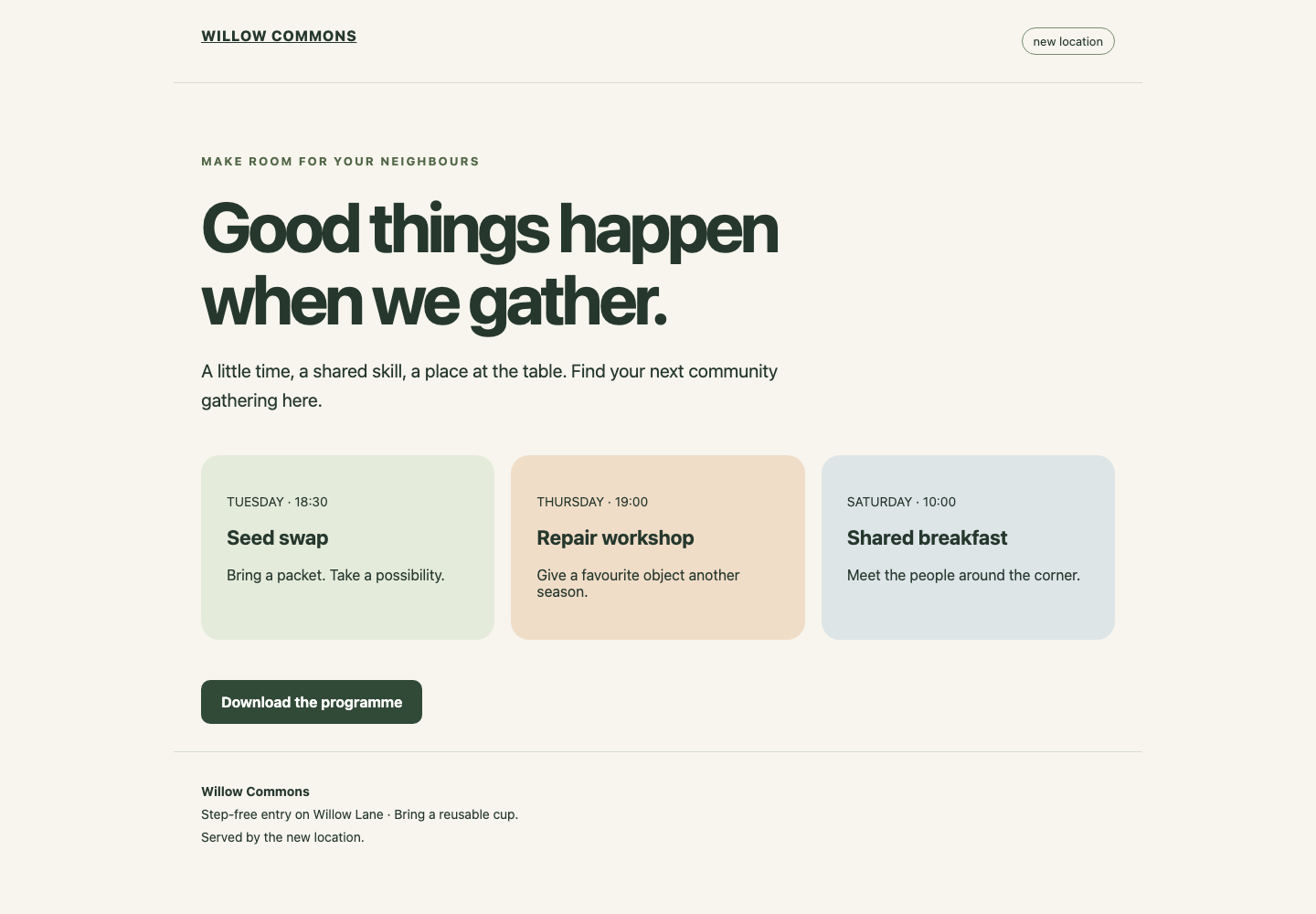
Read the new location label near the top and the original programme link below the three gatherings. Each client should show this genuine new-backend page.
Return to Warm Client to prove the preservation requirements. Request the old backend directly:
curl --noproxy '*' -fsS --max-time 5 http://10.94.0.10:8081/programme.txt
Expect the original old-location programme. Query the unrelated name at the authority:
dig @10.94.0.2 keep.community.test A +noall +answer
Expect the unchanged 120 IN A 10.94.0.10. The old service remains part of this transition contract. Do not stop it after two clients migrate; these observations do not establish that every real-world client has updated.
If a saved file contains an earlier location, repeat the same download command in that client's correct tab after its real DNS lookup changes. If the path is wrong, recover with pwd and cd /home/labex/project/site-move/warm or the corresponding fresh directory. The final checks read existing DNS/reload evidence before their own requests. Repeated grading neither flushes caches nor reloads the authority; normal reads can append native logs.
Summary
You checked the new backend, lowered the TTL while the old address remained authoritative, and let a real client obtain that policy. You then changed the address, compared independent clients and verified full new-site content after natural expiration. The original name, old backend and unrelated records remain available. These are controlled client observations, not a guarantee of worldwide DNS propagation.


