



Introduction
Willow Games has two network links and two kinds of work: small score updates and large rehearsal sound files. Both services already run, but the link that responds quickest may not carry a large file quickest.
You will try normal deliveries, compare delay and upload throughput to the same target over both paths, and restore the original route after each experiment. You need basic terminal use and the ability to read a destination, next hop and scoped route, as taught in the preceding routing project or equivalent practice. No programming, media encoding, traffic-shaping or iperf experience is assumed.
Use Event Client for all commands and Event Receipts to read receiver records. Each lab prepares its own isolated network; nothing from a previous VM is required. The 45-minute duration is an author estimate including reading and ordinary mistakes, not a measured beginner completion time.
Try a Small Update and a Large Delivery
In this step, you will use an already working score desk, then send two real demonstration deliveries. Begin in Event Client. This terminal is the administrator shell inside one isolated Linux network namespace, already in /home/labex/project/event-links. The receiver is another namespace; they share one VM kernel. Do not use a platform shell for these commands. Opening the tab does not rebuild the network.
Willow Games needs quick score interactions and complete rehearsal sound files. A small request spends much of its time waiting for packets to travel; a large upload also needs enough capacity to carry its bytes. Latency is travel delay, and throughput is useful data delivered per second. Neither alone describes every job.
pwd prints the working directory. cat prints a file. If a command reports a missing file, compare the spelling and use the full cd command below to return to the workspace; a typing mistake does not require a VM reset.
pwd
cd /home/labex/project/event-links
cat links.tsv
The two rows identify lane1 and lane2, their next hops and this client's source addresses. A next hop is the neighbor that receives a packet on its way to the destination. The score destination is 10.205.10.10; the media destination is the different address 10.205.10.20. Both listen on port 8080. Link delay and capacity are prepared by setup; leave shaping, addresses and services unchanged.
Start with an existing working score. curl transfers an HTTP resource. --noproxy '*' bypasses proxy environment settings for every address; the quotes prevent shell wildcard expansion. -f makes HTTP errors fail, -s hides the progress meter, and -S still prints errors. These combined options are written -fsS. --max-time 35 limits the whole transfer to 35 seconds. The URL chooses the actual destination, port and resource.
curl --noproxy '*' -fsS --max-time 35 http://10.205.10.10:8080/reference
Expect warmup, a 1–1 score and preserved. This normal example must remain available. It is not your new delivery.
Read the demonstration score, represented as JSON: braces enclose named fields, strings use double quotes, and the two scores are integers.
cat source/demo.json
Expect match demo, home 1, away 0. -H sets the HTTP content type. --data-binary @source/demo.json reads this exact file and submits it with HTTP POST; @ means a file body. -w prints a small timing result after the response. In its single-quoted string, \n means a new line and %{time_total} means elapsed seconds. Copy the whole command as one line:
curl --noproxy '*' -fsS --max-time 35 -H 'Content-Type: application/json' --data-binary @source/demo.json -w '\nseconds=%{time_total}\n' http://10.205.10.10:8080/scores
Read the receipt's match, scores, peer_ip and local_ip. They identify what the receiver accepted and the actual connection source and destination. Repeating a POST for the same match replaces that match's receipt; it does not create duplicate matches.
The prepared demo.wav is an original two-second sound-check tone, valid PCM WAV audio. You do not need to create or encode media. -T uploads the file body with HTTP PUT. Repeating a PUT for the same name replaces that one media task.
curl --noproxy '*' -fsS --max-time 35 -T source/demo.wav -w '\nseconds=%{time_total}\n' http://10.205.10.20:8080/media/demo.wav
The receipt includes its byte count and SHA-256 content digest. A digest summarizes bytes; matching digests support content identity, while the filename alone does not. To compare the actual received file, download it again. -o saves the response at the specified path. cmp compares every byte and prints nothing on success:
curl --noproxy '*' -fsS --max-time 35 -o received/demo.wav http://10.205.10.20:8080/media/demo.wav
cmp source/demo.wav received/demo.wav
Switch to Event Receipts and select Refresh receipts. Open Existing demonstration receipts and find your demo score and demo.wav. The page reads the real receivers through Event Client; it never fills missing records from the source folder. The main cards await the next lab's new tasks.
The expanded demonstration section below shows the accepted demo score and demo.wav identity, content digest and actual connection sources. The waiting main cards are expected at this stage.
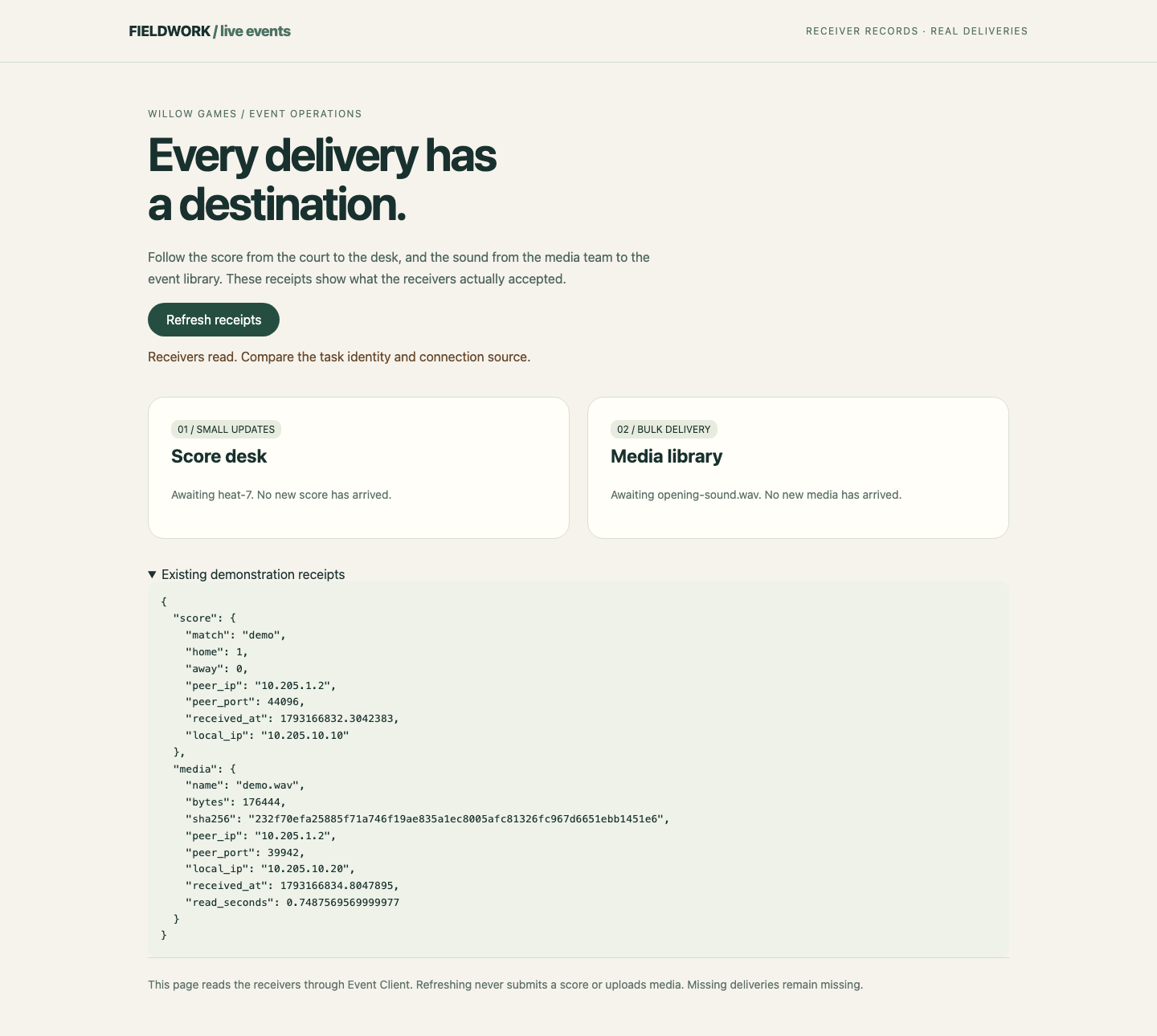
If curl exits 7, it could not connect: return to Event Client and check the address, port and ip route get command taught next. Exit 28 means the time limit expired, not an HTTP rejection. Exit 22 means an HTTP error. With -f, curl reports the HTTP status but omits the error response body; compare the exact endpoint path and supplied JSON/body file. Read the named source with cat and correct the command, preserving the supplied files. A successful connection with the wrong task is still the wrong business result.
Measure Delay on Each Path
In this step, you will compare a bounded delay sample to the same destination through each link. Begin in Event Client. All commands run on this same client; only the media destination's route changes. Keep the score and reference routes, default route, interfaces, source files and shaping unchanged.
ip route show lists current routes. /32 selects exactly one IPv4 destination. ip route get asks which route and source the kernel would use; it sends no packet. Read the current media route before changing it:
ip route show
ip route get 10.205.10.20
Expect via 10.205.1.1 dev lane1 src 10.205.1.2. Keep this original route in mind: you will restore it after each experiment. This course uses a prepared default within the isolated network; it does not provide Internet access.
ip route replace adds or replaces just the stated destination route. via selects its next hop, and dev selects the outgoing interface. Replacing one /32 does not replace the default. First make the lane1 test explicit:
ip route replace 10.205.10.20/32 via 10.205.1.1 dev lane1
ip route get 10.205.10.20
ping sends ICMP echo requests. -n displays numeric addresses, -c 4 stops after four requests, and -W 2 waits at most two seconds for a reply. Round-trip time (RTT) includes the outward trip and response; it is not one-way delay or an application score response.
ping -n -c 4 -W 2 10.205.10.20
Read all four replies and the final min/avg/max/mdev line, in milliseconds (ms). Compare the average and spread, not just the lowest sample. This link is usually around 11 ms RTT in the prepared scene. First-use neighbor discovery or VM scheduling can make a sample slower.
Now switch only that same destination to lane2:
ip route replace 10.205.10.20/32 via 10.205.2.1 dev lane2
ip route get 10.205.10.20
Expect via 10.205.2.1 dev lane2 src 10.205.2.2 before measuring:
ping -n -c 4 -W 2 10.205.10.20
This path is usually around 180 ms RTT. The difference should be large; it is not a promise about a real supplier or the Internet. No replies do not automatically mean that the HTTP service is broken: ICMP and HTTP are different protocols. Check this destination, next hop and interface first. If values seem close, repeat this same bounded sample one path at a time; do not start parallel tests.
Restore the original one-destination route and confirm it:
ip route replace 10.205.10.20/32 via 10.205.1.1 dev lane1
ip route get 10.205.10.20
You have observed two travel times without changing either link's properties. Next, test whether the faster response also carries bulk data faster.
Measure Throughput in the Needed Direction
In this step, you will compare TCP upload throughput over the same two paths. Begin in Event Client, with the media route restored to lane1. The prepared receiver runs an iperf3 server on port 5201. The client starts a test; the server receives test data and reports what arrived. These test bytes are not your media delivery.
iperf3 -c selects the server address and -t 5 limits the data test to five seconds. The default TCP test sends from client to server, the same direction as the event media upload. We do not use -R, which reverses the direction. Short setup and result exchanges can make the whole command take slightly longer than five seconds.
Confirm the route before the first test:
ip route get 10.205.10.20
iperf3 -c 10.205.10.20 -t 5
Read the final receiver row. The Bitrate column may use Mbits/sec (Mbps): millions of bits each second. A byte has eight bits, so divide Mbps by eight for approximate MB/s. For example, 2 Mbps is at most roughly 0.25 MB/s before protocol overhead. MBytes in the transfer column is an amount of data, not a rate. The lane1 receiver rate is usually near 1.9 Mbps.
Wait for the command to finish before changing the route. Measure the same destination through lane2:
ip route replace 10.205.10.20/32 via 10.205.2.1 dev lane2
ip route get 10.205.10.20
iperf3 -c 10.205.10.20 -t 5
Lane2 usually delivers tens of Mbps despite its longer RTT. TCP startup, acknowledgments, protocol overhead, scheduling and the short observation window affect the rate. A virtual interface's nominal speed is not measured throughput. If the server reports a test in progress, wait for the current bounded test to finish and retry once; do not launch another server or overlap more tests.
Restore the original media route and confirm it:
ip route replace 10.205.10.20/32 via 10.205.1.1 dev lane1
ip route get 10.205.10.20
The low-RTT link suits small interactions, while the high-throughput link suits this bulk upload. This conclusion is scoped to the prepared paths and measured direction. You have not measured Wi-Fi, public Internet capacity or production reliability. The next independent lab asks you to use these observations to deliver new business content.
Summary
You sent a real score and playable audio, compared the same target over two paths, interpreted RTT and TCP receiver throughput, and restored the scoped route. Measurements describe a path and direction; the next task turns those observations into separate business routes.


