



Introduction
Maple Yard's check-in device needs a known address so the event team can recognize it. A dynamic pool is already prepared, but the check-in reservation is missing and the new-device gateway and DNS options point to unused addresses. The protected reference desk remains available.
You will match the real device identity to its reservation, correct the server options, and actually release and obtain the check-in lease again. This fresh environment contains everything required; it does not reuse files or leases from the first lab. Complete the first guided lab, or be comfortable with its pool, lease and tab-switching workflow.
Use Network Desk for the server file, Check-In and Guest A for their own client commands, and Network Map for read-only observation. As before, these are isolated Linux nodes sharing one kernel.
Reserve the Address for the Right Device
In this step, you will give the check-in device a real lease for its planned address. Begin in Network Map and request the reference programme to confirm the healthy example. Its address must stay 10.77.0.10.
Switch to Network Desk, in /home/labex/project/event-network:
cat devices.tsv
cat dhcp.conf
The check-in device has MAC 02:77:00:00:00:28 and needs 10.77.0.20. The guest pool remains 10.77.0.100–10.77.0.109; the reservation is outside it. Matching a friendly label alone would not identify the device. This prepared exercise matches the stable MAC address.
A dhcp-host line associates a device with an address and an optional hostname. Here >> appends to the existing file, preserving its pool and options. Copy the complete literal block:
cat >> dhcp.conf <<'CONF'
dhcp-host=02:77:00:00:00:28,10.77.0.20,check-in
CONF
Check and apply it, using the same course service as the first lab:
dnsmasq --test --conf-file=dhcp.conf
sudo systemctl restart event-dhcp
If syntax fails, read the file and correct only the malformed line before restarting. Do not remove the protected include.
Switch to Check-In. It begins in its own client workspace and administrator shell. Request the real lease:
dhclient -4 -v -1 -cf client.conf -pf client.pid -lf client.leases eth0
ip -4 addr show dev eth0
Expect 10.77.0.20/24. Reload Network Map to compare the check-in card with its planned identity. This step verifies the reserved address only. The new-device gateway and DNS are intentionally still wrong; a programme request from Check-In is expected to fail until the next step. Do not treat that known failure as a reason to reset the VM.
Send Settings the Clients Can Actually Use
In this step, you will repair the gateway and DNS options and make the clients receive them. Begin in Check-In:
ip route show default
cat /etc/resolv.conf
The prepared wrong values are 10.77.0.254 for the gateway and 10.77.0.253 for DNS. Those addresses have no such service. The real course router and DNS are both 10.77.0.1. The first value controls traffic leaving the subnet; the second controls name resolution.
Switch to Network Desk. dhcp-option=option:router supplies a gateway, while dhcp-option=option:dns-server supplies DNS. Replace the complete file with the correct include, unchanged pool, device reservation and these two options. The first lab taught > and the quoted here-document:
cat > dhcp.conf <<'CONF'
conf-file=/opt/labex/event-network/server-base.conf
dhcp-range=10.77.0.100,10.77.0.109,255.255.255.0,2h
dhcp-host=02:77:00:00:00:28,10.77.0.20,check-in
dhcp-option=option:router,10.77.0.1
dhcp-option=option:dns-server,10.77.0.1
CONF
dnsmasq --test --conf-file=dhcp.conf
sudo systemctl restart event-dhcp
Changing the server does not rewrite a lease already applied by a client. Switch to Check-In. Release its old lease using -r; only this client's process and interface are affected:
dhclient -4 -v -r -cf client.conf -pf client.pid -lf client.leases eth0
Request again:
dhclient -4 -v -1 -cf client.conf -pf client.pid -lf client.leases eth0
ip route show default
cat /etc/resolv.conf
Both should now use 10.77.0.1. The address remains 10.77.0.20 because the reservation matches the same device.
Switch to Guest A and obtain its first lease in this environment:
dhclient -4 -v -1 -cf client.conf -pf client.pid -lf client.leases eth0
ip -4 addr show dev eth0
ip route show default
cat /etc/resolv.conf
Expect a dynamic address within the guest pool, with the correct gateway and DNS. Request the programme:
curl --noproxy '*' -fsS --max-time 5 http://programme.event.test:8080/programme.txt
Expect all five Maple Yard programme lines from the first lab. If an old wrong value remains, confirm the server file was actually restarted and that you released and requested on the affected client. Do not overwrite /etc/resolv.conf by hand; that would conceal the server option problem.
Reconnect and Keep the Desk Ready
In this step, you will prove the reservation works through a real new lease and save the desk resource. Switch to Check-In. Read the current address before releasing it:
ip -4 addr show dev eth0
It should be 10.77.0.20/24. Release and obtain the lease again:
dhclient -4 -v -r -cf client.conf -pf client.pid -lf client.leases eth0
dhclient -4 -v -1 -cf client.conf -pf client.pid -lf client.leases eth0
ip -4 addr show dev eth0
Expect the same reserved address. This was a real DHCP release and acquisition, not a manually restored static address. The guest's dynamic assignment need not always be the same address.
Use the received configuration to download the desk instructions. The first lab explained the curl options and -o:
curl --noproxy '*' -fsS --max-time 5 -o desk.txt http://desk.event.test:8080/desk.txt
cat desk.txt
Expect:
MAPLE YARD | Registration desk
Desk: North entrance
Session: Community workshop
Status: Ready for arrivals
If the address is wrong, return to Network Desk and compare the exact MAC-to-address relationship with devices.tsv. Validate the corrected file, restart only the course DHCP service, then release and request on Check-In. A restart or tab reconnect alone is not a new client lease.
In Network Map, reload the page and request the programme from Check-In, Guest A and reference. All must work. The fixed check-in address, usable options, real re-acquisition and preserved services together form the completed network.
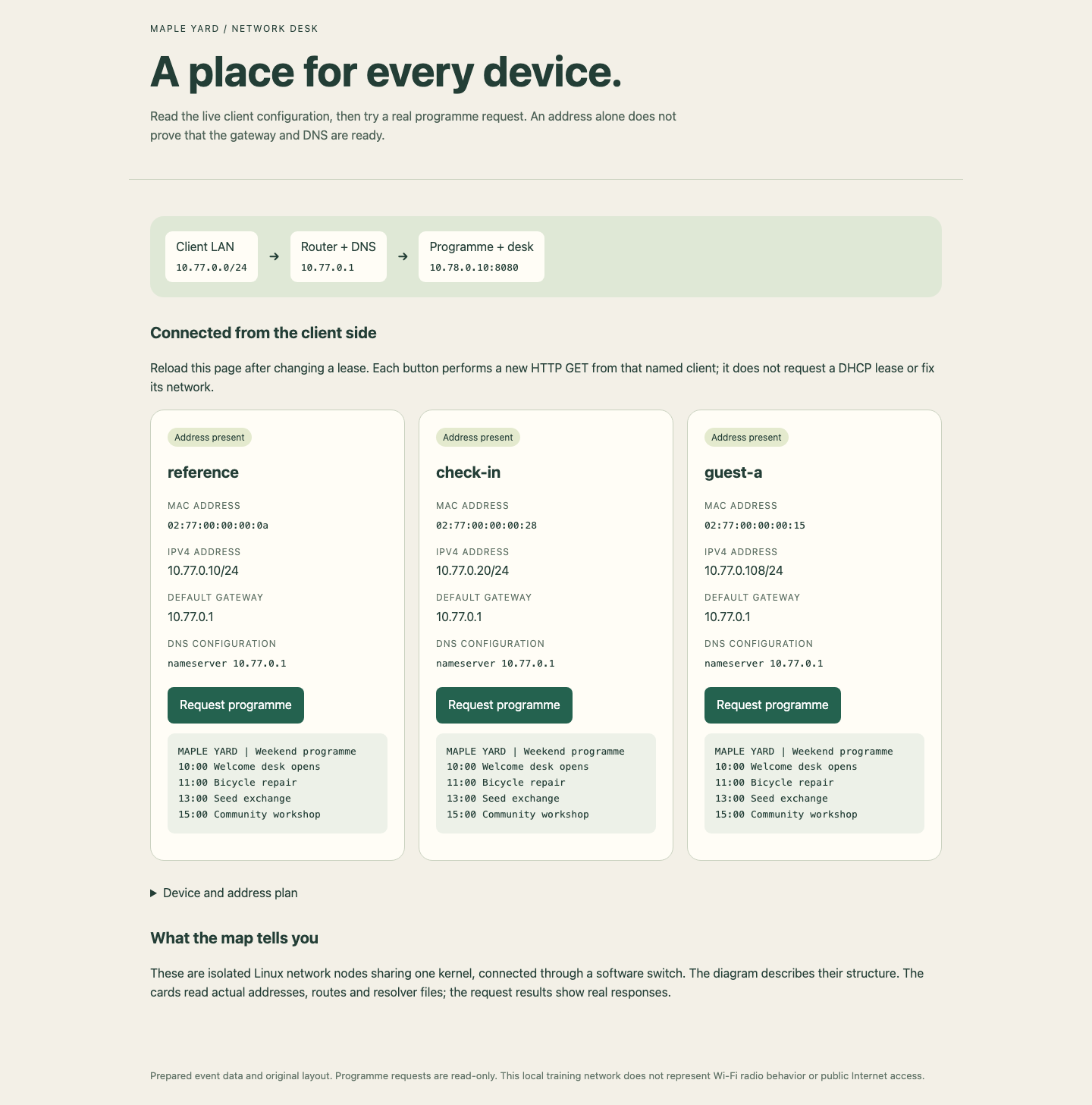
Compare the IPv4 address, gateway and DNS on each card, then read the programme response below its button. Guest address allocations can differ from this example.
Summary
You tied a real device identity to a reserved address, repaired gateway and DNS options at their source, and made clients apply new leases. You then released and obtained the check-in lease again without losing its address or normal guest service.
The independent challenge changes the event's address plan and device set. It uses the same tools and mechanisms. The course has not configured DHCP relay, Wi-Fi radio settings, high availability or reboot persistence.


