



Introduction
The Lantern Festival has a prepared forward route from Main Stage to Workshop, but the reply cannot return. You will observe real connection packets and repair the missing return path while preserving existing services.
Complete Reach the Other Festival Area first, or know its destination lookup and scoped route add/replace/recovery workflow. You should already recognize IPv4 addresses, a simple /24 range, client/server roles and ports, and be able to enter terminal commands and view addresses with ip addr. The prepared Linux nodes share one kernel; they are network namespaces, not separate physical machines. No programming, firewall, dynamic routing or subnet arithmetic is required.
Use Area Plan for real programme requests, Area A and Area B for their clients, and West Router and East Router for routing changes. Each terminal keeps its own directory and network state. Opening a tab does not reset progress. This lab starts independently. Times are author estimates, including reading and ordinary mistakes, without a beginner timing study.
Restore the Reply Path and Preserve the Festival Network
In this step, you will observe the two directions of a connection before changing a route. This independent scene already has the West Router route to Workshop. Begin in Area Plan: request Main Stage from Area A and Workshop from Area B. Each local programme works. Request Broadcast Room from Area A too. Workshop from Area A still fails.
TCP (Transmission Control Protocol) establishes a connection before this HTTP exchange. The client chooses a temporary source port, called an ephemeral port; the reply reverses the source and destination addresses and ports. A TCP connection begins with a client SYN packet; the server answers with SYN-ACK before HTTP can be sent. Seeing a SYN at the server's network does not prove that the HTTP request reached the service. You will look at real, bounded traffic on both routers.
Switch to West Router. tcpdump observes packets; -n keeps numeric addresses, -i any watches this node's interfaces, and -c 8 stops after at most eight matching packets. The quoted filter selects TCP port 8080. timeout 120 also stops after two minutes if eight packets never arrive. This limits collection; it does not create traffic. Packet lines may appear only when collection stops. Wait for the startup message before changing tabs, then read the collected lines after stopping.
timeout 120 tcpdump -ni any -c 8 'tcp port 8080'
Wait for listening on any, then switch to East Router and start the same bounded observer:
timeout 120 tcpdump -ni any -c 8 'tcp port 8080'
After listening on any, switch to Area A and make one request. The three-second timeout is expected:
curl --noproxy '*' -fsS --max-time 3 http://10.72.0.10:8080/programme.txt
echo $?
Expect 28. Switch to East Router after the failed request. If this observer is still running, press Ctrl+C to stop it and flush any buffered packet lines. If it has already returned to the prompt, leave it stopped. In either case, immediately print its status before any other command:
echo $?
A 124 means the intentional two-minute bound ended collection. A 0 can mean tcpdump reached its packet count or handled Ctrl+C cleanly; an interrupted wrapper can instead report 130. Read the packet lines as evidence, not the observer status alone. Repeat both bounded captures and the request if the window elapsed before your request or you captured nothing. The two-minute bound is room for tab switching, not a measured beginner timing guarantee.
Look for source 10.71.0.10 toward 10.72.0.10.8080, Flags [S], arriving through transit and leaving through lan. The response reverses the addresses: 10.72.0.10.8080 toward 10.71.0.10, Flags [S.], arriving on lan. It has no working route onward. Switch to West Router, press Ctrl+C to stop its observer if it is still running, then read its status too:
echo $?
West sees outgoing SYNs toward Workshop but no returning SYN-ACKs. Exact times, ephemeral client ports and retransmission counts vary. The evidence narrows the failure to the reply path; it is not a captured completed HTTP exchange.
Add the Return Route
In this step, you will provide the response destination with its own route. Begin in East Router. Read its table and ask about the original client's address:
ip route
ip route get 10.71.0.10
Expect RTNETLINK answers: No route to host. East Router is attached to 10.72.0.0/24 and transit 172.22.0.0/24, but the response destination belongs to 10.71.0.0/24. Its next hop must be the adjacent West Router, 172.22.0.1, not the remote client itself.
Use the same narrow route syntax taught in the previous lab:
ip route add 10.71.0.0/24 via 172.22.0.1 dev transit
ip route get 10.71.0.10
Expect via 172.22.0.1 dev transit. Switch to Area A and repeat the business request:
curl --noproxy '*' -fsS --max-time 3 http://10.72.0.10:8080/programme.txt
Read Workshop's complete programme and Request received from: 10.71.0.10. Success now includes the connection handshake, HTTP request and HTTP response. The source has stayed Area A's address; address translation or a proxy would conceal the missing return path rather than teach its repair.
If the route already exists, read the table and use ip route replace 10.71.0.0/24 via 172.22.0.1 dev transit. If it still fails, compare the destination and next hop in both routers, then retry from the correct client tab. Do not restart all services or change endpoint addresses.
Keep the Other Paths Working
In this step, you will check both directions and the protected third network. Begin in Area B and request Main Stage:
curl --noproxy '*' -fsS --max-time 3 http://10.71.0.10:8080/programme.txt
Expect the opening set, lantern parade and Request received from: 10.72.0.10. Request the local programme and the broadcast cue as well:
curl --noproxy '*' -fsS --max-time 3 http://10.72.0.10:8080/programme.txt
curl --noproxy '*' -fsS --max-time 3 http://10.73.0.10:8080/programme.txt
Switch to Area A and retain its original local and broadcast access:
ip -4 addr show dev eth0
ip route show default
curl --noproxy '*' -fsS --max-time 3 http://10.71.0.10:8080/programme.txt
curl --noproxy '*' -fsS --max-time 3 http://10.73.0.10:8080/programme.txt
The address is still 10.71.0.10/24, and the client default is still via 10.71.0.1. Switch to Area B and read the corresponding values:
ip -4 addr show dev eth0
ip route show default
Its address remains 10.72.0.10/24, with default via 10.72.0.1. In Area Plan, request each of the three resources from both Area A and Area B. Read content and original source identity, then expand each router's table. Both original unreachable default metric 32760 routes remain. Narrow destination routes take precedence without replacing defaults.
If you accidentally delete the protected third-network route on East Router, restore only it with the taught replacement form:
ip route replace 10.73.0.0/24 via 172.22.0.1 dev transit
The original endpoint defaults are shown above. The routers' original defaults can be restored in their own tabs with ip route replace unreachable default metric 32760; do not run these course commands against platform networking. Read the table after any correction and retry all affected requests. Preserve original connected routes, addresses, links and service processes. The checks make read-only observations and ordinary GET requests; they never add routes or repair the scene. Equivalent precise routes within the stated remote-area range are acceptable.
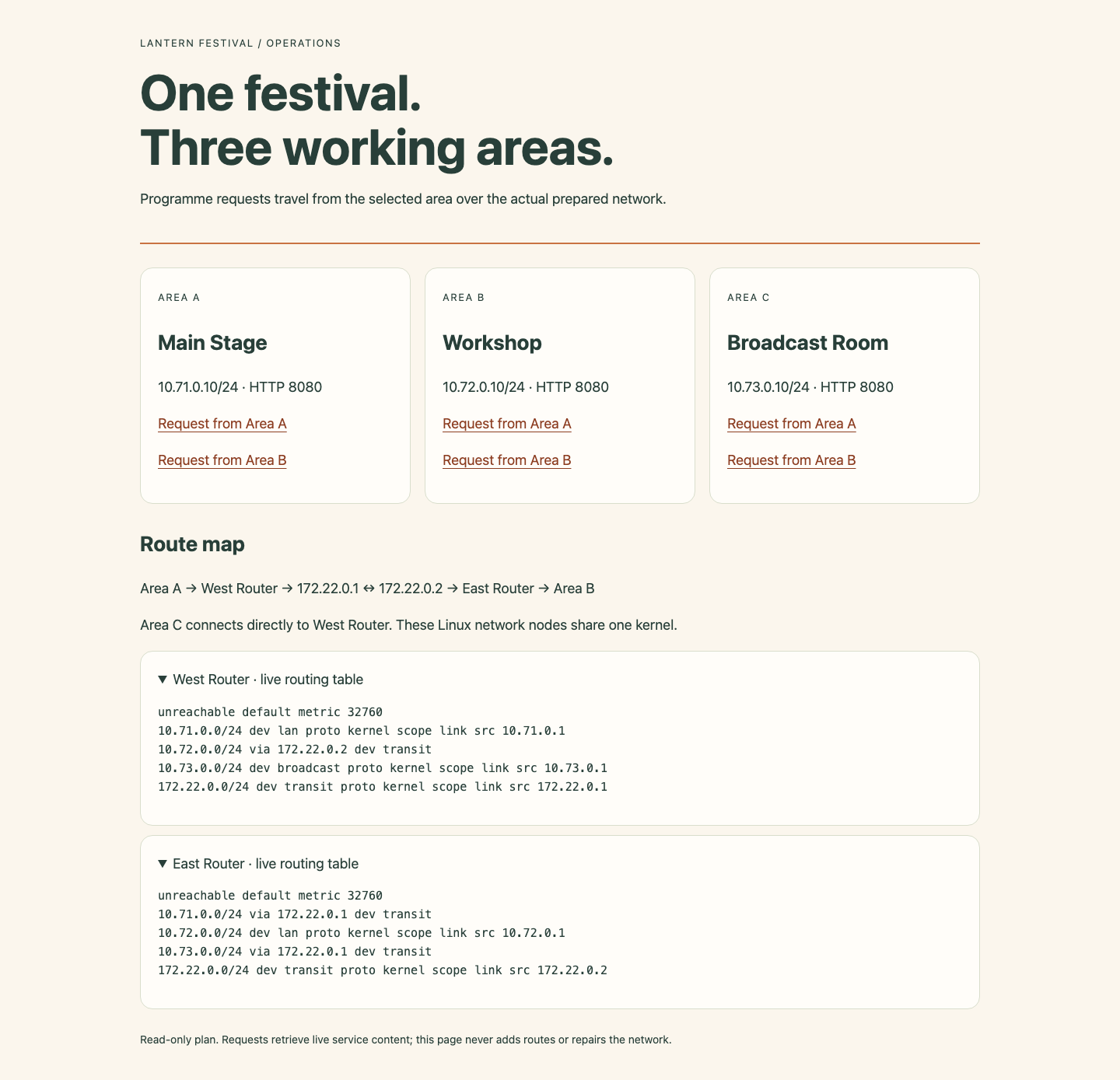
Use the route map to locate the two transit neighbors, then compare the destination rows with the retained defaults. The expanded tables show actual kernel routes in the working lab.
Summary
You used actual destination lookups and scoped routes to deliver festival programmes while preserving original addresses and unrelated paths. You also separated connection requests from replies using bounded live captures.


