



Introduction
PARCEL is a fictional gift studio. Visitors browse an Arc lamp or Clay vase and compare delivery with collection. Collection already returns an estimate, but delivery fails. Your task is to follow a fresh failed request from the entry to the service that answered it, then restore accurate delivery prices without breaking collection.
Basic terminal familiarity is enough. You will edit two short Nginx configuration files, read real logs, and test actual responses. No application programming, SDK, external account, purchase or personal data is needed. All services run on one prepared training instance; this is request correlation, not a full distributed tracing platform.
Use Website to browse and request estimates. Use Workstation for all commands; it starts in /home/labex/project/parcel. Each unit has its own environment. The entry on port 8081 forwards each estimate request to one backend. The delivery service listens on 8091, and collection on 8092. A port identifies a network service; 127.0.0.1 means this lab instance when used in Workstation.
Give a Fresh Request One Reference
In this step, you will meet the normal customer journey, observe the failure, and connect a new request across two real logs. Begin in Website.
Meet the Studio
Open Arc lamp under Two good things. Its detail page shows $48 and a local illustration. Select Estimate collection, leave Arc lamp and Near selected, then click Get estimate. It should show $2.00 and HTTP 200. This is the normal function you must preserve. Use PARCEL↗ to return home, open Delivery, and click Get estimate. It shows Estimate unavailable and HTTP 404.
HTTP is the request/response protocol used by the browser. 200 means a successful response; 404 means the receiving service did not find the requested path. A connection error is different: no usable server response arrived. The reference currently says not available, so the customer response cannot yet be matched easily to the service logs.

Understand the Evidence
The prepared entry log already records each Nginx request's generated identifier. The backend can record a forwarded identifier. Once connected, one failed request will produce records shaped like these; the dots stand for your own identifier:
entry:    {"id":"...","path":"/api/delivery","status":404,"upstream":"127.0.0.1:8091","upstream_status":"404"}
delivery: {"service":"delivery","id":"...","path":"/v1/shipping","status":404}
The entry path is what the browser requested. The backend path is what the entry actually forwarded. upstream names the contacted backend address, and upstream_status is its actual response status. Matching identifiers connect these two observations; matching timestamps alone would be less reliable with many requests. No request bodies or secrets are logged.
Connect the Identifier
Switch to Workstation. pwd prints the current directory and cat prints a file:
pwd
Expect /home/labex/project/parcel. If you left it, run cd /home/labex/project/parcel; cd changes the current directory. Paths without an initial /, such as correlation.conf, are relative to that directory.
cat correlation.conf
It currently contains only a comment. Nginx is the prepared entry server. Its configuration consists of directives terminated by semicolons. The main server includes this small file, so you do not edit the main scaffold.
A header is a named value carried with an HTTP request or response. proxy_set_header sets a header sent to the backend; add_header adds one to the customer response. $request_id is Nginx's generated value for this request. always includes the response header on failures as well as successes. The name X-Request-ID is the shared convention here. The entry creates its own identifier rather than trusting a visitor's identifier.
cat > correlation.conf replaces that file with a here-document. Paste the entire block, including the final CONF on its own line. Quoting 'CONF' keeps $request_id literal in the file so Nginx, rather than the shell, interprets it:
cat > correlation.conf <<'CONF'
proxy_set_header X-Request-ID $request_id;
add_header X-Request-ID $request_id always;
CONF
Read the saved file, then apply it with the supplied helper. bash runs this shell script. It first checks syntax and only reloads Nginx if the configuration is valid; it does not repair routing or judge prices.
cat correlation.conf
bash reload.sh
Expect a successful configuration test and Configuration accepted. Send a new request to test it. If the test reports a line error, compare spelling, semicolons, and the literal dollar signs with the block, rewrite the file, and retry. The previous running configuration remains in service if syntax testing fails. Reloading does not change an old response; send a new request.
Follow Your Own New Failure
In Website, click Get estimate on Delivery again. It should still fail, but now Request reference has 32 hexadecimal characters. Copy that exact new value. Do not use the dots above or an identifier from a screenshot.
Return to Workstation. A shell variable stores a value for later commands. In the assignment below, replace PASTE_YOUR_NEW_REQUEST_REFERENCE_HERE with the exact new reference copied from Website. Keep the single quotes and do not put spaces around =. The quotes preserve the value literally. Do not run the placeholder unchanged:
REQUEST_ID='PASTE_YOUR_NEW_REQUEST_REFERENCE_HERE'
grep prints matching lines. -F treats the value as plain text; double quotes keep the variable value together. These absolute paths work from any directory:
grep -F "$REQUEST_ID" /var/log/parcel/entry.jsonl
grep -F "$REQUEST_ID" /var/log/parcel/delivery.jsonl
You should see exactly the same identifier in both records, the backend path /v1/shipping, and status 404. You have proved that delivery reached a responding backend; this is not a stopped service or a missing network connection. Empty output usually means an old or mistyped reference: request again in Website, copy its new value, and set REQUEST_ID again. Merely enabling the response header would leave the backend identifier as -; both directives are necessary.
The step check sends fresh read-only requests to test correlation. It does not require a particular shell variable, command history, or copied log file.
Restore the Route and Keep Both Estimates Working
In this step, you will use the two log records and the service contract to repair delivery. Begin in Workstation.
Separate the Address from the Path
cat the routing configuration:
cat routes.conf
A location = block matches one exact public path; braces group its directives. proxy_pass tells Nginx where to send the request. In http://127.0.0.1:8091/v1/shipping, the address and port select a service, while /v1/shipping selects an operation within that service. Either part can be wrong. With these exact locations, the configured backend path replaces the matched public path; the query options still travel with the request.
The prepared services have this contract:
| Public operation | Responsible service | Service address | Backend path |
|---|---|---|---|
| Delivery | delivery | http://127.0.0.1:8091 |
/v1/delivery |
| Collection | collection | http://127.0.0.1:8092 |
/v1/collection |
Both services also answer /health, but a healthy service is not proof of correct routing. The logs showed that delivery reached 8091 at /v1/shipping. That service owns delivery, but does not provide that path. The contract calls for /v1/delivery. Collection already has both the correct address and path.
Apply the Small Repair
Replace only the editable route file, preserving collection:
cat > routes.conf <<'CONF'
location = /api/delivery {
    proxy_pass http://127.0.0.1:8091/v1/delivery;
}
location = /api/collection {
    proxy_pass http://127.0.0.1:8092/v1/collection;
}
CONF
bash reload.sh
If syntax testing fails, compare braces and semicolons, rewrite this file and retry. Do not edit the prepared backend, website, logs, or main server configuration. Returning 200 without an actual correct estimate would conceal the defect rather than fix it.
Test Actual Prices and Correlation
Switch to Website, open Delivery, and request Arc lamp / Near again. It should show $6.00, HTTP 200, and a new reference. Select Clay vase / Far and request again: expect $13.00. Open Collection and test Arc lamp / Near: it must still show $2.00; Clay vase / Far must show $4.00. Each click sends a new request, so references should differ. Returning to the product pages through PARCEL↗ should still work with images and prices.
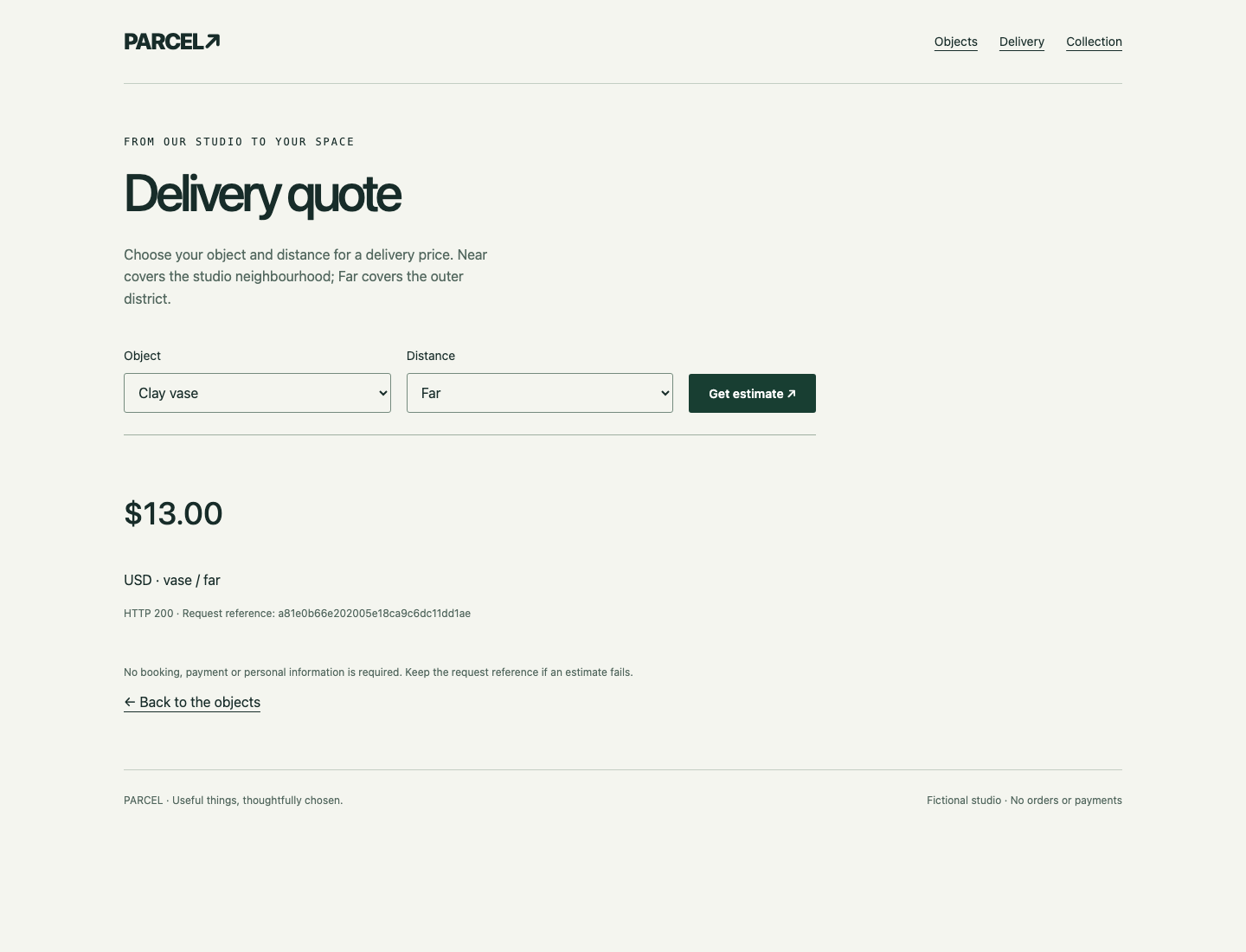
Return to Workstation. curl sends an HTTP request. -sS hides progress but displays connection errors; -i includes response headers. The single quotes keep & inside the URL instead of letting the shell interpret it. Query options after ? select the object and distance:
curl -sS -i 'http://127.0.0.1:8081/api/delivery?item=vase&zone=far'
Expect HTTP/1.1 200 OK, an X-Request-ID header, and JSON fields including "service": "delivery", "amount": 13, "currency": "USD". JSON is a text format of named values. The body's request_id should equal the header. Header capitalization can vary without changing its meaning.
Take the reference from this response and set REQUEST_ID again and repeat the two grep -F commands from step 1. Both logs now show 200, and the delivery log records /v1/delivery. The old 404 records remain useful history; do not erase or rewrite them.
Check the preserved function independently:
curl -sS -i 'http://127.0.0.1:8081/api/collection?item=lamp&zone=near'
Expect 200, "service": "collection", and "amount": 2. Receiving a 404 is an ordinary HTTP response, so curl without a fail-on-HTTP-error option can still exit normally. A connection error instead points to an unavailable process or wrong address; revisit the last working configuration rather than treating it as the path evidence above.
The final check requests every object/distance combination for both operations, matches fresh identifiers to actual service logs, and tests the complete customer website. Only normal access-log records are appended; grading does not reload configuration, rewrite files, or create orders.
Summary
You connected a new request's entry and backend logs with one generated reference, distinguished a responding service's missing path from a connection failure, and repaired the actual route. You tested varied business results and kept collection working. The independent challenge changes which service receives a request, using the same address/path and correlation methods.


