



Introduction
Maple Yard is opening a weekend event. The reference desk already receives its network settings automatically. Two new guest devices need the same kind of service, without taking addresses reserved for the router or fixed desks.
You will configure a small DHCP address pool, let both clients obtain real leases, and download the event programme through the gateway and DNS they receive. Only basic terminal input and switching between named tabs are assumed. No programming or previous DHCP administration is required.
Use Network Desk to edit the server configuration, Guest A and Guest B for client commands, and Network Map to observe the live nodes. These are isolated Linux network nodes sharing one kernel. Their directories and network state are separate. Opening or reconnecting a tab does not reset the course.
Make Room for the New Devices
In this step, you will choose a safe dynamic address range and make the DHCP server offer it. Begin in Network Map. Find the reference card and select Request programme. Expect the Maple Yard programme. This is an existing working example, not your new result.
An IPv4 address identifies a device on this network. The /24 in 10.77.0.10/24 means addresses beginning with 10.77.0 are on this local subnet. The gateway carries traffic to the programme server on another subnet. DNS translates a name such as programme.event.test into its address. Receiving an address alone does not prove those other settings are useful.
Switch to Network Desk. This terminal begins in /home/labex/project/event-network. pwd prints your current directory; cat prints a text file:
pwd
cat devices.tsv
The MAC address is the device's link-layer identity in this prepared network. It is different from its IPv4 address and its friendly tab name. The reference desk uses 10.77.0.10; the router and DNS use 10.77.0.1. Leave those fixed addresses unchanged. The guest pool is 10.77.0.100 through 10.77.0.109, inclusive, with mask 255.255.255.0 (the same /24).
Read the editable server file:
cat dhcp.conf
Its conf-file line includes the prepared reference service. Keep that line. dhcp-range sets the first address, last address, subnet mask and lease duration. A lease is a temporary assignment; 2h means two hours, not permanent ownership.
The following here-document writes the complete small file. > replaces its previous contents. The quoted 'CONF' keeps the block literal; the final CONF must be alone at the start of its line. Copy the whole block:
cat > dhcp.conf <<'CONF'
conf-file=/opt/labex/event-network/server-base.conf
dhcp-range=10.77.0.100,10.77.0.109,255.255.255.0,2h
CONF
--test checks syntax without starting another server. --conf-file selects your file:
dnsmasq --test --conf-file=dhcp.conf
Expect dnsmasq: syntax check OK. If it reports an error, read the saved file with cat, restore the shown block and test again. Do not restart a working service with a known syntax error.
sudo runs this one administrative command. systemctl restart loads the changed configuration into the course service, named event-dhcp:
sudo systemctl restart event-dhcp
A successful restart normally prints nothing. It does not request leases for the guests. You have prepared what the server may offer; the clients must still ask. In this first lab, dnsmasq advertises its prepared local address as the default gateway and DNS. The next lab teaches how explicit server options control those values.
Let Each Guest Ask for a Lease
In this step, you will connect both new clients through real DHCP requests. Switch to Guest A. This is the administrator shell of that isolated client, already in its own workspace. Its eth0 is the course link, not the platform interface. Do not run these commands in Network Desk.
dhclient is the supplied ISC DHCP client. The course uses an unchanged local copy with a prepared hook that applies only received options to this isolated node. It does not invent an address or change the platform resolver. -4 selects IPv4, -v shows the exchange, and -1 makes this acquisition attempt end if no server answers. -cf client.conf selects the supplied settings; -pf client.pid and -lf client.leases keep this client's process and lease state in its own directory. The prepared lease file starts empty; the client writes its real received lease there. Keep these prepared files.
Run this as one line:
dhclient -4 -v -1 -cf client.conf -pf client.pid -lf client.leases eth0
Look for DHCPDISCOVER, DHCPOFFER, DHCPREQUEST and DHCPACK. In a first exchange, the client looks for a server, receives an offer, requests it and receives acknowledgment. An existing lease can shorten a later exchange. The final bound to 10.77.0... identifies the assigned address. The exact guest address and renewal time can vary within the pool.
ip -4 addr show displays IPv4 addresses on the selected interface:
ip -4 addr show dev eth0
Expect one address from 10.77.0.100–10.77.0.109 with /24.
Switch to Guest B, which has its own directory and client state. Run the complete command there too:
dhclient -4 -v -1 -cf client.conf -pf client.pid -lf client.leases eth0
ip -4 addr show dev eth0
Both addresses must be in the pool and different. If you see No DHCPOFFERS received, first confirm the correct tab, then return to Network Desk to read dhcp.conf, test its syntax and restart event-dhcp. Retry the acquisition only on the client still waiting. Do not delete lease files or reset the VM to solve a typing error.
In Network Map, reload the page. The two guest cards should now show their real addresses. This observation does not request or repair a lease.
Use the Settings to Get the Programme
In this step, you will prove that each client can use its received configuration, then keep a real programme file. Begin in Guest A.
ip route show default displays the gateway used for destinations outside this local subnet. /etc/resolv.conf lists this client's DNS resolver:
ip route show default
cat /etc/resolv.conf
Expect gateway 10.77.0.1 on eth0 and nameserver 10.77.0.1. The prepared router also provides DNS. The programme itself lives on another subnet, so this request needs both settings.
curl requests an HTTP resource. --noproxy '*' keeps this local exercise off any external proxy; quotes keep * literal. -f treats HTTP errors as failures, -s hides the progress meter, and -S still shows errors. --max-time 5 bounds the wait to five seconds. -o programme.txt saves the response bytes in your current client directory:
curl --noproxy '*' -fsS --max-time 5 -o programme.txt http://programme.event.test:8080/programme.txt
cat programme.txt
Expect:
MAPLE YARD | Weekend programme
10:00 Welcome desk opens
11:00 Bicycle repair
13:00 Seed exchange
15:00 Community workshop
Switch to Guest B and inspect its independently received settings:
ip route show default
cat /etc/resolv.conf
Download and read the programme there too:
curl --noproxy '*' -fsS --max-time 5 -o programme.txt http://programme.event.test:8080/programme.txt
cat programme.txt
Could not resolve host points to name resolution; a connection timeout can point to the path or gateway; Connection refused means the selected destination has no accepting service on that port. A successful HTTP response can still contain the wrong resource, so read all programme entries.
If an address exists but the request fails, compare the gateway and DNS with the values above. Return to the correct server file rather than manually assigning client settings. If you need to release and request a lease again, -r releases this client's current lease and ends its old client process:
dhclient -4 -v -r -cf client.conf -pf client.pid -lf client.leases eth0
Then use the already taught acquisition command and repeat the download. Run these recovery actions only in the affected guest tab.
Finally reload Network Map. Select Request programme on both guests and the reference desk. All three should return the complete programme. Your saved files and live requests now demonstrate usable configuration, not just a server configuration that looks right.
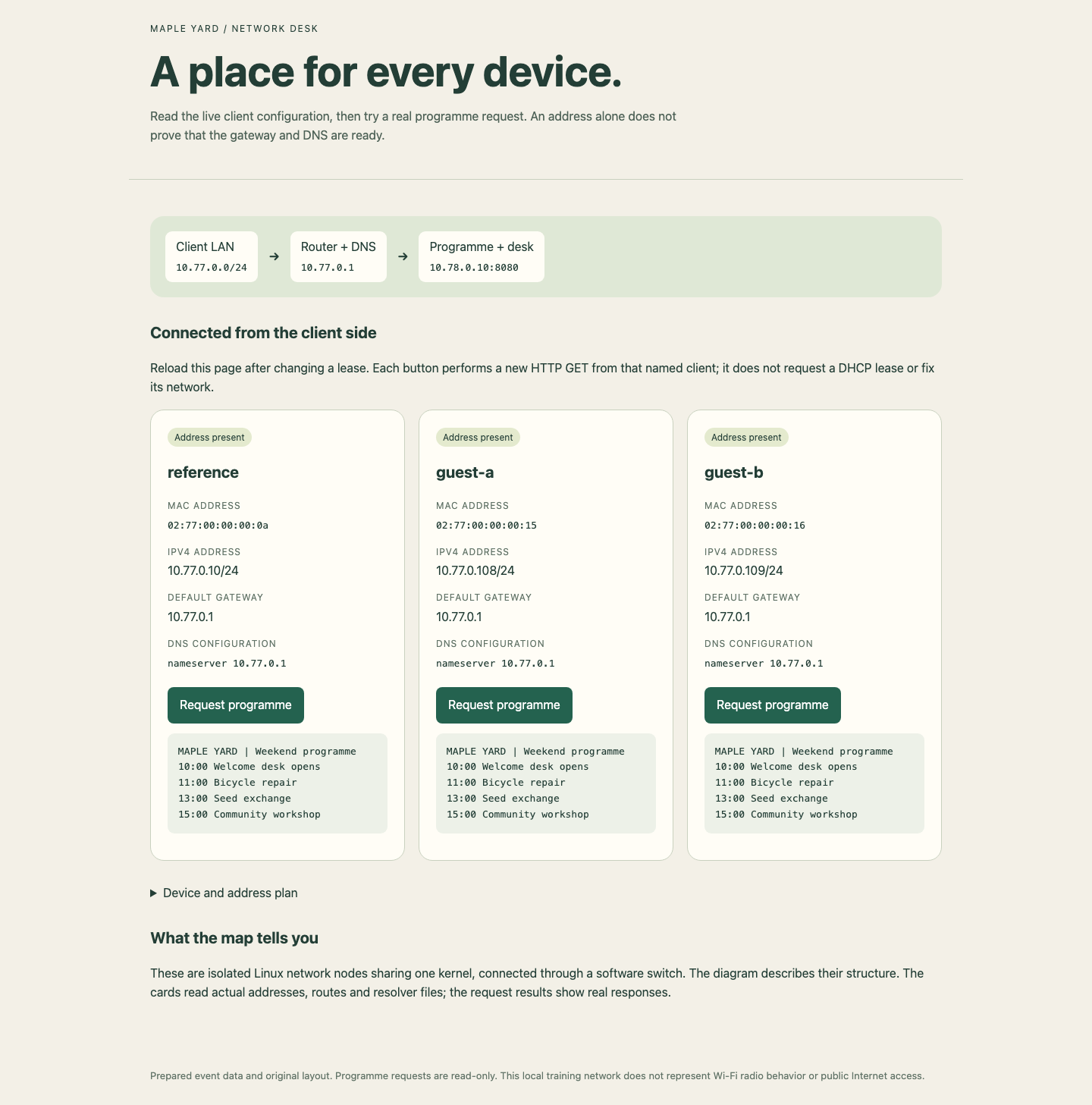
Compare the IPv4 address, gateway and DNS on each card, then read the programme response below its button. Guest address allocations can differ from this example.
Summary
You selected a pool that excludes fixed devices, obtained distinct real DHCP leases, read the applied gateway and DNS, and downloaded the complete programme from both clients. You also kept the reference desk working.
These are temporary settings inside the current training VM. They do not claim reboot persistence, public Internet access or compatibility with every DHCP client. The next guided lab independently prepares a new environment for a device reservation and configuration recovery.


