



Introduction
A small shop uses an order service to match customers, products, and quantities. After a prepared incident, two orders are missing. Your job is to recover the required data without replacing the shop's unrelated public catalog. All people and records in this environment are synthetic; there is no malware.
A backup is a recovery copy. An archive groups files together, and a checksum summarizes their bytes. You will learn why a checksum only helps when its reference comes from a trusted source, then restore a real SQLite database through a staging area. This is a bounded recovery exercise, not a complete incident-response procedure.
You need only basic terminal entry and tab switching. Workstation and App Server are separate terminal sessions on the same training host, with different starting directories; they are not separate machines. Use Order Service for the browser view.
Preserve the Damaged Service Data
In this step, you will understand the missing business data and preserve a rollback copy before changing the service.
Select the Order Service tab in the lab interface to begin this step.
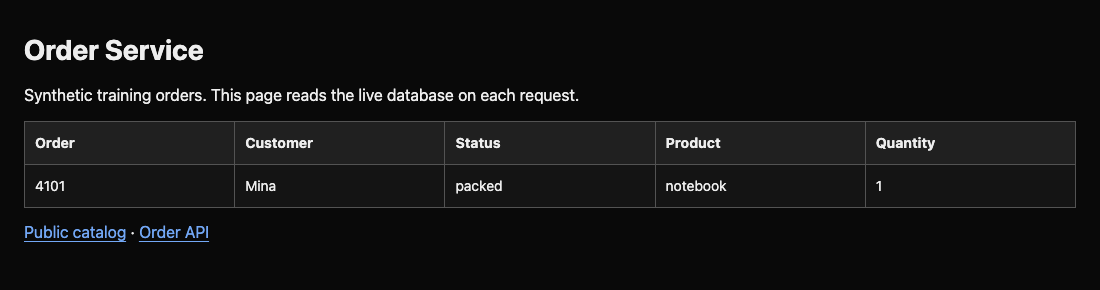
Switch to the Order Service tab. Normally each table row connects an order number with a customer, status, product, and quantity. The required recovery point has these three orders:
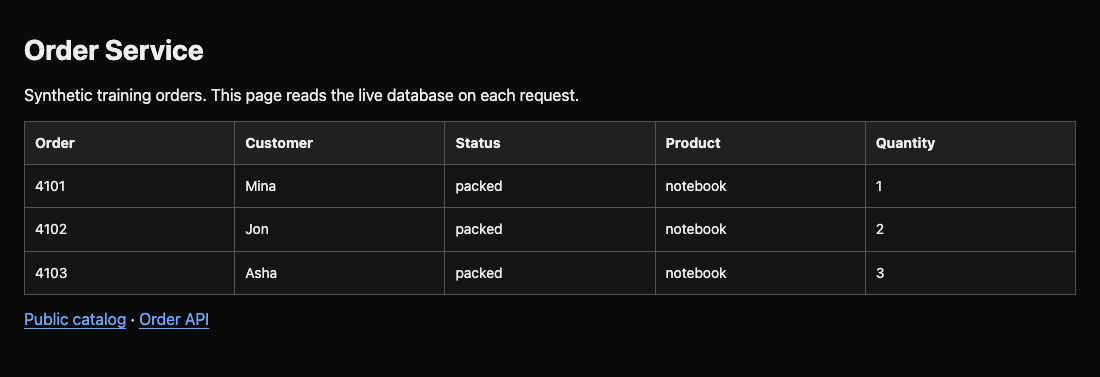
| Order | Customer | Status | Product | Quantity |
|---|---|---|---|---|
| 4101 | Mina | packed | notebook | 1 |
| 4102 | Jon | packed | notebook | 2 |
| 4103 | Asha | packed | notebook | 3 |
Only 4101 currently appears. Click Public catalog: it should still list mugs, notebooks, and tote bags. This upload is unrelated to the database and must survive recovery. Use the browser Back button within the Order Service tab to return to the order page afterward.
An API is a service interface for programs. In Workstation, curl requests the API; -f treats server errors as failures, -s hides progress, and -S still shows errors. Here 127.0.0.1 means this same training host, and 8080 is the service port.
Switch to the Workstation tab before running the following command.
curl -fsS http://127.0.0.1:8080/api/orders
The result is a JSON array, a bracketed list of rows. Only Mina's row is present. A successful request does not mean the business data is complete.
Switch to the App Server tab. pwd prints your current directory:
Switch to the App Server tab before running the following command.
pwd
Expect /srv/order-service. SQLite keeps the application's tables in orders.db. This prepared service has no writers and opens the database afresh for every request; copying it is safe here. A busy production database needs an application-consistent backup procedure instead.
cp takes a source then a destination. Preserve the current database outside the application directory, so a mistaken restore can be reversed:
cp /srv/order-service/orders.db /home/labex/project/recovery/damaged-before-recovery.db
No output normally means the copy completed. Do not repeat this command after restoring: that would overwrite your rollback copy with the recovered database. You have preserved the damaged state; the service still needs recovery.
Select a Trusted Recovery Archive
In this step, you will reject altered backup bytes and put the suitable verified archive in a staging directory.
Select the Workstation tab in the lab interface to begin this step.
Switch to the Workstation tab. cd changes directories; ls lists their contents. An absolute path starts with / and works regardless of your current directory.
Switch to the Workstation tab before running the following command.
cd /home/labex/project/recovery/backups
ls
You have three .tar.gz archives: tar groups files and gzip compresses them. Their names describe recovery times; the newest is not automatically safe or suitable.
cat prints a text file. Read the recovery points from the separately supplied backup custodian:
cat /opt/backup-custodian/recovery-points.txt
The 0800 archive predates orders 4102 and 4103. The 0900 archive includes the required recovery point. The 1000 candidate is later, but still needs integrity checking.
Integrity means the bytes have not changed relative to a reference. SHA-256 produces a digest, a comparison value. The custodian's root-owned manifest is outside your ordinary editable recovery folder. The scenario assumes it arrived through a separately protected channel; this lab does not teach digital signatures or key distribution. Administrator access can override local ownership, so do not treat this teaching host as a tamper-proof trust anchor.
sha256sum -c reads filename/digest pairs and compares the named files in your current directory. Use the independent manifest:
sha256sum -c /opt/backup-custodian/SHA256SUMS
Expect 0800 and 0900 to report OK, and 1000 to report FAILED. The nonzero exit and warning are intentional: at least one archive changed. Do not extract that candidate.
The adjacent manifest is editable along with the backups. Compare its result:
sha256sum -c SHA256SUMS
All three report OK. Someone who changes an archive can also replace a checksum beside it. Matching an untrusted digest does not establish authenticity. The older 0800 archive is unchanged but misses required records. Choose 0900 because it is both unchanged and suitable.
A staging directory lets you inspect recovery data before touching the live service. mkdir -p creates the directory and tolerates it already existing:
mkdir -p /home/labex/project/recovery/stage
Copy the verified candidate there:
cp orders-0900.tar.gz /home/labex/project/recovery/stage/orders-0900.tar.gz
If you mistype the source, cp reports that it cannot find the file; use ls and retry. This checkpoint checks the actual staged archive bytes, not a written claim that you verified them.
Inspect the Database in Staging
In this step, you will inspect archive members, extract the single expected file, and read the staged database without modifying it.
Select the Workstation tab in the lab interface to begin this step.
Switch to the Workstation tab. Move into staging:
Switch to the Workstation tab before running the following command.
cd /home/labex/project/recovery/stage
tar -tvzf lists a gzip-compressed archive: t means list, v includes type and permissions, z means gzip, and f names the archive. Listing does not extract anything.
tar -tvzf orders-0900.tar.gz
The only member should be orders.db, with a permissions field beginning with - for a regular file. Stop if you see absolute paths, .. path components, links, or unexpected files. Inspecting member names is useful here because this trusted training archive has one regular file; it is not a complete safe-extraction policy for arbitrary archives. Never run programs found in a suspect backup.
Use x instead of t to extract and omit the verbose v. The final orders.db restricts extraction to that member, and --no-same-owner keeps your own ownership:
tar -xzf orders-0900.tar.gz --no-same-owner orders.db
SQLite stores related tables in one file. The prepared db-view tool opens a database read-only, checks internal consistency and relationships, then prints joined business rows. You do not need to write SQL or edit the database for this recovery. Give it the staged file path:
/opt/c11-runtime/db-view /home/labex/project/recovery/stage/orders.db
Expect Integrity: ok, Relationships: ok, followed by all three required orders. A valid database can still be the wrong recovery point, so compare the customers, statuses, and quantities with step 1 as well.
If a path is wrong, the tool reports an error rather than creating an empty database. Check pwd and ls, then retry. If the data differs, return to the independent manifest and select the correct archive before extracting again. The live site is still damaged: staging alone does not restore the application.
Restore and Test the Live Service
In this step, you will replace only the designated database and confirm recovery through real requests while preserving the public upload.
Select the App Server tab in the lab interface to begin this step.
Switch to the App Server tab. Your rollback copy is outside this directory, and the staged database has passed inspection. Copy only that database into the application's designated data path:
Switch to the App Server tab before running the following command.
cp /home/labex/project/recovery/stage/orders.db /srv/order-service/orders.db
The source and destination are different files. Avoid copying the whole staging directory over /srv/order-service: it contains unrelated uploads that must remain intact. No daemon restart is needed because this prepared read-only application closes the database after each request. Other applications may require a documented maintenance or restart procedure.
Query the application, rather than relying on the presence of a backup or a restored text file:
curl -fsS http://127.0.0.1:8080/api/orders
Expect all three rows with order numbers 4101, 4102, and 4103, correct customers, packed status, and quantities 1, 2, and 3. Switch to the Order Service tab and refresh the page. The table should show the same records.
Switch back to the App Server tab. Check the unrelated public upload too:
curl -fsS http://127.0.0.1:8080/uploads/catalog.txt
Public catalog: mugs, notebooks, tote bags
Switch to the Order Service tab, return to the order page with the browser Back button if necessary, and click Public catalog and confirm the same content. Use the browser Back button in Order Service to return to the order table when finished. Recovery means the required business data is back and normal unrelated behavior still works.
If the service reports Database unavailable, inspect the staged database again and repeat the single-file copy with the correct absolute paths. To return to the original damaged state while investigating a mistake, switch to the App Server tab and use the preserved copy:
cp /home/labex/project/recovery/damaged-before-recovery.db /srv/order-service/orders.db
That last command intentionally undoes recovery. If you use it, repeat the verified staged-to-live copy before completing the lab. Preserve the rollback file for further review.
Summary
You preserved a rollback copy, compared backup bytes with an independently trusted manifest, selected a suitable recovery point, and inspected a staged SQLite database. You then restored the real service and checked both recovered relationships and an unrelated upload. Newest, unchanged, and suitable describe different properties; a safe recovery needs the right combination.


