



Introduction
Maple Hall now uses two software switches joined by one shared cable. Local visitor and staff groups are already correct. Your task is to carry both groups across that uplink, then move a reassigned device into its intended staff group without breaking existing devices.
Complete the first guided lab or know its access-port workflow: read the port plan, remove an exact membership, add the intended PVID and untagged egress, and use actual service/ARP observations. Basic MAC/IP and subnet knowledge is required. This independent scene does not depend on the previous VM.
Switch A and Switch B are separate persistent consoles for separate network namespaces in one instance, sharing its kernel. Client Checks observes endpoints; LAN Groups displays live state and real requests. Only VLAN membership/PVID/tag properties of the two uplink ports and Switch B's ticket port are editable. Keep every endpoint address, other port, service, bridge and firewall unchanged. The 45-minute duration is an author estimate; no beginner pilot is claimed.
Complete the Tagged Uplink
In this step, you will distinguish a working local group from an incomplete shared path, then complete both uplink ends. Open LAN Groups, then Open device plan. Visitors use VLAN 10, staff VLAN 20. Local servers are on Switch A; remote servers and the ticket device are on Switch B. Each endpoint's prepared /24 address already matches its intended group.
Switch to Client Checks. First use both known-good local paths, with the same helper as the first lab:
python3 /opt/labex/lan-groups/checks.py request visitor local
python3 /opt/labex/lan-groups/checks.py request staff local
Read the complete programme and staff instructions. Now omit local to target the same-group server across the uplink. A connection timeout is expected because the uplink has no allowed VLANs. The helper returns a nonzero status and reports a connection timeout. This is expected here; continue with the next command:
python3 /opt/labex/lan-groups/checks.py request visitor
Switch to Switch A and read its actual port memberships:
bridge vlan show
Switch to Switch B and read that separate switch:
bridge vlan show
Both consoles begin in /home/labex/project/lan-groups, but commands act in different switch namespaces. Read the tab name before every change. An empty/missing uplink row means no permitted groups, not an unplugged endpoint. Both local access groups can work while this shared path is incomplete.
The ticket endpoint already has staff address 10.60.20.31/24, but its access port still shows visitor VLAN 10. That deliberate mismatch is a separate task after the uplink. Do not repair it by changing its IP address.
Allow the Groups on Both Uplink Ends
Now you will carry two groups over the same link. A tagged uplink puts an IEEE 802.1Q VLAN identifier into each Ethernet frame so the next switch knows its group. Ordinary access endpoints continue receiving untagged frames. Both ends must allow the same groups.
Begin in Switch A. Add visitor and staff memberships to uplink. These commands intentionally omit pvid and untagged: this link carries tagged frames, with no native untagged group:
bridge vlan add dev uplink vid 10
bridge vlan add dev uplink vid 20
Switch to Switch B and configure its end:
bridge vlan add dev uplink vid 10
bridge vlan add dev uplink vid 20
bridge vlan show dev uplink
Expect VLANs 10 and 20, with neither PVID nor Egress Untagged flags. Return to Switch A and read its end too:
bridge vlan show dev uplink
Switch to Client Checks and test both remote paths:
python3 /opt/labex/lan-groups/checks.py request visitor
python3 /opt/labex/lan-groups/checks.py request staff
Capture each group on the actual endpoints and both uplink ends:
python3 /opt/labex/lan-groups/checks.py broadcast visitor
python3 /opt/labex/lan-groups/checks.py broadcast staff
Read uplink-a and uplink-b: visitor lines contain 802.1Q and vlan 10; staff lines contain vlan 20. The remote same-group server receives ARP without a VLAN tag, while the other group's server receives zero matching frames. This proves real tagging on the shared path and untagged delivery at its ends.
At this intermediate point ticket still receives visitor broadcasts and misses staff broadcasts because its port has the old membership. That is expected until the next step. If a remote server misses its own group, compare both uplink tables before retrying; one correctly configured end is insufficient. If you accidentally add a wrong VLAN, remove only that row with the already taught bridge vlan del dev uplink vid ... form in the affected switch tab, then add the intended membership.
Put the Reassigned Device in Its Intended Group
In this step, you will finish the ticket desk's reassignment while preserving both remote groups. Begin in Switch B. Read the exact current port first:
bridge vlan show dev ticket
Its stale visitor VLAN is 10, although the prepared address and business purpose already belong to staff. Remove that membership, then install staff PVID and untagged egress:
bridge vlan del dev ticket vid 10
bridge vlan add dev ticket vid 20 pvid untagged
bridge vlan show dev ticket
Expect only 20 PVID Egress Untagged. IP address and VLAN membership are different layers; no endpoint readdressing is needed in this task.
Switch to Client Checks and use the reassigned endpoint's actual staff service across its group:
python3 /opt/labex/lan-groups/checks.py request ticket
Repeat both original remote business requests:
python3 /opt/labex/lan-groups/checks.py request visitor
python3 /opt/labex/lan-groups/checks.py request staff
Capture both groups again:
python3 /opt/labex/lan-groups/checks.py broadcast visitor
python3 /opt/labex/lan-groups/checks.py broadcast staff
Now ticket receives staff broadcasts and zero visitor broadcasts. Both tagged uplink copies and every same-group endpoint must remain visible. A stopped service cannot pass the positive business checks, and different IP subnets cannot hide ARP leakage.
Open LAN Groups, reload, and request the service on every client card, including both reference devices and ticket. Read each complete resource. Open live membership to compare the two ends and ticket with the plan. If you edited the wrong access port, restore only its original membership from the plan using the taught deletion/addition pattern; do not reset the VM or delete the bridge.
Assessment reads current configuration and sends bounded read probes, without repairing configuration. Neighbor learning and FDB (Forwarding Database) MAC-to-port learning and ordinary service access logs can naturally change. These are temporary wired groups in one shared-kernel training instance, without inter-VLAN routing or reboot persistence.
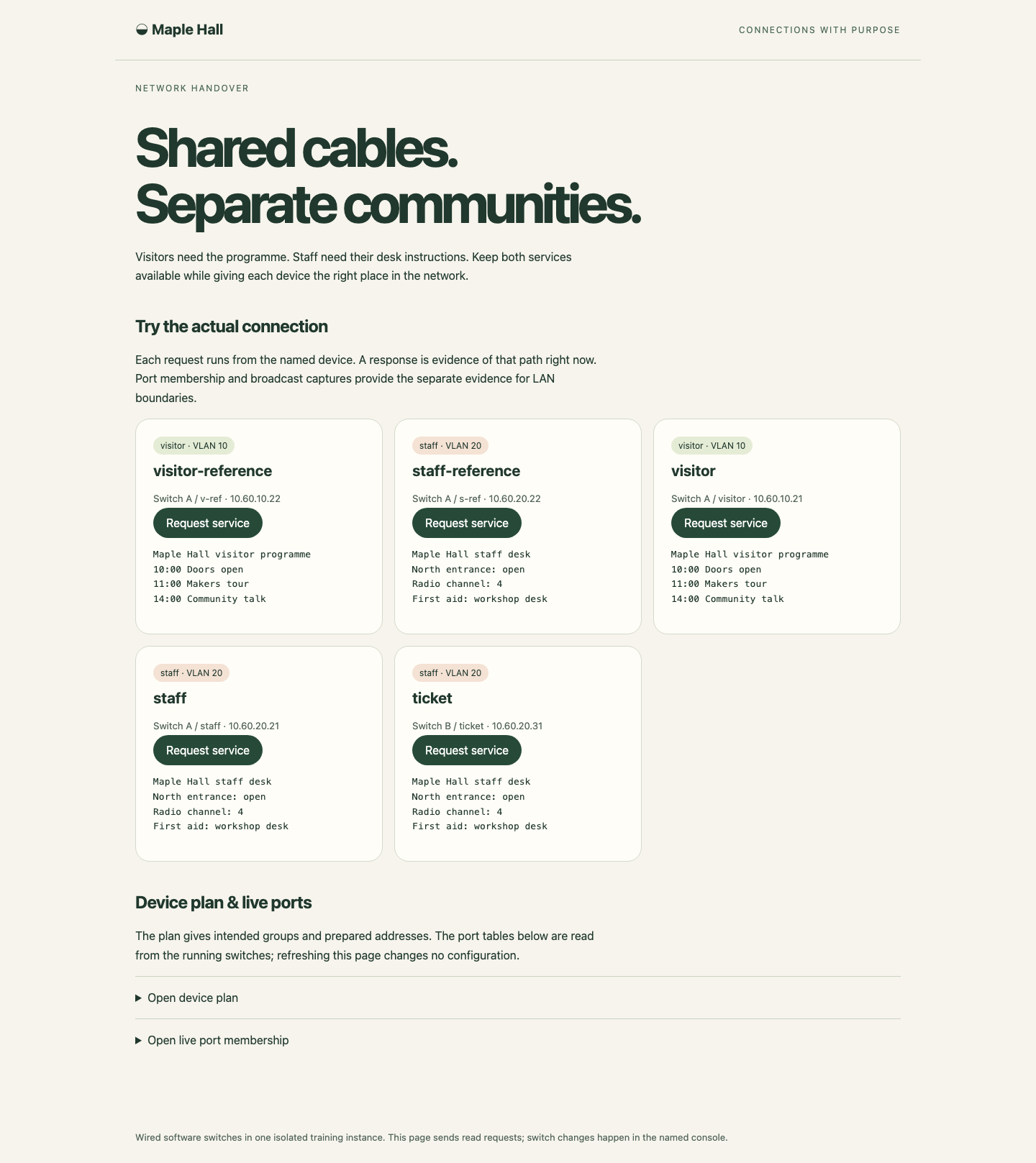
Read the full response under each device button; group labels describe the plan, while successful requests and live port tables show the actual result.
Summary
You distinguished local success from a complete cross-switch path, allowed both tagged VLANs at both ends, and corrected a reassigned access port. Actual 802.1Q captures, untagged endpoint captures, complete business responses and preserved references demonstrated the result. The independent challenge changes VLAN IDs and asks you to combine the same operations.


