



Introduction
A worker needs report access through a temporary job identity. You will create a role, choose who may use it, test its read permission, and revoke access before cleanup.
Complete Give a Report Reader Least Privilege first for policy fields and request boundaries. This fresh VM prepares default, worker, and outsider profiles. Use /home/labex/project and AWS View; no personal account setup is needed. Keep credential files, CLI caches, and unfiltered AssumeRole responses private.
Certification Relevance
| Certification | Exam task | Practice |
|---|---|---|
| Cloud Practitioner (CLF-C02) | Task 2.3 | IAM role trust, temporary sessions, and resource access. |
| Solutions Architect – Associate (SAA-C03) | Task 1.1 | IAM role trust, temporary sessions, and resource access. |
| Developer – Associate (DVA-C02) | Task 2.1 | IAM role trust, temporary sessions, and resource access. |
| CloudOps Engineer – Associate (SOA-C03) | Task 4.1 | IAM role trust, temporary sessions, and resource access. |
| Security – Specialty (SCS-C03) | Task 4.1, Task 4.2 | Foundational practice: IAM role trust, temporary sessions, and resource access; IAM policies, action/resource scope, and least privilege. |
| Data Engineer – Associate (DEA-C01) | Task 4.1 | Foundational practice: IAM role trust, temporary sessions, and resource access. |
| DevOps Engineer – Professional (DOP-C02) | Task 6.1 | Foundational practice: IAM role trust, temporary sessions, and resource access. |
| Solutions Architect – Professional (SAP-C02) | Task 2.3 | Foundational practice: IAM role trust, temporary sessions, and resource access. |
Lab Overview
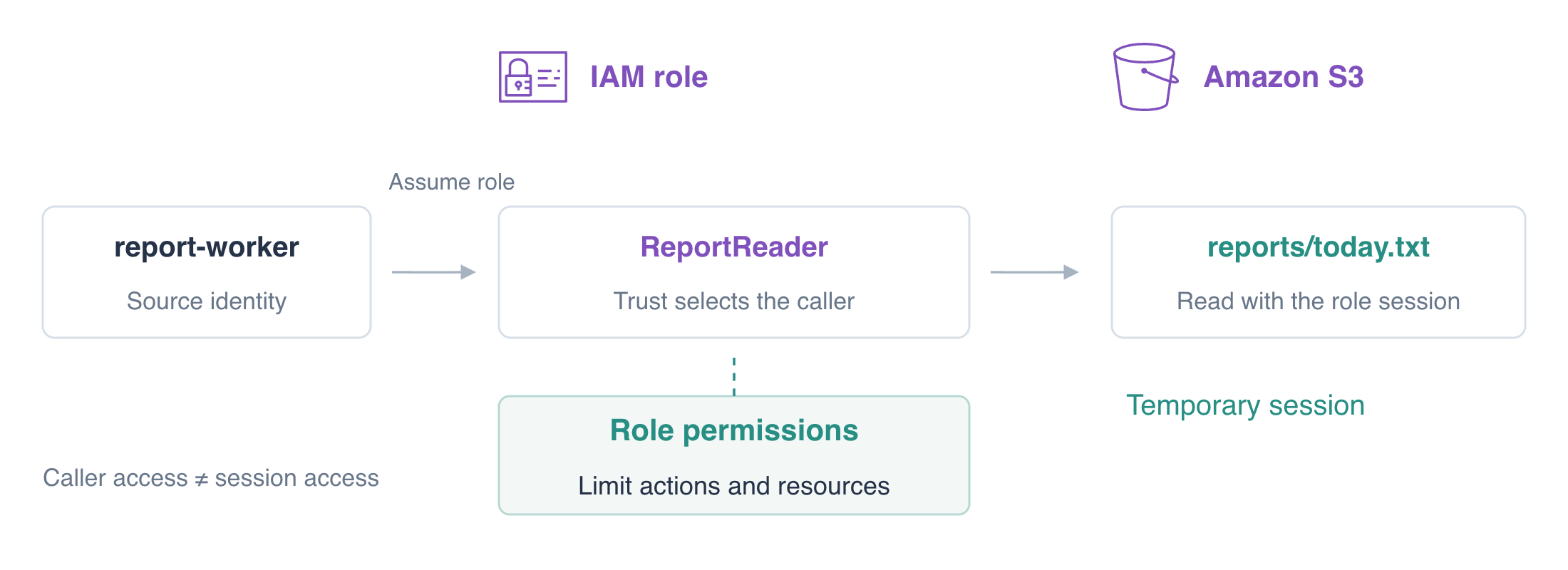
Define the Role's Trust and Read Permission
In this step, you will create ReportReader with a trust policy naming its permitted caller. A trust policy is a resource policy on the role: its Principal identifies who may assume that role. The role's permission policy separately defines what a resulting session may do.
The reporting job now needs a temporary role session. Use the familiar Action and Resource fields for its S3 work, and a separate trust policy for entry into the role. You will test these two decisions separately before withdrawing access.
An IAM role defines permissions and who may assume it. AWS Security Token Service (STS) issues temporary credentials for a role session, a different identity from its caller.
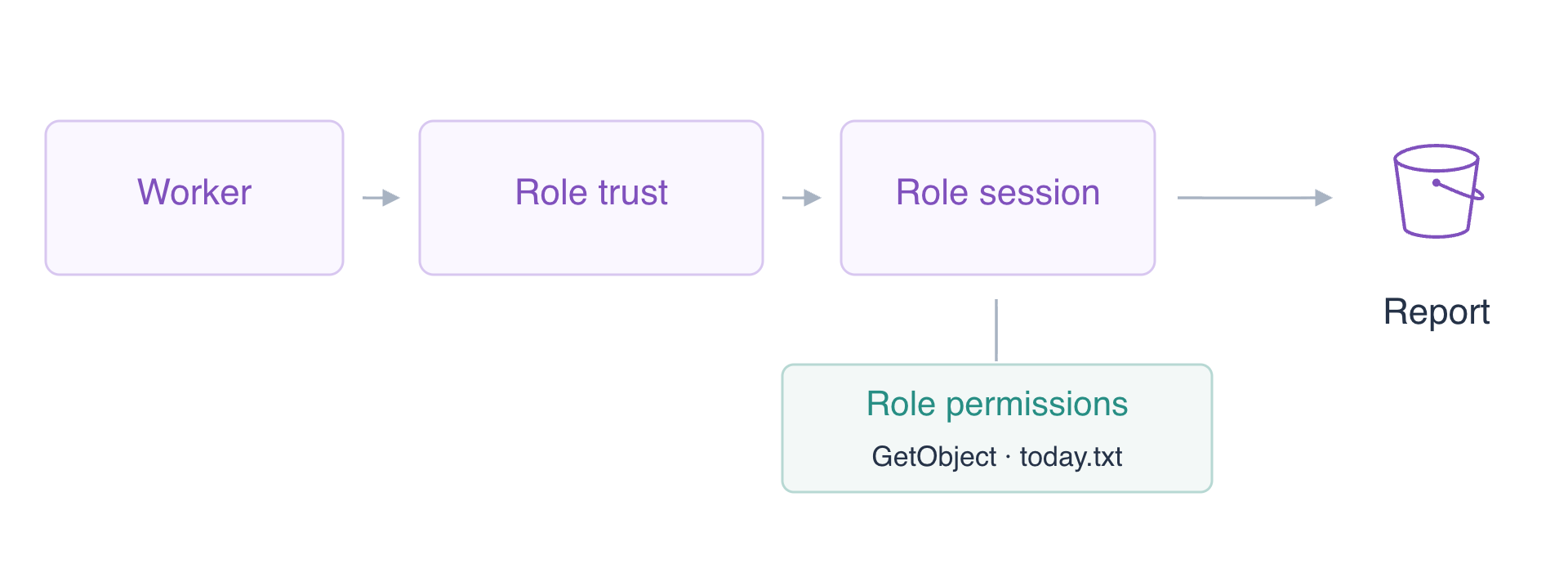
Confirm the worker's ARN so you can compare it with the initial trust.
cd /home/labex/project
aws sts get-caller-identity --profile worker --query Arn --output text
Expect arn:aws:iam::123456789012:user/report-worker. Start with trust naming only the operator. sts:AssumeRole requests a role session; Principal is an identity ARN, not a profile name. The worker is deliberately not trusted yet.
cat > trust.json <<'JSON'
{"Version":"2012-10-17","Statement":[{"Effect":"Allow","Principal":{"AWS":"arn:aws:iam::123456789012:user/iam03-operator"},"Action":"sts:AssumeRole"}]}
JSON
aws iam create-role \
  --role-name ReportReader \
  --assume-role-policy-document file://trust.json \
  --query Role.Arn \
  --output text
Expect the ARN ending role/ReportReader. Creating a role does not give it S3 permissions. Add one narrow inline policy: the role may GetObject only for today's report, not write it or read payroll.
cat > role-policy.json <<'JSON'
{"Version":"2012-10-17","Statement":[{"Effect":"Allow","Action":"s3:GetObject","Resource":"arn:aws:s3:::labex-iam03-reports/reports/today.txt"}]}
JSON
aws iam put-role-policy \
  --role-name ReportReader \
  --policy-name ReportRead \
  --policy-document file://role-policy.json
aws iam get-role --role-name ReportReader --query Role.AssumeRolePolicyDocument
aws iam get-role-policy \
  --role-name ReportReader \
  --policy-name ReportRead \
  --query PolicyDocument
Read back both documents. Trust controls entry; role permissions control the session's operations. The worker is not trusted yet. Test that gate, selecting only the safe returned ARN field.
aws sts assume-role --profile worker --role-arn arn:aws:iam::123456789012:role/ReportReader --role-session-name report-run --query AssumedRoleUser.Arn --output text || true
Expect AccessDenied. Do not remove the query filter: an unfiltered successful response includes secrets.
Authorize the Caller and Use a Role Profile
In this step, you will let the worker request ReportReader, update the role's trust, and use a role profile. Both test users will receive the same caller permission; only the trusted worker should obtain the role session.
Write a caller policy whose Resource is the exact role ARN, then attach it to the worker.
cat > assume-policy.json <<'JSON'
{"Version":"2012-10-17","Statement":[{"Effect":"Allow","Action":"sts:AssumeRole","Resource":"arn:aws:iam::123456789012:role/ReportReader"}]}
JSON
aws iam put-user-policy \
  --user-name report-worker \
  --policy-name AssumeReportReader \
  --policy-document file://assume-policy.json
To isolate the trust check, give the outsider the same narrow caller permission. This disposable comparison user is not in the trust document.
aws iam put-user-policy \
  --user-name outsider \
  --policy-name AssumeReportReader \
  --policy-document file://assume-policy.json
aws sts assume-role --profile worker --role-arn arn:aws:iam::123456789012:role/ReportReader --role-session-name before-trust --query AssumedRoleUser.Arn --output text || true
Expect AccessDenied: its identity Allow does not override the existing trust naming only the operator. Replace that trust with the intended worker and update the role.
cat > trust.json <<'JSON'
{"Version":"2012-10-17","Statement":[{"Effect":"Allow","Principal":{"AWS":"arn:aws:iam::123456789012:user/report-worker"},"Action":"sts:AssumeRole"}]}
JSON
aws iam update-assume-role-policy \
  --role-name ReportReader \
  --policy-document file://trust.json
aws sts assume-role --profile outsider --role-arn arn:aws:iam::123456789012:role/ReportReader --role-session-name outsider-test --query AssumedRoleUser.Arn --output text || true
Expect AccessDenied even though the outsider's identity policy permits AssumeRole. Its ARN is not trusted. Repeat as the worker:
aws sts assume-role \
  --profile worker \
  --role-arn arn:aws:iam::123456789012:role/ReportReader \
  --role-session-name report-run \
  --query AssumedRoleUser.Arn \
  --output text
The role's trust decided which caller could enter. An identity Allow cannot bypass it. For same-account trust directly naming a user, that trust can grant entry without a separate identity Allow; the equal caller grants here help isolate the trust comparison.
Expect an ARN ending assumed-role/ReportReader/report-run. A session name helps distinguish role uses in activity records. Role credentials expire; the CLI role profile below obtains temporary credentials for you.
Configure the prepared report-role profile to request these temporary credentials automatically. source_profile selects the caller, and role_arn selects the target role. These settings contain no secret values. The CLI stores its temporary cache securely; do not print it.
aws configure set role_arn arn:aws:iam::123456789012:role/ReportReader --profile report-role
aws configure set source_profile worker --profile report-role
aws configure set role_session_name report-run --profile report-role
aws sts get-caller-identity --profile report-role --query Arn --output text
Expect the assumed-role ARN again. The CLI performs STS authentication internally for this profile. The worker identity itself has AssumeRole permission, not the role's S3 permission.
aws s3api get-object --profile worker --bucket labex-iam03-reports --key reports/today.txt direct-worker.txt || true
Expect AccessDenied. Assuming a role does not attach its permissions back to the source user.
Test the Role Session's Resource and Action Boundaries
In this step, you will use the role profile for the reporting job and confirm it cannot perform unrelated work. A successful AssumeRole request proves only entry into the role; actual S3 requests prove its effective access.
aws s3api get-object \
  --profile report-role \
  --bucket labex-iam03-reports \
  --key reports/today.txt today.txt
cat today.txt
Expect Daily orders: 145. Try the two existing resources outside the role's exact object ARN.
aws s3api get-object --profile report-role --bucket labex-iam03-reports --key private/payroll.txt private-denied.txt || true
aws s3api get-object --profile report-role --bucket labex-iam03-reference --key reference.txt reference-denied.txt || true
Both must return AccessDenied. Then attempt to overwrite today's report with the supplied unapproved replacement. GetObject does not authorize PutObject.
aws s3api put-object --profile report-role --bucket labex-iam03-reports --key reports/today.txt --body upload.txt || true
aws s3api get-object \
  --profile report-role \
  --bucket labex-iam03-reports \
  --key reports/today.txt today.txt
cat today.txt
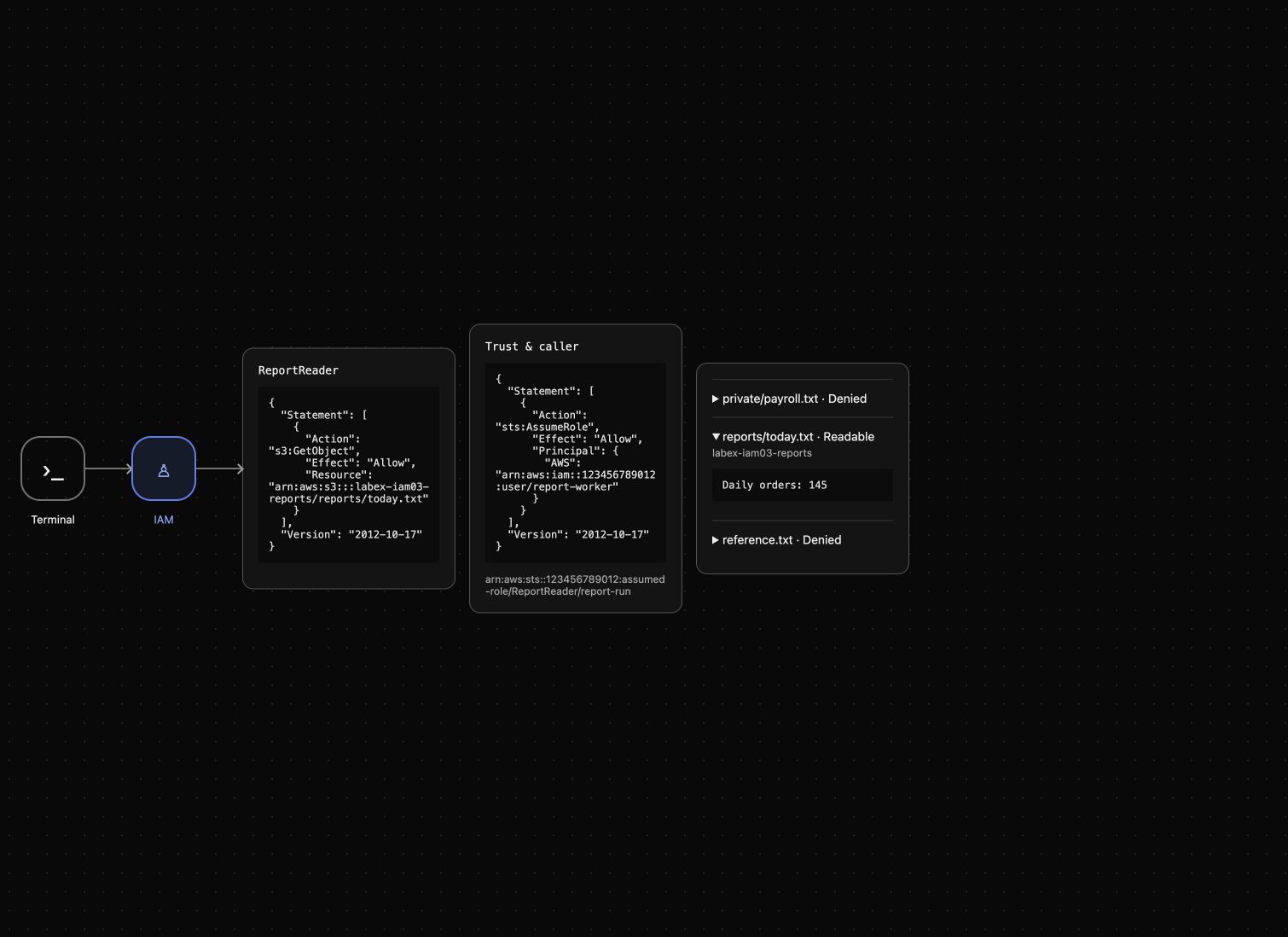
Expect PutObject AccessDenied and unchanged Daily orders: 145. A missing local file, expired credential error or unavailable service is a different diagnosis and does not prove a permission boundary. AWS View shows the stored trust, role policy and actual role-session reads; expand today's report to inspect its bytes.
Revoke Role Access and Clean Up
In this step, you will remove the role's report grant before deleting its data. Removing a role permission and preventing new assumptions are separate actions; clearing a local cache alone does not revoke server-side permissions.
Remove ReportRead while the role and report still exist, then repeat the read through the role profile.
aws iam delete-role-policy --role-name ReportReader --policy-name ReportRead
aws s3api get-object --profile report-role --bucket labex-iam03-reports --key reports/today.txt revoked.txt || true
Expect AccessDenied. Remove both caller grants and replace the direct worker trust with operator-only trust. Removing an identity Allow alone does not revoke a same-account direct trust grant. Then test that the worker cannot obtain a fresh session.
aws iam delete-user-policy --user-name report-worker --policy-name AssumeReportReader
aws iam delete-user-policy --user-name outsider --policy-name AssumeReportReader
cat > trust.json <<'JSON'
{"Version":"2012-10-17","Statement":[{"Effect":"Allow","Principal":{"AWS":"arn:aws:iam::123456789012:user/iam03-operator"},"Action":"sts:AssumeRole"}]}
JSON
aws iam update-assume-role-policy \
  --role-name ReportReader \
  --policy-document file://trust.json
aws sts assume-role --profile worker --role-arn arn:aws:iam::123456789012:role/ReportReader --role-session-name after-revocation --query AssumedRoleUser.Arn --output text || true
Expect AccessDenied while the role still exists. Delete the role only after these functional revocation checks.
aws iam delete-role --role-name ReportReader
aws iam list-roles --query 'Roles[].RoleName'
aws s3api delete-object --bucket labex-iam03-reports --key reports/today.txt
aws s3api delete-object --bucket labex-iam03-reports --key private/payroll.txt
aws s3api list-objects-v2 --bucket labex-iam03-reports
Expect an empty role list and KeyCount: 0 in the object response. Delete the empty owned bucket, then confirm the reference still exists with its original bytes.
aws s3api delete-bucket --bucket labex-iam03-reports
aws s3api list-buckets --query 'Buckets[].Name'
aws s3api get-object --bucket labex-iam03-reference --key reference.txt reference.txt
cat reference.txt
Only the reference bucket remains with Platform reference: keep. These successful queries establish deletion and preservation. The disposable environment reclaims prepared identities and temporary credential files when it ends. You have removed the role and the caller grants that were created for this exercise.
Summary
You separated the role's trust from its permission policy, proved a caller grant alone cannot bypass trust, and used STS through a CLI role profile. The role session could read only its report and could not write or read unrelated data. You removed both role and caller grants before scoped cleanup. Prefer temporary roles over permanent workload keys, and inspect actual identity and allowed/denied requests when diagnosing access.
For further reading, see the AWS reference on IAM roles, trust, and temporary credentials.


