



Introduction
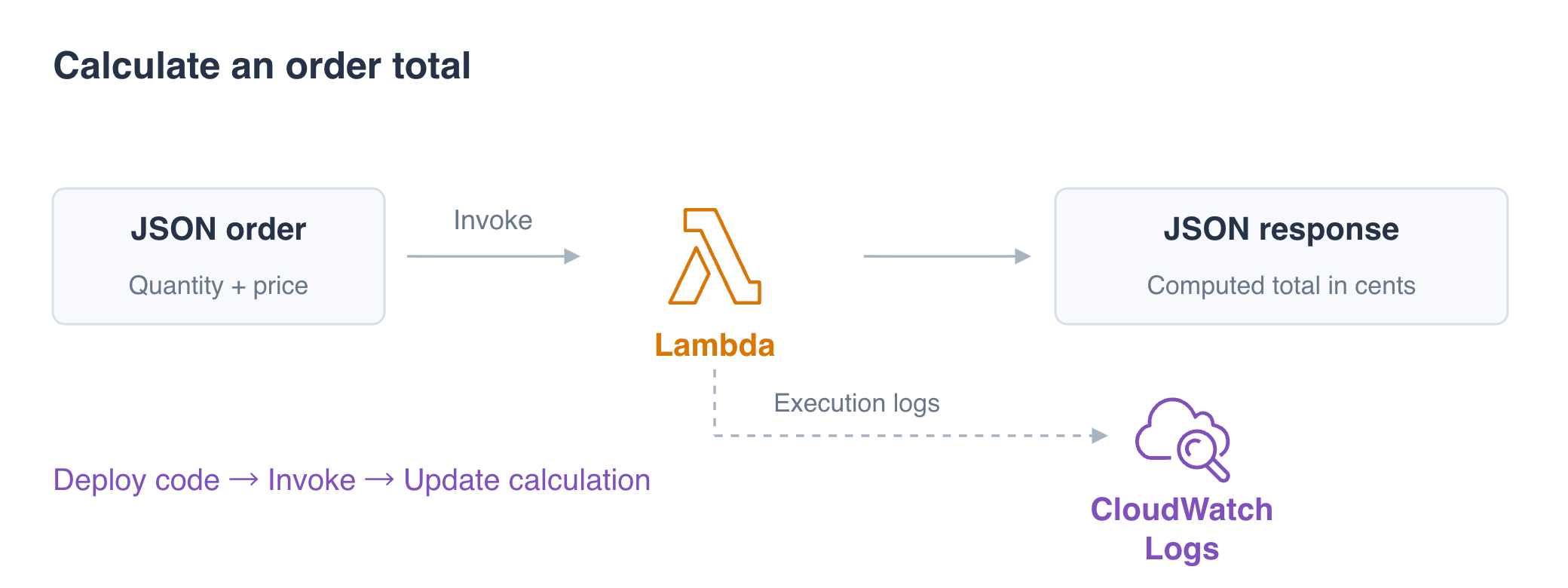
A checkout team needs a function that calculates an order total. You will deploy a short Python handler, send two JSON inputs, and update the calculation with a handling fee. Use integer cents to keep the arithmetic simple, then remove your function and logs.
Complete Get Started with AWS on LabEx, Use Temporary Credentials with an IAM Role, and Find a Failed Request in CloudWatch Logs first. This fresh environment supplies the CLI, workspace and execution role.
Certification Relevance
| Certification | Exam task | Practice |
|---|---|---|
| Cloud Practitioner (CLF-C02) | Task 3.3 | Lambda deployment, JSON events, and computed responses. |
| Solutions Architect – Associate (SAA-C03) | Task 2.1 | Lambda deployment, JSON events, and computed responses. |
| Developer – Associate (DVA-C02) | Task 1.2 | Lambda deployment, JSON events, and computed responses. |
Lab Overview
Deploy an Order Calculation
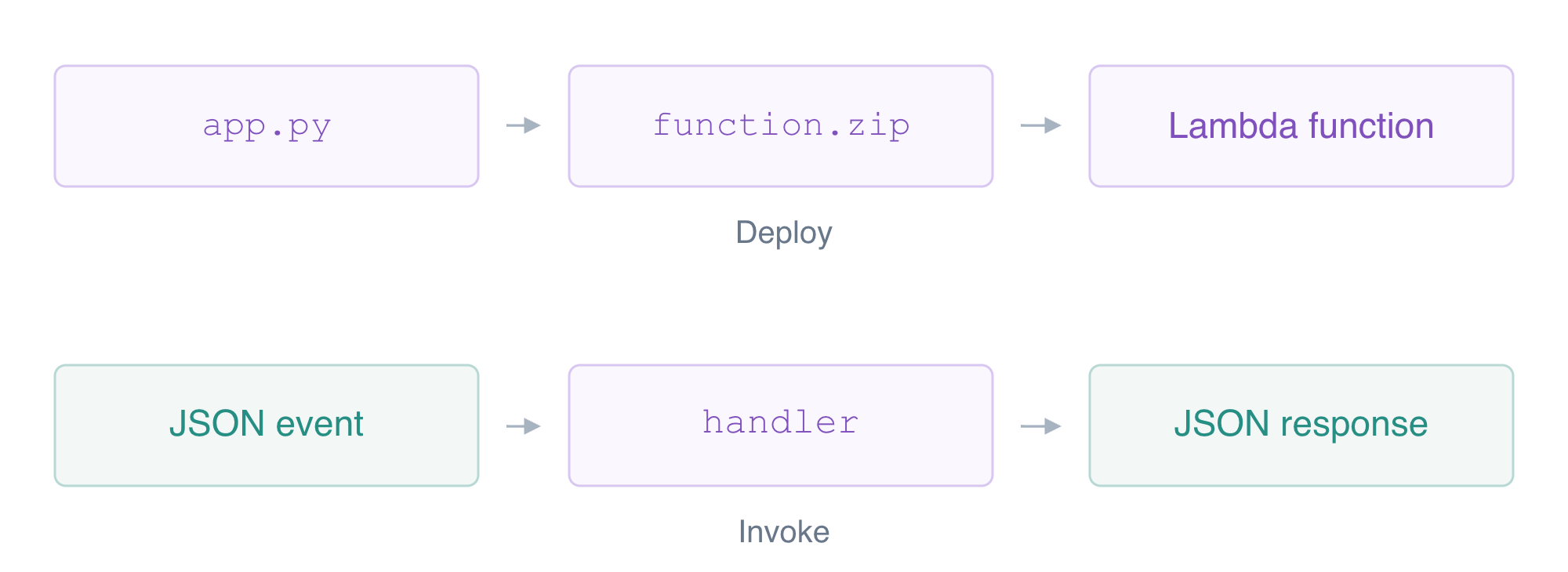
In this step, you will replace an unfinished handler and deploy a function. AWS Lambda runs your code when you invoke a function. An event is the input supplied for that invocation; a handler is the Python function Lambda calls with it. The setting app.handler means the function named handler in app.py.
Move to the prepared workspace and inspect the skeleton. It currently returns an empty object, so it cannot calculate an order.
cd /home/labex/project
cat app.py
Python uses indentation to group statements inside a function. event["quantity"] reads a value from the incoming JSON object. * multiplies the quantity by the unit price; return sends the computed object to the caller. context supplies invocation information, although this calculation does not need it yet.
Replace the skeleton with this complete handler. cat > app.py writes the lines between <<'PY' and the closing PY into the file. The closing line must stand alone.
cat > app.py <<'PY'
import json

def handler(event, context):
    order_id = event["order_id"]
    quantity = event["quantity"]
    unit_price = event["unit_price_cents"]
    total = quantity * unit_price
    print("EVENT " + json.dumps(event))
    return {"order_id": order_id, "total_cents": total}
PY
The print statement writes the input to execution logs; it does not return the response. Keep customer secrets out of logs. These events contain only synthetic identifiers and numbers.
Create a Zip package, the archive Lambda deploys. Put app.py at its top level so the handler can be found. The execution role is the identity Lambda uses while running your code. This prepared role supports logging; you will configure data access in a later lab. Read its ARN into a shell variable. An ARN identifies a specific resource; the variable avoids copying it by hand.
zip -q function.zip app.py
Save the returned value in ROLE_ARN:
ROLE_ARN=$(aws iam get-role \
  --role-name labex-fn01-execution \
  --query 'Role.Arn' \
  --output text)
echo "$ROLE_ARN"
Deploy using the Python 3.12 runtime and a five-second timeout. fileb:// reads the archive as bytes. The runtime chooses the language environment; the timeout bounds one invocation.
aws lambda create-function \
  --function-name labex-fn01-quote \
  --runtime python3.12 \
  --handler app.handler \
  --role "$ROLE_ARN" \
  --zip-file fileb://function.zip \
  --timeout 5 \
  --query '{Name:FunctionName,Runtime:Runtime,Handler:Handler,Timeout:Timeout,CodeSize:CodeSize}'
Expect Name labex-fn01-quote, Runtime python3.12, Handler app.handler, Timeout 5 and a positive CodeSize. Creating the function deploys code; it does not invoke the handler.
AWS View displays the function, handler and code fingerprint. Invocation logs are still empty. The reference log group is unrelated platform data and must remain unchanged.
Invoke Two JSON Events
In this step, you will call the deployed function with two different orders and interpret its responses. JSON represents an object with named fields. Numbers have no quotation marks; strings do. Each invocation receives its own event.
These calls are synchronous: the CLI waits for the function response. Terminal displays invocation metadata, while the response file contains the handler’s returned object or error. Read both to decide whether the requested order calculation succeeded.
Write the first event: two items at 375 cents each.
cat > small.json <<'JSON'
{"order_id":"fn01-small","quantity":2,"unit_price_cents":375}
JSON
Invoke the function and save its response. --cli-binary-format raw-in-base64-out lets the CLI accept ordinary JSON as the payload. file:// reads the event text; the final filename receives the returned payload.
aws lambda invoke \
  --function-name labex-fn01-quote \
  --cli-binary-format raw-in-base64-out \
  --payload file://small.json small-response.json
Display the contents of small-response.json:
cat small-response.json
The command reports StatusCode 200. The response file should contain {"order_id":"fn01-small","total_cents":750}. The service request status and the handler's returned data are different evidence; inspect the payload too.
Send a second order without redeploying code. Five items at 120 cents should produce a different total.
cat > large.json <<'JSON'
{"order_id":"fn01-large","quantity":5,"unit_price_cents":120}
JSON
Invoke the function with the specified test input:
aws lambda invoke \
  --function-name labex-fn01-quote \
  --cli-binary-format raw-in-base64-out \
  --payload file://large.json large-response.json
Display the contents of large-response.json:
cat large-response.json
Expect {"order_id":"fn01-large","total_cents":600}. The input values drive the same function's computation.
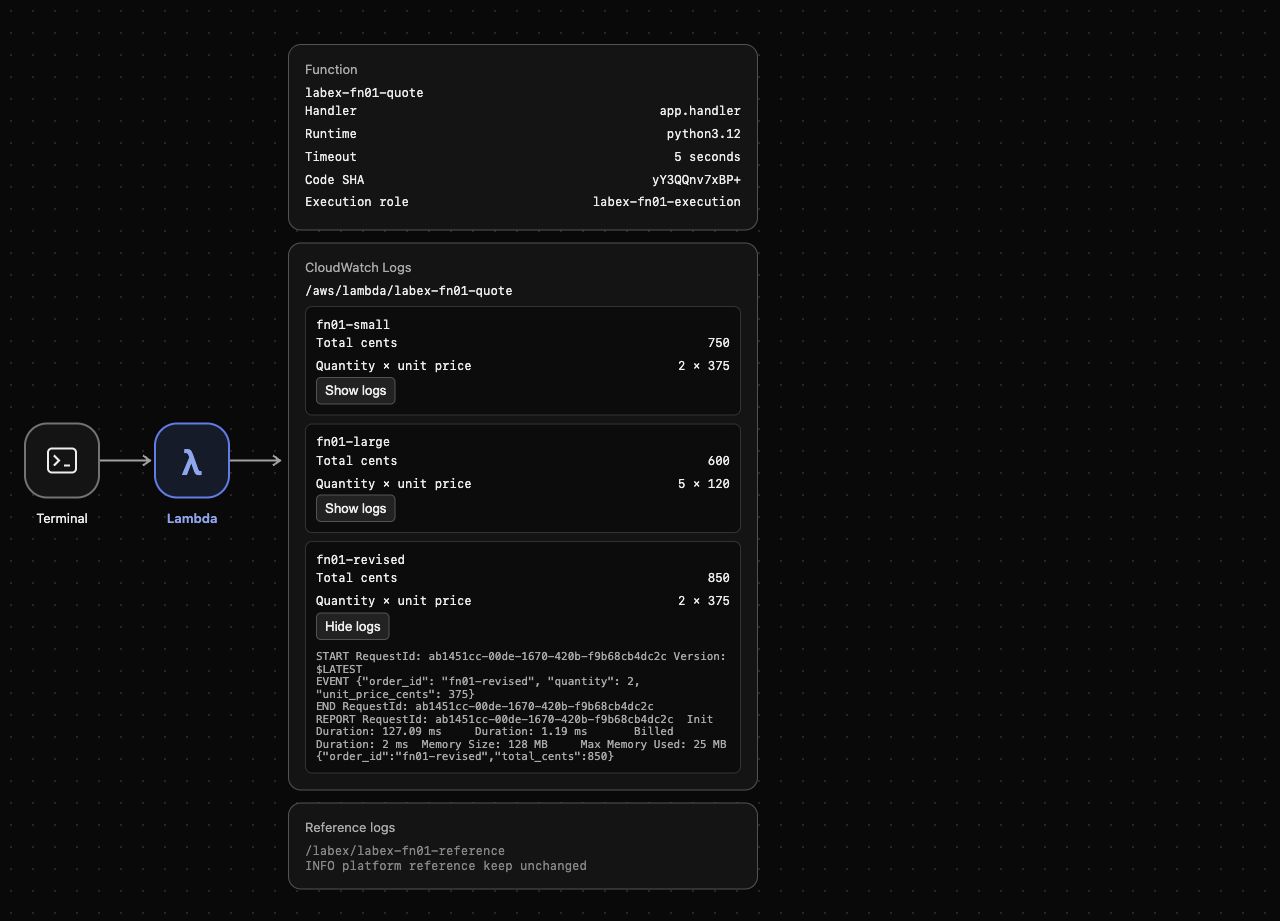
In AWS View, compare the order IDs, quantities, prices and totals. The function configuration stays the same while the invocation records change. Open Show logs for either order to see its input and returned result.
Update the Code and Trace Its Result
In this step, you will add a 100-cent handling fee and confirm that a new invocation runs the updated calculation. Editing local app.py does not change deployed code; update the package and send it to Lambda.
Replace the handler with this revision. Only the calculation changes: + 100 adds the fee after multiplication.
cat > app.py <<'PY'
import json

def handler(event, context):
    order_id = event["order_id"]
    quantity = event["quantity"]
    unit_price = event["unit_price_cents"]
    total = quantity * unit_price + 100
    print("EVENT " + json.dumps(event))
    return {"order_id": order_id, "total_cents": total}
PY
Package the application into function.zip:
zip -q function.zip app.py
Apply the new function code package:
aws lambda update-function-code \
  --function-name labex-fn01-quote \
  --zip-file fileb://function.zip \
  --query '{Name:FunctionName,CodeSHA:CodeSha256}'
The deployment returns the name and a code SHA fingerprint. AWS View shows the changed fingerprint; earlier invocation results remain in logs.
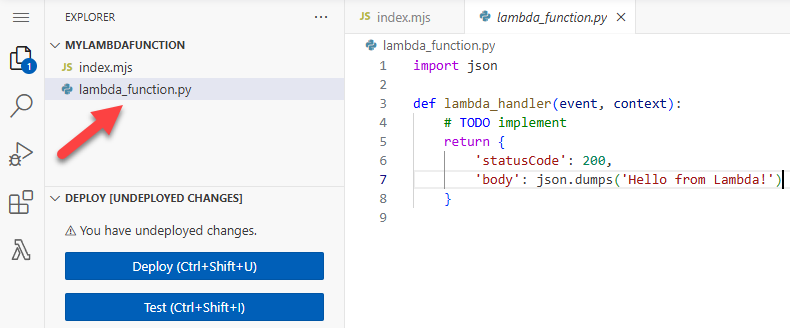
For a Console comparison, the official example shows the Python file beside Deploy and Test controls. Its lambda_function.py and lambda_handler correspond to this lab’s app.py and handler; continue with the Terminal workflow here.
Use the first order's quantities with a new correlation ID.
cat > revised.json <<'JSON'
{"order_id":"fn01-revised","quantity":2,"unit_price_cents":375}
JSON
Invoke the function with the specified test input:
aws lambda invoke \
  --function-name labex-fn01-quote \
  --cli-binary-format raw-in-base64-out \
  --payload file://revised.json revised-response.json
Display the contents of revised-response.json:
cat revised-response.json
Expect {"order_id":"fn01-revised","total_cents":850}: 750 cents for items plus the 100-cent fee. The first response remains 750; updating code does not rewrite history.
Execution logs are stored in /aws/lambda/<function-name>. Retrieve messages containing this order ID to join its event to the computed response.
aws logs filter-log-events \
  --log-group-name /aws/lambda/labex-fn01-quote \
  --filter-pattern '"fn01-revised"' \
  --query 'events[].message'
Expect the EVENT input and returned object with total 850. Full streams also contain invocation start, end and runtime reports, separate from the order response.
Look at AWS View above Terminal. Compare the three actual records, open Show logs for fn01-revised, and match its input to the 850-cent result. The reference remains unchanged.
Remove the Function and Preserve Reference Logs
In this step, you will delete only the function and its execution log group, then confirm the unrelated reference remains. The function and log group are separate resources; deleting the function alone does not remove stored logs.
Delete the exact function, then read a successful inventory.
aws lambda delete-function --function-name labex-fn01-quote
Inspect the Lambda function inventory:
aws lambda list-functions --query 'Functions[].FunctionName'
Expect an empty list. An authentication or connection error would not prove deletion.
Remove the owned execution logs and list remaining groups.
aws logs delete-log-group --log-group-name /aws/lambda/labex-fn01-quote
Inspect the remaining log groups:
aws logs describe-log-groups --query 'logGroups[].logGroupName'
Only /labex/labex-fn01-reference should remain. Read its message to prove that cleanup preserved unrelated data.
aws logs get-log-events \
  --log-group-name /labex/labex-fn01-reference \
  --log-stream-name platform \
  --query 'events[].message'
Expect INFO platform reference keep unchanged. AWS View shows no deployed function or invocation logs, while the reference remains. The prepared role and identity are environment fixtures; credential revocation and shutdown follow the resource checks.
Summary
You wrote a Python handler, deployed a Zip package and computed totals from two JSON events. You updated the deployed calculation, correlated its new result with execution logs, and deleted only the function and its log group while preserving reference data.


