Introduction
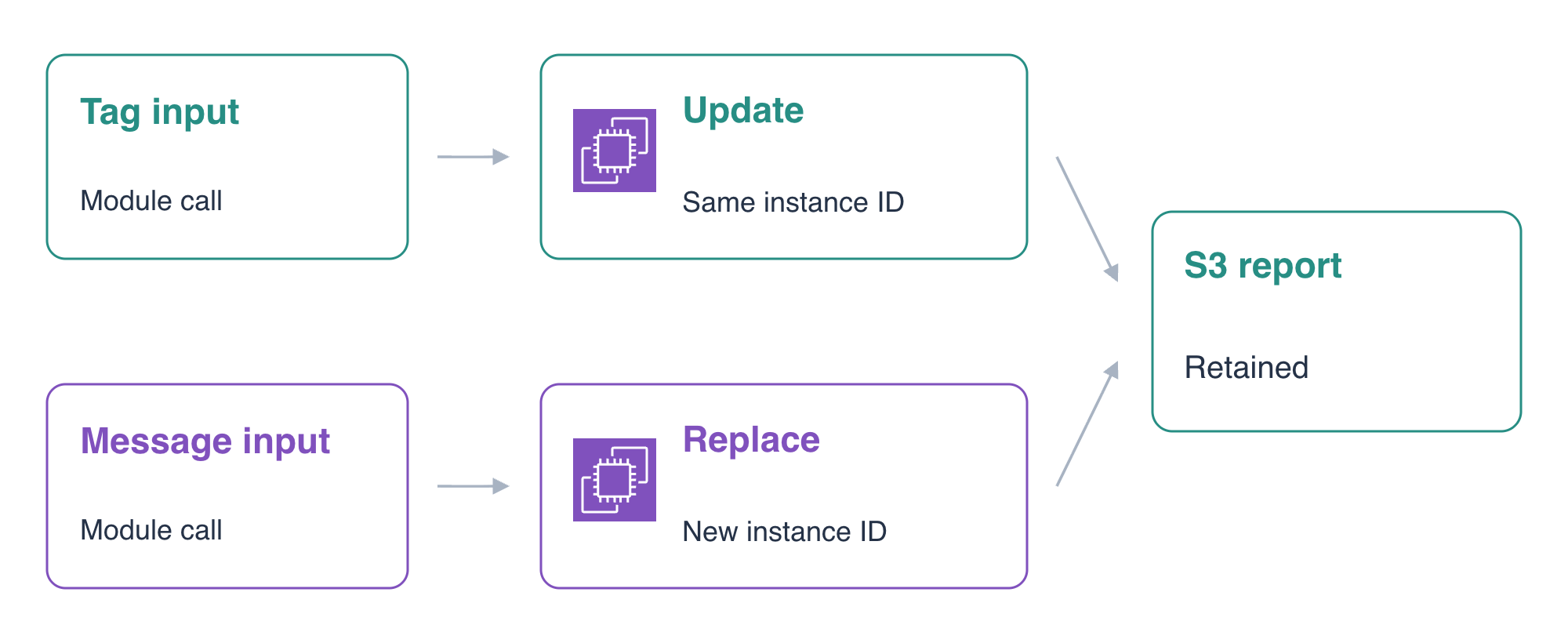
An application deployment can change without every change replacing its instance. You will use a supplied local module, review a tag update that retains the workload, then publish a new startup configuration that replaces it. The application reads its report from supplied external storage.
This lab assumes basic Terraform module calls, plans and state, plus the preceding EC2 and workload-role labs. A fresh environment supplies the initial deployment, network, AMI, role/profile, private reports and reference application. You will change the module call and observe resource identity, local files and external data at each stage.
Certification Relevance
| Certification | Exam task | Practice |
|---|---|---|
| Cloud Practitioner (CLF-C02) | Task 3.1 | Infrastructure-as-code provisioning methods. |
| CloudOps Engineer – Associate (SOA-C03) | Task 3.1 | Basic Terraform deployment updates and replacements. |
Lab Overview
Read the Module Interface and Apply an Update
In this step, you will read the supplied module's inputs and outputs, change its release tag input, and verify that the existing instance and local file remain intact.
The upper AWS View observes the same resources as Terminal and sends actual workload requests. The module deployment is already running. The supplied role/profile grants only the required report read; the network, role and report bucket remain outside this root's ownership.
Inspect the root call and the small module interface:
cd /home/labex/project/application-releases
cat application.tf
cat modules/application/variables.tf
cat modules/application/outputs.tf
cat modules/application/main.tf
terraform state list
ORIGINAL_ID=$(terraform output -raw instance_id)
echo "$ORIGINAL_ID"
REPORT_BUCKET=$(terraform output -raw report_bucket)
echo "$REPORT_BUCKET"
source = "./modules/application" selects the local module directory. The call passes prepared infrastructure inputs plus message and release_label. The child creates the EC2 resource, and its output exposes the actual instance ID through the root output. The state addresses therefore begin with module.application.
The module maps release_label to the ReleaseNote tag. It maps message into User Data and enables user_data_replace_on_change. You will change the caller's inputs while keeping this supplied implementation. Keep all three files under modules/application/ unchanged and use that supplied local module. Make your changes in the root call.
In AWS View, select application-server, User · 198.51.100.10, Application · 8081 and Health, then click Send request. Expect Connected · 200 and Application release one. Choose Local report file and send again: the prepared instance contains local,existing-record. Choose Private report to read the separate S3 report, period,total / Q1,320.
Change only the tag input from initial to reviewed. This rewrites the small root call while keeping all infrastructure references and the startup message:
cat > application.tf <<'HCL'
module "application" {
  source = "./modules/application"
  ami_id = var.ami_id
  subnet_id = var.subnet_id
  security_group_id = var.security_group_id
  profile_name = var.profile_name
  report_bucket = var.report_bucket
  message = "Application release one"
  release_label = "reviewed"
}
output "instance_id" { value = module.application.instance_id }
output "image_id" { value = module.application.image_id }
output "report_bucket" { value = var.report_bucket }
HCL
terraform fmt
terraform validate
terraform plan
Review an in-place update of the module's instance tag, with no instance creation or destruction. Apply and enter yes:
terraform apply
Compare the actual ID and native tag:
echo "$ORIGINAL_ID"
terraform output -raw instance_id
aws ec2 \
  describe-instances \
  --instance-ids "$ORIGINAL_ID" \
  --query 'Reservations[].Instances[].{ID:InstanceId,State:State.Name,Tags:Tags}'
The ID is unchanged and ReleaseNote is reviewed. In AWS View, send Health and Local report file requests to the same instance. Its message is still Application release one, and its existing local record remains. A tag update does not rerun startup initialization.
terraform plan
Expect No changes.
Review and Apply the Startup-Configuration Replacement
In this step, you will change the startup message, inspect a saved replacement plan, and verify the new workload while retaining the external report.
The message is part of User Data. This module's user_data_replace_on_change setting makes a startup-configuration change an explicit instance replacement. The existing local record belongs to the old instance's filesystem; the S3 report belongs to separate supplied storage.
Change the call's message and save the plan:
sed -i 's/Application release one/Application release two/' application.tf
terraform fmt
terraform validate
terraform plan -out=release.tfplan
terraform show release.tfplan
Review the instance's -/+ replacement and changed User Data. The plan must not destroy the supplied network, role, profile, image, bucket or reference application. release.tfplan saves the reviewed plan for the next command.
Apply that saved plan:
terraform apply release.tfplan
Applying a saved plan does not ask for another yes; the command applies the saved actions. Wait for completion, then compare the two actual instance identities:
NEW_ID=$(terraform output -raw instance_id)
echo "$ORIGINAL_ID"
echo "$NEW_ID"
aws ec2 \
  describe-instances \
  --instance-ids "$ORIGINAL_ID" "$NEW_ID" \
  --query 'Reservations[].Instances[].{ID:InstanceId,State:State.Name,Image:ImageId}'
The IDs differ: the original is terminated, and the new one is running on the same prepared AMI. Match the IDs rather than depending on row order.
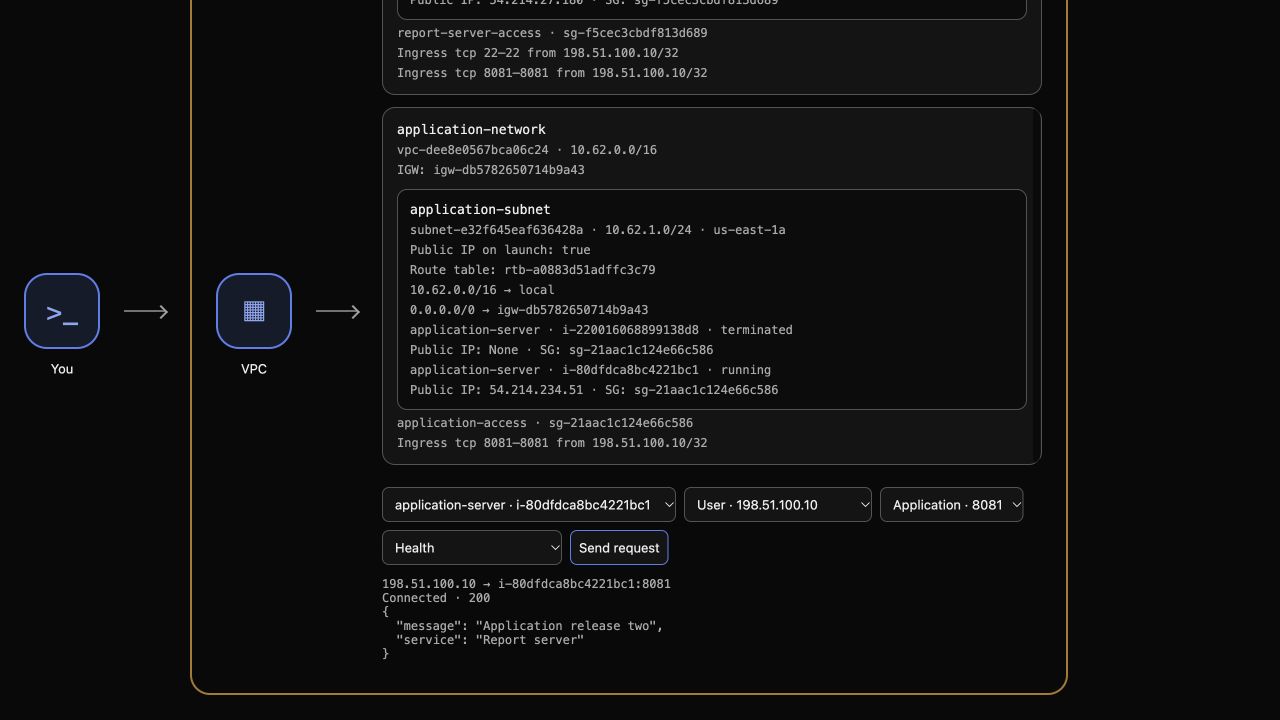
In AWS View, select the running application-server entry and send Health. Expect Connected · 200 and Application release two. The terminated old instance is no longer a selectable running target.
Send Local report file. Its content is now local,initialized, created by User Data in the new instance. The old instance's local record was not retained by replacement. Then send Private report: the external S3 report still returns Connected · 200 with period,total / Q1,320. Send Unrelated private object and expect Connected · 403 with Access denied.
Finally select reference-server, User, port 8081 and Health, then send a request. It must still return Connected · 200 and Reference application.
terraform plan
Expect No changes. The new instance is managed by the module, while the external data and reference environment remain intact.
Destroy the Module Workload and Keep Its Dependencies
In this step, you will remove the managed replacement instance while preserving the supplied infrastructure, workload role and external report data.
Record the image ID before destroying the root's managed resources:
IMAGE_ID=$(terraform output -raw image_id)
echo "$IMAGE_ID"
terraform plan -destroy
Expect one managed instance to destroy. The AMI data source reads an existing image; the network, profile, role and bucket were passed into the module as supplied inputs. Apply the deletion and enter yes:
terraform destroy
Query the replacement instance's native terminated state and inspect the remaining state:
aws ec2 \
  describe-instances \
  --instance-ids "$NEW_ID" \
  --query 'Reservations[].Instances[].{ID:InstanceId,State:State.Name}'
terraform state list
Expect terminated and no managed instance left in state. The supplied image and profile must still exist:
aws ec2 describe-images --image-ids "$IMAGE_ID" --query 'Images[].{ID:ImageId,Name:Name}'
aws iam \
  get-instance-profile \
  --instance-profile-name supplied-application-reader \
  --query 'InstanceProfile.{Name:InstanceProfileName,Roles:Roles[].RoleName}'
Use the Terminal operator to read the retained S3 report. This checks external-data preservation; the workload's own scoped access was verified before destruction.
aws s3api get-object --bucket "$REPORT_BUCKET" --key report.csv /tmp/g5-retained-report.csv
cat /tmp/g5-retained-report.csv
Its bytes remain period,total / Q1,320. In AWS View, select reference-server, User, port 8081 and Health, then send a request. Expect Connected · 200 with Reference application.
Keep the root and module files for review. Retained HCL would propose a new instance on an ordinary later plan; cleanup requires native deletion of the managed workload, not an empty future plan.
Summary
You used a supplied module's inputs and outputs to update an existing workload and publish a replacement. You reviewed the resource and data impact, applied a saved plan, distinguished instance-local files from retained external reports, and cleaned up only the module-owned workload.