



Introduction
An order support tool must show the right customer's orders for a chosen month. Looking up only one item or stopping at an empty filtered page can miss valid records. You will build a composite-key table, query Ada's October orders, and configure a supplied application to follow continuation keys for a packed-order view.
Complete Create a DynamoDB Table for Orders first, including typed items and updates. This unit starts independently with a fresh disposable connection, synthetic data files and an ordinary application. Use /home/labex/project, the official AWS CLI and AWS View; no earlier VM resources are reused.
Certification Relevance
| Certification | Exam task | Practice |
|---|---|---|
| Solutions Architect – Associate (SAA-C03) | Task 3.3 | DynamoDB access patterns, key queries, and pagination. |
| Developer – Associate (DVA-C02) | Task 1.3 | DynamoDB access patterns, key queries, and pagination. |
| Data Engineer – Associate (DEA-C01) | Task 2.1 | Foundational practice: DynamoDB access patterns, key queries, and pagination. |
Lab Overview
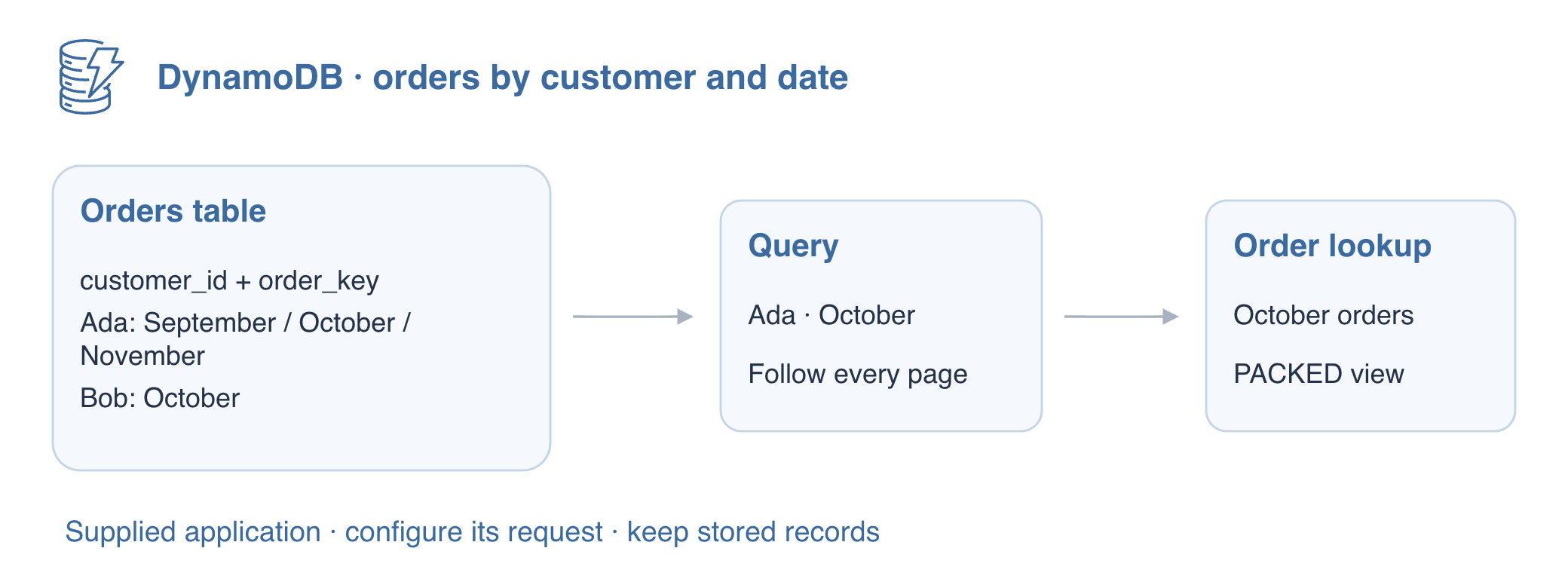
Build Keys Around the Access Pattern
In this step, you will prepare orders that need a customer-and-date lookup. A composite primary key has a partition key and a sort key. The partition key groups a customer's orders; the sort key identifies each order within that group and orders the query results. Both values together identify one item.
Dates use fixed-width YYYY-MM-DD strings followed by # and an order ID. String sort keys compare UTF-8 bytes, so this format keeps these dates in chronological order. This is a small order model, not a universal single-table design.
cd /home/labex/project
aws sts get-caller-identity
aws dynamodb create-table \
  --table-name labex-d02-orders \
  --attribute-definitions AttributeName=customer_id,AttributeType=S AttributeName=order_key,AttributeType=S \
  --key-schema AttributeName=customer_id,KeyType=HASH AttributeName=order_key,KeyType=RANGE \
  --billing-mode PAY_PER_REQUEST
aws dynamodb wait table-exists --table-name labex-d02-orders
A prepared orders.json contains five synthetic orders, not credentials. cat prints the ordinary API request so you can inspect each customer, date and status before loading it.
cat orders.json
aws dynamodb batch-write-item --cli-input-json file://orders.json
BatchWriteItem loads these distinct keys. Confirm UnprocessedItems is {}. On AWS an unprocessed batch needs retry; a response alone does not guarantee all writes completed. The sample includes Ada's September, October and November orders plus Bob's October order, which lets you test boundaries rather than one happy path.
Query One Customer and Date Range
In this step, you will select Ada's October orders with key conditions. Query requires equality on one partition key and can narrow the sort key. Scan examines the table rather than choosing a key partition first. The next step adds a filter; first choose the customer and date range using the keys.
A support agent needs one customer's monthly orders, rather than a table inventory. Query uses that customer's partition and the date bounds to select candidates. A Scan filter can hide other customers from the response, but it still examines their items; a filter cannot turn Scan into a keyed lookup.
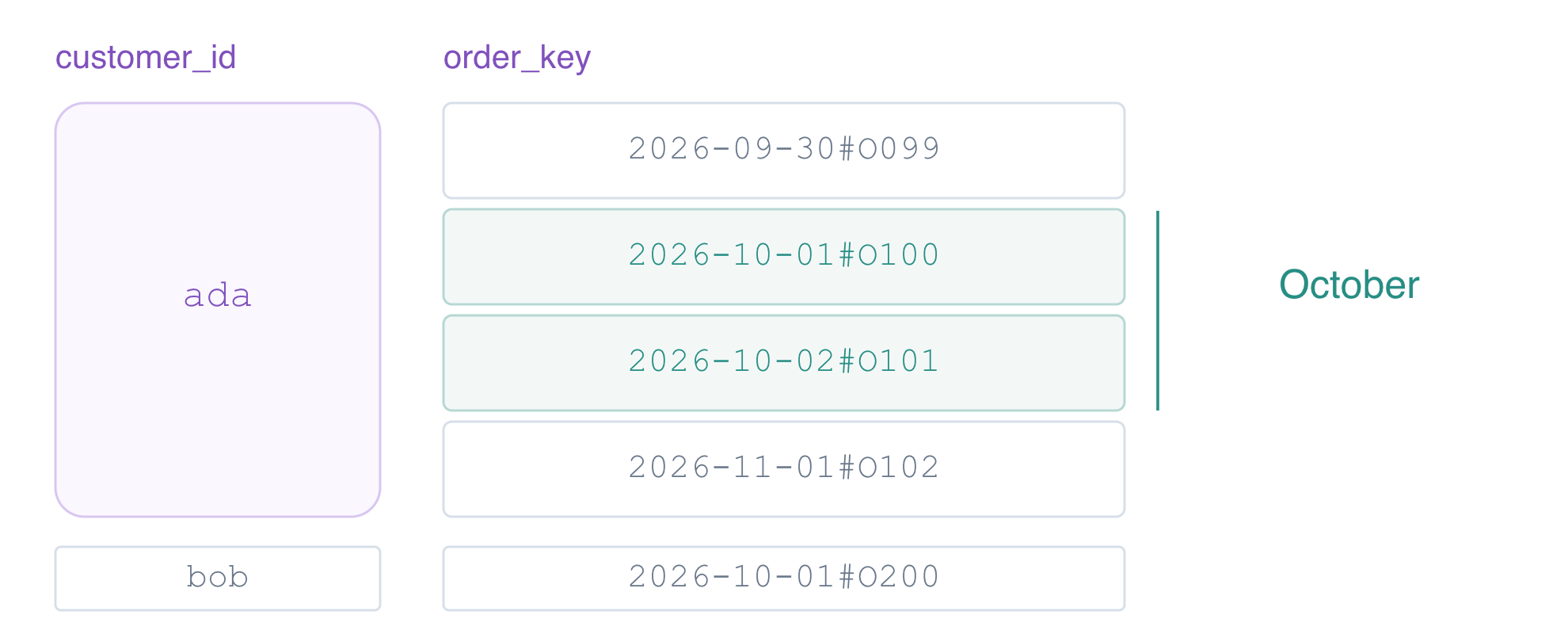
First inspect all five records to understand the scope of a scan.
aws dynamodb scan --table-name labex-d02-orders --consistent-read --query 'Items'
A supplied order lookup application reads lookup.json and calls the DynamoDB Query API. Its executable is order-lookup; its source is provided for inspection, and writing Python is not required. You will configure ordinary Query request fields and inspect real application results rather than command history.
BETWEEN includes both endpoints. An order key contains the date followed by # and its ID. The start 2026-10-01# comes before that day’s IDs; 2026-10-31#~ comes after them because ~ sorts after the letters and digits used here. This bound is specific to this key format.
The quoted heredoc writes JSON literally to lookup.json. request holds the Query fields. paginate: false requests one application page for now; you will enable continuation in the next step.
cat > lookup.json <<'JSON'
{
  "paginate": false,
  "request": {
    "TableName": "labex-d02-orders",
    "KeyConditionExpression": "customer_id = :customer AND order_key BETWEEN :start AND :end",
    "ExpressionAttributeValues": {
      ":customer": {
        "S": "ada"
      },
      ":start": {
        "S": "2026-10-01#"
      },
      ":end": {
        "S": "2026-10-31#~"
      }
    },
    "ConsistentRead": true
  }
}
JSON
The Query values use typed strings, as in GetItem. The application file also holds its own paginate setting, so compare it with a direct CLI request for the same keys.
aws dynamodb query \
  --table-name labex-d02-orders \
  --key-condition-expression 'customer_id = :customer AND order_key BETWEEN :start AND :end' \
  --expression-attribute-values '{":customer":{"S":"ada"},":start":{"S":"2026-10-01#"},":end":{"S":"2026-10-31#~"}}' \
  --consistent-read
./order-lookup
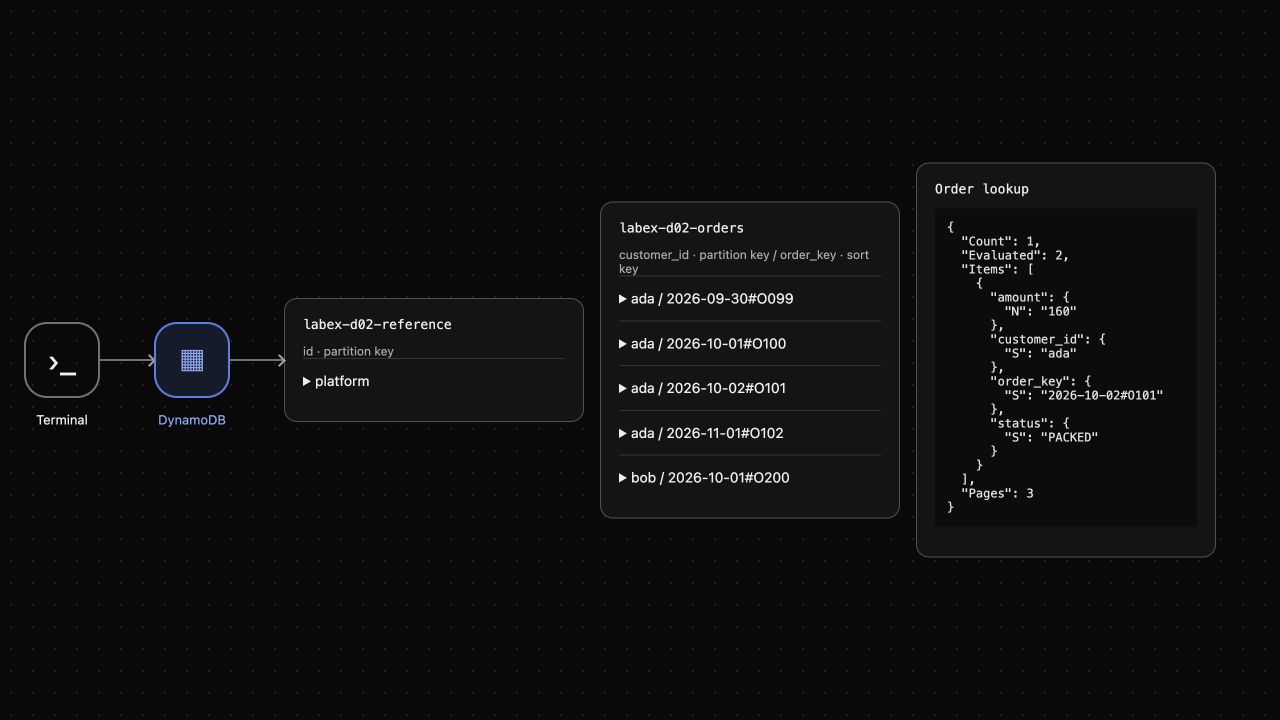
Both results contain Ada's O100 and O101 only, in ascending sort-key order. Bob's O200 and Ada's outside-month orders are excluded. Look at AWS View above Terminal to see the actual Order lookup result alongside the stored table items. No records are changed by these reads.
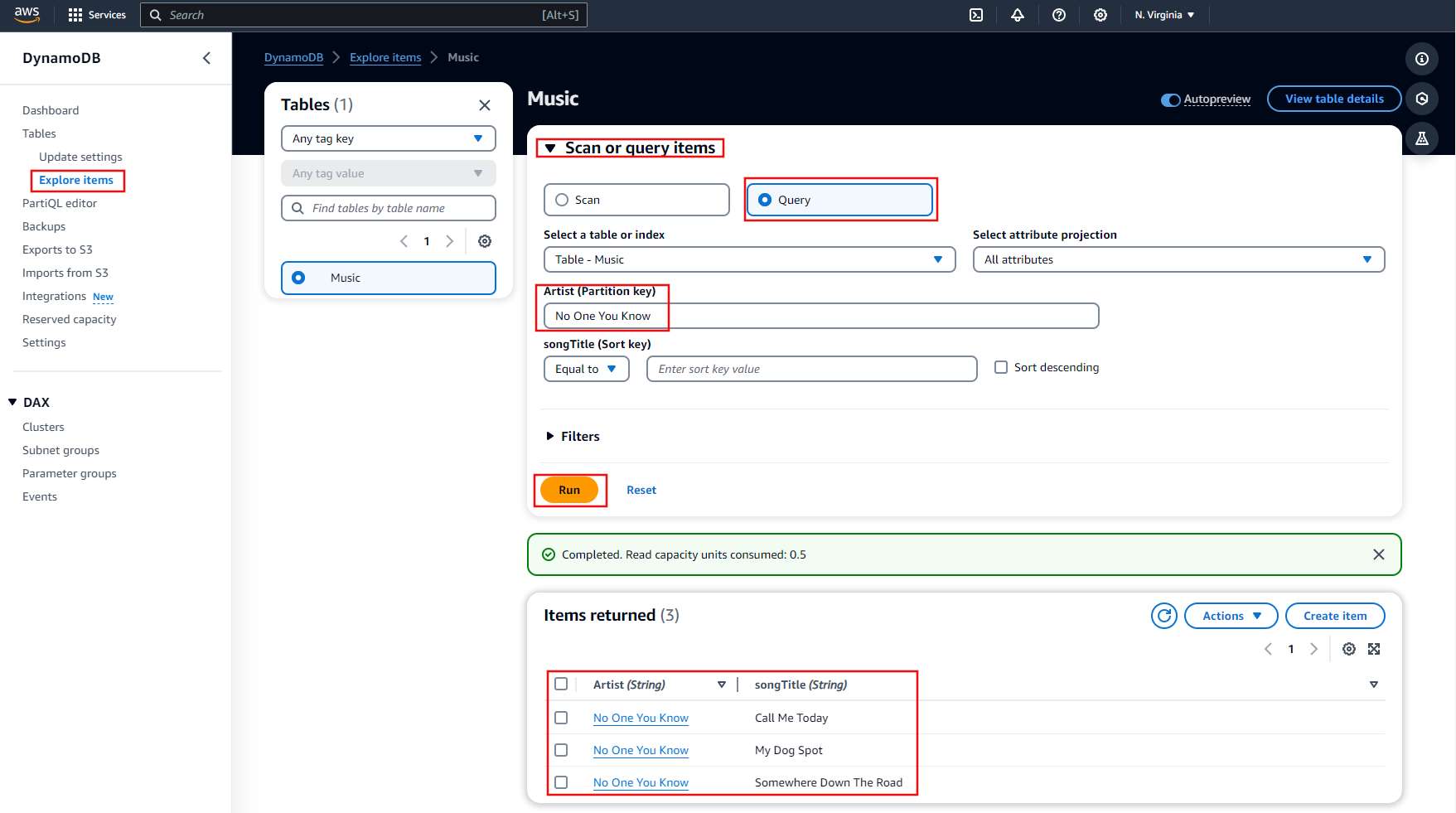
The official Console example below shows a partition-key Query. Its Artist and songTitle have the same key roles as customer_id and order_key here. Use it to recognize the interface; continue this exercise in Terminal and AWS View.
Follow Pagination Even When a Filtered Page Is Empty
In this step, you will retrieve packed October orders without stopping at an empty first page. DynamoDB applies Limit to evaluated items before a filter. Query responses may include LastEvaluatedKey even when Items is empty. That continuation key, rather than an item count, tells an application whether to request another page. A filter does not reduce the read work already performed.
The prepared packed-page.json keeps the same keys, adds a PACKED status filter and sets Limit: 1. This small limit makes the page boundary visible. --no-paginate stops the CLI from fetching additional pages, so you can inspect one service response.
cat packed-page.json
aws dynamodb query --cli-input-json file://packed-page.json --no-paginate
The first evaluated order is NEW, so expect Items: [], Count: 0, ScannedCount: 1 and a LastEvaluatedKey for O100. It is not the end of the result set.
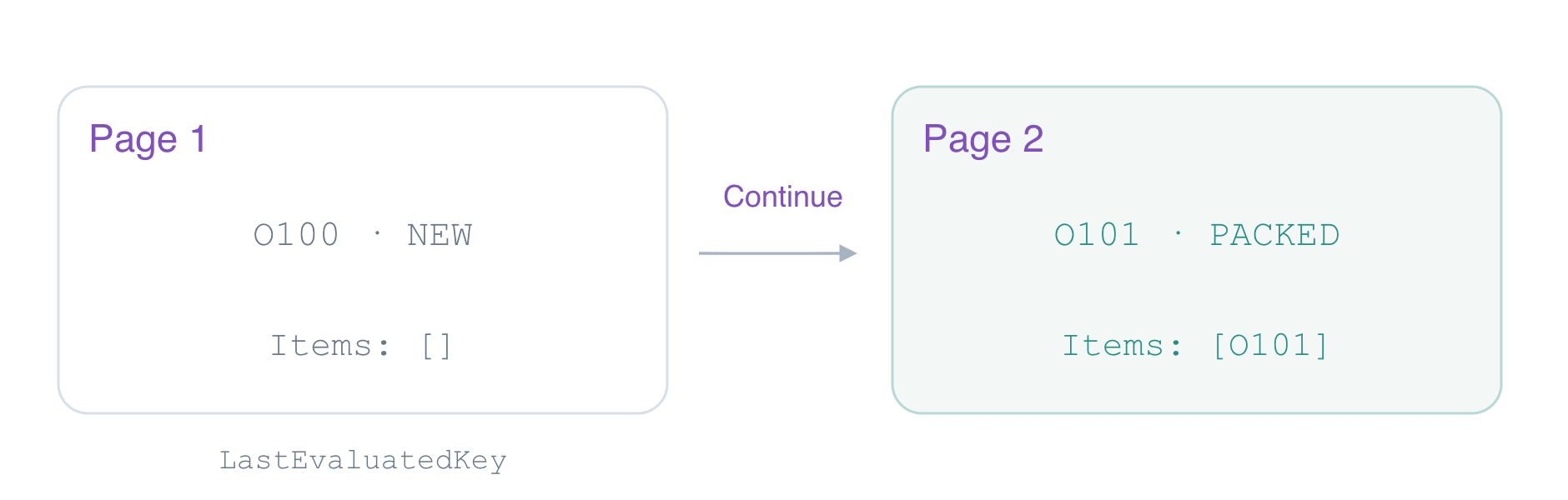
Write the application configuration to follow that key until the API stops returning it. #state avoids the reserved word status, and :state carries the filter value.
cat > lookup.json <<'JSON'
{
  "paginate": true,
  "request": {
    "TableName": "labex-d02-orders",
    "KeyConditionExpression": "customer_id = :customer AND order_key BETWEEN :start AND :end",
    "ExpressionAttributeValues": {
      ":customer": {
        "S": "ada"
      },
      ":start": {
        "S": "2026-10-01#"
      },
      ":end": {
        "S": "2026-10-31#~"
      },
      ":state": {
        "S": "PACKED"
      }
    },
    "ConsistentRead": true,
    "ExpressionAttributeNames": {
      "#state": "status"
    },
    "FilterExpression": "#state = :state",
    "Limit": 1
  }
}
JSON
./order-lookup
The application returns only Ada's O101 with PACKED status, Count: 1 and Evaluated: 2. In this dataset, Pages: 3 includes a final empty request that establishes the end of the query. A continuation key marks a read boundary; it does not guarantee more matching items. The application follows ExclusiveStartKey until the service stops returning it. In AWS View the lookup result changes while all stored records remain unchanged.
Verify the Inventory and Remove the Owned Table
In this step, you will clean up after proving the lookup behavior. First check the target table still contains the original five records. Reads and configuration changes should not modify order data.
aws dynamodb scan --table-name labex-d02-orders --consistent-read --select COUNT
Expect Count: 5. Delete only labex-d02-orders, then wait for its absence. The reference table belongs to the environment and must stay.
aws dynamodb delete-table --table-name labex-d02-orders
aws dynamodb wait table-not-exists --table-name labex-d02-orders
aws dynamodb list-tables
aws dynamodb get-item \
  --table-name labex-d02-reference \
  --key '{"id":{"S":"platform"}}' \
  --consistent-read
The inventory retains only labex-d02-reference, whose note remains keep unchanged. AWS View removes the owned table and lookup result. Successful service responses establish deletion; an unavailable connection would not. The disposable connection ends with this VM.
Summary
You grouped orders by customer and ordered them with date-based sort keys. Query selected the intended partition and range while Scan examined the broader table. You saw that filters run after evaluation and an empty page can still require continuation. The supplied application used actual Query requests to collect the packed order across paginated requests, then you removed only owned resources.
For further reading, see the AWS reference on Query key conditions and sort-key ranges; Query pagination and continuation keys.


