



Introduction
A bucket owner wants to grant one report role access and protect private data. You will attach a bucket policy, compare it with the role's own policy, and test how a matching Deny affects access.
Complete Use Temporary Credentials with an IAM Role and Give a Report Reader Least Privilege first. This fresh VM supplies default, report-role, and other-role; the role profiles already obtain temporary sessions. Use /home/labex/project and AWS View. Keep credentials and caches private.
Certification Relevance
| Certification | Exam task | Practice |
|---|---|---|
| Cloud Practitioner (CLF-C02) | Task 2.3 | Resource policies and explicit deny precedence. |
| Solutions Architect – Associate (SAA-C03) | Task 1.1 | Resource policies and explicit deny precedence. |
| Developer – Associate (DVA-C02) | Task 2.1 | Resource policies and explicit deny precedence. |
| CloudOps Engineer – Associate (SOA-C03) | Task 4.1 | Resource policies and explicit deny precedence. |
| Security – Specialty (SCS-C03) | Task 4.2 | Foundational practice: Resource policies and explicit deny precedence. |
| Data Engineer – Associate (DEA-C01) | Task 4.2 | Foundational practice: Resource policies and explicit deny precedence. |
| DevOps Engineer – Professional (DOP-C02) | Task 6.1 | Foundational practice: Resource policies and explicit deny precedence. |
| Solutions Architect – Professional (SAP-C02) | Task 2.3 | Foundational practice: Resource policies and explicit deny precedence. |
Lab Overview
Grant One Role Access from the Bucket
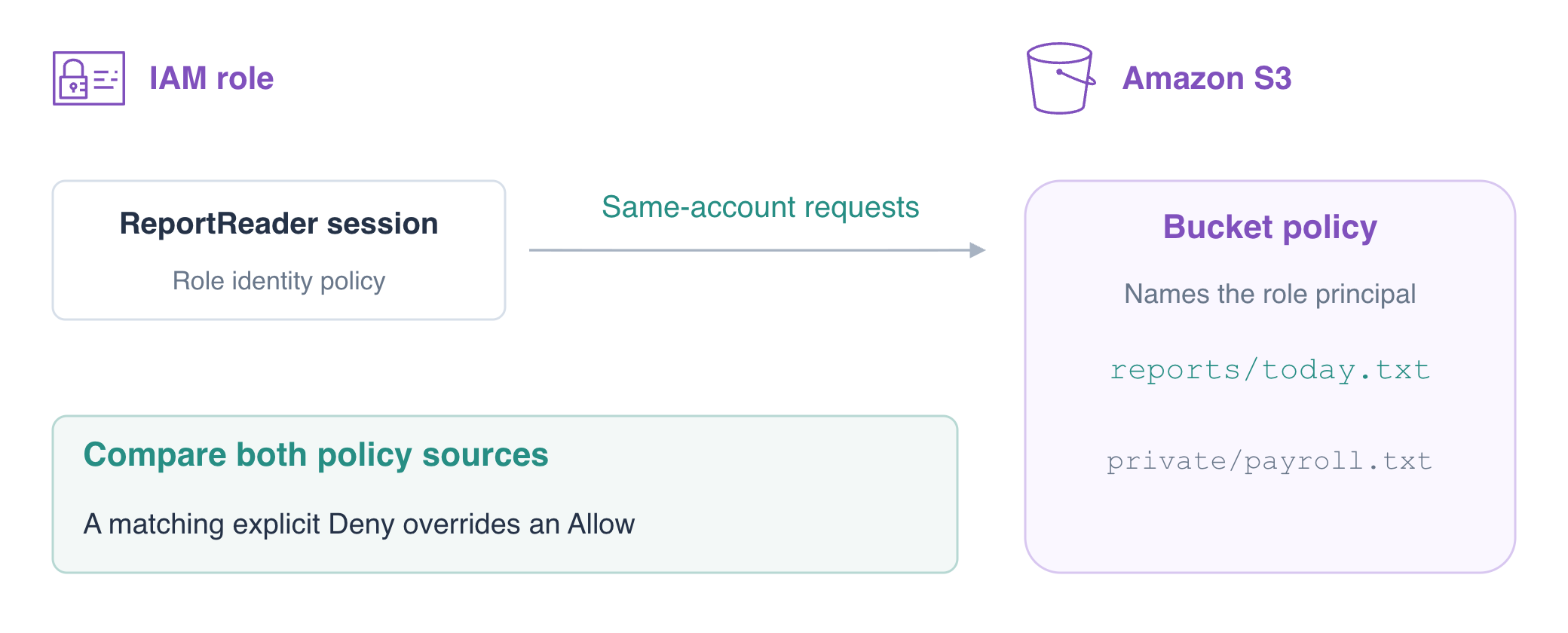
In this step, you will attach a resource policy granting ReportReader access to the reports prefix. Unlike an identity policy, the bucket policy must specify Principal. Use the IAM role ARN, which identifies the role; the assumed-role session ARN identifies one use of it.
You have granted access from an identity; now the bucket owner will grant it from the resource. Both role profiles are already prepared, so keep their trust unchanged and focus on how the bucket policy and role permission policy affect the same requests.
A resource policy is stored on the resource. An S3 bucket policy is one example: its Principal identifies whose requests the statement covers. Compare this with an identity policy stored on a user or role.
Confirm the two active session identities and the report role's initially empty permission policy list.
cd /home/labex/project
aws sts get-caller-identity --profile report-role --query Arn --output text
aws sts get-caller-identity --profile other-role --query Arn --output text
aws iam list-role-policies --role-name ReportReader
Expect assumed-role/ReportReader/report-run and assumed-role/OtherReader/other-run, and an empty PolicyNames list. Authentication as a role does not itself authorize S3 access. Test the current read:
aws s3api get-object --profile report-role --bucket labex-iam04-reports --key reports/today.txt before.txt || true
Expect AccessDenied. || true keeps an expected failure from stopping a pasted sequence. Connection failures do not prove denial.
Write the bucket policy. GetObject grants object reads; Resource limits it to reports/ in this one bucket. The role Principal excludes OtherReader and grants no public access.
cat > bucket-policy.json <<'JSON'
{
  "Version":"2012-10-17",
  "Statement":[
    {"Effect":"Allow","Principal":{"AWS":"arn:aws:iam::123456789012:role/ReportReader"},"Action":"s3:GetObject","Resource":"arn:aws:s3:::labex-iam04-reports/reports/*"}
  ]
}
JSON
aws s3api put-bucket-policy \
  --bucket labex-iam04-reports \
  --policy file://bucket-policy.json
aws s3api get-bucket-policy --bucket labex-iam04-reports --query Policy --output text
The bucket policy is now stored on the bucket, not attached to the role. In the same account, this applicable resource Allow can grant the role access without a separate role identity Allow, provided no relevant Deny blocks it.
aws s3api get-object \
  --profile report-role \
  --bucket labex-iam04-reports \
  --key reports/today.txt today.txt
cat today.txt
aws s3api get-object --profile other-role --bucket labex-iam04-reports --key reports/today.txt other-denied.txt || true
aws s3api get-object --profile report-role --bucket labex-iam04-reports --key private/payroll.txt private-denied.txt || true
aws s3api get-object --profile report-role --bucket labex-iam04-reference --key reference.txt reference-denied.txt || true
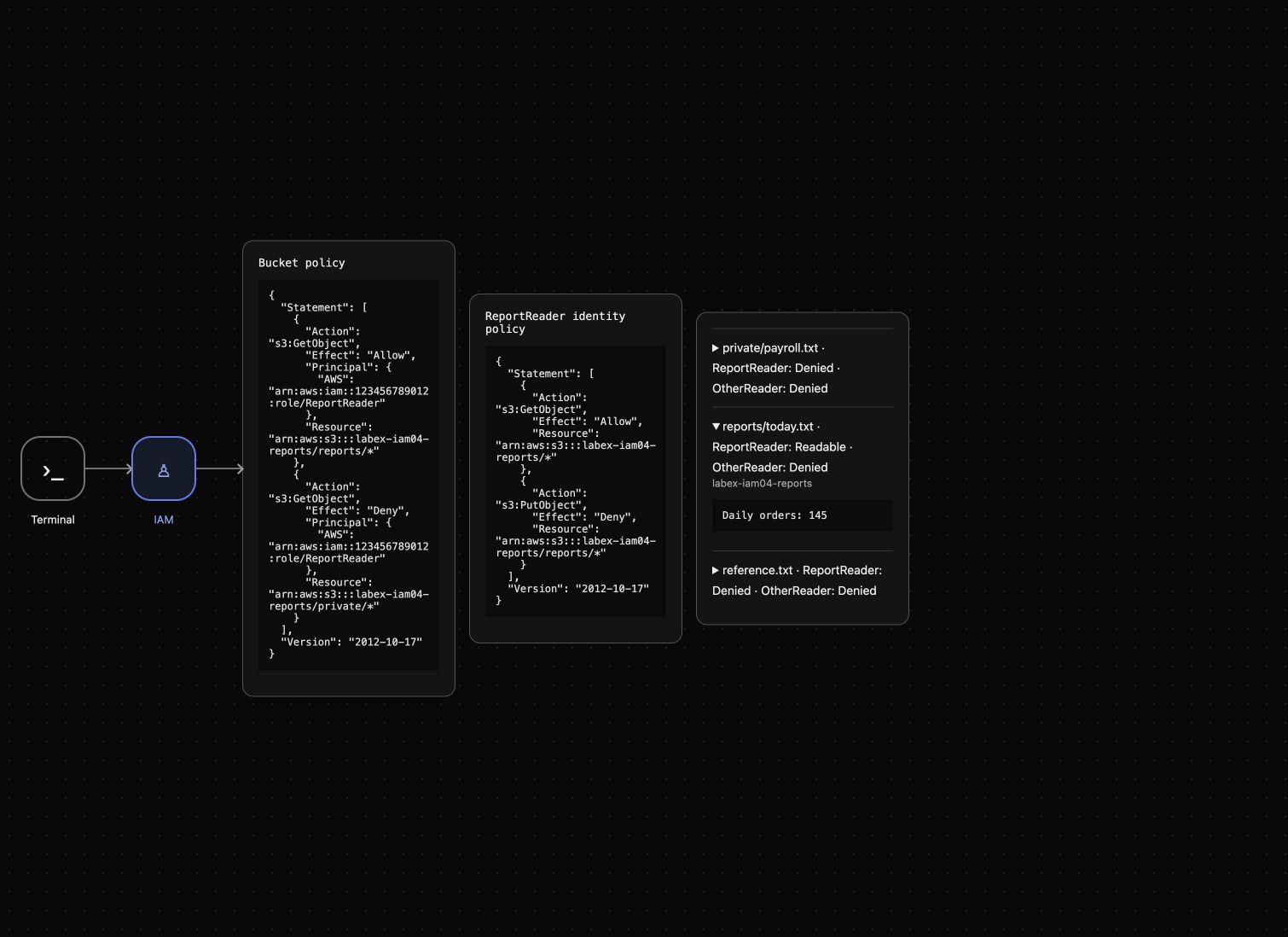
ReportReader receives Daily orders: 145; all three other requests receive AccessDenied. The bucket grant does not cover another role, another prefix or another bucket. AWS View issues the same actual role reads.
Protect Private Data Against an Additional Identity Allow
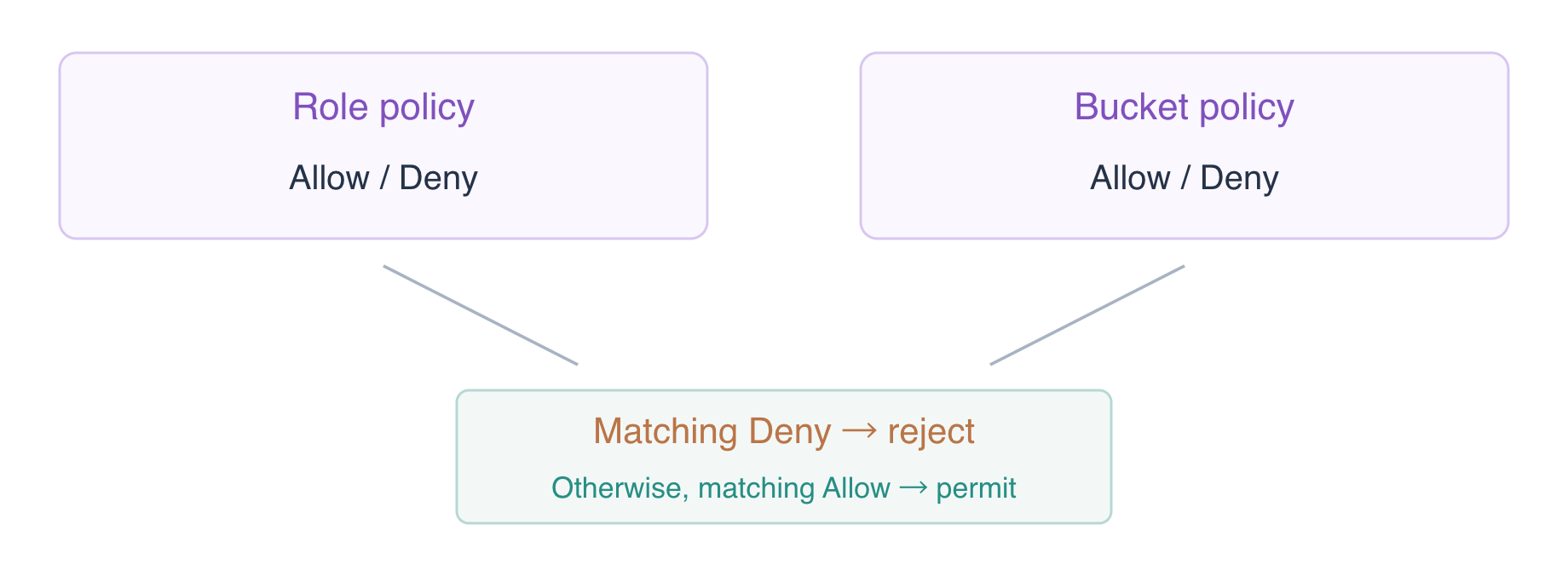
In this step, you will observe how a role identity grant combines with a bucket grant, then use a bucket Deny to protect private data. For these same-account requests, applicable Allows combine; the two policy sources are not automatically intersected. An explicit Deny in either applicable policy source overrides an Allow.
Temporarily widen ReportReader's identity read scope to objects in this owned bucket. This controlled comparison covers synthetic data and does not grant other-bucket access.
cat > role-read.json <<'JSON'
{"Version":"2012-10-17","Statement":[{"Effect":"Allow","Action":"s3:GetObject","Resource":"arn:aws:s3:::labex-iam04-reports/*"}]}
JSON
aws iam put-role-policy \
  --role-name ReportReader \
  --policy-name ReadAllOwned \
  --policy-document file://role-read.json
aws s3api get-object \
  --profile report-role \
  --bucket labex-iam04-reports \
  --key private/payroll.txt private-before-deny.txt
cat private-before-deny.txt
Expect Synthetic payroll: restricted. The identity Allow applies even though the bucket's Allow covers only reports/. Add a bucket Deny scoped to this role and the private prefix, keeping the report Allow.
cat > bucket-policy.json <<'JSON'
{
  "Version":"2012-10-17",
  "Statement":[
    {"Effect":"Allow","Principal":{"AWS":"arn:aws:iam::123456789012:role/ReportReader"},"Action":"s3:GetObject","Resource":"arn:aws:s3:::labex-iam04-reports/reports/*"},
    {"Effect":"Deny","Principal":{"AWS":"arn:aws:iam::123456789012:role/ReportReader"},"Action":"s3:GetObject","Resource":"arn:aws:s3:::labex-iam04-reports/private/*"}
  ]
}
JSON
aws s3api put-bucket-policy \
  --bucket labex-iam04-reports \
  --policy file://bucket-policy.json
aws s3api get-object --profile report-role --bucket labex-iam04-reports --key private/payroll.txt private-denied.txt || true
aws s3api get-object \
  --profile report-role \
  --bucket labex-iam04-reports \
  --key reports/today.txt today.txt
cat today.txt
Private now returns AccessDenied despite the identity Allow; the report still returns 145. The Deny names ReportReader, so the operator can still inspect and preserve the fixture. Statement order does not make an Allow override a matching Deny.
Confirm an Identity Deny Overrides a Bucket Allow
In this step, you will test the opposite direction: a role identity Deny overrides a bucket Allow. Keep the current read grant and add a Deny for writes to the reports prefix.
cat > role-read.json <<'JSON'
{"Version":"2012-10-17","Statement":[
  {"Effect":"Allow","Action":"s3:GetObject","Resource":"arn:aws:s3:::labex-iam04-reports/*"},
  {"Effect":"Deny","Action":"s3:PutObject","Resource":"arn:aws:s3:::labex-iam04-reports/reports/*"}
]}
JSON
aws iam put-role-policy \
  --role-name ReportReader \
  --policy-name ReadAllOwned \
  --policy-document file://role-read.json
For a controlled precedence test, temporarily add a bucket Allow for the same role and write prefix. Apply the identity Deny first so the report remains protected.
cat > bucket-write-test.json <<'JSON'
{
  "Version":"2012-10-17",
  "Statement":[
    {"Effect":"Allow","Principal":{"AWS":"arn:aws:iam::123456789012:role/ReportReader"},"Action":"s3:GetObject","Resource":"arn:aws:s3:::labex-iam04-reports/reports/*"},
    {"Effect":"Deny","Principal":{"AWS":"arn:aws:iam::123456789012:role/ReportReader"},"Action":"s3:GetObject","Resource":"arn:aws:s3:::labex-iam04-reports/private/*"},
    {"Effect":"Allow","Principal":{"AWS":"arn:aws:iam::123456789012:role/ReportReader"},"Action":"s3:PutObject","Resource":"arn:aws:s3:::labex-iam04-reports/reports/*"}
  ]
}
JSON
aws s3api put-bucket-policy \
  --bucket labex-iam04-reports \
  --policy file://bucket-write-test.json
aws s3api put-object --profile report-role --bucket labex-iam04-reports --key reports/today.txt --body upload.txt || true
Expect PutObject AccessDenied even though the bucket allows it. The identity Deny wins. Immediately remove the temporary write Allow by restoring the two-statement policy saved in the previous step.
aws s3api put-bucket-policy \
  --bucket labex-iam04-reports \
  --policy file://bucket-policy.json
aws s3api get-object \
  --profile report-role \
  --bucket labex-iam04-reports \
  --key reports/today.txt today.txt
cat today.txt
aws s3api get-object --profile other-role --bucket labex-iam04-reports --key reports/today.txt other-denied.txt || true
The report must remain Daily orders: 145, and OtherReader remains denied. The temporary write grant is gone. AWS View shows the bucket policy and the role's identity policy alongside the actual read results.
Remove Both Grant Sources and Clean Up
In this step, you will withdraw both policy sources before deleting the owned data. Removing one Allow is not enough when another policy still grants the same action.
Delete the bucket policy, then repeat the report read. ReadAllOwned still grants that read from the role's identity policy.
aws s3api delete-bucket-policy --bucket labex-iam04-reports
aws s3api get-object \
  --profile report-role \
  --bucket labex-iam04-reports \
  --key reports/today.txt remaining-grant.txt
cat remaining-grant.txt
Expect Daily orders: 145. Now delete ReadAllOwned and test again while the report still exists.
aws iam delete-role-policy --role-name ReportReader --policy-name ReadAllOwned
aws s3api get-object --profile report-role --bucket labex-iam04-reports --key reports/today.txt revoked.txt || true
aws iam list-role-policies --role-name ReportReader
Expect AccessDenied and an empty policy list. The prepared roles and their caller trust remain intact; you are removing the S3 grants created during this exercise.
aws s3api delete-object --bucket labex-iam04-reports --key reports/today.txt
aws s3api delete-object --bucket labex-iam04-reports --key private/payroll.txt
aws s3api list-objects-v2 --bucket labex-iam04-reports
Check KeyCount: 0 in this successful response, then delete the empty report bucket and confirm the reference bytes.
aws s3api delete-bucket --bucket labex-iam04-reports
aws s3api list-buckets --query 'Buckets[].Name'
aws s3api get-object --bucket labex-iam04-reference --key reference.txt reference.txt
cat reference.txt
Only the reference bucket remains with Platform reference: keep. Network errors are not evidence of deletion. AWS View now shows no bucket or role permission policy and Reports bucket removed. Prepared identities, fixtures and local temporary caches are reclaimed when the disposable environment ends.
Summary
You used Principal to grant one role access through a bucket policy, observed how identity and resource Allows combine, and tested explicit Deny precedence in both directions. The forbidden write did not change report bytes. You withdrew both grant sources before scoped cleanup and preserved prepared identities and unrelated data. Inspect all applicable policy sources when a request remains authorized or unexpectedly denied.
For further reading, see the AWS reference on Identity-based and resource-based policy evaluation.


