Introduction
A maintainer needs a shared location for a working stack's resource mappings. Migrate a local state into a separate, versioned S3 backend while preserving the existing report, then observe state history and the backend's independent lifecycle.
You should understand Terraform state, import, saved plans and S3 object versions. Every resource in this lab is prepared in this fresh environment; no earlier state or personal AWS account is needed.
Certification Relevance
| Certification | Exam task | Practice |
|---|---|---|
| CloudOps Engineer – Associate (SOA-C03) | Task 3.1, Skill 3.1.6 | Foundational Terraform practice: maintain infrastructure through reviewed configuration and state changes while preserving working resources. |
Lab Overview
Establish the Local State and Backend Boundary
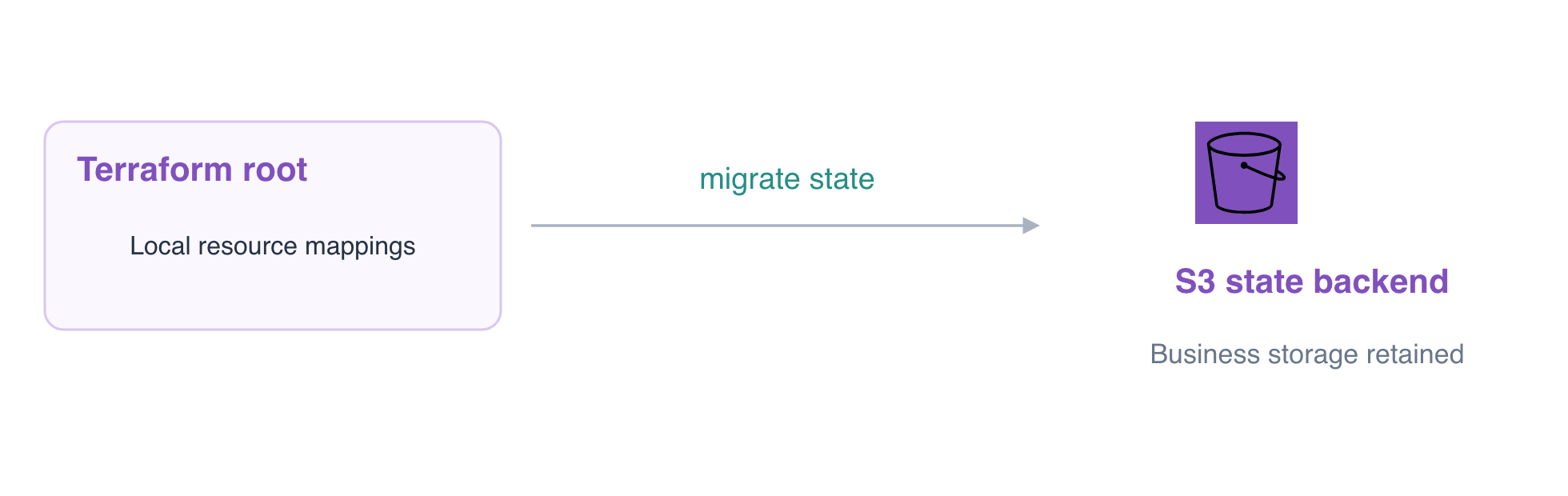
In this step, identify the business bucket and the separate destination for state. The supplied report root already manages migration-daily-reports; its local state is independent of the finance reference. The versioned maintenance-team-state bucket is prepared by the platform team so it exists before this root starts using it.
cd /home/labex/project/state-migration
terraform state list
terraform state show aws_s3_bucket.reports
Confirm the remote bucket ID is migration-daily-reports. A backend stores resource mappings; it is not the Provider that creates and reads AWS resources. Provider and backend connection settings are prepared separately in this environment.
Save a private local backup before changing where state is stored. Redirection (>) writes the state JSON to a file; do not commit state or plans to public source control:
terraform state pull > local-before-migration.json
chmod 600 local-before-migration.json
Check backend versioning and its initially empty inventory:
aws s3api \
  get-bucket-versioning \
  --bucket maintenance-team-state
Expect Status: Enabled.
aws s3api \
  list-objects-v2 \
  --bucket maintenance-team-state
No state object should exist yet. Choosing an empty destination matters: migrating to a key that already belongs to another environment can overwrite its management record. Keep migration-finance-reference untouched.
Migrate the Existing Mapping to the Intended S3 Key
In this step, configure a remote backend and copy the existing local resource mapping into its empty destination. A key is the name of the state object inside the backend bucket; choose it for one specific environment.
Write a partial S3 backend declaration. The connection settings are supplied separately, and the next file supplies your bucket/key choice:
cat > backend.tf <<'HCL'
terraform {
  backend "s3" {}
}
HCL
Create the environment-specific backend configuration. use_lockfile = true enables Terraform's native S3 lock file for future writers:
cat > reports.s3.tfbackend <<'HCL'
bucket       = "maintenance-team-state"
key          = "reports/production.tfstate"
region       = "us-east-1"
use_lockfile = true
HCL
-migrate-state asks Terraform to move the existing mapping to the new backend. Terraform asks whether it should copy the existing state; the printf pipeline supplies the answer yes. Run this only after confirming this lab's destination key was empty:
printf 'yes\n' | terraform init \
  -backend-config=backend-connection.hcl \
  -backend-config=reports.s3.tfbackend \
  -migrate-state
Expect successful S3 backend configuration and completed initialization. Do not use migration as a way to switch to an already existing environment: selecting an existing state is a different operation, covered later in this course.
Inspect the mapping from its new location:
terraform state show aws_s3_bucket.reports
The resource ID must still be migration-daily-reports. Confirm that S3 now contains the actual state object:
aws s3api \
  head-object \
  --bucket maintenance-team-state \
  --key reports/production.tfstate
An ETag and VersionId show the stored state object. Those metadata alone are insufficient: the background check also reads its resource mapping and compares the existing report identity and bytes.
terraform plan
Expect No changes. Migrating state should not recreate the business bucket.
Observe a New Version of Remote State
In this step, make one reviewed configuration update and observe the resulting state history. Versioning retains earlier state objects; this lab observes history, rather than restoring damaged state.
Add a revision tag while keeping the bucket name, owner and destruction setting unchanged:
cat > main.tf <<'HCL'
resource "aws_s3_bucket" "reports" {
  bucket        = "migration-daily-reports"
  force_destroy = false
  tags = { Owner = "reporting", Revision = "two" }
}
HCL
Review a saved plan:
terraform plan -out=revision.tfplan
Expect 0 to add, 1 to change, 0 to destroy. Apply only that in-place update:
terraform apply revision.tfplan
Inspect the backend object's versions:
aws s3api \
  list-object-versions \
  --bucket maintenance-team-state \
  --prefix reports/production.tfstate
At least two state versions should exist after migration and update. They describe management history; they are distinct from versions of the business report in the other bucket.
aws s3 \
  cp s3://migration-daily-reports/report.txt -
The report remains Daily sales: 120 orders. AWS View shows the business, finance reference and backend as separate buckets. State files can contain sensitive values; inspect only the metadata needed for this exercise.
terraform plan
Expect No changes. Verify this working state before starting the separate cleanup phase.
Remove Business Resources While Retaining the Backend
In this step, retire this disposable business stack after its functionality and data preservation have passed. The platform team's backend and the independent finance reference are outside the stack's deletion scope.
force_destroy = false prevents Terraform from silently emptying the versioned report bucket. Deliberately identify the original report version before deleting this lab's report. Command substitution saves its ID; display that non-secret identifier:
VERSION_ID=$(aws s3api \
  head-object \
  --bucket migration-daily-reports \
  --key report.txt \
  --query VersionId \
  --output text)
echo "$VERSION_ID"
Delete that exact disposable version, then destroy the business resource. These commands intentionally end report availability only after the previous step's preservation check:
aws s3api \
  delete-object \
  --bucket migration-daily-reports \
  --key report.txt \
  --version-id "$VERSION_ID"
terraform destroy -auto-approve
-auto-approve skips a prompt; use it here only for the single disposable business bucket you just reviewed. Expect 1 destroyed.
Confirm that its management record still exists in the backend:
aws s3api \
  head-object \
  --bucket maintenance-team-state \
  --key reports/production.tfstate
The backend remains, now holding a state with no managed business resources. The finance reference must still be available. Destroying a stack does not delete the storage used by its backend. Leave that backend intact for its owner; do not run another normal apply, which would recreate the desired business bucket.
See the S3 backend documentation for backend configuration and native lock files.
Summary
You separated Provider and backend roles, backed up and migrated an existing mapping to S3, observed state versions, and removed a business stack without deleting its independently owned backend.