Introduction
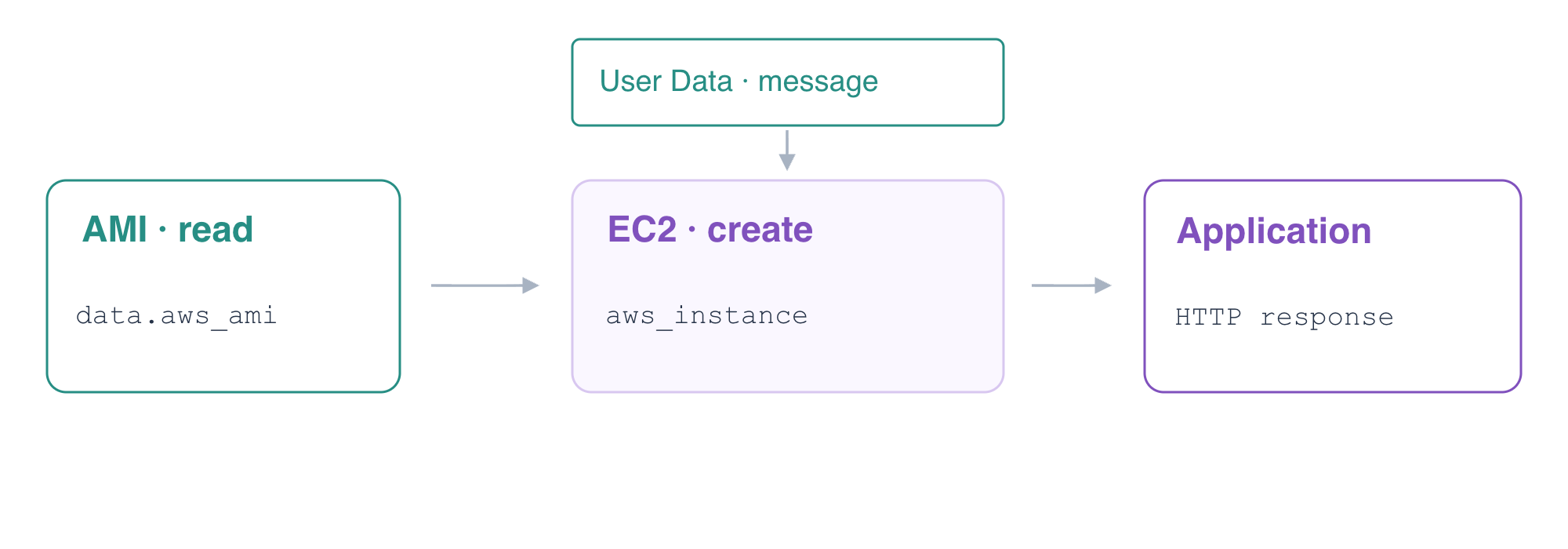
A running instance is useful only when its application has initialized correctly. You will use Terraform to read a prepared application AMI, launch an EC2 instance in the supplied network and configure the application through User Data.
You should know Terraform variables and resource references, public subnet routing, security groups and EC2 launch basics. This fresh environment provides the AMI, key pair, network and a separate reference application. You will create and remove your own application instance.
Certification Relevance
| Certification | Exam task | Practice |
|---|---|---|
| Cloud Practitioner (CLF-C02) | Task 3.1 | Provision an initialized EC2 application through infrastructure as code and inspect its deployed state with AWS CLI. |
Lab Overview
Read an AMI and Launch the Application
In this step, you will connect a prepared AMI, network inputs and User Data to a Terraform EC2 resource, then verify the application's initialized response.
Open Terminal and AWS View. The reference server is already running. The application network is ready, but there is no application-server yet. This lab does not reuse the VM or resources from a previous lab.
Enter the working directory and inspect its prepared input values:
cd /home/labex/project/application-launch
cat terraform.tfvars.json
These values identify the supplied AMI, subnet and security group. The network already assigns public IPs at launch, has an internet route and permits the User client on application port 8081. Terraform is prepared for the course environment; no personal credentials are required.
Find the supplied application image through an independent AWS query. An AMI describes the image used when an instance is created; reading an existing AMI does not create a new image.
aws ec2 \
  describe-images \
  --filters Name=name,Values=report-server-ubuntu-2204 \
  --query 'Images[].{Image:ImageId,Name:Name,Architecture:Architecture}'
The name is report-server-ubuntu-2204, its architecture is x86_64, and its ID matches the ami_id input. A Terraform data source reads an existing object; a resource manages an object's lifecycle. You will read this AMI with data.aws_ami.application, then create an instance with aws_instance.application.
Create application.tf. The quoted outer heredoc writes HCL without shell expansion. Inside HCL, ${...} interpolates a Terraform expression, and jsonencode converts the message into valid JSON. The inner quoted CONFIG heredoc writes that JSON into the prepared application's configuration when User Data runs in the new guest.
cat > application.tf <<'HCL'
data "aws_ami" "application" {
  most_recent = true
  filter {
    name   = "image-id"
    values = [var.ami_id]
  }
}

resource "aws_instance" "application" {
  ami                    = data.aws_ami.application.id
  instance_type          = "t3.micro"
  key_name               = "report-key"
  subnet_id              = var.subnet_id
  vpc_security_group_ids = [var.security_group_id]

  user_data_replace_on_change = true
  user_data = <<-SCRIPT
    #!/bin/bash
    set -eu
    cat > /etc/report-app/config.json <<'CONFIG'
    ${jsonencode({ message = var.message })}
    CONFIG
  SCRIPT

  tags = {
    Name = "application-server"
  }
}

output "instance_id" {
  value = aws_instance.application.id
}

output "image_id" {
  value = data.aws_ami.application.id
}
HCL
The instance references the AMI data source rather than a copied image ID. The supplied subnet and group inputs connect it to the prepared network. User Data runs during the initial boot to configure the application; it is not an interactive login command. The default message input is Terraform report application. user_data_replace_on_change makes later startup-configuration changes explicit replacements; you will explore that release behavior in a later lab.
Initialize, format and validate:
terraform init
terraform fmt
terraform validate
If init reports Incomplete lock file information for providers, it describes checksums for other platforms. This prepared VM uses linux_amd64; continue after initialization and validation succeed.
Review the plan. It reads the supplied AMI and proposes creating one EC2 instance. It must not replace the reference server or create a new AMI.
terraform plan
Apply and enter yes when prompted:
terraform apply
Save and display the resulting instance and image IDs:
INSTANCE_ID=$(terraform output -raw instance_id)
echo "$INSTANCE_ID"
IMAGE_ID=$(terraform output -raw image_id)
echo "$IMAGE_ID"
Query the instance independently. Check its running state, image, subnet and security group against the prepared inputs.
aws ec2 \
  describe-instances \
  --instance-ids "$INSTANCE_ID" \
  --query 'Reservations[].Instances[].{ID:InstanceId,State:State.Name,Image:ImageId,Subnet:SubnetId,Groups:SecurityGroups[].GroupId,PublicIP:PublicIpAddress}'
In AWS View, select application-server, User · 198.51.100.10 and Application · 8081, then click Send request. Expect Connected · 200 and Terraform report application. The actual application response demonstrates that startup configuration reached the workload; running alone would not establish that result.
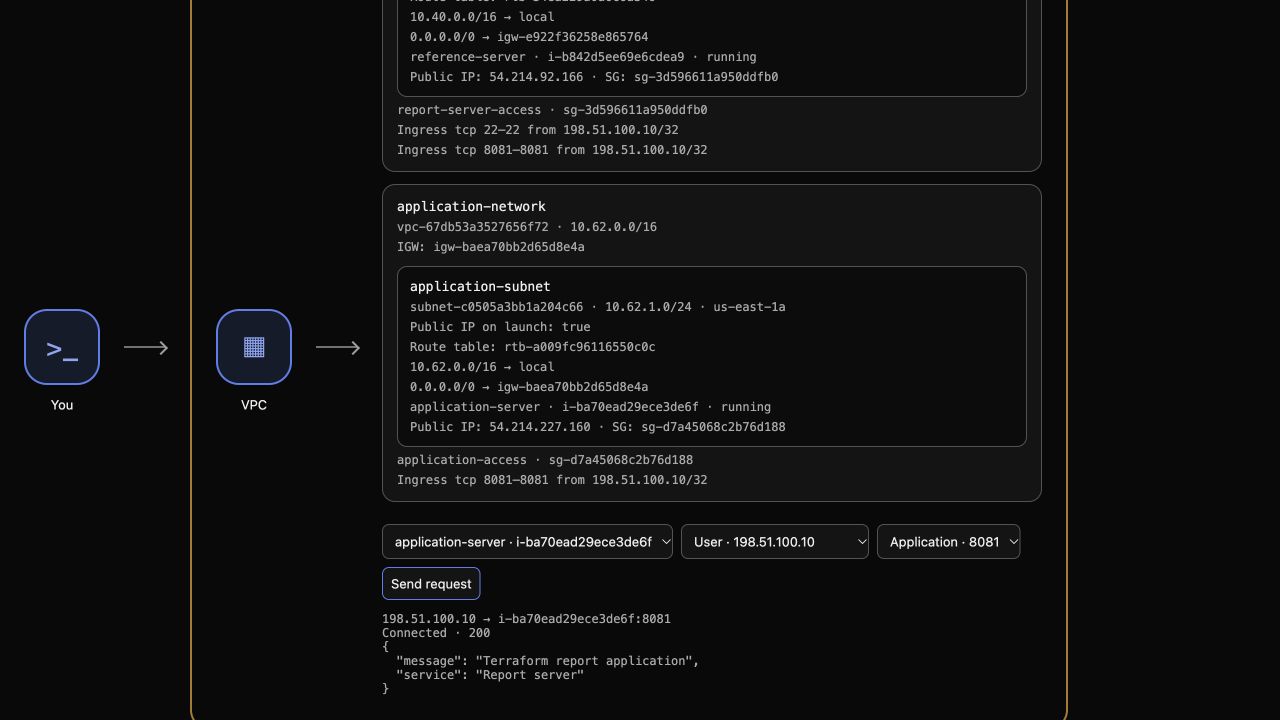
Example checkpoint: AWS View shows the running application and its actual initialized message. Resource IDs and addresses vary in each VM.
Inspect Terraform's mapping and confirm convergence:
terraform state list
terraform plan
The state contains the AMI data source and instance resource; the plan reports No changes.
Remove the Instance and Retain the Supplied Infrastructure
In this step, you will destroy only the Terraform-managed application instance while preserving its source image, prepared network and reference application.
A data source does not own the image it reads. The VPC, subnet, route, security group and key pair were also supplied outside this state. Review the deletion scope before approving it:
terraform plan -destroy
Expect one managed instance to destroy. Then run the deletion and enter yes:
terraform destroy
Query the same instance ID. Its state should be terminated; a failed request is not proof of termination.
aws ec2 \
  describe-instances \
  --instance-ids "$INSTANCE_ID" \
  --query 'Reservations[].Instances[].{ID:InstanceId,State:State.Name}'
The prepared image must still exist with its original ID:
aws ec2 \
  describe-images \
  --image-ids "$IMAGE_ID" \
  --query 'Images[].{Image:ImageId,Name:Name}'
Check the remaining state:
terraform state list
There should be no managed application resource. In AWS View, the terminated instance is no longer a selectable running target. Select reference-server, the User source and port 8081, and send a request. Its response must still be Connected · 200 with Reference application.
Keep the HCL files for review. Retained configuration would propose a new instance on a later ordinary plan; it does not mean the destroy operation failed.
Summary
You distinguished an AMI data source from an EC2 resource, connected supplied network inputs, initialized an application through User Data and verified its actual response. You confirmed a no-change plan and removed only the managed instance, preserving the image, network and reference application.