



Introduction
A worker receives an order job but stops before acknowledging it. You will observe the same job return, give its next delivery more processing time and check the real order before acknowledgment.
Complete Send and Consume Jobs with SQS first. This independent VM supplies its own worker, tables and reference data; previous queues, messages and receipt handles are not reused.
Certification Relevance
| Certification | Exam task | Practice |
|---|---|---|
| Solutions Architect – Associate (SAA-C03) | Task 2.1 | SQS visibility timeouts, redelivery, and receipt handles. |
| Developer – Associate (DVA-C02) | Task 1.1 | SQS visibility timeouts, redelivery, and receipt handles. |
| DevOps Engineer – Professional (DOP-C02) | Task 5.1 | Foundational practice: SQS visibility timeouts, redelivery, and receipt handles. |
| Solutions Architect – Professional (SAP-C02) | Task 2.4 | Foundational practice: SQS visibility timeouts, redelivery, and receipt handles. |
Lab Overview
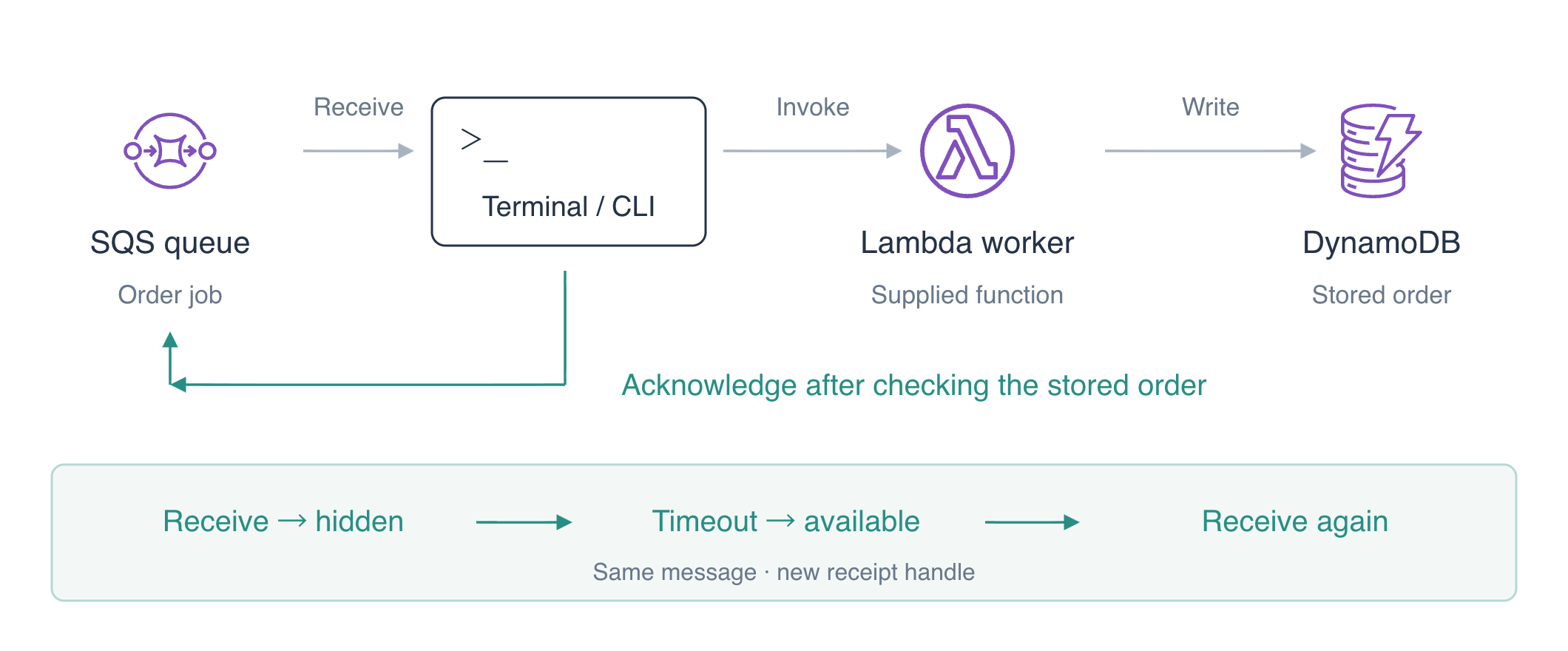
Prepare a Job for Redelivery
In this step, create a queue with a short default visibility timeout and send a job without processing it.
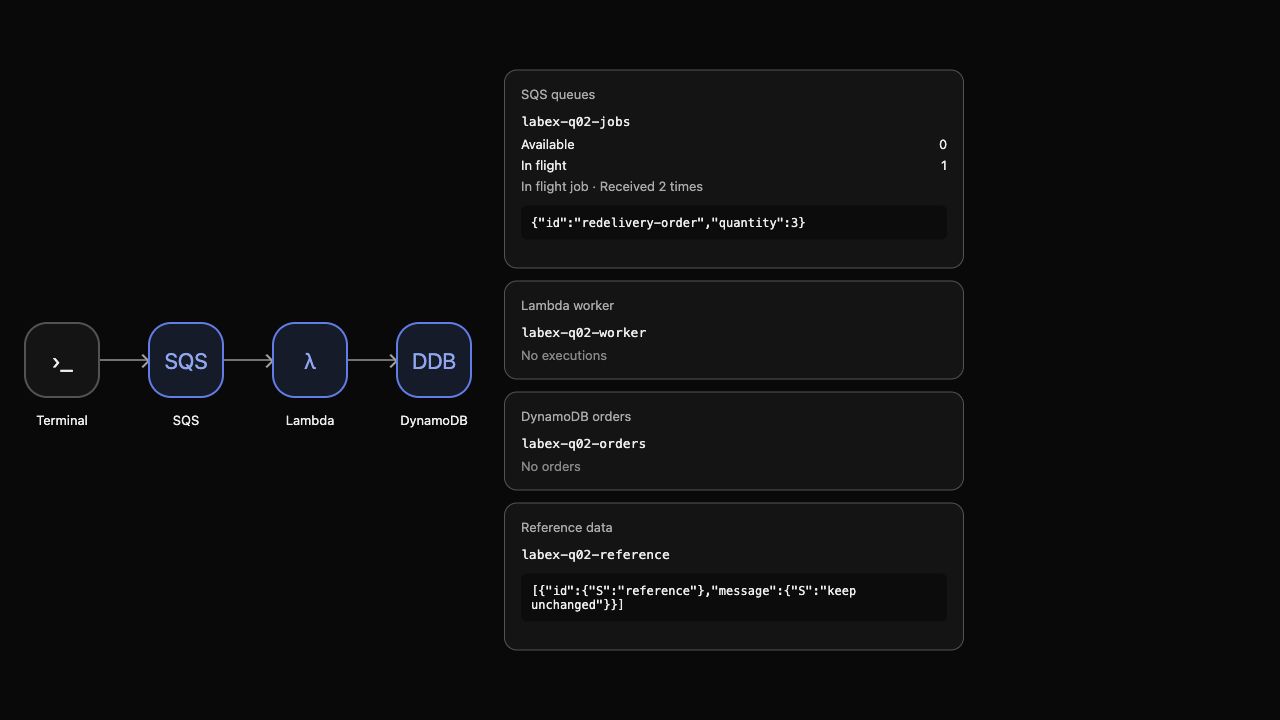
Use AWS View above Terminal to compare current queues, worker outcomes and stored orders. Preserve the unrelated reference data.
Work in the prepared project directory:
cd /home/labex/project
Create a Standard queue. Its default visibility timeout is 30 seconds, used when a receive request does not specify an override. $(...) saves the selected queue address for later commands.
QUEUE_URL=$(aws sqs create-queue \
  --queue-name labex-q02-jobs \
  --attributes VisibilityTimeout=30 \
  --query QueueUrl \
  --output text)
echo "$QUEUE_URL"
Send one JSON job:
aws sqs send-message \
  --queue-url "$QUEUE_URL" \
  --message-body '{"id":"redelivery-order","quantity":3}'
Read the default timeout and counts:
aws sqs get-queue-attributes \
  --queue-url "$QUEUE_URL" \
  --attribute-names VisibilityTimeout ApproximateNumberOfMessages ApproximateNumberOfMessagesNotVisible
Expect timeout 30, one available message and zero in-flight messages. In AWS View, the job has receive count zero, the supplied Lambda has no execution and there is no stored order. Sending accepts the job into the queue; it does not process it.
Observe Expiry and a Second Delivery
In this step, receive a job, leave it unacknowledged and observe a second delivery after its visibility expires.
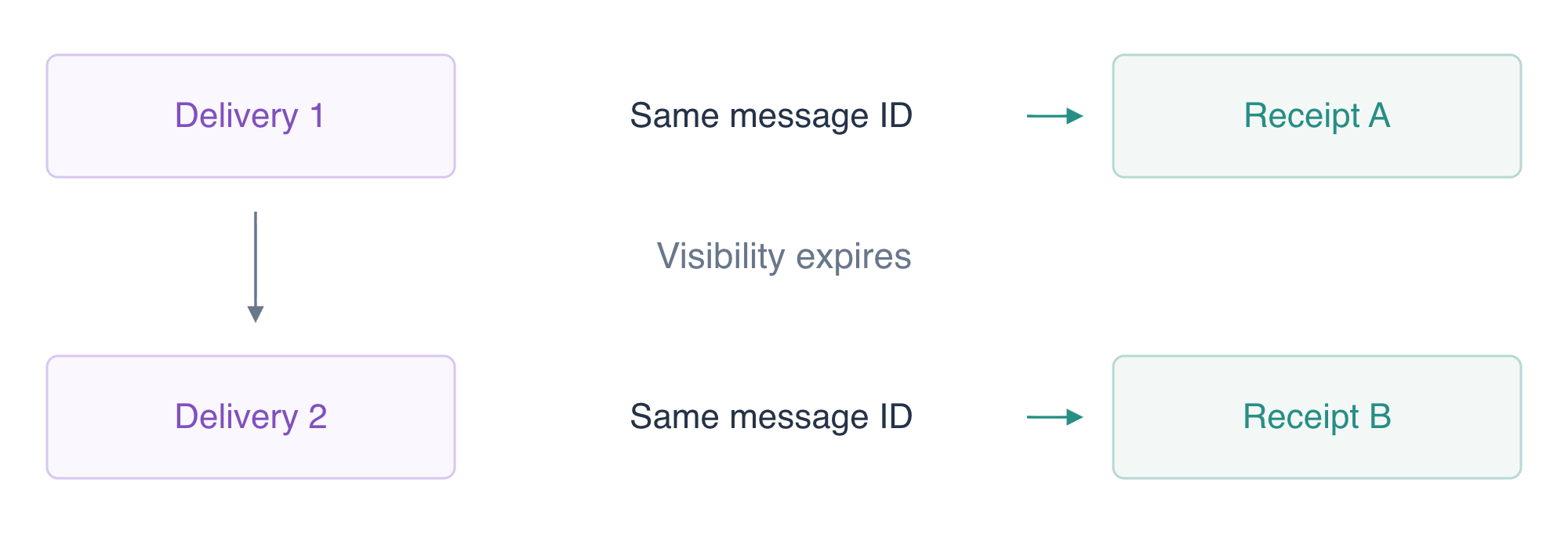
After visibility expires, the same message can be delivered again with a new receipt handle.
The following command block is one timed experiment. Read it before running it. The first receive overrides visibility to 10 seconds; the immediate second receive should find nothing while that job is hidden. sleep 12 waits for the deadline to pass. The final receive gives the returning job a 120-second window so you can inspect it without racing the short timeout. Each > saves a JSON response into a different file.
aws sqs receive-message --queue-url "$QUEUE_URL" --max-number-of-messages 1 --visibility-timeout 10 --message-system-attribute-names ApproximateReceiveCount --output json > first-delivery.json
aws sqs receive-message --queue-url "$QUEUE_URL" --max-number-of-messages 1 --wait-time-seconds 0 --output json > while-hidden.json
sleep 12
aws sqs receive-message --queue-url "$QUEUE_URL" --max-number-of-messages 1 --visibility-timeout 120 --message-system-attribute-names ApproximateReceiveCount --output json > second-delivery.json
The empty receive does not process or delete anything. Show that response:
cat while-hidden.json
Expect an empty response with no Messages. jq -s reads the two saved responses together: .[0] is the first delivery and .[1] is the second. Compare the message identity and delivery receipt without printing the handles:
jq -s '{
  same_message: (.[0].Messages[0].MessageId == .[1].Messages[0].MessageId),
  new_receipt: (.[0].Messages[0].ReceiptHandle != .[1].Messages[0].ReceiptHandle),
  receive_count: .[1].Messages[0].Attributes.ApproximateReceiveCount
}' first-delivery.json second-delivery.json
Expect same_message and new_receipt to be true, with receive count "2". A message ID identifies the queued message across attempts. A receipt handle identifies one delivery attempt, so always use the latest handle for visibility changes and deletion.
AWS View shows the same body in flight, received twice, with no order yet. This is actual redelivery following an unacknowledged attempt. No second send was needed. Standard queues can also deliver duplicates for other reasons; visibility management does not provide exactly-once processing.
Extend the Window and Finish the Work
In this step, extend the current delivery's processing window, complete the supplied worker and acknowledge only after verifying stored data.
Choose a processing window that gives this attempt time to finish. A longer window also delays recovery if the worker stops. Visibility is not a lock on the order record: even while a message is hidden, Standard queue delivery can repeat. Extending the window and preventing duplicate business effects solve different problems.
Select the latest receipt handle from the second response. jq -r writes a plain string suitable for the command argument.
RECEIPT_HANDLE=$(jq -r '.Messages[0].ReceiptHandle' second-delivery.json)
Change visibility for this specific delivery to 300 seconds:
aws sqs change-message-visibility \
  --queue-url "$QUEUE_URL" \
  --receipt-handle "$RECEIPT_HANDLE" \
  --visibility-timeout 300
This new interval begins when the change succeeds. It leaves the queue's default 30-second setting unchanged and does not acknowledge the job. If the 120-second inspection window already expired, receive the job again into second-delivery.json and select its latest handle before changing visibility. Extra attempts increase the receive count; use the timed experiment again in a fresh workspace if you need to repeat its exact two-delivery observation.
Convert the received body from JSON text into a job object:
jq '.Messages[0].Body | fromjson' second-delivery.json > job.json
Run the supplied Lambda, then inspect its result:
aws lambda invoke \
  --function-name labex-q02-worker \
  --payload fileb://job.json worker-response.json
cat worker-response.json
Expect processed: true, quantity 3 and total 850 cents. Read the persisted item independently:
aws dynamodb get-item \
  --table-name labex-q02-orders \
  --key '{"id":{"S":"redelivery-order"}}' \
  --consistent-read \
  --query Item
Only after confirming the actual stored result, delete with the current receipt handle:
aws sqs delete-message --queue-url "$QUEUE_URL" --receipt-handle "$RECEIPT_HANDLE"
aws sqs get-queue-attributes \
  --queue-url "$QUEUE_URL" \
  --attribute-names VisibilityTimeout ApproximateNumberOfMessages ApproximateNumberOfMessagesNotVisible
Expect default timeout 30, zero available and zero in-flight messages. AWS View shows an empty queue, actual worker input/result and the order redelivery-order/3/850. Visibility extension reduced the chance of another worker receiving the job while this attempt was working. It did not make the business action idempotent; later units teach a durable guard against duplicate effects.
Remove the Queue and Owned Result
In this step, remove your queue, order and execution logs while preserving supplied fixtures and reference data.
aws sqs delete-queue --queue-url "$QUEUE_URL"
aws dynamodb delete-item \
  --table-name labex-q02-orders \
  --key '{"id":{"S":"redelivery-order"}}'
aws logs delete-log-group --log-group-name /aws/lambda/labex-q02-worker
Use successful service queries to confirm absence and reference availability:
aws sqs list-queues
aws dynamodb scan --table-name labex-q02-orders --query Items
aws dynamodb scan --table-name labex-q02-reference --query Items
No queue URLs or order items remain. The reference item still says keep unchanged. AWS View shows the same cleanup state and the supplied worker remains available. Network or authentication errors cannot prove deletion.
Remove the local delivery and response files:
rm -f first-delivery.json while-hidden.json second-delivery.json job.json worker-response.json
Run the step check before ending your environment.
Summary
You observed an unacknowledged SQS job become available after visibility expiry, received the same message with a new receipt handle and a higher receive count, and extended the current delivery's processing time. You verified a real stored order before acknowledgment and cleaned up your queue, result and logs while preserving supplied resources.
For further reading, see the AWS reference on Visibility timeout, redelivery, and per-message changes.


