
Introduction
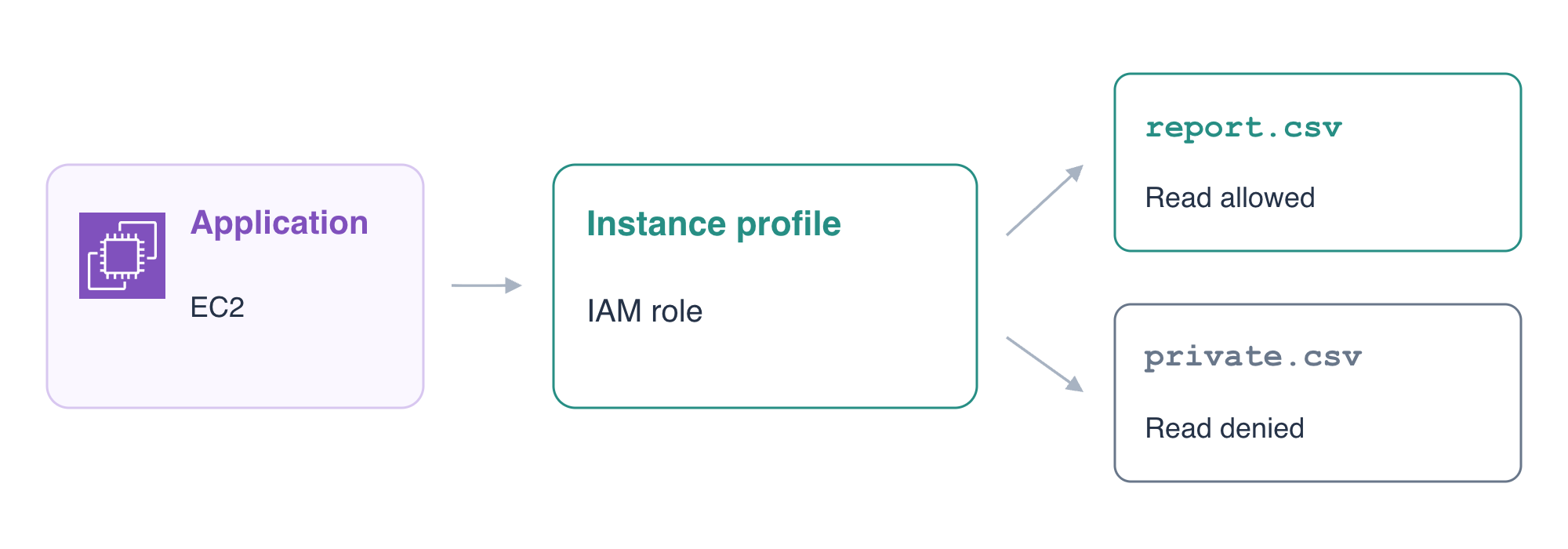
A running application needs to read a private report. You will connect an IAM role and instance profile through Terraform references, grant access to the intended object, and test the application's actual requests before and after permission removal.
This lab assumes Terraform references and EC2 deployment, plus AWS role trust, instance profiles and scoped S3 permissions. A fresh environment supplies the running application, its network, a private report bucket and an unrelated reference application. You will keep the supplied data and reference environment intact.
Certification Relevance
| Certification | Exam task | Practice |
|---|---|---|
| Cloud Practitioner (CLF-C02) | Task 2.3 | IAM roles and least-privilege object permissions. |
| Solutions Architect – Associate (SAA-C03) | Task 1.1 | Role-based workload access with scoped permissions. |
| CloudOps Engineer – Associate (SOA-C03) | Task 4.1 | Basic IAM role and policy implementation. |
Lab Overview
Give the Running Application a Role Identity
In this step, you will define an EC2 role and instance profile, attach the profile to the supplied application, and observe its effective workload identity.
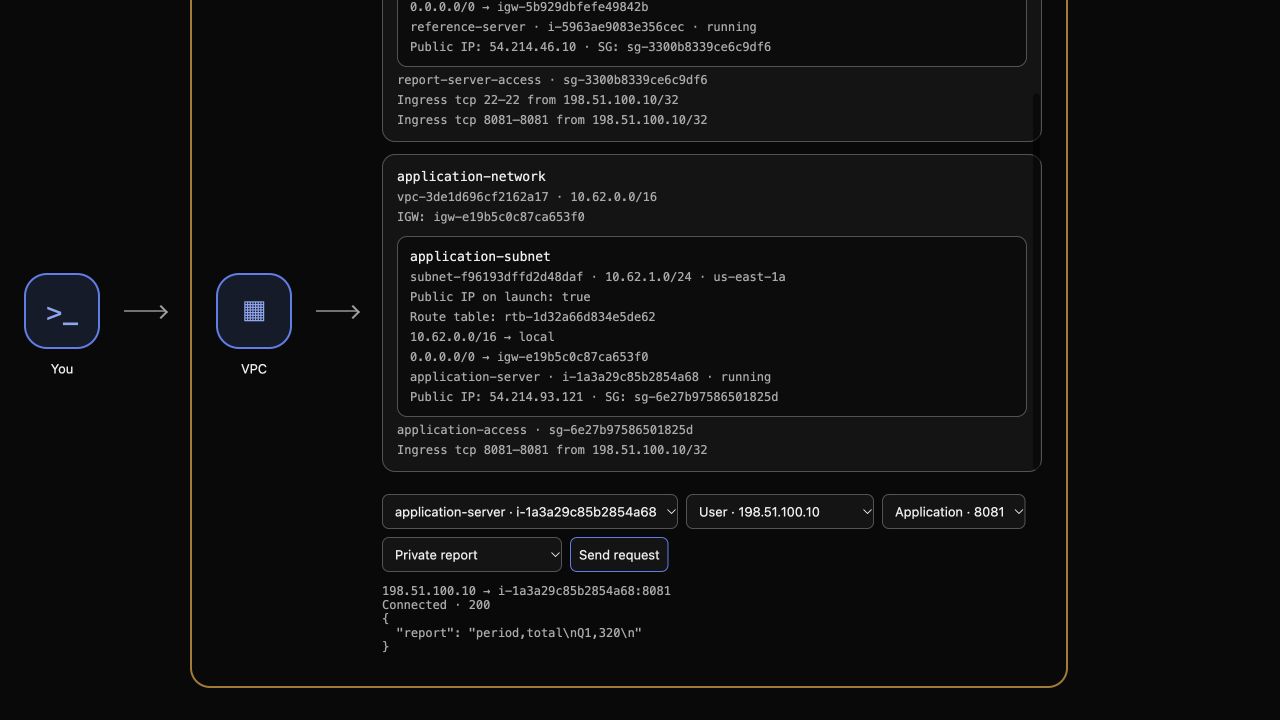
The upper AWS View displays the same resources queried in Terminal. Its Request path selector can request application health, workload identity or either private object. Terminal uses the prepared operator identity; the application uses its own instance role. A successful operator query does not prove that the application has permission.
Inspect the prepared root and record the instance ID:
cd /home/labex/project/application-reports
cat terraform.tfvars.json
cat application.tf
terraform state list
INSTANCE_ID=$(terraform output -raw instance_id)
echo "$INSTANCE_ID"
REPORT_BUCKET=$(terraform output -raw report_bucket)
echo "$REPORT_BUCKET"
The existing state manages the application instance. The network, AMI, bucket and reference application were supplied separately. User Data already points the application at report.csv in the prepared bucket, but contains no access key.
In AWS View, select application-server, User · 198.51.100.10, Application · 8081 and Health, then click Send request. Expect Connected · 200 and Report application. Choose Private report and send again. The application cannot read it yet and reports Connected · 503 with Application storage unavailable: the HTTP application is reachable, but it has no workload credentials.
An IAM role's trust policy controls who can assume it. An instance profile connects the role to EC2. Neither object, by itself, grants permission to read an S3 object. Create those two resources:
cat > identity.tf <<'HCL'
resource "aws_iam_role" "reports" {
  name = "tf-report-reader"
  assume_role_policy = jsonencode({
    Version = "2012-10-17"
    Statement = [{
      Effect = "Allow"
      Principal = { Service = "ec2.amazonaws.com" }
      Action = "sts:AssumeRole"
    }]
  })
}

resource "aws_iam_instance_profile" "reports" {
  name = "tf-report-reader"
  role = aws_iam_role.reports.name
}
HCL
sed -i '/vpc_security_group_ids/a\  iam_instance_profile = aws_iam_instance_profile.reports.name' application.tf
terraform fmt
terraform validate
terraform plan
The sed command inserts the instance-profile attribute after the existing security-group attribute. Its resource reference connects the running instance to the profile, which references the role. Review the plan: create the role/profile and update the existing instance association, without replacing the instance or changing User Data.
Apply and enter yes:
terraform apply
Inspect the native association and profile:
aws ec2 \
  describe-iam-instance-profile-associations \
  --filters "Name=instance-id,Values=$INSTANCE_ID" \
  --query 'IamInstanceProfileAssociations[].{Instance:InstanceId,State:State,Profile:IamInstanceProfile.Arn}'
aws iam \
  get-instance-profile \
  --instance-profile-name tf-report-reader \
  --query 'InstanceProfile.{Name:InstanceProfileName,Roles:Roles[].RoleName}'
In AWS View, choose Workload identity for application-server and send a request. Expect Connected · 200 and an ARN containing assumed-role/tf-report-reader/. This comes from STS inside the guest using temporary role credentials, not from the Terminal operator.
Choose Private report and send again. Expect Connected · 403 and Access denied. The role identity now works, but there is no object-read permission yet. This is an intentional authorization failure.
Grant Access to Only the Intended Report
In this step, you will grant the application's role one object-read permission and test both the permitted report and an unrelated private object.
A role's permissions policy answers what its session may do. Use an identity policy that permits s3:GetObject for the exact report.csv ARN. The bucket name comes from the supplied input; the role comes from the resource reference. No static credential belongs in User Data.
cat > permissions.tf <<'HCL'
resource "aws_iam_role_policy" "report" {
  name = "ReadApplicationReport"
  role = aws_iam_role.reports.id
  policy = jsonencode({
    Version = "2012-10-17"
    Statement = [{
      Effect = "Allow"
      Action = ["s3:GetObject"]
      Resource = ["arn:aws:s3:::${var.report_bucket}/report.csv"]
    }]
  })
}
HCL
terraform fmt
terraform validate
terraform plan
The plan adds one policy. It must not replace the application or create a new bucket. Apply and enter yes:
terraform apply
In AWS View, keep application-server, User and port 8081 selected. Choose Private report and send a request. Expect Connected · 200, with the report:
period,total
Q1,320
Choose Unrelated private object and send another request. Expect Connected · 403 and Access denied. The application can read its own report while private.csv remains outside the grant. This 403 is an actual S3 authorization result returned by the reached application, not a failed network connection.
Return to Workload identity and send again. Its ARN must still identify the workload role. Confirm convergence:
terraform plan
Expect No changes.
Revoke the Permission and Test the Actual Effect
In this step, you will remove only the read policy and demonstrate that a running application with a valid role identity no longer has report access.
Removing permission is different from detaching the profile or stopping the instance. Keep the role and profile in place, remove the policy resource configuration, then review the deletion:
rm permissions.tf
terraform plan
Expect the read policy to be destroyed, with no instance replacement. Apply and enter yes:
terraform apply
Read the remaining inline-policy names independently:
aws iam \
  list-role-policies \
  --role-name tf-report-reader \
  --query PolicyNames
Expect []. In AWS View, send Workload identity for the application. It still returns Connected · 200 with the same role name. Then send Private report and Unrelated private object requests. Both must return Connected · 403 and Access denied. The denied read proves permission removal affects actual workload requests even though the application and its role association still exist.
terraform plan
Expect No changes.
Remove Managed Resources and Keep the Supplied Data
In this step, you will remove the managed instance, profile and role while retaining the external report bucket, its objects and the reference environment.
The policy has already been removed. Review the remaining deletion scope:
terraform plan -destroy
Expect the three managed resources: the application instance, instance profile and IAM role. Then destroy them and enter yes:
terraform destroy
The same instance must be natively terminated:
aws ec2 \
  describe-instances \
  --instance-ids "$INSTANCE_ID" \
  --query 'Reservations[].Instances[].{ID:InstanceId,State:State.Name}'
terraform state list
Expect terminated and no managed resources in state. Query the role and profile lists using exact names; successful empty lists establish absence without treating an authentication failure as cleanup:
aws iam list-roles --query "Roles[?RoleName=='tf-report-reader'].RoleName"
aws iam list-instance-profiles --query "InstanceProfiles[?InstanceProfileName=='tf-report-reader'].InstanceProfileName"
Both return []. The bucket was supplied outside this state. Use the Terminal operator to read both retained objects and inspect their bytes. These operator reads check preservation; the application's restricted access was tested separately through its role.
aws s3api get-object --bucket "$REPORT_BUCKET" --key report.csv /tmp/retained-report.csv
cat /tmp/retained-report.csv
aws s3api get-object --bucket "$REPORT_BUCKET" --key private.csv /tmp/retained-private.csv
cat /tmp/retained-private.csv
The report remains period,total / Q1,320; the unrelated object remains private,retained. In AWS View, select reference-server, User, Application · 8081 and Health, then send a request. Expect Connected · 200 and Reference application.
Keep the Terraform files for review. A later ordinary plan would propose recreation of the remaining configuration; successful destruction does not require deleting that configuration.
Summary
You connected an application's instance to a role through Terraform references, distinguished role identity from object permission, and tested both a successful private-report read and an unrelated-object denial. You then revoked the grant, observed the actual authorization failure, and removed managed resources while preserving supplied data and the reference application.