Introduction
A preview working root selects the wrong environment's state, although both environments and their valid state objects already exist. Establish the correct root-to-key relationship and make a preview-only change without harming dev.
You need local modules, remote S3 state and native locking concepts from earlier units. This independent fresh environment includes both report stores and both states; no previous VM or personal AWS account is required.
Certification Relevance
| Certification | Exam task | Practice |
|---|---|---|
| CloudOps Engineer – Associate (SOA-C03) | Task 3.1, Skill 3.1.6 | Foundational Terraform practice: maintain infrastructure through reviewed configuration and state changes while preserving working resources. |
Lab Overview
Identify Each Environment Before Making Changes
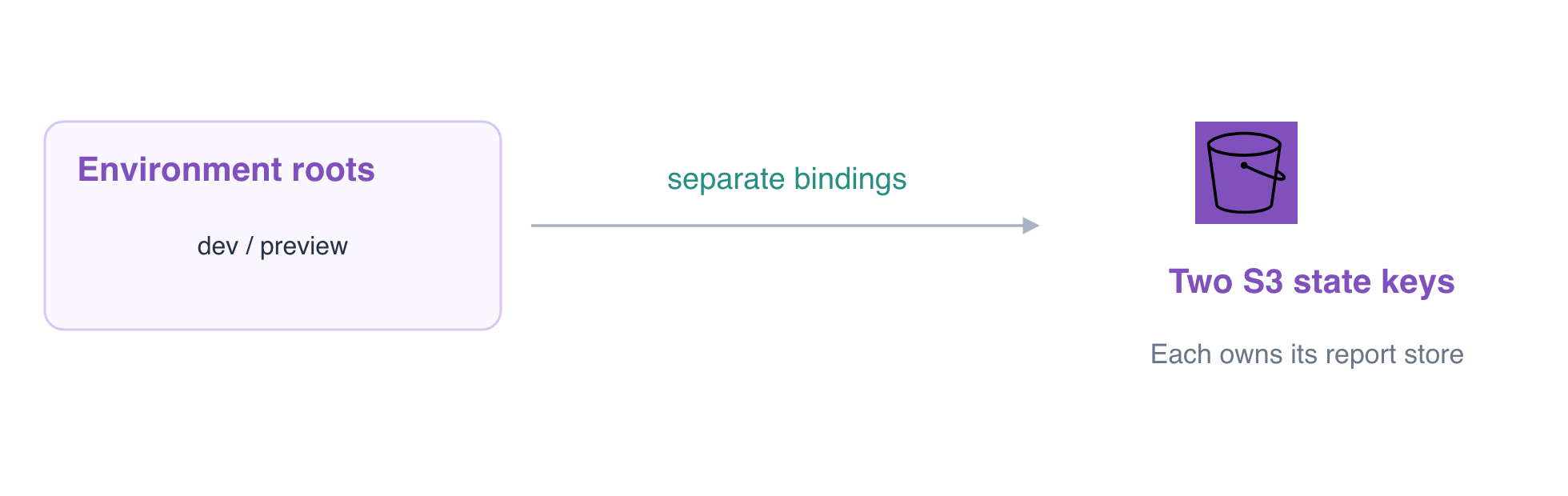
In this step, distinguish two environments from two copies of one environment. Each root below has its own variables and existing report bucket. Both valid remote states already exist in the versioned environment-team-state backend.
cd /home/labex/project/environment-states
cat dev/terraform.tfvars
cat preview/terraform.tfvars
The inputs name isolated-dev-reports and isolated-preview-reports. A root directory or variable file does not automatically isolate state: the backend bucket and key select the mapping Terraform will use.
Inspect the preview root's selected resource:
terraform -chdir=preview state show aws_s3_bucket.reports
It currently reports the dev bucket ID, even though the preview inputs describe another bucket. Inspect its current backend choice:
cat preview/environment.s3.tfbackend
The cached backend and file select environments/dev.tfstate. The intended keys already exist separately:
aws s3api \
  list-objects-v2 \
  --bucket environment-team-state \
  --prefix environments/
Confirm that both environments/dev.tfstate and environments/preview.tfstate exist. AWS View also shows both report stores; expand their report.txt objects to see the distinct original data.
Inspect the unsafe preview plan without applying it:
terraform -chdir=preview plan
It tries to reconcile preview inputs with dev's mapping and can propose replacing the wrong bucket. Do not apply it. A different variable value is not an instruction to take ownership of another environment's state.
Select the Existing Preview State Without Copying State
In this step, rebind the preview root to its already valid state. Migration copies a current mapping into a different backend. Reconfiguration discards the cached backend choice and initializes the requested existing backend without copying the old mapping.
Keep dev's file unchanged. Correct preview's bucket/key choice:
cat > preview/environment.s3.tfbackend <<'HCL'
bucket       = "environment-team-state"
key          = "environments/preview.tfstate"
region       = "us-east-1"
use_lockfile = true
HCL
Initialize that existing key with -reconfigure. The supplied connection file remains separate from your environment selection:
terraform -chdir=preview init \
  -reconfigure \
  -backend-config=backend-connection.hcl \
  -backend-config=environment.s3.tfbackend
Do not use -migrate-state or -force-copy here. Copying the selected dev state into preview's valid key would overwrite preview's management record rather than select it.
terraform -chdir=preview state show aws_s3_bucket.reports
terraform -chdir=preview plan
Expect the ID isolated-preview-reports and No changes. Check dev independently:
terraform -chdir=dev state show aws_s3_bucket.reports
terraform -chdir=dev plan
Dev still selects isolated-dev-reports, also with No changes. Both valid keys and both original reports must remain intact; this is environment selection, not damaged-state recovery.
Prove a Preview Change Stays in Preview
In this step, change only the preview revision after establishing its correct binding. terraform.tfvars supplies values for that root's declared variables; the source configuration and resource address can remain the same across environments.
cat > preview/terraform.tfvars <<'HCL'
bucket_name = "isolated-preview-reports"
environment = "preview"
revision = "two"
HCL
Review the preview plan:
terraform -chdir=preview plan -out=preview.tfplan
Expect 0 to add, 1 to change, 0 to destroy, affecting the preview revision tag only. Apply the saved plan from that same root:
terraform -chdir=preview apply preview.tfplan
Inspect live tags for each environment:
aws s3api \
  get-bucket-tagging \
  --bucket isolated-preview-reports
Preview should have Environment=preview and Revision=two.
aws s3api \
  get-bucket-tagging \
  --bucket isolated-dev-reports
Dev should still have Environment=dev and Revision=one. Read both original reports:
aws s3 \
  cp s3://isolated-preview-reports/report.txt -
aws s3 \
  cp s3://isolated-dev-reports/report.txt -
Expect preview daily report and dev daily report. The background check also compares dev's original state bytes, both object versions and the resource mappings in both backend keys.
terraform -chdir=preview plan
terraform -chdir=dev plan
Both roots should report No changes. Keep both report stores and their backend for their owners. Directory names, for_each keys and Terraform variables do not replace explicit state isolation; another working copy of dev should intentionally select the same dev key, whereas preview must select its own key.
Summary
You distinguished working copies from environments, selected an existing state with backend reconfiguration, and proved that a preview-only update left dev resources, data and state unchanged.