



Introduction
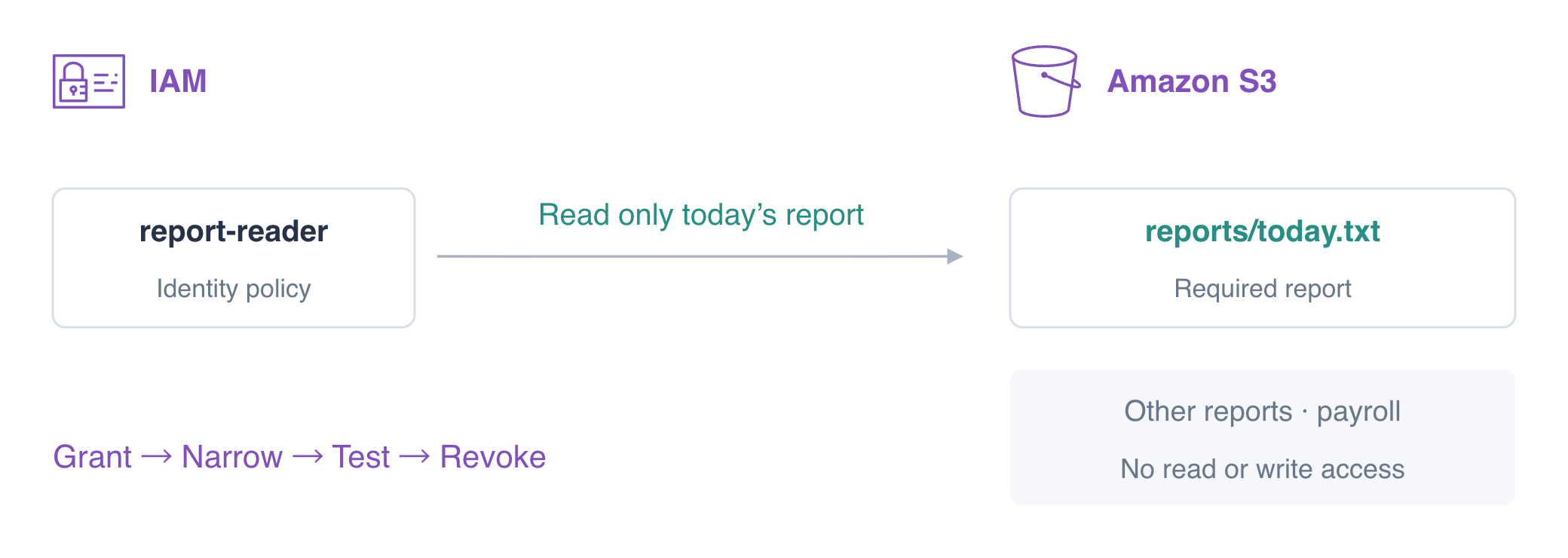
A report reader needs today's report while leaving other reports and payroll private. You will grant that read, narrow its scope, test the permission boundary, and revoke it before cleanup.
Use what you learned about caller identity and ARNs in AWS Foundations and object downloads in S3. This fresh VM prepares the CLI and two identities: default manages the exercise; reader represents the job. Work in /home/labex/project and compare requests with AWS View above Terminal.
Certification Relevance
| Certification | Exam task | Practice |
|---|---|---|
| Cloud Practitioner (CLF-C02) | Task 2.3 | IAM policies, action/resource scope, and least privilege. |
| Solutions Architect – Associate (SAA-C03) | Task 1.1 | IAM policies, action/resource scope, and least privilege. |
| Developer – Associate (DVA-C02) | Task 2.1 | IAM policies, action/resource scope, and least privilege. |
| CloudOps Engineer – Associate (SOA-C03) | Task 4.1 | IAM policies, action/resource scope, and least privilege. |
| Security – Specialty (SCS-C03) | Task 4.2 | Foundational practice: IAM policies, action/resource scope, and least privilege. |
| Data Engineer – Associate (DEA-C01) | Task 4.2 | Foundational practice: IAM policies, action/resource scope, and least privilege. |
| DevOps Engineer – Professional (DOP-C02) | Task 6.1 | Foundational practice: IAM policies, action/resource scope, and least privilege. |
| Solutions Architect – Professional (SAP-C02) | Task 2.3 | Foundational practice: IAM policies, action/resource scope, and least privilege. |
Lab Overview
Give the Reader Report Access
In this step, you will write and attach an identity policy that permits reading reports. An identity policy is attached to a user, group, or role. It describes allowed or denied actions; it does not contain access keys.
In S3 you downloaded object bytes. Here the reporting job needs the same download under its own restricted identity: the operator changes permissions, and the reader tests the result. The report data is already supplied so you can focus on authorization.
AWS Identity and Access Management (IAM) controls which identity may perform an action on a resource. Least privilege grants only what a job needs.
An AWS CLI profile selects credentials and settings; it does not grant permissions. Here default is the exercise operator, while reader selects report-reader. First confirm both identities. --profile reader selects the job for one command. get-caller-identity reports the caller's identity without printing credentials.
cd /home/labex/project
aws sts get-caller-identity --query Arn --output text
The default ARN ends with user/iam01-operator. Use this operator profile for policy administration; use the reader profile when testing the job. This lab operator is prepared for administration. A production reporting application would use a restricted role, which you will practice later.
aws sts get-caller-identity --profile reader --query Arn --output text
The reader ARN ends with user/report-reader. An ARN, or Amazon Resource Name, identifies a resource. For an S3 object it includes the bucket and complete object key; a bucket ARN alone does not identify an object inside it.
The reader initially has no policy. Test a read before granting anything:
aws s3api get-object --profile reader --bucket labex-iam01-reports --key reports/today.txt before.txt || true
Expect AccessDenied, not a report download. || true lets this intentionally failing command finish without stopping a pasted command sequence. Read the error: a connection error is not proof of an IAM denial.
A JSON policy uses three essential fields: Effect is Allow or Deny; Action names a service operation; Resource limits which ARN that operation can affect. s3:GetObject permits reading object bytes. The * below matches object keys in the reports/ prefix, including today and yesterday. It does not match private/ or another bucket. Version selects the policy language, not the report version.
The following here-document writes the lines between JSON markers to report-policy.json. > replaces that local file, and the quoted marker keeps the shell from expanding its contents.
cat > report-policy.json <<'JSON'
{
  "Version": "2012-10-17",
  "Statement": [
    {
      "Effect": "Allow",
      "Action": "s3:GetObject",
      "Resource": "arn:aws:s3:::labex-iam01-reports/reports/*"
    }
  ]
}
JSON
Writing a file alone does not authorize the reader. put-user-policy attaches an inline policy, a policy stored directly on this user. --policy-name identifies that policy; using the same name later updates it. file:// tells the CLI to read the document from your local file.
aws iam put-user-policy \
  --user-name report-reader \
  --policy-name ReportRead \
  --policy-document file://report-policy.json
A successful update normally prints no output. Now request the reports using the reader's credentials. The last argument is the local destination file.
aws s3api get-object \
  --profile reader \
  --bucket labex-iam01-reports \
  --key reports/today.txt today.txt
cat today.txt
Expect Daily orders: 145. S3 response fields such as ETag identify the downloaded object; the file itself contains the report bytes.
aws s3api get-object \
  --profile reader \
  --bucket labex-iam01-reports \
  --key reports/yesterday.txt yesterday.txt
Yesterday also succeeds because the policy covers the entire reports prefix. The business needs only today's report, so you will now reduce that scope.
Narrow the Resource to Today's Report
In this step, you will replace a prefix grant with one object ARN and prove that other resources remain inaccessible. An implicit deny means no applicable policy allows the request. You do not need a separate Deny for every unrelated object.
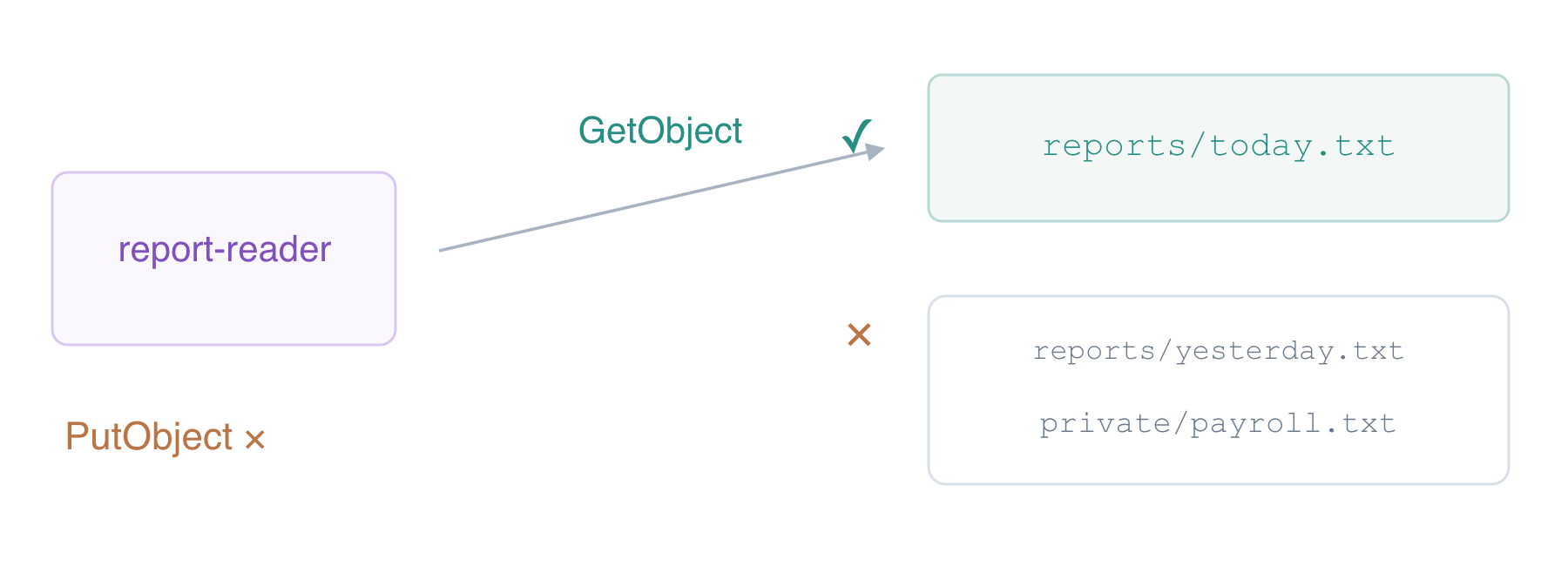
Replace the local policy. The only change is the Resource: the exact key reports/today.txt replaces reports/*.
cat > report-policy.json <<'JSON'
{
  "Version": "2012-10-17",
  "Statement": [
    {
      "Effect": "Allow",
      "Action": "s3:GetObject",
      "Resource": "arn:aws:s3:::labex-iam01-reports/reports/today.txt"
    }
  ]
}
JSON
Update the same inline policy on the same reader. Editing the file does not update IAM until you send this command.
aws iam put-user-policy \
  --user-name report-reader \
  --policy-name ReportRead \
  --policy-document file://report-policy.json
Read back the stored policy. --query PolicyDocument selects the document from the response; it does not change the permissions.
aws iam get-user-policy \
  --user-name report-reader \
  --policy-name ReportRead \
  --query PolicyDocument
Check that the Resource ends in reports/today.txt. Then test the reader again.
aws s3api get-object \
  --profile reader \
  --bucket labex-iam01-reports \
  --key reports/today.txt today.txt
The required report still downloads. Each following request should fail with AccessDenied because its object ARN does not match the grant.
aws s3api get-object --profile reader --bucket labex-iam01-reports --key reports/yesterday.txt yesterday-denied.txt || true
aws s3api get-object --profile reader --bucket labex-iam01-reports --key private/payroll.txt payroll-denied.txt || true
aws s3api get-object --profile reader --bucket labex-iam01-reference --key reference.txt reference-denied.txt || true
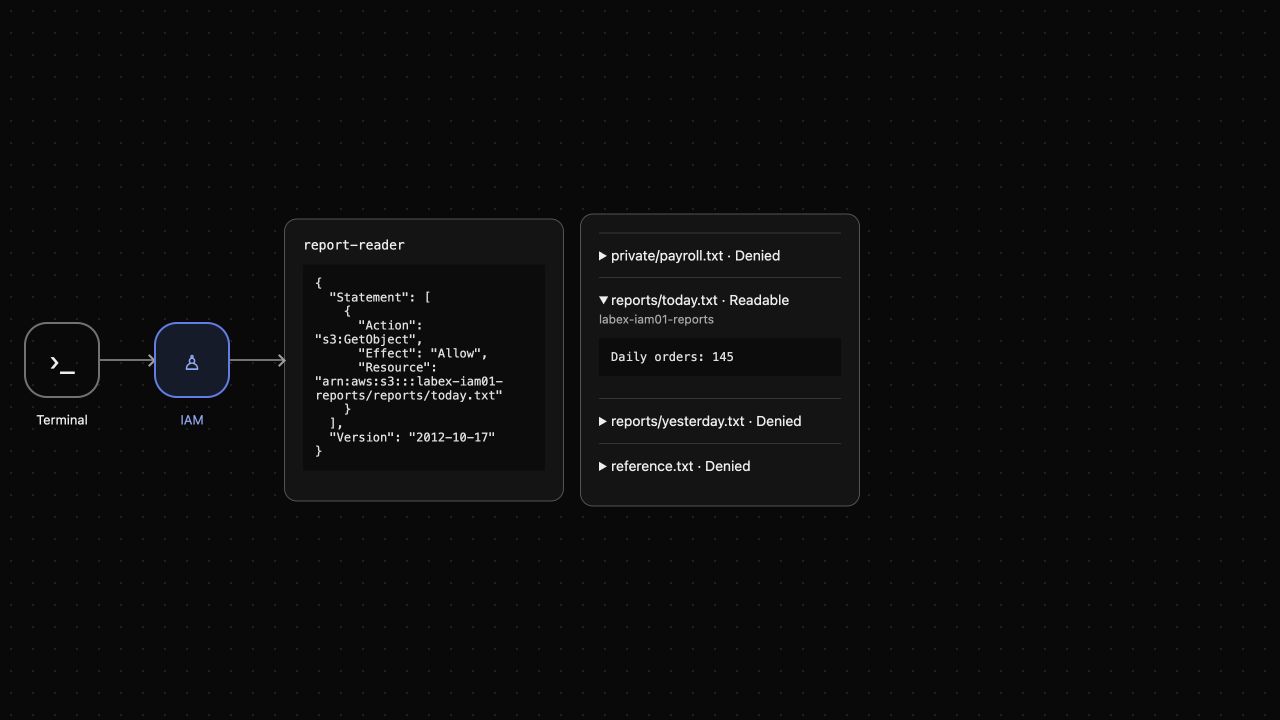
These objects exist; the operator can read them. A NoSuchKey response would diagnose a missing object, while these permission errors demonstrate the reader's resource boundary. In the AWS View, today is Readable and the other three objects are Denied. This view issues actual read requests as the same reader.
Distinguish an Explicit Deny from a Missing Allow
In this step, you will protect the private prefix explicitly and test the action boundary. An explicit deny is a matching Deny statement. It takes precedence over an Allow from another applicable identity policy. Statement order does not make an Allow override it.
Add a second statement while keeping the exact read grant. s3:* matches all S3 actions, but this Deny is limited to objects under this bucket's private/ prefix. It does not deny access to today's report.
cat > report-policy.json <<'JSON'
{
  "Version": "2012-10-17",
  "Statement": [
    {
      "Effect": "Allow",
      "Action": "s3:GetObject",
      "Resource": "arn:aws:s3:::labex-iam01-reports/reports/today.txt"
    },
    {
      "Effect": "Deny",
      "Action": "s3:*",
      "Resource": "arn:aws:s3:::labex-iam01-reports/private/*"
    }
  ]
}
JSON
aws iam put-user-policy \
  --user-name report-reader \
  --policy-name ReportRead \
  --policy-document file://report-policy.json
The Deny reinforces the private boundary. To observe its precedence, temporarily attach a second read grant for this bucket. This is a controlled test; remove it immediately afterward.
cat > temporary-read.json <<'JSON'
{"Version":"2012-10-17","Statement":[{"Effect":"Allow","Action":"s3:GetObject","Resource":"arn:aws:s3:::labex-iam01-reports/*"}]}
JSON
aws iam put-user-policy \
  --user-name report-reader \
  --policy-name TemporaryRead \
  --policy-document file://temporary-read.json
aws s3api get-object --profile reader --bucket labex-iam01-reports --key private/payroll.txt payroll-denied.txt || true
Expect AccessDenied even though TemporaryRead allows this key. The matching explicit Deny wins. Remove the temporary grant to restore least privilege.
aws iam delete-user-policy --user-name report-reader --policy-name TemporaryRead
A read grant does not allow writes. upload.txt is a supplied unapproved replacement. put-object attempts to store its bytes at today's key, and the reader must be refused.
aws s3api put-object --profile reader --bucket labex-iam01-reports --key reports/today.txt --body upload.txt || true
Expect AccessDenied for PutObject; do not treat missing files or service failures as this result. Read today again to confirm that the failed write did not change it.
aws s3api get-object \
  --profile reader \
  --bucket labex-iam01-reports \
  --key reports/today.txt today.txt
cat today.txt
It must still contain Daily orders: 145. Read back the final policy and confirm the narrow Allow and private Deny.
aws iam get-user-policy \
  --user-name report-reader \
  --policy-name ReportRead \
  --query PolicyDocument
Revoke Access and Clean Up Owned Resources
In this step, you will withdraw the reader's policy and remove only this exercise's report bucket. IAM policy cleanup and data cleanup are separate: deleting a policy does not delete objects, and deleting objects does not revoke credentials.
Use the default operator to remove ReportRead. delete-user-policy removes an inline policy by name.
aws iam delete-user-policy --user-name report-reader --policy-name ReportRead
aws iam list-user-policies --user-name report-reader
Expect PolicyNames to be empty. While the report still exists, test that the reader has lost access.
aws s3api get-object --profile reader --bucket labex-iam01-reports --key reports/today.txt revoked.txt || true
Expect AccessDenied. Now remove the three exact owned keys as the operator. The reference bucket belongs to the prepared platform fixture and must remain intact.
aws s3api delete-object --bucket labex-iam01-reports --key reports/today.txt
aws s3api delete-object --bucket labex-iam01-reports --key reports/yesterday.txt
aws s3api delete-object --bucket labex-iam01-reports --key private/payroll.txt
aws s3api list-objects-v2 --bucket labex-iam01-reports
Check that KeyCount is 0 and no objects appear in Contents. This successful authenticated response shows that the owned bucket is empty before deletion.
aws s3api delete-bucket --bucket labex-iam01-reports
aws s3api list-buckets --query 'Buckets[].Name'
Only labex-iam01-reference remains. Confirm its original bytes:
aws s3api get-object --bucket labex-iam01-reference --key reference.txt reference.txt
cat reference.txt
Expect Platform reference: keep. The AWS View now shows No inline policy and Reports bucket removed. A service outage would be shown as unavailable, not as successful cleanup. The disposable prepared identities are reclaimed when your lab environment ends; you have removed the learner-created permissions and the exercise data while preserving the unrelated fixture.
Summary
You attached and revised an IAM identity policy, used Action and Resource to restrict a reporting job, compared implicit and explicit denies, and proved that read permission does not authorize a write. You revoked the policy and removed only the owned data. Test both the intended success and the forbidden operations whenever you review access; a stored policy alone is not proof that an application is correctly authorized.
For further reading, see the AWS reference on IAM policy types and permission statements.


