



Introduction
Valid orders fail while an inventory request succeeds. You will compare application metrics, trace a failed request in logs, repair a small configuration fault, and confirm recovery without erasing the failure history.
Complete Find a Failed Request in CloudWatch Logs and Measure Application Health with CloudWatch Metrics first. This lab supplies its own application and incident.
Certification Relevance
| Certification | Exam task | Practice |
|---|---|---|
| CloudOps Engineer – Associate (SOA-C03) | Task 1.2 | Diagnosing application failures with logs and metrics. |
| Developer – Associate (DVA-C02) | Task 4.1 | Diagnosing application failures with logs and metrics. |
| DevOps Engineer – Professional (DOP-C02) | Task 5.3 | Foundational practice: Diagnosing application failures with logs and metrics. |
| Solutions Architect – Professional (SAP-C02) | Task 3.1 | Foundational practice: Diagnosing application failures with logs and metrics. |
| Data Engineer – Associate (DEA-C01) | Task 3.3 | Foundational practice: Diagnosing application failures with logs and metrics. |
Lab Overview
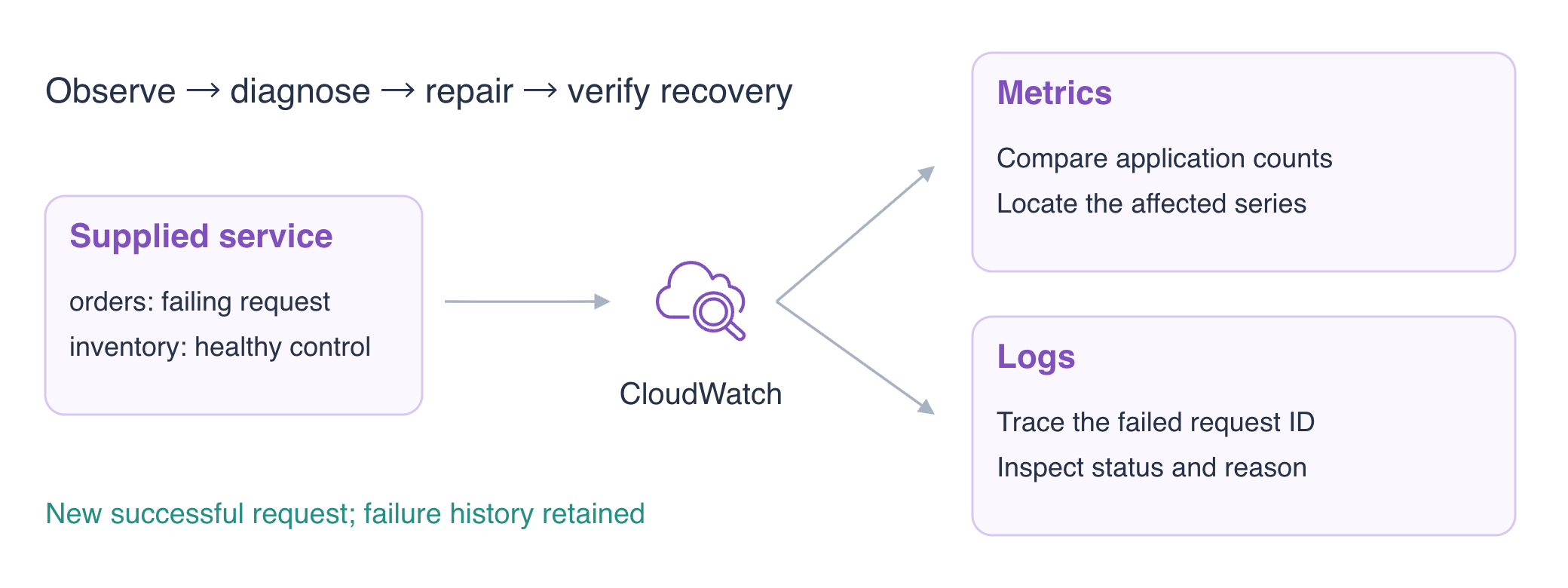
Reproduce the Incident and Compare a Control
In this step, you will reproduce a valid order request that unexpectedly fails. The independently prepared service has an ordinary configuration fault. Its logs and metrics begin empty, so the observations come from your own requests.
cd /home/labex/project
curl -i -H 'Content-Type: application/json' -H 'X-Request-ID: o05-failure-1' -d '{"sku":"apple","quantity":1}' http://127.0.0.1:5050/orders
curl -i -H 'Content-Type: application/json' -H 'X-Request-ID: o05-failure-2' -d '{"sku":"apple","quantity":1}' http://127.0.0.1:5050/orders
curl -i -H 'Content-Type: application/json' -H 'X-Request-ID: o05-control' -d '{"sku":"apple","quantity":1}' http://127.0.0.1:5050/inventory
Expect two orders HTTP 503 stock_unavailable responses and an inventory HTTP 200 accepted response for the same valid synthetic apple request. The control suggests an orders-specific problem; it does not prove the entire system is healthy.
Use a recent UTC window and exact Application dimensions to compare server-error counts. A metric summarizes frequency, while individual logs can explain a specific response.
START=$(date -u -d '15 minutes ago' +%Y-%m-%dT%H:%M:%SZ)
echo "$START"
Save the query window’s end time in UTC:
END=$(date -u -d '1 minute' +%Y-%m-%dT%H:%M:%SZ)
echo "$END"
aws cloudwatch get-metric-statistics \
  --namespace LabEx/O05 \
  --metric-name Errors \
  --dimensions Name=Application,Value=orders \
  --start-time "$START" \
  --end-time "$END" \
  --period 60 \
  --statistics Sum
aws cloudwatch get-metric-statistics \
  --namespace LabEx/O05 \
  --metric-name Errors \
  --dimensions Name=Application,Value=inventory \
  --start-time "$START" \
  --end-time "$END" \
  --period 60 \
  --statistics Sum
Expect orders Sum2 and inventory Sum0 across the returned buckets. Keep /labex/o05-reference unchanged.
Connect the Error Count to Request Logs
In this step, you will connect the summarized symptom with concrete failed requests. Query ERROR first, then the exact request ID. A quoted phrase matches the full request_id token; it avoids mixing similarly named requests.
aws logs filter-log-events \
  --log-group-name /labex/o05-application \
  --filter-pattern ERROR \
  --query 'events[].{Time:timestamp,Message:message}'
aws logs filter-log-events \
  --log-group-name /labex/o05-application \
  --filter-pattern '"request_id=o05-failure-1"' \
  --query 'events[].message'
Both failures identify application=orders, status 503 and reason stock_unavailable. The metrics and logs cover the same requests in the recent window. Inspect the application settings to locate the mismatch with the valid apple request.
cat app.json
accepted_sku is pear for orders. Inventory uses the expected apple setting independently. This is a small configuration fault; replacing the service or disabling observability would hide the symptom without fixing it.
The failed request asked for apple, while the orders configuration accepts pear. That mismatch is a testable explanation for stock_unavailable; the healthy inventory request helps narrow the scope. The next step tests this explanation by changing the orders setting and repeating a valid request. Recovery needs a successful response and its matching new log, rather than the configuration edit alone.
Repair the Setting and Verify Recovery
In this step, you will change the accepted SKU and prove that the business response recovers while telemetry remains enabled. Replace the ordinary configuration with the corrected setting.
cat > app.json <<'JSON'
{"logging": {"enabled": true, "group": "/labex/o05-application", "stream": "requests"}, "metrics": {"enabled": true, "namespace": "LabEx/O05"}, "accepted_sku": "apple"}
JSON
curl -i -H 'Content-Type: application/json' -H 'X-Request-ID: o05-recovered' -d '{"sku":"apple","quantity":1}' http://127.0.0.1:5050/orders
aws logs filter-log-events \
  --log-group-name /labex/o05-application \
  --filter-pattern '"request_id=o05-recovered"' \
  --query 'events[].message'
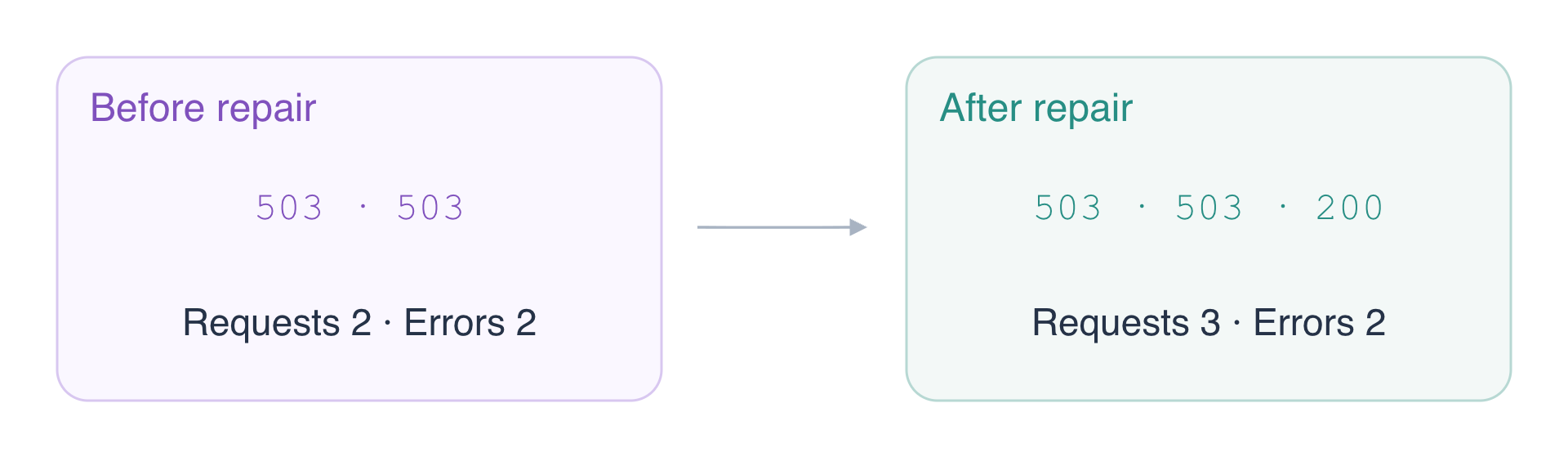
Expect HTTP 200 accepted and an INFO log for the same recovered request ID. Historical failures remain in the window. A healthy request publishes Errors=0, so the cumulative error Sum stays2 while Requests increases to 3.
START=$(date -u -d '15 minutes ago' +%Y-%m-%dT%H:%M:%SZ)
echo "$START"
Save the query window’s end time in UTC:
END=$(date -u -d '1 minute' +%Y-%m-%dT%H:%M:%SZ)
echo "$END"
aws cloudwatch get-metric-statistics \
  --namespace LabEx/O05 \
  --metric-name Errors \
  --dimensions Name=Application,Value=orders \
  --start-time "$START" \
  --end-time "$END" \
  --period 60 \
  --statistics Sum
aws cloudwatch get-metric-statistics \
  --namespace LabEx/O05 \
  --metric-name Requests \
  --dimensions Name=Application,Value=orders \
  --start-time "$START" \
  --end-time "$END" \
  --period 60 \
  --statistics Sum
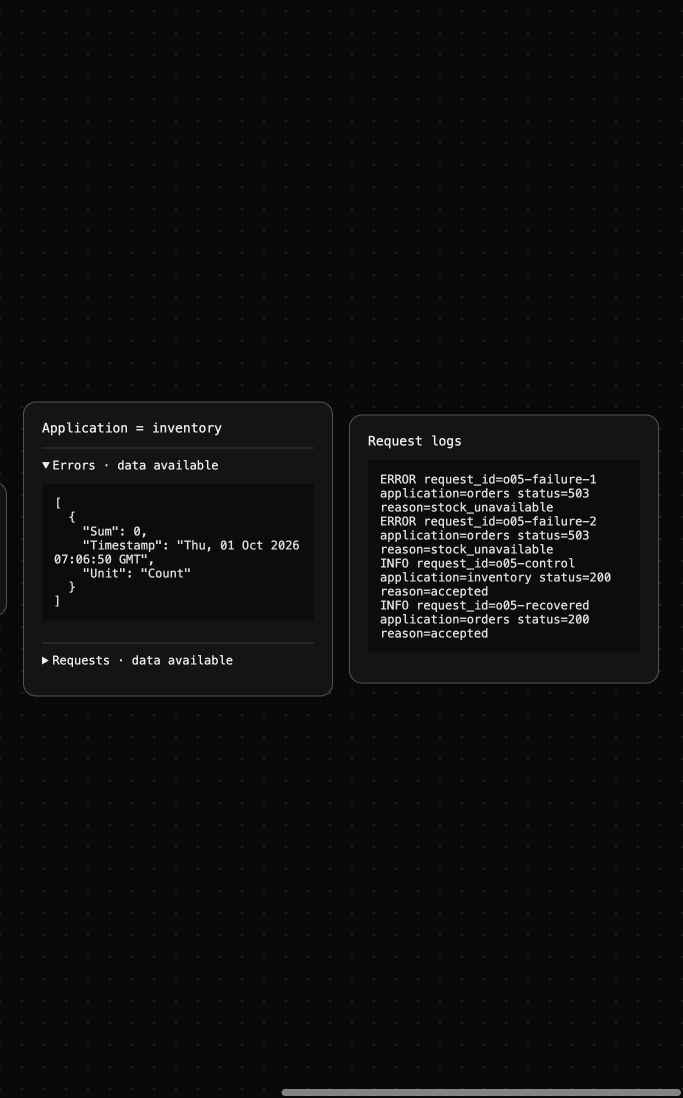
AWS View shows actual application series and request logs. Use the recovered request ID to distinguish the new successful response from retained failure history.
Stop Telemetry and Clean Up the Owned Log Group
In this step, you will stop instrumentation and remove only the incident log group. Existing metrics remain according to retention; there is no individual metric-delete API.
cat > app.json <<'JSON'
{"logging": {"enabled": false, "group": "/labex/o05-application", "stream": "requests"}, "metrics": {"enabled": false, "namespace": "LabEx/O05"}, "accepted_sku": "apple"}
JSON
aws logs delete-log-group --log-group-name /labex/o05-application
aws logs describe-log-groups --query 'logGroups[].logGroupName'
aws logs get-log-events \
  --log-group-name /labex/o05-reference \
  --log-stream-name platform \
  --query 'events[].message'
Expect only /labex/o05-reference and its original INFO platform reference keep unchanged message. Successful inventory verifies targeted deletion; failed queries would not establish cleanup.
Summary
You reproduced an incident with a control, connected metric counts to request logs, repaired an application setting, verified a new successful response and preserved historical evidence until targeted cleanup.
For further reading, see the AWS reference on Metric identity, dimensions, and statistics; Filtering log events by terms and exact phrases.


