Introduction
Your application needs an address space before it can run. You will define an AWS VPC and subnet with Terraform, compare the deployed network with Terraform state, and remove only your application network.
You should already know Terraform's init/plan/apply workflow, resource addresses, and AWS VPC/subnet CIDR basics. The Terminal, Terraform tools, AWS CLI and a separate reference network are prepared. Each lab starts independently; you do not need resources from an earlier VM.
Certification Relevance
| Certification | Exam task | Practice |
|---|---|---|
| Solutions Architect – Associate (SAA-C03) | Task 1.2 | Practice the VPC/subnet address-space and Availability Zone foundations used in network segmentation. |
Lab Overview
Define and Deploy the VPC
In this step, you will map the application's address plan into a Terraform resource and inspect the resulting VPC.
Open Terminal. The AWS View shows live network resources; use it to observe the topology, while the CLI provides precise fields and Terraform manages changes. The existing reference-network belongs to another application and must remain unchanged.
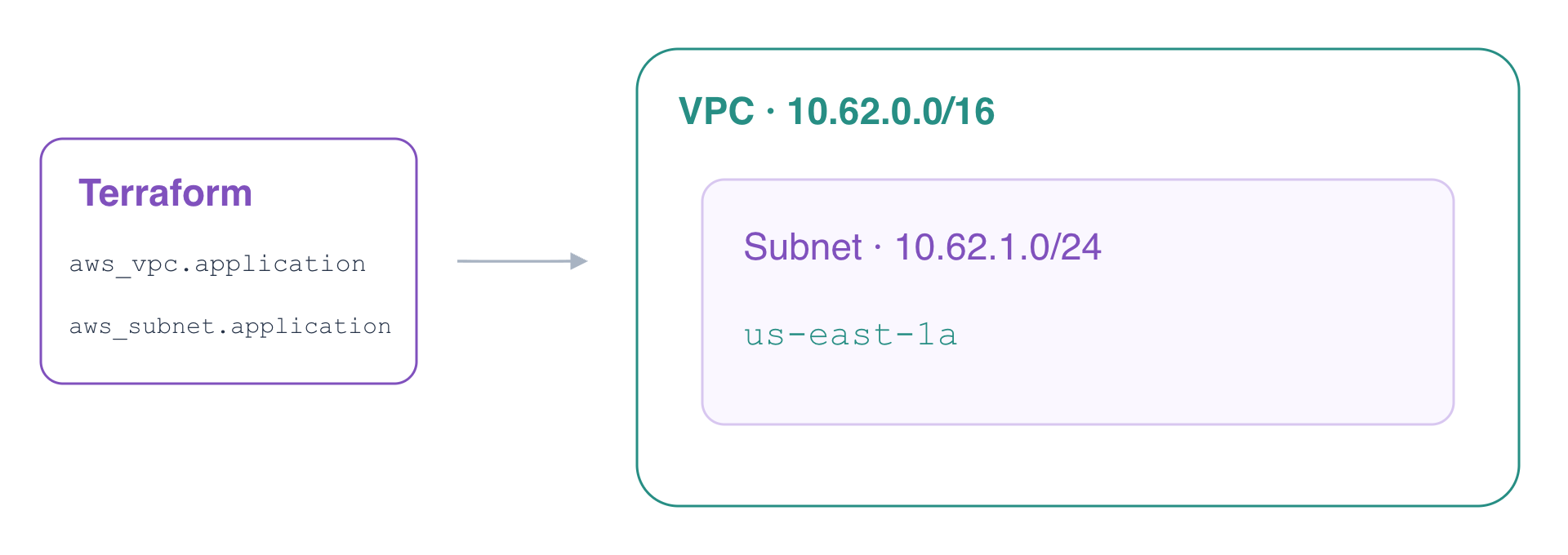
A VPC is a regional network boundary. Its CIDR block defines its address range: 10.62.0.0/16 reserves addresses for this application. Terraform's aws_vpc.application is a configuration address, not an AWS ID. AWS assigns the ID after creation.
The application-network directory contains the prepared Provider configuration. It selects the supplied account and tested tool versions. Change into this directory:
cd /home/labex/project/application-network
Create main.tf. The quoted heredoc writes the following HCL literally until HCL; > creates or replaces this file. The Name tag makes the application's network easy to distinguish from the reference network.
cat > main.tf <<'HCL'
resource "aws_vpc" "application" {
  cidr_block = "10.62.0.0/16"
  tags = {
    Name = "application-network"
  }
}
HCL
Initialize the working directory to select the required Provider, then format and validate the configuration. Validation checks configuration structure; it does not prove a resource exists.
terraform init
terraform fmt
terraform validate
If init reports Incomplete lock file information for providers, it is describing checksums for other platforms. This prepared VM uses linux_amd64; continue after initialization and validation succeed.
Review a plan. Terraform also describes default VPC settings; find cidr_block and the Name tag in the proposed addition.
terraform plan
The final summary should show one resource to add. Apply the configuration and enter yes when Terraform asks for confirmation:
terraform apply
Query the actual VPC. --filters selects the application tag; --query displays just the ID and CIDR. The ID varies, while the CIDR must be 10.62.0.0/16.
aws ec2 \
  describe-vpcs \
  --filters Name=tag:Name,Values=application-network \
  --query 'Vpcs[].{ID:VpcId,CIDR:CidrBlock}'
Refresh your observation in AWS View: the application VPC appears beside the reference VPC. The new VPC currently has no application subnet.
Connect a Subnet with a Resource Reference
In this step, you will create a subnet inside the application VPC and verify its address range, Availability Zone and Terraform mapping.
A subnet belongs to exactly one VPC and one Availability Zone. Use 10.62.1.0/24, a smaller range inside the VPC's /16, in us-east-1a. Neither this CIDR nor an Availability Zone alone makes a subnet public; internet routing and access rules come later.
Create subnet.tf. The expression aws_vpc.application.id references the VPC resource. Terraform uses that dependency to create the VPC before the subnet and obtains the actual ID automatically. You do not copy an ID from command output into HCL.
cat > subnet.tf <<'HCL'
resource "aws_subnet" "application" {
  vpc_id            = aws_vpc.application.id
  cidr_block        = "10.62.1.0/24"
  availability_zone = "us-east-1a"
  tags = {
    Name = "application-subnet"
  }
}

output "vpc_id" {
  value = aws_vpc.application.id
}

output "subnet_id" {
  value = aws_subnet.application.id
}
HCL
Format and validate the new file, then review the plan. It should add a subnet and expose two outputs, without replacing your VPC.
terraform fmt
terraform validate
terraform plan
Apply and confirm with yes:
terraform apply
Save and display the generated IDs. $(...) captures the output of a command; terraform output -raw returns a string without quotation marks.
VPC_ID=$(terraform output -raw vpc_id)
echo "$VPC_ID"
SUBNET_ID=$(terraform output -raw subnet_id)
echo "$SUBNET_ID"
Query AWS independently. The subnet's VPC field must match the displayed VPC ID, its CIDR must be 10.62.1.0/24, and its Availability Zone must be us-east-1a.
aws ec2 \
  describe-subnets \
  --subnet-ids "$SUBNET_ID" \
  --query 'Subnets[].{ID:SubnetId,VPC:VpcId,CIDR:CidrBlock,Zone:AvailabilityZone}'
Terraform state maps configuration addresses to deployed resources. Inspect that mapping; compare the VPC/subnet IDs with AWS rather than treating a state entry as proof of a working network.
terraform state list
terraform state show aws_subnet.application
The list includes aws_vpc.application and aws_subnet.application. Now check convergence:
terraform plan
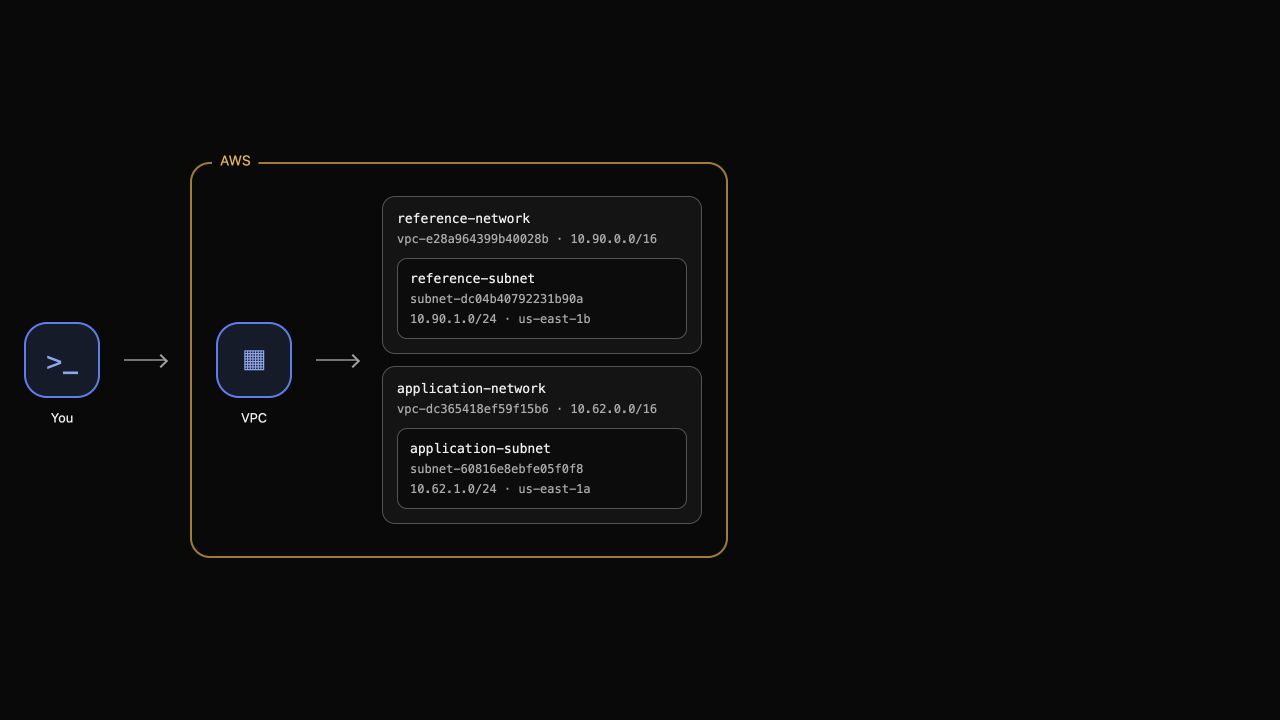
Expect No changes. In AWS View, the application subnet appears inside its actual VPC, alongside the untouched reference network.
Remove Only the Application Network
In this step, you will review the deletion order, destroy your Terraform stack, and confirm that the reference network remains.
Terraform uses the same dependency graph in reverse: it removes the subnet before the VPC. A destroy plan covers resources managed by this working directory, so the separately prepared reference network should not appear.
Review the planned deletions:
terraform plan -destroy
Expect two resources to destroy. Check the resource addresses before continuing. Then destroy the application network and enter yes:
terraform destroy
Query the application resources by tag. Both queries should return empty lists; a failed request does not prove deletion.
aws ec2 \
  describe-vpcs \
  --filters Name=tag:Name,Values=application-network \
  --query 'Vpcs[].VpcId'
aws ec2 \
  describe-subnets \
  --filters Name=tag:Name,Values=application-subnet \
  --query 'Subnets[].SubnetId'
Confirm that Terraform no longer manages any resources:
terraform state list
The command prints no resource addresses. Finally, inspect the retained reference subnet:
aws ec2 \
  describe-subnets \
  --filters Name=tag:Name,Values=reference-subnet \
  --query 'Subnets[].{CIDR:CidrBlock,Zone:AvailabilityZone}'
Its CIDR remains 10.90.1.0/24 in us-east-1b. AWS View now shows only the reference network. Your HCL files remain available for review even though the application resources have been deleted.
Summary
You defined a VPC and subnet in HCL, used a resource reference to connect them, compared actual AWS network fields with Terraform state, and confirmed a no-change plan. You then removed only your managed network and preserved an unrelated reference network. Routing and security rules are separate steps toward an accessible application.