Introduction
An application can have a running instance and a public address while still being unreachable. You will define the missing route and a narrowly scoped security group rule with Terraform, then test both allowed and blocked connections.
You should understand Terraform resource references, VPCs, subnets, internet routes and security groups. This independent environment provides an application target, a separate working reference application and prepared Terraform input values. You will manage only the new connection resources.
Certification Relevance
| Certification | Exam task | Practice |
|---|---|---|
| Solutions Architect – Associate (SAA-C03) | Task 1.2 | Connect a VPC subnet through an internet gateway and restrict an application's network access by source and port. |
Lab Overview
Build the Internet Route
In this step, you will attach an internet gateway to the application VPC and explicitly associate a route table with its subnet.
Open Terminal and AWS View. The application and reference networks are independent. The application-server already has a public address because its subnet assigns public IPs at launch. A public address alone does not create an internet route or an inbound permission.
In AWS View, select application-server, User · 198.51.100.10, and Application · 8081, then click Send request. Expect Blocked. Select reference-server with the same client and application port, send another request, and confirm that the reference application responds. Keep that reference application working throughout this lab.
Enter the prepared working directory:
cd /home/labex/project/application-access
The supplied terraform.tfvars.json contains this fresh environment's VPC, subnet and security group IDs. Terraform automatically loads these input values. Read them before using the corresponding variables:
cat terraform.tfvars.json
The prepared Provider configuration selects the course environment. You do not need to copy IDs from an earlier VM or enter personal credentials. Save and display the supplied target instance ID for later inspection. $(...) captures command output, and --output text returns the ID as plain text.
TARGET_ID=$(aws ec2 \
  describe-instances \
  --filters Name=tag:Name,Values=application-server Name=instance-state-name,Values=running \
  --query 'Reservations[0].Instances[0].InstanceId' \
  --output text)
echo "$TARGET_ID"
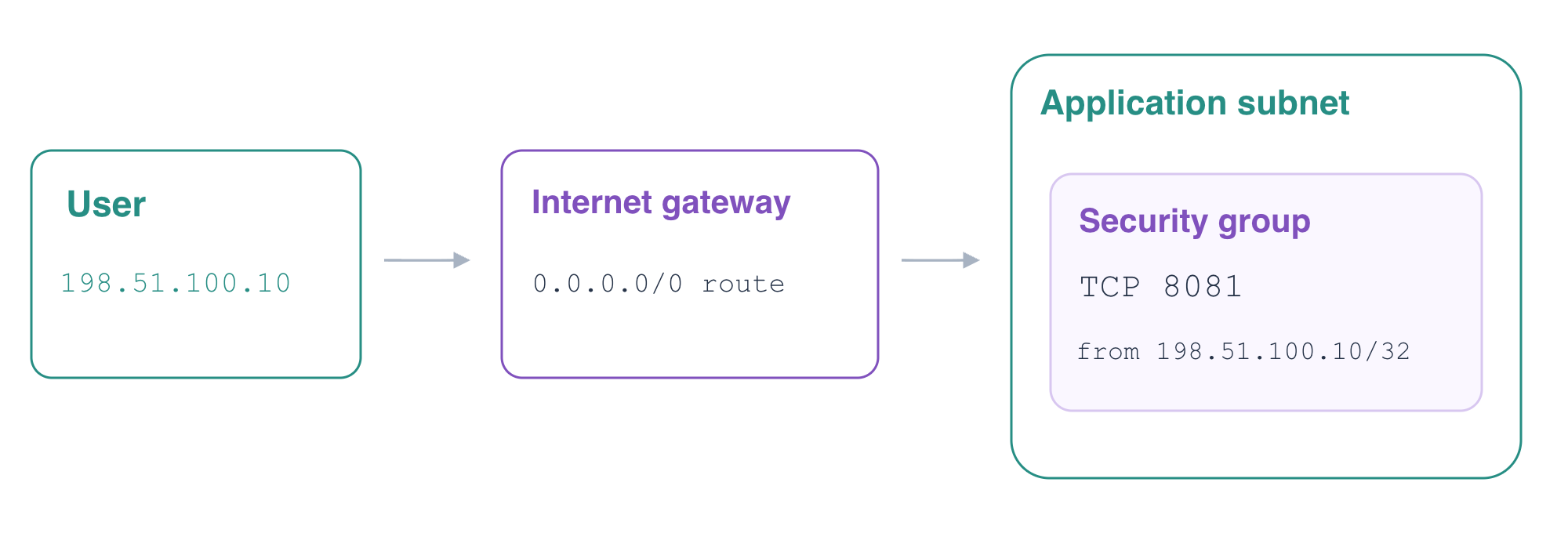
An internet gateway attaches to a VPC. A route table sends traffic for a destination to its gateway, and a subnet association chooses which table governs the subnet. Without an explicit association, a subnet uses its VPC's main route table. Leave that supplied main table unchanged. The destination 0.0.0.0/0 matches IPv4 addresses without a more specific route; it does not grant permission through a security group.
Create routing.tf. The quoted heredoc writes the HCL literally. Resource references connect the route to its table and gateway, and connect the subnet association to the same table.
cat > routing.tf <<'HCL'
resource "aws_internet_gateway" "application" {
  vpc_id = var.vpc_id
}

resource "aws_route_table" "application" {
  vpc_id = var.vpc_id
}

resource "aws_route" "internet" {
  route_table_id         = aws_route_table.application.id
  destination_cidr_block = "0.0.0.0/0"
  gateway_id             = aws_internet_gateway.application.id
}

resource "aws_route_table_association" "application" {
  subnet_id      = var.subnet_id
  route_table_id = aws_route_table.application.id
}

output "route_table_id" {
  value = aws_route_table.application.id
}

output "subnet_id" {
  value = var.subnet_id
}
HCL
Initialize, format and validate the configuration:
terraform init
terraform fmt
terraform validate
If init prints Incomplete lock file information for providers, it concerns checksums for other platforms. This prepared VM uses linux_amd64; continue after initialization and validation succeed.
Review the four additions: the gateway, table, route and association. The supplied instance and reference network must not appear as resources to replace or delete.
terraform plan
Apply and enter yes when prompted:
terraform apply
Save and display the new table ID and supplied subnet ID:
TABLE_ID=$(terraform output -raw route_table_id)
echo "$TABLE_ID"
SUBNET_ID=$(terraform output -raw subnet_id)
echo "$SUBNET_ID"
Query the route table independently. Find the default destination, the igw-... gateway and the association with your subnet ID. The local VPC route also remains.
aws ec2 \
  describe-route-tables \
  --route-table-ids "$TABLE_ID" \
  --query 'RouteTables[].{Routes:Routes[].{Destination:DestinationCidrBlock,Gateway:GatewayId},Subnets:Associations[].SubnetId}'
Confirm public assignment on the supplied subnet:
aws ec2 \
  describe-subnets \
  --subnet-ids "$SUBNET_ID" \
  --query 'Subnets[].{CIDR:CidrBlock,PublicIPOnLaunch:MapPublicIpOnLaunch}'
PublicIPOnLaunch is true. That setting controls newly launched instances; changing it is not a way to retroactively assign an address to an existing instance. AWS View now shows the actual gateway and effective route table. Send the application's User/8081 request again: it remains Blocked because no ingress rule permits it yet.
Permit the Intended Client and Test the Boundary
In this step, you will allow the User client to reach the application port and verify that a different client and a different port remain blocked.
A security group is a stateful network boundary attached to an instance's network interface. Routing makes a path available; the group still decides which incoming connections are permitted. The supplied application group currently has no ingress rules.
Create one independent ingress-rule resource for that group. cidr_ipv4 = "198.51.100.10/32" selects the User client's single IPv4 address. Setting both ports to 8081 allows only the application listener. The reference application uses its own security group.
cat > access.tf <<'HCL'
resource "aws_vpc_security_group_ingress_rule" "application" {
  security_group_id = var.security_group_id
  ip_protocol       = "tcp"
  from_port         = 8081
  to_port           = 8081
  cidr_ipv4         = "198.51.100.10/32"
}

output "security_group_id" {
  value = var.security_group_id
}
HCL
Format and validate, then review the plan. There should be one ingress-rule addition and no instance replacement.
terraform fmt
terraform validate
terraform plan
Apply the rule and confirm with yes:
terraform apply
Save and display the existing group ID, then read its actual ingress permission:
GROUP_ID=$(terraform output -raw security_group_id)
echo "$GROUP_ID"
aws ec2 \
  describe-security-groups \
  --group-ids "$GROUP_ID" \
  --query 'SecurityGroups[].{Group:GroupId,Ingress:IpPermissions}'
The permission must describe TCP port 8081 from 198.51.100.10/32. Confirm that Terraform has converged:
terraform plan
Expect No changes. Now perform all three tests in AWS View, choosing application-server each time:
Select User · 198.51.100.10 and Application · 8081. Click Send request. Expect Connected · 200 and the message Application network connected.
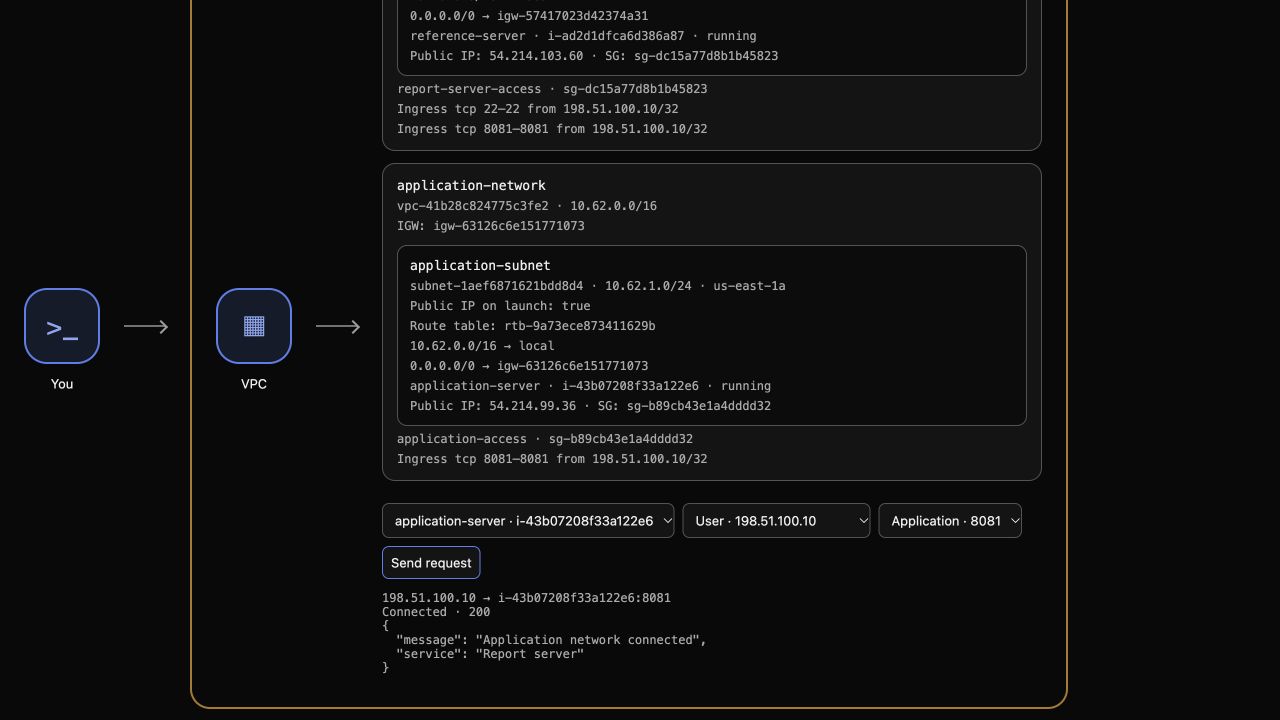 Change the source to Unrelated · 198.51.100.20, keep port 8081, and send another request. Expect Blocked.
Return to the User source, choose SSH · 22, and send another request. Expect Blocked. A successful application request does not authorize the guest's separate SSH listener.
The result identifies the actual source, target instance and port. Request service unavailable is an environment error, not proof of an intended network rejection. Avoid broadening the rule to 0.0.0.0/0: doing so would expose the same application listener to the unrelated client.
The AWS Provider ingress-rule documentation describes the resource's fields. Your CLI, Terraform mapping and actual request results should agree.
Remove the Connection Resources and Preserve the Applications
In this step, you will remove only the Terraform-managed connection resources and confirm that the supplied applications remain intact.
This working directory owns five resources: an internet gateway, route table, default route, subnet association and ingress rule. The VPC, subnet, main route table, target instance and reference application were supplied independently. They are outside this state and must remain.
Review the destroy plan:
terraform plan -destroy
Expect five resources to destroy. Then run the deletion and enter yes:
terraform destroy
Confirm the state has no managed resource addresses:
terraform state list
The supplied target should still be running with the same ID:
aws ec2 \
  describe-instances \
  --instance-ids "$TARGET_ID" \
  --query 'Reservations[].Instances[].{ID:InstanceId,State:State.Name,Subnet:SubnetId}'
In AWS View, send the target's User/8081 request again. It should be Blocked because you removed its connection resources. Then select reference-server, User and port 8081, and send a request. The reference application must still return Connected · 200 and Reference application.
Your HCL files remain available for review. A later ordinary plan would propose recreating the removed resources; retaining that configuration is normal after terraform destroy.
Summary
You used Terraform references to attach an internet gateway, define a default route and associate a route table with an application subnet. You then added one scoped ingress rule, tested actual source and port boundaries, confirmed convergence, and removed only your connection resources while preserving the supplied applications.