



Introduction
An order team needs to accept JSON orders and return calculated totals. You will connect health, write and read routes to a supplied Lambda application, test valid and rejected requests, and check the stored DynamoDB records before cleanup.
Complete Expose a Lambda Function with an HTTP API and Read and Write DynamoDB from Lambda first. This fresh environment provides the application, role and separate tables.
Certification Relevance
| Certification | Exam task | Practice |
|---|---|---|
| Solutions Architect – Associate (SAA-C03) | Task 2.1 | API request validation, responses, and persisted business data. |
| Developer – Associate (DVA-C02) | Task 1.1, Task 3.2 | API request validation, responses, and persisted business data. |
| DevOps Engineer – Professional (DOP-C02) | Task 3.2 | Foundational practice: API request validation, responses, and persisted business data. |
Lab Overview
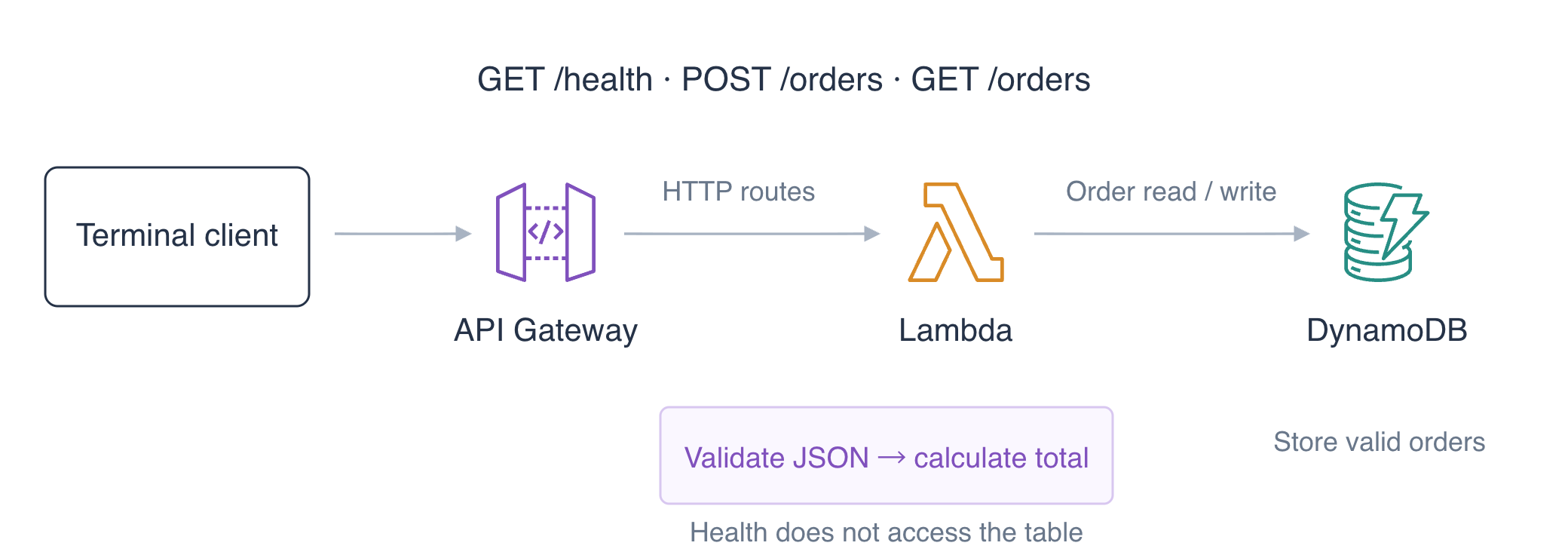
Prepare the Order Backend
In this step, you will inspect the supplied request contract, grant the function access to its order table and deploy the backend. The application computes integer cents: quantity × 250 + a 100-cent handling fee. Use AWS View above Terminal to compare requests with stored data.
Enter the workspace and read the application:
cd /home/labex/project
cat app.py
handler receives HTTP payload format 2.0. POST /orders expects exactly two JSON fields: a lowercase id of 2–40 characters that starts with a letter and uses letters, digits or hyphens, and an integer quantity from 1 to 10. The code rejects other shapes before PutItem. GET /orders?id=... reads the stored record with GetItem. Each response contains an HTTP status and a JSON body. You do not need to rewrite this supplied application.
Read the prepared table inventory:
aws dynamodb list-tables --query TableNames
Expect labex-a02-orders and labex-a02-reference. Only the orders table belongs to this API's business work. Read its ARN into a shell variable:
TABLE_ARN=$(aws dynamodb describe-table \
  --table-name labex-a02-orders \
  --query Table.TableArn \
  --output text)
echo "$TABLE_ARN"
The execution role controls outbound database access. Use a here-document to create a policy file. The unquoted JSON marker allows $TABLE_ARN to expand to the ARN just read; it does not contain credentials:
cat > orders-policy.json <<JSON
{
  "Version": "2012-10-17",
  "Statement": [{
    "Effect": "Allow",
    "Action": ["dynamodb:PutItem", "dynamodb:GetItem"],
    "Resource": "$TABLE_ARN"
  }]
}
JSON
Attach this named inline policy to the prepared execution role:
aws iam put-role-policy \
  --role-name labex-a02-execution \
  --policy-name OrdersData \
  --policy-document file://orders-policy.json
Package the supplied code with app.py at the archive root:
zip orders.zip app.py
Read the prepared role ARN:
ROLE_ARN=$(aws iam get-role \
  --role-name labex-a02-execution \
  --query Role.Arn \
  --output text)
echo "$ROLE_ARN"
Deploy the function with a ten-second timeout. The application reads TABLE_NAME from its environment, keeping the table selection separate from the source code:
aws lambda create-function \
  --function-name labex-a02-orders-api \
  --runtime python3.12 \
  --handler app.handler \
  --role "$ROLE_ARN" \
  --timeout 10 \
  --environment '{"Variables":{"TABLE_NAME":"labex-a02-orders"}}' \
  --zip-file fileb://orders.zip \
  --query '{Name:FunctionName,Handler:Handler,Table:Environment.Variables.TABLE_NAME}'
Expect the function name, app.handler and labex-a02-orders. In AWS View, inspect the Function card and confirm the orders table still has zero items. Deploying code and granting data access do not create an order.
Map Health and Order Routes
In this step, you will configure one integration for three routes and grant each route permission to invoke the function.
Create an HTTP API and save its ID:
API_ID=$(aws apigatewayv2 create-api \
  --name labex-a02 \
  --protocol-type HTTP \
  --query ApiId \
  --output text)
echo "$API_ID"
printf '%s\n' "$API_ID" > api-id.txt
Create the literal $default stage with automatic deployment:
aws apigatewayv2 create-stage \
  --api-id "$API_ID" \
  --stage-name '$default' \
  --auto-deploy \
  --query '{Stage:StageName,AutoDeploy:AutoDeploy}'
Read the backend ARN and create the payload 2.0 integration. Its POST method invokes Lambda; each client route still has its own HTTP method:
FUNCTION_ARN=$(aws lambda get-function-configuration \
  --function-name labex-a02-orders-api \
  --query FunctionArn \
  --output text)
echo "$FUNCTION_ARN"
INTEGRATION_ID=$(aws apigatewayv2 create-integration \
  --api-id "$API_ID" \
  --integration-type AWS_PROXY \
  --integration-method POST \
  --integration-uri "$FUNCTION_ARN" \
  --payload-format-version 2.0 \
  --query IntegrationId \
  --output text)
echo "$INTEGRATION_ID"
Map the public health endpoint to this integration:
aws apigatewayv2 create-route \
  --api-id "$API_ID" \
  --route-key 'GET /health' \
  --target "integrations/$INTEGRATION_ID" \
  --authorization-type NONE \
  --query RouteKey \
  --output text
Map the JSON write route:
aws apigatewayv2 create-route \
  --api-id "$API_ID" \
  --route-key 'POST /orders' \
  --target "integrations/$INTEGRATION_ID" \
  --authorization-type NONE \
  --query RouteKey \
  --output text
Map the stored-order read route:
aws apigatewayv2 create-route \
  --api-id "$API_ID" \
  --route-key 'GET /orders' \
  --target "integrations/$INTEGRATION_ID" \
  --authorization-type NONE \
  --query RouteKey \
  --output text
The execution role's database policy does not let API Gateway invoke the function. Read the account ID, then add three precise invocation grants. Each statement uses the API ID, literal $default, client method and route path; \$ preserves the dollar sign in an expanded shell string:
ACCOUNT_ID=$(aws sts get-caller-identity --query Account --output text)
echo "$ACCOUNT_ID"
aws lambda add-permission \
  --function-name labex-a02-orders-api \
  --statement-id ApiHealth \
  --action lambda:InvokeFunction \
  --principal apigateway.amazonaws.com \
  --source-account "$ACCOUNT_ID" \
  --source-arn "arn:aws:execute-api:us-east-1:$ACCOUNT_ID:$API_ID/\$default/GET/health" \
  --query Statement \
  --output text
aws lambda add-permission \
  --function-name labex-a02-orders-api \
  --statement-id ApiWriteOrder \
  --action lambda:InvokeFunction \
  --principal apigateway.amazonaws.com \
  --source-account "$ACCOUNT_ID" \
  --source-arn "arn:aws:execute-api:us-east-1:$ACCOUNT_ID:$API_ID/\$default/POST/orders" \
  --query Statement \
  --output text
aws lambda add-permission \
  --function-name labex-a02-orders-api \
  --statement-id ApiReadOrder \
  --action lambda:InvokeFunction \
  --principal apigateway.amazonaws.com \
  --source-account "$ACCOUNT_ID" \
  --source-arn "arn:aws:execute-api:us-east-1:$ACCOUNT_ID:$API_ID/\$default/GET/orders" \
  --query Statement \
  --output text
Build the prepared workspace API address using your generated ID. This address serves requests inside the workspace and is not an AWS public hostname:
API_URL="http://127.0.0.1:8081/api/$API_ID"
echo "$API_URL"
Test the health route. curl -i includes the HTTP response headers:
curl -i "$API_URL/health"
Expect HTTP 200 and {"healthy": true}. In AWS View, confirm all three route keys have NONE, the stage has AutoDeploy enabled, and the health invocation returned 200. The orders table should still be empty because this request checks health rather than storing an order.
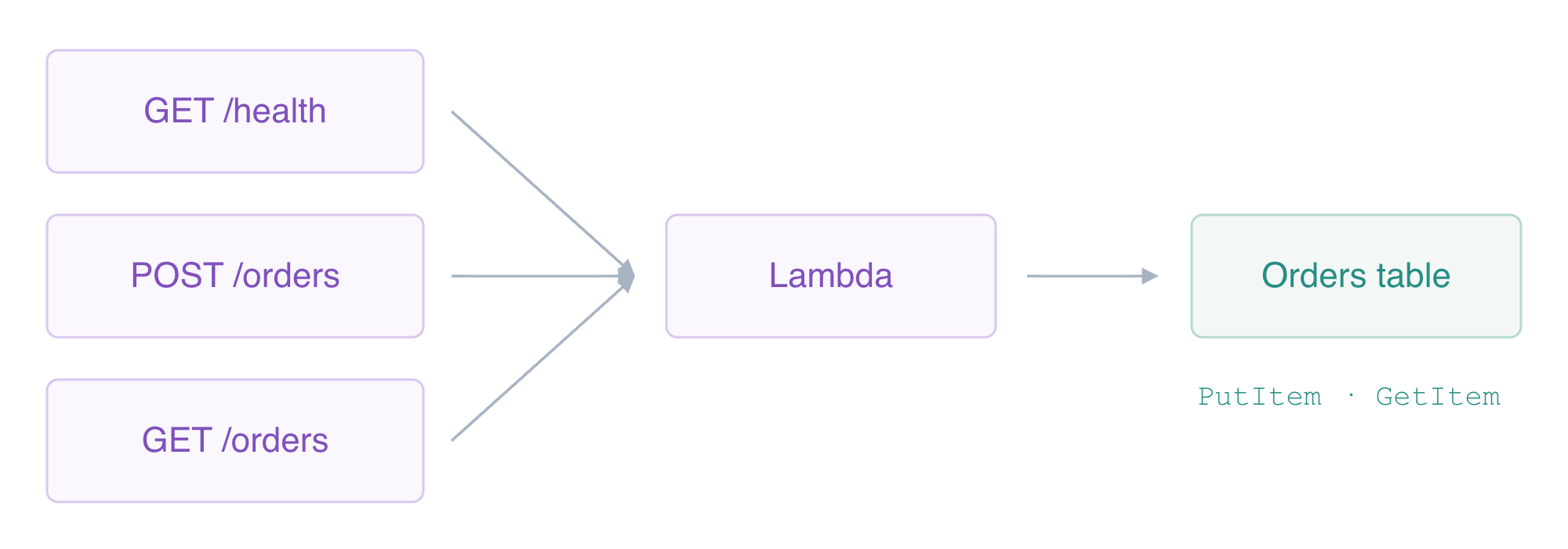
Test Valid Orders and Rejected Requests
In this step, you will create two orders, read their stored results and check failures before they can affect business data.
An HTTP request consists of a method, path, headers and optional body. -X POST chooses the write method, -H supplies Content-Type: application/json, and --data sends the JSON string. Create an order with quantity 2:
curl -i -X POST "$API_URL/orders" -H 'Content-Type: application/json' --data '{"id":"order-one","quantity":2}'
Expect HTTP 201 Created and a body containing order-one, quantity 2 and total_cents: 600 (2 × 250 + 100). The status tells the client an order was stored; the body reports the computed result.
Create a second order with a different quantity:
curl -i -X POST "$API_URL/orders" -H 'Content-Type: application/json' --data '{"id":"order-two","quantity":5}'
Expect HTTP 201 and total_cents: 1350. Read both orders through the API using their query parameter:
curl -i "$API_URL/orders?id=order-one"
curl -i "$API_URL/orders?id=order-two"
Both responses should be HTTP 200 with the same ID, quantity and total as the corresponding create response. The read handler retrieves DynamoDB state rather than recalculating the total from a new client quantity.
Independently inspect the first stored item with the CLI:
aws dynamodb get-item \
  --table-name labex-a02-orders \
  --key '{"id":{"S":"order-one"}}' \
  --consistent-read \
  --query Item
The typed item contains quantity: {"N":"2"} and total_cents: {"N":"600"}. In AWS View, compare the two actual table records with the POST and GET invocation responses.
A syntactically valid JSON request can still violate the business contract. Send a negative quantity:
curl -i -X POST "$API_URL/orders" -H 'Content-Type: application/json' --data '{"id":"bad-negative","quantity":-1}'
Expect HTTP 400 Bad Request and Use an id and an integer quantity from 1 to 10. A number encoded as a JSON string is also rejected:
curl -i -X POST "$API_URL/orders" -H 'Content-Type: application/json' --data '{"id":"bad-type","quantity":"2"}'
Finally, test a malformed JSON body:
curl -i -X POST "$API_URL/orders" -H 'Content-Type: application/json' --data '{not-json'
The last two requests also return HTTP 400. Their actual handler events may appear in CloudWatch Logs, but the table must still contain only the two valid orders. Request validation happens in the supplied application before PutItem; a matching API route alone does not validate its body.
A valid read ID can refer to no stored order. Query one that has not been created:
curl -i "$API_URL/orders?id=missing-order"
Expect HTTP 404 with Order not found. This differs from a 400 invalid request: the ID has the expected format, but no item exists. Look at AWS View above Terminal and inspect the actual 201, 200, 400 and 404 responses; expand an invocation's Show logs to compare its input with its result. This manual UI inspection complements the independent read-only checks of remote records and actual executions.
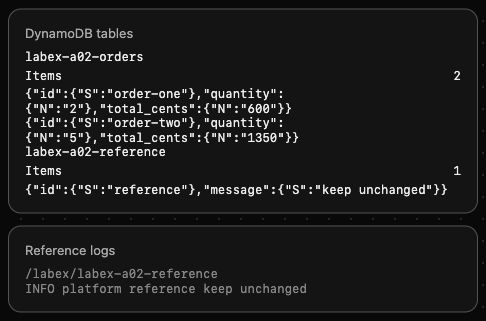
Scroll down to the DynamoDB tables card to compare these fields in your environment.
These 400 responses test application validation: the request reaches Lambda, which rejects the input before writing. Later JWT rejection stops a request at API Gateway before Lambda. Compare both the execution log and stored items to identify which boundary rejected a request.
Remove the API and Owned Order Resources
In this step, you will delete the API's resources while preserving the unrelated reference table, logs and prepared execution role.
Your inventory consists of the API ID in api-id.txt, labex-a02-orders-api, its /aws/lambda/labex-a02-orders-api log group, labex-a02-orders, and the OrdersData inline role policy. Delete the API first, including its routes, integration and default stage:
aws apigatewayv2 delete-api --api-id "$API_ID"
Remove the function and its invocation policy:
aws lambda delete-function --function-name labex-a02-orders-api
Delete the separate function log group:
aws logs delete-log-group --log-group-name /aws/lambda/labex-a02-orders-api
Delete the owned orders table and its data:
aws dynamodb delete-table \
  --table-name labex-a02-orders \
  --query TableDescription.TableName \
  --output text
Remove only the data policy you added to the prepared role:
aws iam delete-role-policy --role-name labex-a02-execution --policy-name OrdersData
Successfully read the inventories to prove deletion. Authentication or network errors are not deletion evidence:
aws apigatewayv2 get-apis --query 'Items[].Name'
aws lambda list-functions --query 'Functions[].FunctionName'
aws dynamodb list-tables --query TableNames
The first two lists should be empty; the table list should contain only labex-a02-reference. Confirm its original item remains:
aws dynamodb get-item \
  --table-name labex-a02-reference \
  --key '{"id":{"S":"reference"}}' \
  --query Item
Expect message: {"S":"keep unchanged"}. The role should still retain its unrelated logging policy:
aws iam list-role-policies --role-name labex-a02-execution --query PolicyNames
Expect only FunctionLogs. In AWS View, API, Function and invocation records should be gone, while the reference table and INFO platform reference keep unchanged remain. Keep these prepared resources; testing credentials and VM shutdown are handled after the resource checks.
Summary
You connected three HTTP routes to a supplied Lambda application with a precise database policy and API invocation grants. You created and retrieved orders with different computed totals, checked actual DynamoDB records, and distinguished successful, invalid and missing-order responses. You then removed the API and its owned data, function, logs and policy while preserving the reference resources.
For further reading, see the AWS reference on HTTP API Lambda events and response formats; HTTP API routes and query parameters.


