Introduction
You are taking over a working report bucket that was created outside Terraform. Bring it under management without recreating it or rewriting its report. Then review and apply a small configuration alignment while leaving the finance team's neighboring storage unchanged.
You should already understand Terraform configuration, resource addresses, init, plan, apply, and local state, plus basic S3 object operations. Terraform, its AWS Provider, access configuration, and two independent report buckets are prepared in this fresh environment. No personal AWS account or resources from an earlier lab are required.
Certification Relevance
| Certification | Exam task | Practice |
|---|---|---|
| CloudOps Engineer – Associate (SOA-C03) | Task 3.1, Skill 3.1.6 | Foundational Terraform practice: adopt existing storage and review and apply a non-destructive managed change. |
Lab Overview
Inspect the Existing Storage and Desired Configuration
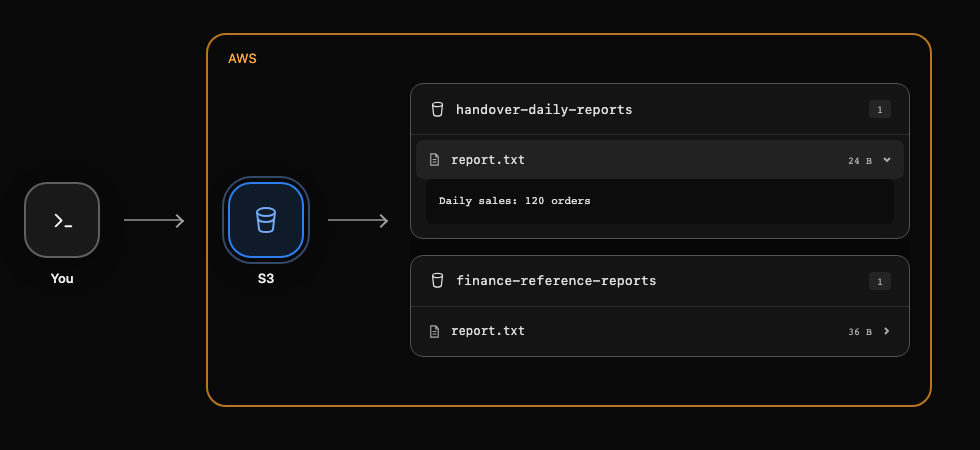
In this step, compare the resource that already exists in AWS with the configuration you are about to manage. AWS View above Terminal displays the same S3 resources that your CLI reads. Expand report.txt in the handover-daily-reports card to inspect the reporting data; finance-reference-reports belongs to another team and must remain unchanged.
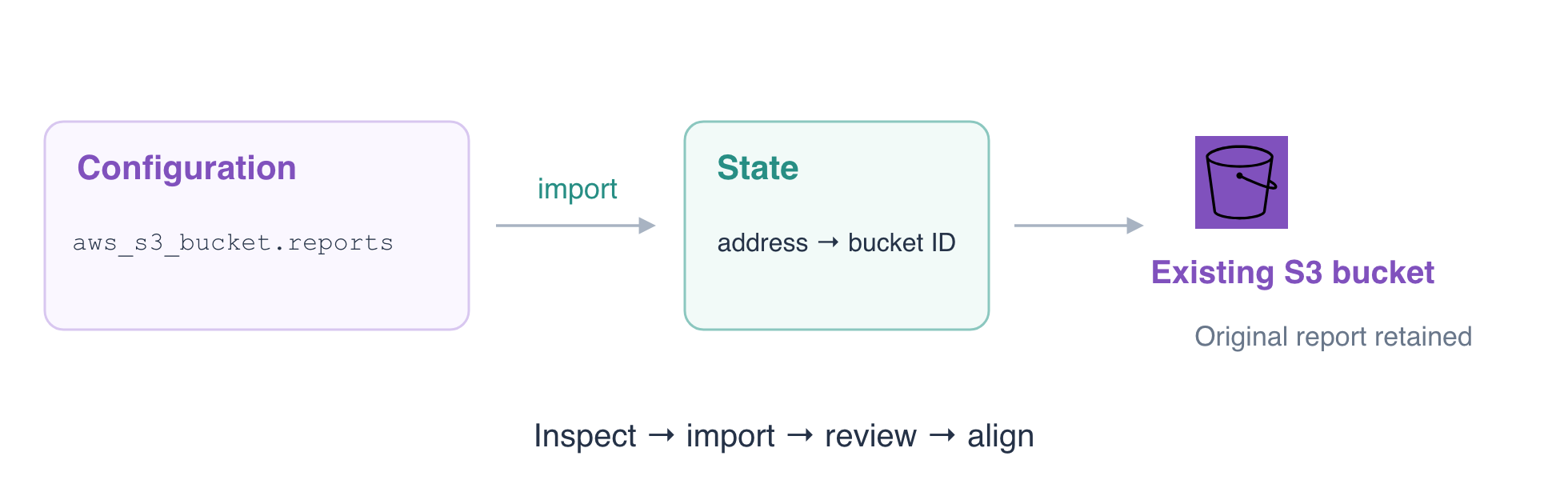
A Terraform resource address, such as aws_s3_bucket.reports, identifies a configuration block. The bucket name identifies the remote AWS resource. State records the mapping between those two identities. A configuration file alone does not establish that mapping.
Enter the prepared root directory and read the desired bucket configuration:
cd /home/labex/project/report-storage
cat main.tf
The bucket argument selects handover-daily-reports. Owner must stay reporting; the new ManagedBy tag will record the handover. force_destroy = false keeps Terraform from automatically emptying a nonempty bucket during a later destroy. It is a Terraform behavior setting, separate from the bucket's stored report.
Inspect the existing tags:
aws s3api \
  get-bucket-tagging \
  --bucket handover-daily-reports
Only Owner=reporting exists initially. Retrieve the original report to standard output, using - as the destination:
aws s3 \
  cp s3://handover-daily-reports/report.txt -
Expected report:
Daily sales: 120 orders
Initialize the working directory. init installs the pinned Provider for this root; it does not import or create the bucket:
terraform init
Inspect the proposed actions without applying them:
terraform plan
The plan proposes 1 to add because this root has no managed resource mapping yet. The bucket already exists; this is evidence of missing state ownership, not permission to replace storage. Do not apply this creation plan. The next step establishes the mapping explicitly.
Before continuing, confirm manually that you can identify the reporting bucket, read its report, and distinguish it from finance storage. The background check for this inspection step checks fixture preservation, not whether you understood the displayed plan.
Import the Existing Bucket and Review the Difference
In this step, map the existing bucket to its intended Terraform address. CLI import reads a remote resource and records its identity in state. It does not generate the desired configuration or import every object inside the bucket.
Run the import with the configuration address first and the existing bucket name second:
terraform import aws_s3_bucket.reports handover-daily-reports
Look for Import successful!. Verify which address is now managed:
terraform state list
Expected address:
aws_s3_bucket.reports
Read its attributes:
terraform state show aws_s3_bucket.reports
The id and bucket should both identify handover-daily-reports. report.txt remains stored in S3; importing a bucket does not adopt the object into a separate aws_s3_object address. The finance bucket must not appear in this root's state.
Importing is not a guarantee of an immediately empty plan. Some settings come from the remote service; others, including force_destroy, describe Terraform's own behavior and may need configuration alignment after import. Such a difference does not mean your report was damaged.
Save a plan for review. -out=handover.tfplan saves the planned actions so the next step can apply the same reviewed plan:
terraform plan -out=handover.tfplan
Read the saved plan:
terraform show handover.tfplan
Expect an in-place update (~), the added ManagedBy=Terraform tag, and possibly alignment of force_destroy to false. The summary must be:
Plan: 0 to add, 1 to change, 0 to destroy.
If the plan proposes deletion, replacement, creation, a different bucket name, or finance storage changes, stop and review the root directory, resource address, and import ID. Do not solve an unexpected plan by deleting the existing report.
Apply the Alignment and Confirm Preservation
In this step, apply only the plan you reviewed and prove that the original report survives. Supplying a saved plan to apply executes that plan directly, without a second approval prompt. Run it only after confirming the previous step's zero-create, zero-destroy summary:
terraform apply handover.tfplan
Expect Resources: 0 added, 1 changed, 0 destroyed. The bucket is now managed, and the handover tag is aligned with the configuration.
Read the live tags to verify the AWS result:
aws s3api \
  get-bucket-tagging \
  --bucket handover-daily-reports
Both Owner=reporting and ManagedBy=Terraform should be present; tag ordering is unimportant.
Read the report again:
aws s3 \
  cp s3://handover-daily-reports/report.txt -
It must still contain Daily sales: 120 orders. In AWS View, expand both reports and confirm the reporting content and the finance reference remain available. A tag alignment does not require a new bucket or an object rewrite.
Check convergence between the current configuration, state, and refreshed AWS resource:
terraform plan
Expected result:
No changes. Your infrastructure matches the configuration.
A no-change plan alone is insufficient evidence of a safe handover: you also checked the intended resource address and original data, while the background check compares the original object version and neighboring storage and plans the current configuration in a disposable copy to confirm convergence. Keep both buckets for this handover. Do not run terraform destroy: the report is still in use. In a real handover, protect state as sensitive operational data and arrange access for the next maintainer; do not commit state or saved plans containing sensitive values to a public repository.
For more context, see HashiCorp's CLI import workflow.
Summary
You compared an existing bucket with Terraform configuration, imported its identity at the intended state address, and reviewed a non-destructive alignment before applying it. You confirmed a no-change plan while preserving the original report and finance storage. Import establishes management; configuration review determines what Terraform should change next.