



Introduction
A document-summary command needs predictable limits around its AI dependency. You will add a bounded Bedrock client to a supplied application, reject oversized input before inference and handle service failure or a slow response without exposing raw exceptions.
You should know introductory Python and the structured-output validation taught in the previous guided lab. The command interface and response parser are supplied so you can focus on request boundaries. This fresh VM has its own source document, configured identity and inference allowance.
Certification Relevance
| Certification | Exam task | Practice |
|---|---|---|
| AI Practitioner (AIF-C01) | Tasks 3.1, 3.2 | Bound inference output and handle generated responses within an application. |
Connect a Bounded Bedrock Client
In this step, you will implement the supplied command's client and generate a real structured summary.
Start in the workspace:
cd /home/labex/project
Read the source document and command options:
cat incident.txt
/opt/labex/aws/venv/bin/python application.py --help
The incident is INC-204. application.py reads a document and prints a JSON result. It calls client.request_summary; the supplied response_parser.py checks the completion reason and the three string fields practiced earlier. The starter client.py reports unfinished work and sends no request.
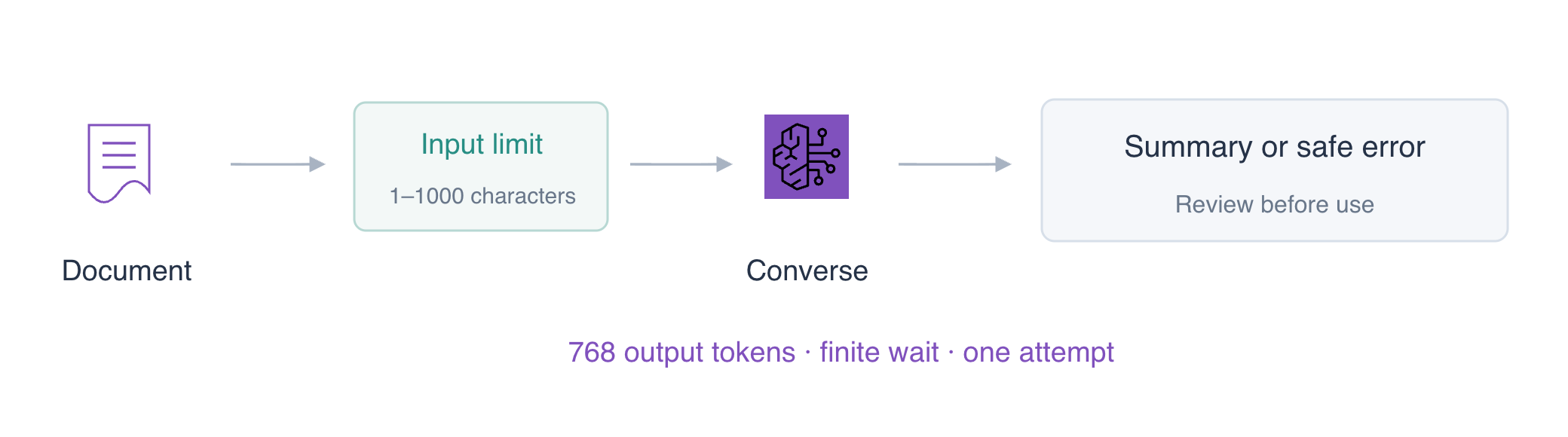
An input limit protects the application before it spends inference allowance. This example accepts 1–1000 nonempty characters, fixes the model's output cap at 768 tokens and uses explicit SDK connection/read timeouts. total_max_attempts: 1 means one initial request with no automatic retry. A read timeout bounds waiting on the connection; it is not a promise that every application action finishes at exactly that instant.
Replace the starter client with this implementation. ClientError represents a service response; ReadTimeoutError identifies a read wait that expired. Both become small diagnostic JSON results. Raw exceptions, request headers and credentials are never included in the result:
cat > client.py <<'EOF'
import boto3
from botocore.config import Config
from botocore.exceptions import BotoCoreError, ClientError, ReadTimeoutError
from response_parser import summarize_response


def request_summary(document, endpoint_url, read_timeout):
    if not document.strip() or len(document) > 1000:
        return {'status': 'rejected', 'reason': 'input_limit'}
    client = boto3.client('bedrock-runtime', endpoint_url=endpoint_url,
        config=Config(proxies={}, connect_timeout=3, read_timeout=read_timeout,
                      retries={'total_max_attempts': 1}))
    try:
        response = client.converse(
            modelId='labex.text-v1:0',
            system=[{'text': 'Summarize only facts supplied in the incident document. Return exactly one JSON object with string fields incident_id, impact and next_action. No Markdown fences, extra keys or surrounding prose. Do not turn planned work into completed work.'}],
            messages=[{'role': 'user', 'content': [{'text': document}]}],
            inferenceConfig={'maxTokens': 768, 'temperature': 0})
    except ReadTimeoutError:
        return {'status': 'unavailable', 'reason': 'read_timeout'}
    except ClientError as error:
        code = error.response.get('Error', {}).get('Code')
        reason = 'busy' if code == 'ThrottlingException' else 'service_unavailable'
        return {'status': 'unavailable', 'reason': reason}
    except BotoCoreError:
        return {'status': 'unavailable', 'reason': 'connection_failed'}
    return summarize_response(response)
EOF
Run the application against its normal configured Bedrock endpoint. > accepted.json saves printed output:
/opt/labex/aws/venv/bin/python application.py > accepted.json
Read it:
cat accepted.json
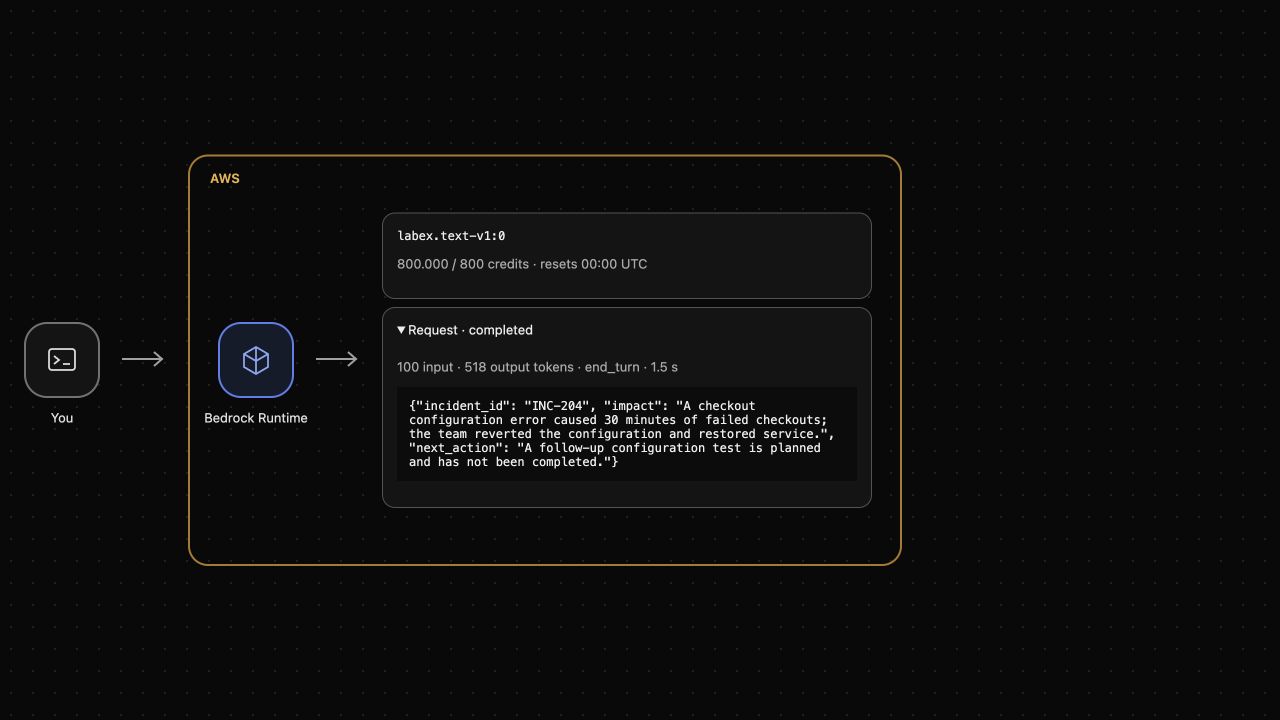
Expect status: ok with the three summary fields. Review their meaning against the document. In the upper AWS View, expand the actual completed request and compare its text. The output cap bounds generated tokens, while the input character limit is a separate application policy. A cached response may reuse real model output without another credit charge.
Reject Oversized Input Before Inference
In this step, you will confirm that the client rejects a document outside its input budget.
The supplied oversized.txt contains more than 1000 characters. wc -m counts characters:
wc -m oversized.txt
Send that file through the same application:
/opt/labex/aws/venv/bin/python application.py --document oversized.txt > too-long.json
This intentional rejection exits with code 2. echo $? prints the preceding command's exit code:
echo $?
Read the safe result:
cat too-long.json
Expect status: rejected and reason: input_limit. The client checks the input before constructing an inference request, so AWS View should still contain only the earlier completed request. Rejecting input prevents new model consumption; deleting a result file would not undo an earlier charge.
Handle Service Failure and Read Timeout
In this step, you will test the client's error boundaries using two explicit local transport fixtures.
The endpoints below deliberately return a service error or delay a response. They send no model request and do not consume inference credits. They are test dependencies, not alternate successful inference providers.
Use the unavailable-service fixture on port 5001:
/opt/labex/aws/venv/bin/python application.py --endpoint-url http://127.0.0.1:5001 > unavailable.json
This expected failure exits with code 3. Inspect its diagnostic result:
cat unavailable.json
Expect status: unavailable and reason: service_unavailable, with no stack trace, SDK exception text or credentials.
The port 5002 fixture waits three seconds. Override the read timeout to one second for this test:
/opt/labex/aws/venv/bin/python application.py --endpoint-url http://127.0.0.1:5002 --read-timeout 1 > timed-out.json
Read the result:
cat timed-out.json
Expect status: unavailable and reason: read_timeout. The SDK sends one attempt. A timeout is not evidence that an upstream model request was cancelled or free: a real upstream may still finish after the client stops waiting. Inspect pending/failed requests and allowance before retrying; do not add an unconditional retry loop.
AWS View should still contain only the genuine request from step 1. The normal command's 150-second read timeout is a finite choice for this exercise; a real application should choose timeouts, retry policy and user feedback according to its latency budget. The official Config reference explains the separate connection/read timeout and attempt controls.
Remove Test Outputs and Keep the Working Application
In this step, you will clean up your four local result files while retaining the working client and supplied application.
Functional and failure checks should pass before cleanup. Remove only the named outputs:
rm accepted.json too-long.json unavailable.json timed-out.json
List the remaining files:
ls
Keep application.py, client.py, response_parser.py, the document and fixtures. Converse created no persistent cloud workload; removing local outputs does not restore credits. The application source remains available for further practice until this VM ends.
Summary
You connected a real Bedrock request to a supplied summary command, bounded input and generated output, disabled automatic retries and configured finite connection/read waits. You tested service failure and timeout without substituting fake successful inference, returned safe diagnostic results and removed only local test outputs.


