



Introduction
An order application needs a way to sign users in. You will create a user directory and public app client, sign in a synthetic user, validate the issued tokens and refresh the session before cleaning up.
Complete Build and Validate an Order API first. This fresh environment supplies its own public backend, disposable sign-in inputs and token-validation example. Keep password and token files private.
Certification Relevance
| Certification | Exam task | Practice |
|---|---|---|
| Solutions Architect – Associate (SAA-C03) | Task 1.2 | Cognito sign-in, token validation, and session refresh. |
| Developer – Associate (DVA-C02) | Task 2.1 | Cognito sign-in, token validation, and session refresh. |
| Security – Specialty (SCS-C03) | Task 4.1 | Foundational practice: Cognito sign-in, token validation, and session refresh. |
Lab Overview
Create the Application User Directory
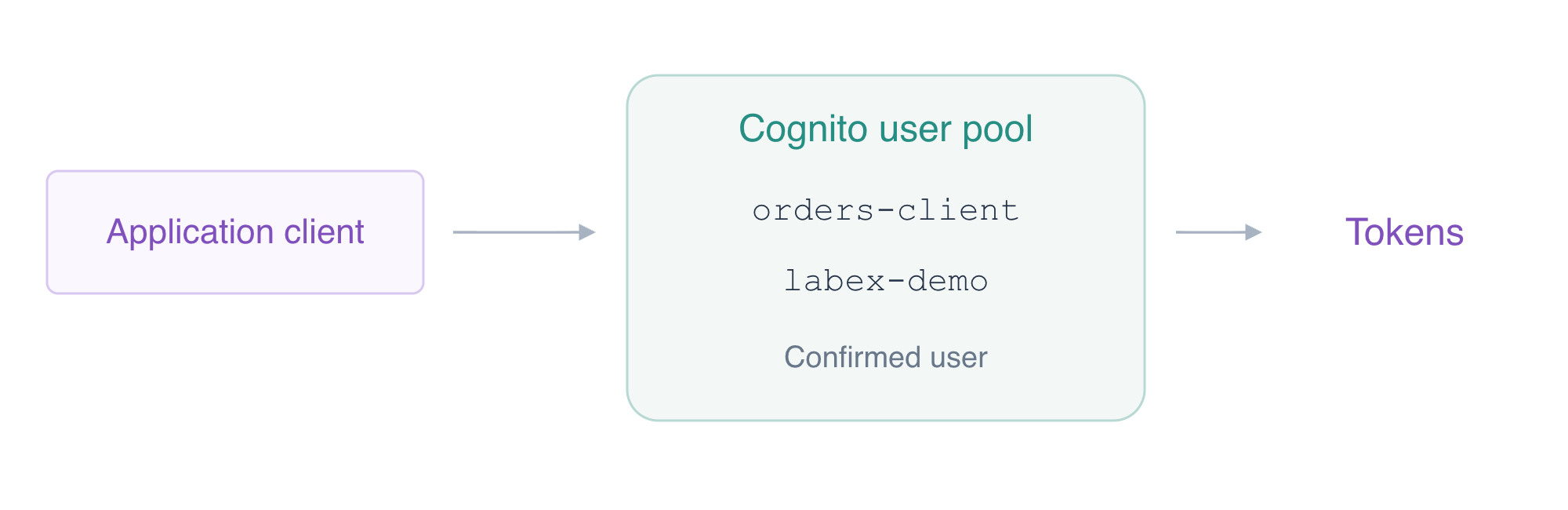
In this step, you will establish a user pool, a public app client and a confirmed synthetic user.
Enter the workspace and use umask 077 so newly created files are accessible only to your user. It affects file permissions, not the API's authorization rules:
cd /home/labex/project
umask 077
A Cognito user pool is your application’s user directory. Its users sign in to the application; your prepared IAM CLI identity administers the cloud resources. Look at AWS View above Terminal to compare these native resources.
Create the owned user pool. $(...) stores the returned pool ID for subsequent native commands:
POOL_ID=$(aws cognito-idp create-user-pool \
  --pool-name labex-a04-users \
  --query UserPool.Id \
  --output text)
echo "$POOL_ID"
Record its ID; > writes the value to the inventory file:
printf '%s\n' "$POOL_ID" > pool-id.txt
An app client identifies the application signing users in through this pool. A public application cannot keep a client secret confidential. Create this client without a secret, allowing the username/password flow and the refresh-token flow used in this walkthrough:
CLIENT_ID=$(aws cognito-idp create-user-pool-client \
  --user-pool-id "$POOL_ID" \
  --client-name orders-client \
  --no-generate-secret \
  --explicit-auth-flows ALLOW_USER_PASSWORD_AUTH ALLOW_REFRESH_TOKEN_AUTH \
  --query UserPoolClient.ClientId \
  --output text)
echo "$CLIENT_ID"
printf '%s\n' "$CLIENT_ID" > client-id.txt
Inspect safe client configuration, without requesting secret values:
aws cognito-idp describe-user-pool-client \
  --user-pool-id "$POOL_ID" \
  --client-id "$CLIENT_ID" \
  --query '{Name:UserPoolClient.ClientName,Flows:UserPoolClient.ExplicitAuthFlows}'
Create the demonstration user with email delivery suppressed. This is an administrator provisioning action, distinct from the user's later sign-in:
aws cognito-idp admin-create-user \
  --user-pool-id "$POOL_ID" \
  --username labex-demo \
  --message-action SUPPRESS \
  --user-attributes Name=email,Value=demo@example.test \
  --query '{Username:User.Username,Status:User.UserStatus}'
The initial status is FORCE_CHANGE_PASSWORD. For this disposable test user only, apply the supplied permanent-password input file through the CLI. The file has Username, Password and Permanent fields; the file:// syntax reads them without printing the password:
aws cognito-idp admin-set-user-password \
  --user-pool-id "$POOL_ID" \
  --cli-input-json file://demo-password.json
Inspect only the safe user status:
aws cognito-idp admin-get-user \
  --user-pool-id "$POOL_ID" \
  --username labex-demo \
  --query '{Username:Username,Status:UserStatus,Enabled:Enabled}'
Expect labex-demo, CONFIRMED and true. In AWS View, compare the owned pool ID, orders-client, its lack of a client secret and the confirmed enabled user. Example from the actual native pool/client/user state:
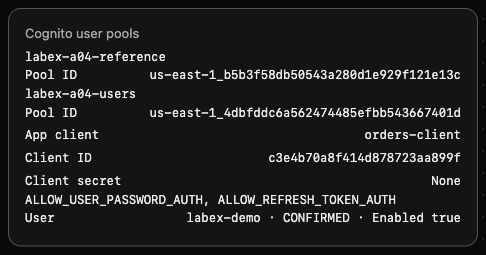
The unrelated labex-a04-reference pool remains empty. No user token has been requested yet.
Sign In and Read the Application Identity
In this step, you will obtain actual tokens for the confirmed user and observe rejection of an incorrect password.
InitiateAuth with USER_PASSWORD_AUTH authenticates the application's username and password. It does not authorize the user through your CLI's IAM administrator identity. The supplied sign-in.json contains the synthetic username/password parameters for this demonstration.
Store only the AuthenticationResult in a private file. Do not use cat on this response; it contains bearer tokens:
aws cognito-idp initiate-auth --client-id "$CLIENT_ID" --auth-flow USER_PASSWORD_AUTH --auth-parameters file://sign-in.json --query AuthenticationResult --output json > tokens.json
Show only the non-secret response fields with jq. The token-presence expression returns a boolean rather than the token values:
jq '{TokenType,ExpiresIn,TokensPresent:(has("AccessToken") and has("IdToken") and has("RefreshToken"))}' tokens.json
Expect Bearer, a positive expiry duration and TokensPresent: true. The access token authorizes appropriate user/API requests, the ID token carries identity information for the application, and the refresh token can obtain new access and ID tokens. These have different purposes and are not interchangeable.
Extract the access and ID tokens into private transport files. jq -r writes raw strings, and redirection keeps them off the terminal:
jq -r '.AccessToken' tokens.json > access-token.txt
jq -r '.IdToken' tokens.json > id-token.txt
GetUser authenticates with the access token. Request only the username in its output:
aws cognito-idp get-user \
  --access-token "$(cat access-token.txt)" \
  --query Username \
  --output text
Expect labex-demo. This is a live Cognito response to the issued token, not proof inferred solely from a local JSON file.
Try the supplied incorrect-password parameters, redirecting any unexpected token response to a separate private file:
aws cognito-idp initiate-auth --client-id "$CLIENT_ID" --auth-flow USER_PASSWORD_AUTH --auth-parameters file://wrong-sign-in.json --query AuthenticationResult --output json > rejected-login.json
Expect NotAuthorizedException: Incorrect username or password. The command intentionally exits nonzero; continue with the next step after reading that exact rejection. A connection or authentication-transport error is not evidence of a wrong-password rejection. Do not overwrite your valid tokens with this failed result. The step's automated check independently validates the issued tokens and live GetUser result; observe the specific wrong-password error manually.
Validate Signed Tokens and Refresh the Session
In this step, you will verify the token's signature and intended recipient, refresh the session, and distinguish sign-in from API route protection.
A JWT contains encoded header and claim data plus a signature. Merely decoding it does not prove who issued it. JWKS is the issuer's public signing-key set; RS256 uses an RSA signature that can be verified with those public keys.
Read the supplied ordinary application validation example; it contains no password or token literals:
cat verify_tokens.py
The example retrieves your pool's public JWKS from its prepared workspace endpoint, verifies RS256 and the key ID, then checks issuer, current time, token_use and app client. The signed issuer uses the Cognito pool identity. The access token identifies the client with client_id; the ID token uses aud. Run it with the saved token file and the actual pool/client IDs:
/home/labex/project/client-venv/bin/python verify_tokens.py tokens.json "$POOL_ID" "$CLIENT_ID"
Expect safe summaries for access and id, each with RS256 and current_time_valid: true. It also changes one signature byte in memory and confirms rejection before accepting the claims; no tampered token is saved. The access token's aws.cognito.signin.user.admin scope permits Cognito user self-service operations. This scope is not AWS administrator access, an order-ownership rule or a custom business scope.
Create private refresh parameters from the original refresh token. This writes to a file and does not expose the value:
jq '{REFRESH_TOKEN:.RefreshToken}' tokens.json > refresh-parameters.json
Obtain new access and ID tokens without sending the user's password again:
aws cognito-idp initiate-auth --client-id "$CLIENT_ID" --auth-flow REFRESH_TOKEN_AUTH --auth-parameters file://refresh-parameters.json --query AuthenticationResult --output json > refreshed.json
Validate the refreshed tokens through the same public-key and claim checks:
/home/labex/project/client-venv/bin/python verify_tokens.py refreshed.json "$POOL_ID" "$CLIENT_ID"
Expect valid access/ID summaries for the same pool and client. The refresh response need not contain another refresh token; preserve the original private response until cleanup.
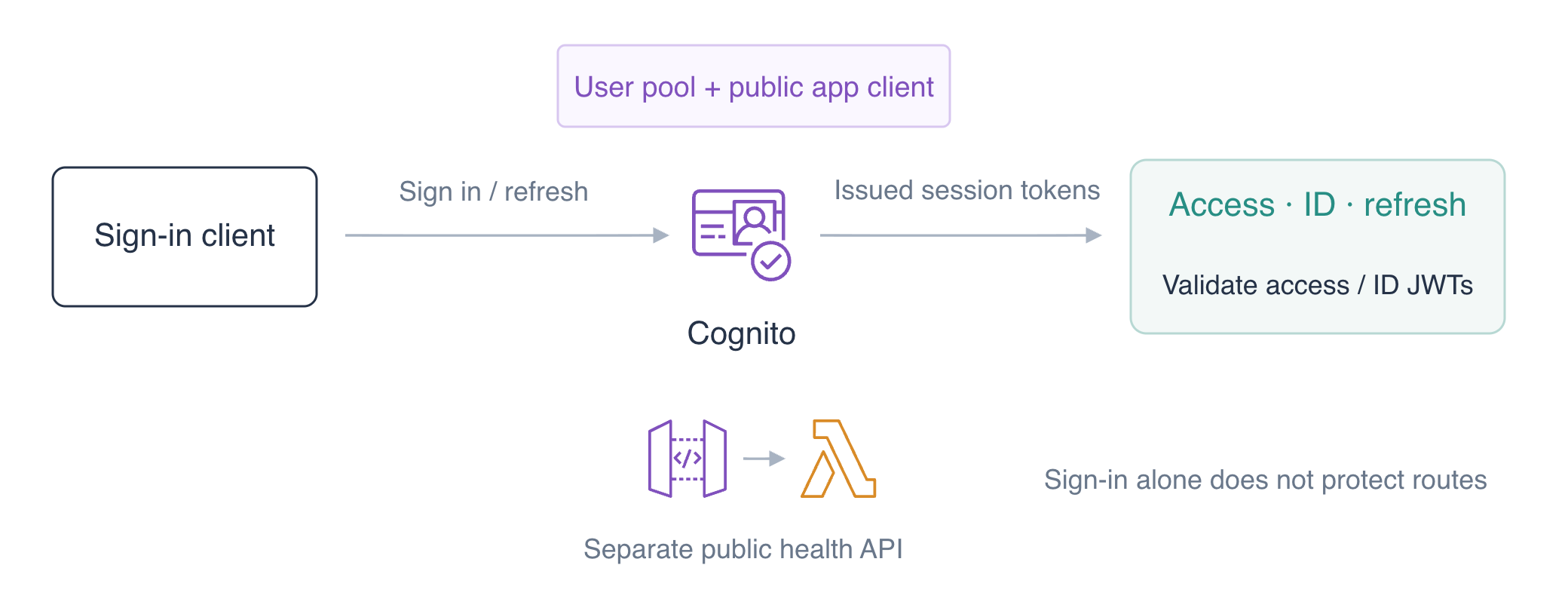
Sign-in alone does not change the prepared public API. Find its generated ID and send a public health request without a bearer token:
API_ID=$(aws apigatewayv2 get-apis \
  --query "Items[?Name=='labex-a04'].ApiId | [0]" \
  --output text)
echo "$API_ID"
printf '%s\n' "$API_ID" > api-id.txt
curl -i "http://127.0.0.1:8081/api/$API_ID/health"
Expect HTTP 200 and healthy: true. AWS View still shows authorization NONE for all routes and no order items. User authentication succeeded, but the API has not required a token yet. The next unit adds JWT route authorization; a valid token still does not automatically establish ownership of a particular order.
Refreshing continues the signed-in session for the same application client. It does not change an API route’s authorization settings or grant access to an order. Keep those decisions separate when comparing the refreshed identity summaries with the still-public health response.
Remove Sign-In and API Resources
In this step, you will remove the owned sign-in resources and backend fixtures while preserving the unrelated reference pool, table and logs.
Your inventory is labex-a04-users from pool-id.txt, orders-client from client-id.txt, the labex-demo user, the API ID in api-id.txt, labex-a04-orders-api, its function log group, labex-a04-orders, and the role's OrdersData policy. Delete only these named resources.
Remove the synthetic user, then the app client and owned pool:
aws cognito-idp admin-delete-user --user-pool-id "$POOL_ID" --username labex-demo
aws cognito-idp delete-user-pool-client --user-pool-id "$POOL_ID" --client-id "$CLIENT_ID"
aws cognito-idp delete-user-pool --user-pool-id "$POOL_ID"
Delete the prepared working API and its owned backend resources:
aws apigatewayv2 delete-api --api-id "$API_ID"
aws lambda delete-function --function-name labex-a04-orders-api
aws logs delete-log-group --log-group-name /aws/lambda/labex-a04-orders-api
aws dynamodb delete-table \
  --table-name labex-a04-orders \
  --query TableDescription.TableName \
  --output text
aws iam delete-role-policy --role-name labex-a04-execution --policy-name OrdersData
Query the native inventories successfully; transport failures do not prove absence:
aws cognito-idp list-user-pools --max-results 60 --query 'UserPools[].Name'
aws apigatewayv2 get-apis --query 'Items[].Name'
aws lambda list-functions --query 'Functions[].FunctionName'
aws dynamodb list-tables --query TableNames
Expect only the reference pool and reference table, with empty API/function lists. AWS View must show the same state and preserve the reference item and INFO platform reference keep unchanged. The prepared execution role retains FunctionLogs.
Remove your private authentication files, including supplied synthetic-password inputs. rm -f deletes only the explicitly listed local files:
rm -f tokens.json access-token.txt id-token.txt refreshed.json refresh-parameters.json rejected-login.json sign-in.json wrong-sign-in.json demo-password.json
Removing local files alone is not server-side session revocation. Here the synthetic user, client and pool were also deleted; this lab does not claim a general JWT logout or revocation mechanism. Keep the unrelated reference resources until author cleanup and VM shutdown.
Summary
You created an application user directory and public app client, provisioned a synthetic user, signed in and observed a wrong-password rejection. You verified actual RS256 signatures and issuer/client/time/type claims, read the live user identity and refreshed access and ID tokens. You distinguished Cognito users from IAM identities and sign-in from API authorization, then removed owned resources and private files while preserving references.
For further reading, see the AWS reference on User pool token purposes; JWT signatures and claim validation; Session refresh and refresh-token flows.


