



Introduction
The packing team needs NEW orders across customers. The customer-and-date primary key cannot serve that access pattern with one base-table Query. You will add a global secondary index, select a projection, query the actual queue, and watch a packed order move between index partitions after a base-table write.
Complete Query Orders with a Partition and Sort Key first. This fresh VM prepares only the base table, synthetic records, reference table and application shell. Creating the index and configuring its lookup are your work. Use /home/labex/project, the official AWS CLI and AWS View.
Certification Relevance
| Certification | Exam task | Practice |
|---|---|---|
| Solutions Architect – Associate (SAA-C03) | Task 3.3 | DynamoDB secondary indexes and attribute projection. |
| Developer – Associate (DVA-C02) | Task 1.3 | DynamoDB secondary indexes and attribute projection. |
| Data Engineer – Associate (DEA-C01) | Task 2.4 | Foundational practice: DynamoDB secondary indexes and attribute projection. |
Lab Overview
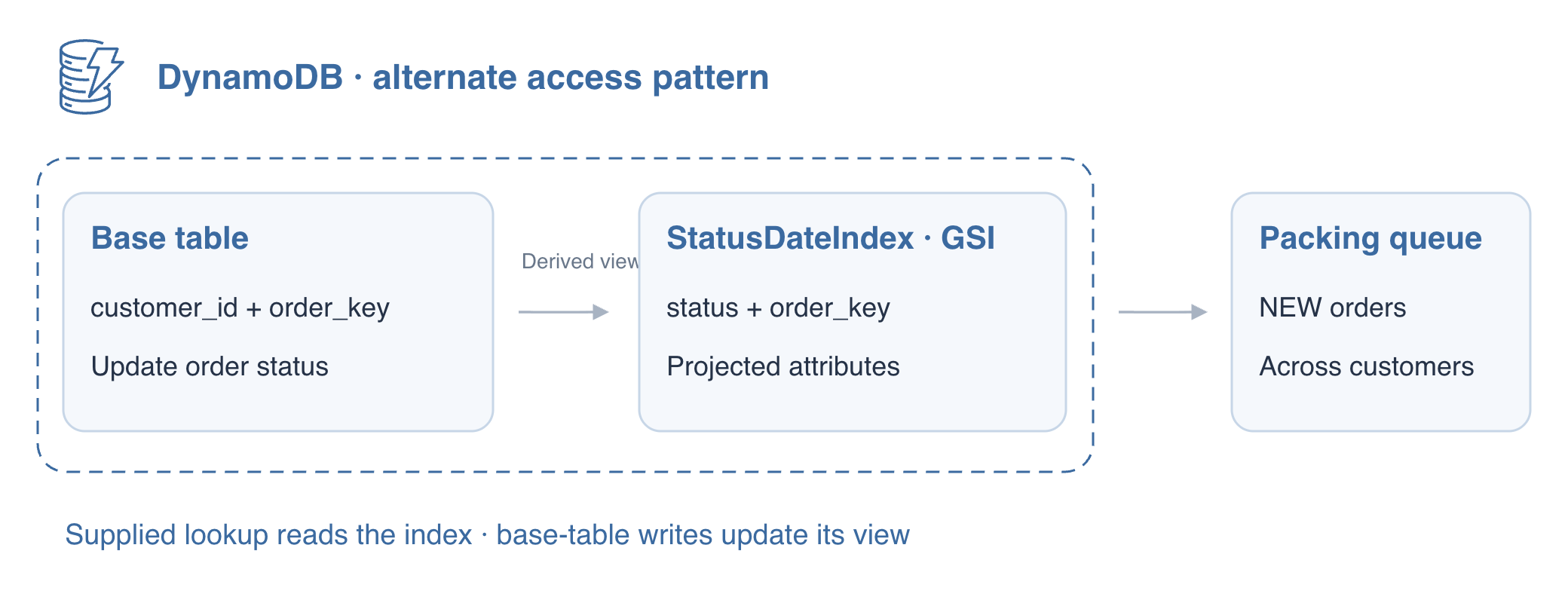
Add an Alternate Access Pattern
In this step, you will add an index for a packing queue that needs NEW orders across customers. The prepared table uses customer_id and order_key; a base-table Query cannot select all customers by status because status is not its partition key. A global secondary index (GSI) provides another partition-and-sort-key view of the same items.
The customer lookup and packing queue answer different business questions over the same orders. The GSI lets the queue select a status partition directly across customers. Adding a status filter to the customer Query would still inspect only that customer's partition; it would not create the queue's alternate access path.
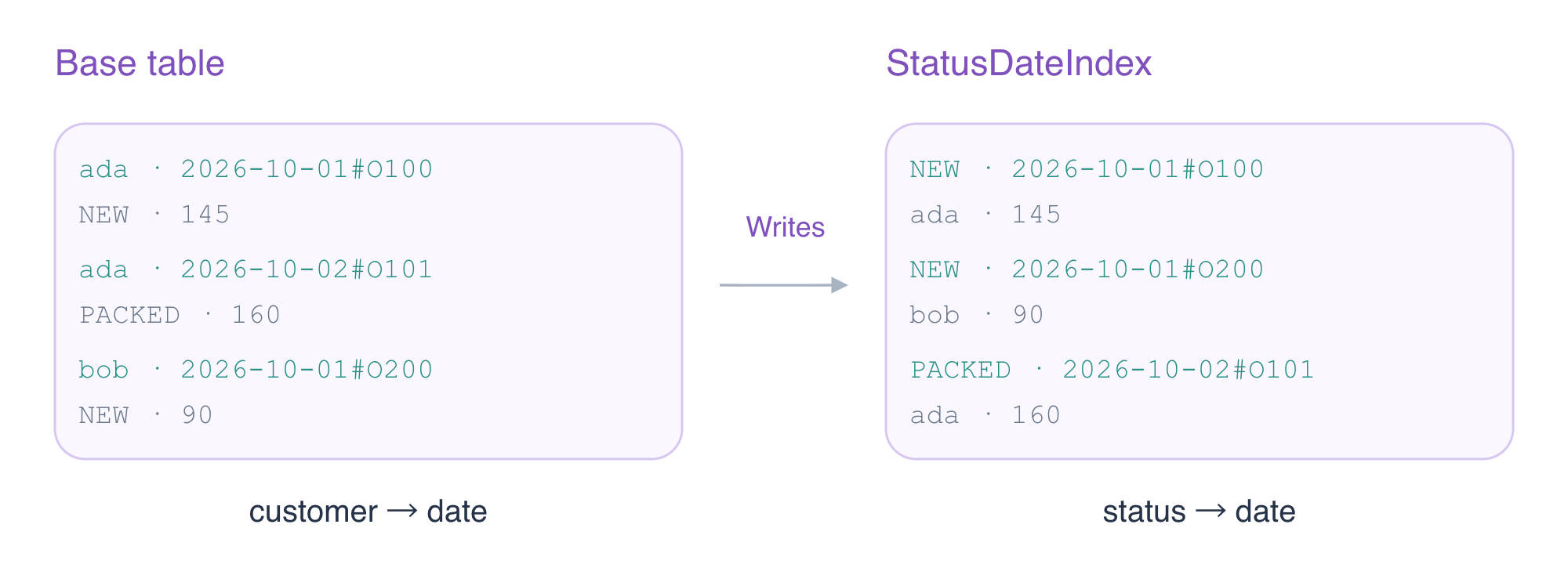
The orders table and three synthetic records are prepared independently so you can focus on the new access pattern. Inspect them first; keep all records except the taught status update unchanged.
cd /home/labex/project
aws dynamodb describe-table --table-name labex-d03-orders --query 'Table.KeySchema'
aws dynamodb scan --table-name labex-d03-orders --consistent-read
Add StatusDateIndex with status as its partition key and order_key as its sort key. A projection determines which attributes the index stores. INCLUDE adds amount; table and index keys are included automatically. The non-key source attribute will remain only in the base table. Index storage and writes have a cost on AWS.
aws dynamodb update-table \
  --table-name labex-d03-orders \
  --attribute-definitions AttributeName=status,AttributeType=S AttributeName=order_key,AttributeType=S \
  --global-secondary-index-updates '[{"Create":{"IndexName":"StatusDateIndex","KeySchema":[{"AttributeName":"status","KeyType":"HASH"},{"AttributeName":"order_key","KeyType":"RANGE"}],"Projection":{"ProjectionType":"INCLUDE","NonKeyAttributes":["amount"]}}}]'
aws dynamodb describe-table \
  --table-name labex-d03-orders \
  --query 'Table.GlobalSecondaryIndexes[].{Name:IndexName,State:IndexStatus,Keys:KeySchema,Projection:Projection}'
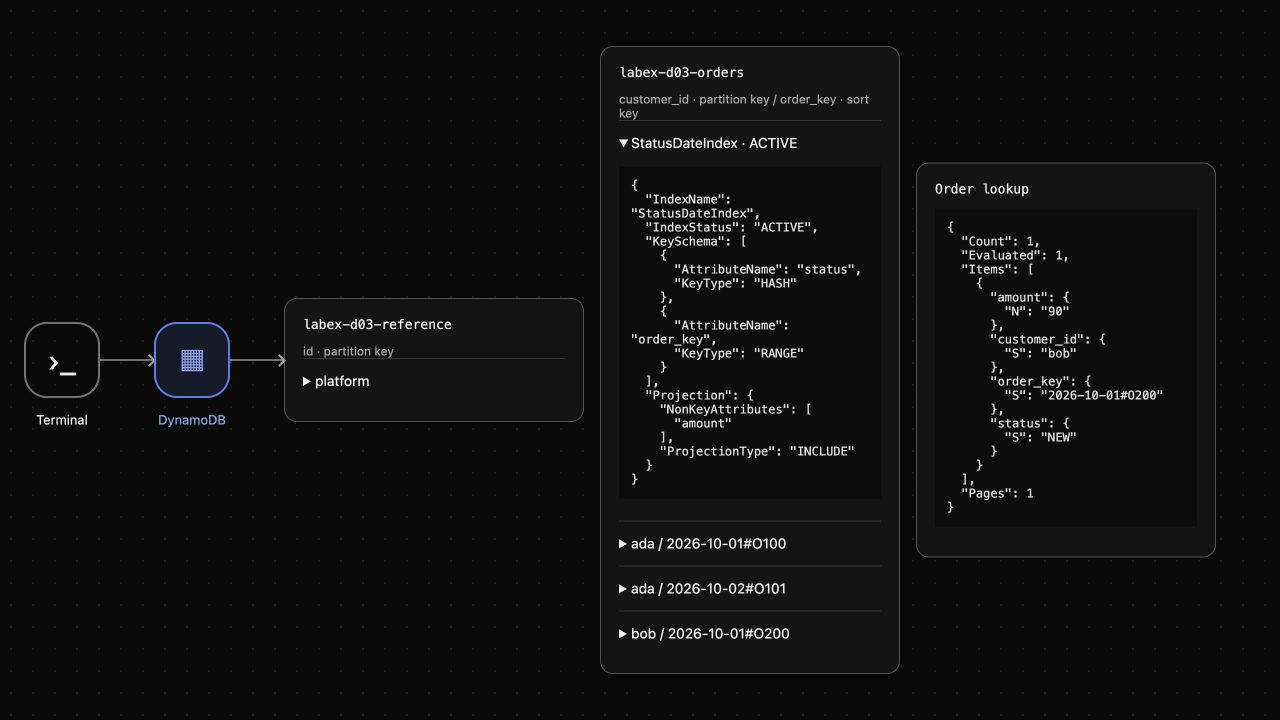
Continue only when StatusDateIndex reports ACTIVE. Creation can take time on AWS; repeat the describe command while the index is still creating. A table-exists waiter does not prove a new index is ready. AWS View shows the index inside the table card after the service reports it.
Query the Status Index and Inspect Its Projection
In this step, you will read the NEW queue through the alternate keys. --index-name selects the GSI. The key condition uses status equality; a filter on a base-table scan would read unrelated items first.
aws dynamodb query \
  --table-name labex-d03-orders \
  --index-name StatusDateIndex \
  --key-condition-expression '#state = :state' \
  --expression-attribute-names '{"#state":"status"}' \
  --expression-attribute-values '{":state":{"S":"NEW"}}'
The index returns Ada's O100 and Bob's O200, each with amount. Their source attribute is absent because it was not projected. Fetching additional base-table attributes would require a separate keyed read.
GSI updates are asynchronous on AWS and GSI reads are eventually consistent. Do not add --consistent-read to a GSI Query: that request is rejected with ValidationException. Wait and repeat a read if a recent write has not reached the index yet; do not treat a stale result as proof that the write failed.
The supplied order-lookup application from the preceding lab reads the ordinary lookup.json settings. Write the request to choose this index and NEW queue. A quoted heredoc writes JSON literally; ConsistentRead: false makes the index-read choice explicit.
cat > lookup.json <<'JSON'
{
  "paginate": true,
  "request": {
    "TableName": "labex-d03-orders",
    "IndexName": "StatusDateIndex",
    "KeyConditionExpression": "#state = :state",
    "ExpressionAttributeNames": {
      "#state": "status"
    },
    "ExpressionAttributeValues": {
      ":state": {
        "S": "NEW"
      }
    },
    "ConsistentRead": false
  }
}
JSON
./order-lookup
The application returns the same two orders. Expand StatusDateIndex in AWS View and compare the actual projection with the lookup result. Keeping both customers is correct for a status queue, even though a customer-specific view would require another key pattern.
Observe an Order Move Between Status Queues
In this step, you will pack O100 and observe its index entry move. A GSI follows base-table writes; you do not write directly to the index. Updating status changes the item's index partition while its base primary key stays the same.
aws dynamodb update-item \
  --table-name labex-d03-orders \
  --key '{"customer_id":{"S":"ada"},"order_key":{"S":"2026-10-01#O100"}}' \
  --update-expression 'SET #state = :state' \
  --expression-attribute-names '{"#state":"status"}' \
  --expression-attribute-values '{":state":{"S":"PACKED"}}' \
  --return-values ALL_NEW
./order-lookup
The NEW queue now contains only Bob's O200. Query PACKED to confirm that O100 appears alongside O101 rather than disappearing from the service.
aws dynamodb query \
  --table-name labex-d03-orders \
  --index-name StatusDateIndex \
  --key-condition-expression '#state = :state' \
  --expression-attribute-names '{"#state":"status"}' \
  --expression-attribute-values '{":state":{"S":"PACKED"}}'
Expect Ada's O100 and O101 in PACKED. On AWS repeat these reads until index propagation is visible. The update response and a consistent base-table read are the authoritative immediate item state; the GSI is an eventually consistent derived view. AWS View shows O100's new status and the NEW lookup containing only O200.
Remove the Owned Index and Table
In this step, you will remove the alternate view and then the owned table. Deleting an index leaves base-table items intact; deleting a table removes the items and its remaining indexes. Name only the owned resources.
aws dynamodb update-table \
  --table-name labex-d03-orders \
  --global-secondary-index-updates '[{"Delete":{"IndexName":"StatusDateIndex"}}]'
aws dynamodb describe-table \
  --table-name labex-d03-orders \
  --query 'Table.GlobalSecondaryIndexes'
Continue once the index list is empty. On AWS repeat DescribeTable while deletion is in progress. The table still holds three items at this point.
aws dynamodb scan --table-name labex-d03-orders --consistent-read --select COUNT
aws dynamodb delete-table --table-name labex-d03-orders
aws dynamodb wait table-not-exists --table-name labex-d03-orders
aws dynamodb list-tables
aws dynamodb get-item \
  --table-name labex-d03-reference \
  --key '{"id":{"S":"platform"}}' \
  --consistent-read
The orders table and its index are absent; the reference note remains keep unchanged. Successful inventory and reference reads distinguish cleanup from a disconnected service. AWS View retains only the unrelated reference. The disposable connection ends with the VM.
Summary
You added a GSI for a cross-customer status queue, selected projected attributes and used the index keys in actual queries. A base-table status update moved the order between index partitions without changing its primary key. You distinguished immediate base-table state from eventual index propagation, then deleted only the owned index and table.
For further reading, see the AWS reference on Global secondary indexes, projections, and consistency.


