



Introduction
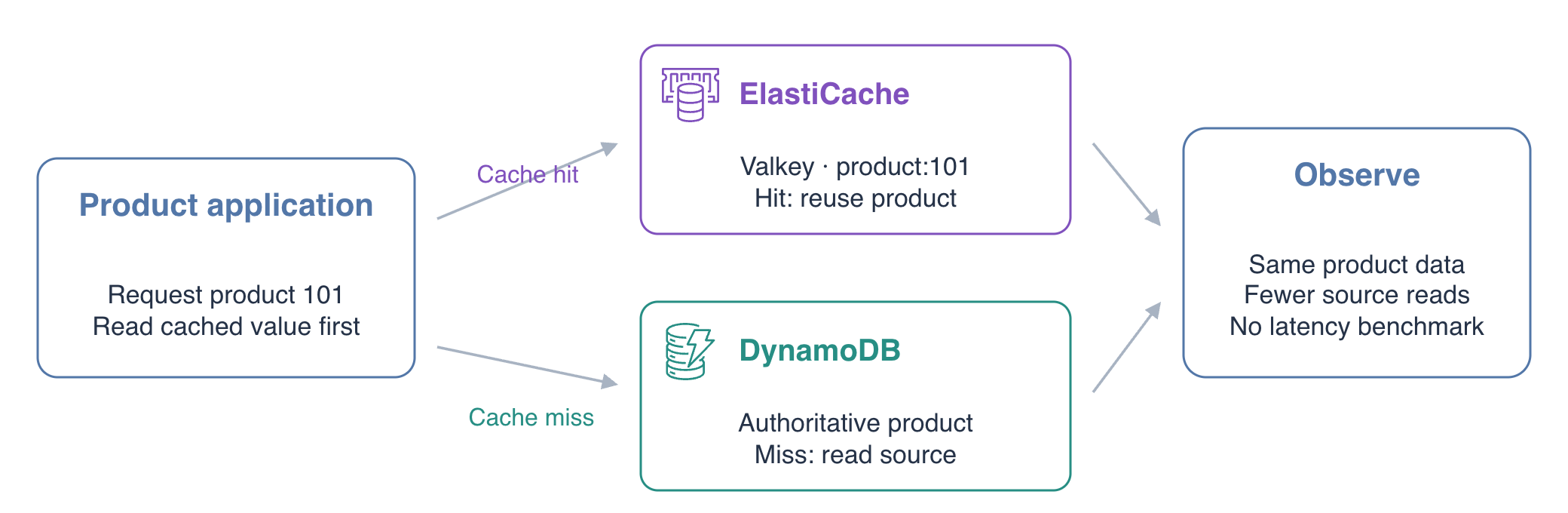
A product application reads its catalog from DynamoDB on every request. Add an Amazon ElastiCache node running Valkey so repeated requests can reuse a product value. Prove the change by comparing the response origin and actual source-read count.
Complete AWS Foundations for Beginners and the basic item operations in AWS DynamoDB for Beginners first. This independent environment supplies the product application, catalog and network configuration. Use Terminal for commands and AWS View to observe the current node, source records and application responses. The AWS CLI is already configured; you do not need a personal AWS account or resources from another lab.
Certification Relevance
| Certification | Exam task | Practice |
|---|---|---|
| Cloud Practitioner (CLF-C02) | Task 3.4 | Identify ElastiCache as an in-memory service and distinguish cached values from authoritative DynamoDB records. |
Observe the Product Source
In this step, observe the product application before caching. A cache keeps reusable data in memory. The database remains the source of truth: losing a cached value must not lose the catalog record. First observe how the supplied application behaves before caching.
Work in the supplied project directory and confirm your configured identity:
cd /home/labex/project
aws sts \
  get-caller-identity
The ARN ends in labex-ca01-operator. This identifies the environment whose resources you will query.
Read product 101 directly from its DynamoDB table. DynamoDB represents strings with S and numbers with N:
aws dynamodb \
  get-item \
  --table-name product-catalog \
  --key '{"product_id":{"S":"101"}}' \
  --consistent-read
The record describes a Travel mug priced at 20.00. The other product, 202, is a separate Notebook record and should remain unchanged throughout this lab.
The supplied HTTP application returns product JSON. Request the same product twice:
curl -sS http://127.0.0.1:8080/api/products/101
curl -sS http://127.0.0.1:8080/api/products/101
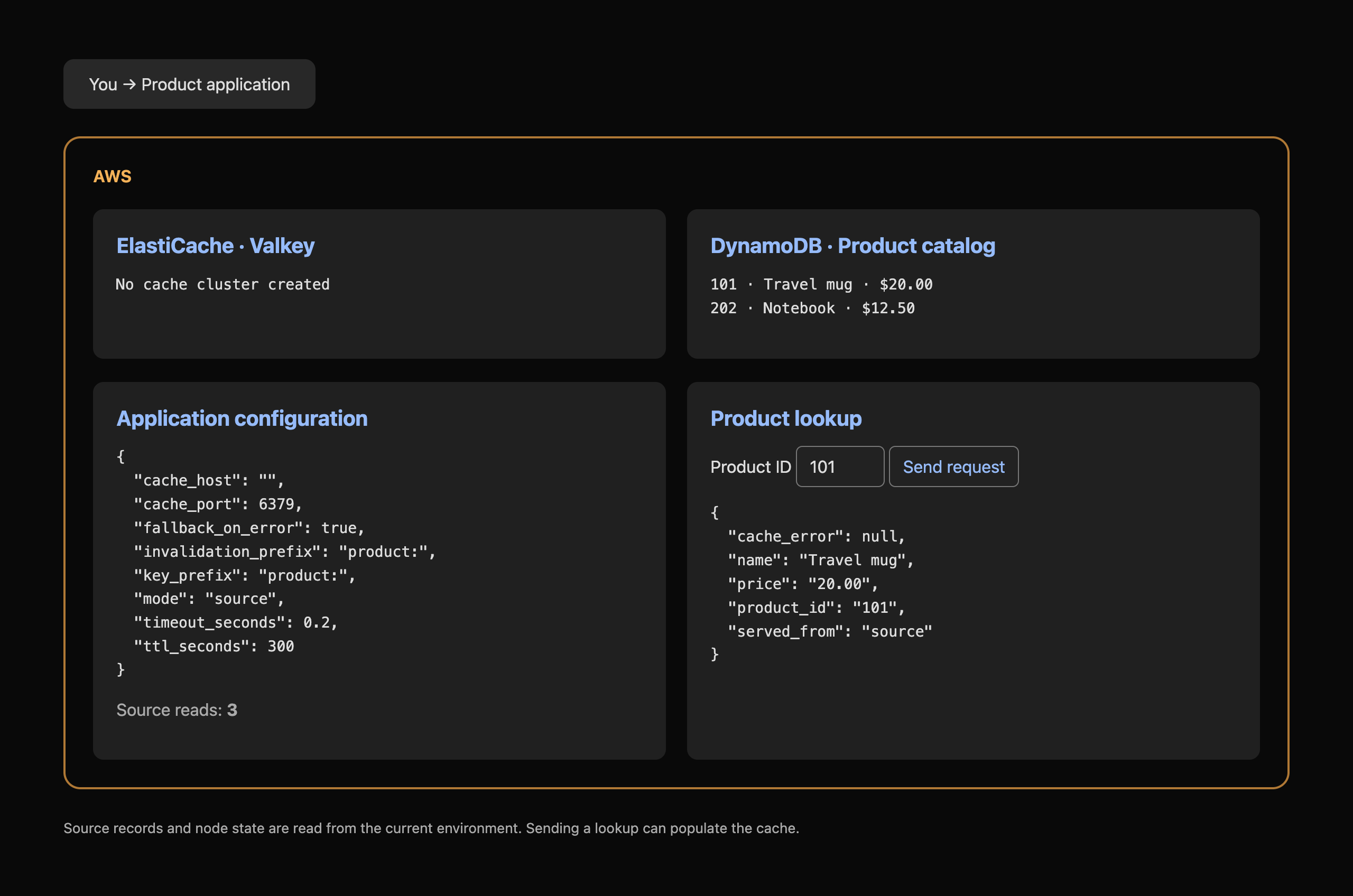
Both responses contain "served_from":"source". Open AWS View: its source-read count has increased by two, and the ElastiCache card has no cluster. A source read means the application actually requested the item from DynamoDB; it does not mean a measured AWS billing charge.
The Send request control sends another real application request. It can change the source-read count, so your count may differ from the example. You will use whether the count changes, rather than a fixed final number.
Create a Valkey Cache Node
In this step, create and connect to a cache node. Amazon ElastiCache manages in-memory cache engines. Valkey stores values by key; here, a product ID will identify a cached product. This exercise uses one standalone node. The supplied subnet group identifies its prepared network placement, and the supplied security group is its network configuration. Network-rule design is covered in the VPC course.
Read the network identifiers supplied for this fresh environment:
cat resources.json
Save and display the security-group ID. $(...) saves command output for use in the following operation:
CACHE_GROUP_ID=$(jq -r .security_group_id resources.json)
echo "$CACHE_GROUP_ID"
Create a small, single-node cache. The cluster identifier product-cache names the resource; the engine and node count select the course's Valkey configuration:
aws elasticache \
  create-cache-cluster \
  --cache-cluster-id product-cache \
  --engine valkey \
  --engine-version 7.2 \
  --cache-node-type cache.t3.micro \
  --num-cache-nodes 1 \
  --cache-subnet-group-name product-cache-network \
  --security-group-ids "$CACHE_GROUP_ID"
Observe CacheClusterStatus. Query the node details to obtain its endpoint, the address and port an application connects to:
aws elasticache \
  describe-cache-clusters \
  --cache-cluster-id product-cache \
  --show-cache-node-info \
  --query 'CacheClusters[0].{Status:CacheClusterStatus,Nodes:CacheNodes}'
Continue when the cluster is available and node 0001 has an endpoint. If it is still creating, wait briefly and repeat the query.
Save and display the actual endpoint address:
CACHE_HOST=$(aws elasticache \
  describe-cache-clusters \
  --cache-cluster-id product-cache \
  --show-cache-node-info \
  --query 'CacheClusters[0].CacheNodes[0].Endpoint.Address' \
  --output text)
echo "$CACHE_HOST"
Use the supplied Valkey client to test the real connection:
valkey-cli -h "$CACHE_HOST" -p 6379 PING
PONG proves that the cache engine answered. It does not yet prove the product application uses it. AWS View now lists the actual cache node and endpoint.
Connect the Application and Observe a Cache Hit
In this step, configure the application and compare its response origins. The application supports cache-aside: it first looks for product:101 in the cache. A missing key is a miss; the application reads DynamoDB and stores the product. A later hit returns that cached value without another source read.
The supplied app.json holds ordinary application settings. Switch its mode and endpoint using jq; write a temporary file and replace the configuration together:
jq --arg host "$CACHE_HOST" \
  '.mode = "cache-aside" | .cache_host = $host' \
  app.json > app.next.json
mv app.next.json app.json
Inspect the new configuration:
cat app.json
The application reads this configuration for each request, so no restart is required. ttl_seconds is the cached value's lifetime; the next lab explores expiration and freshness.
Request product 101 once:
curl -sS http://127.0.0.1:8080/api/products/101
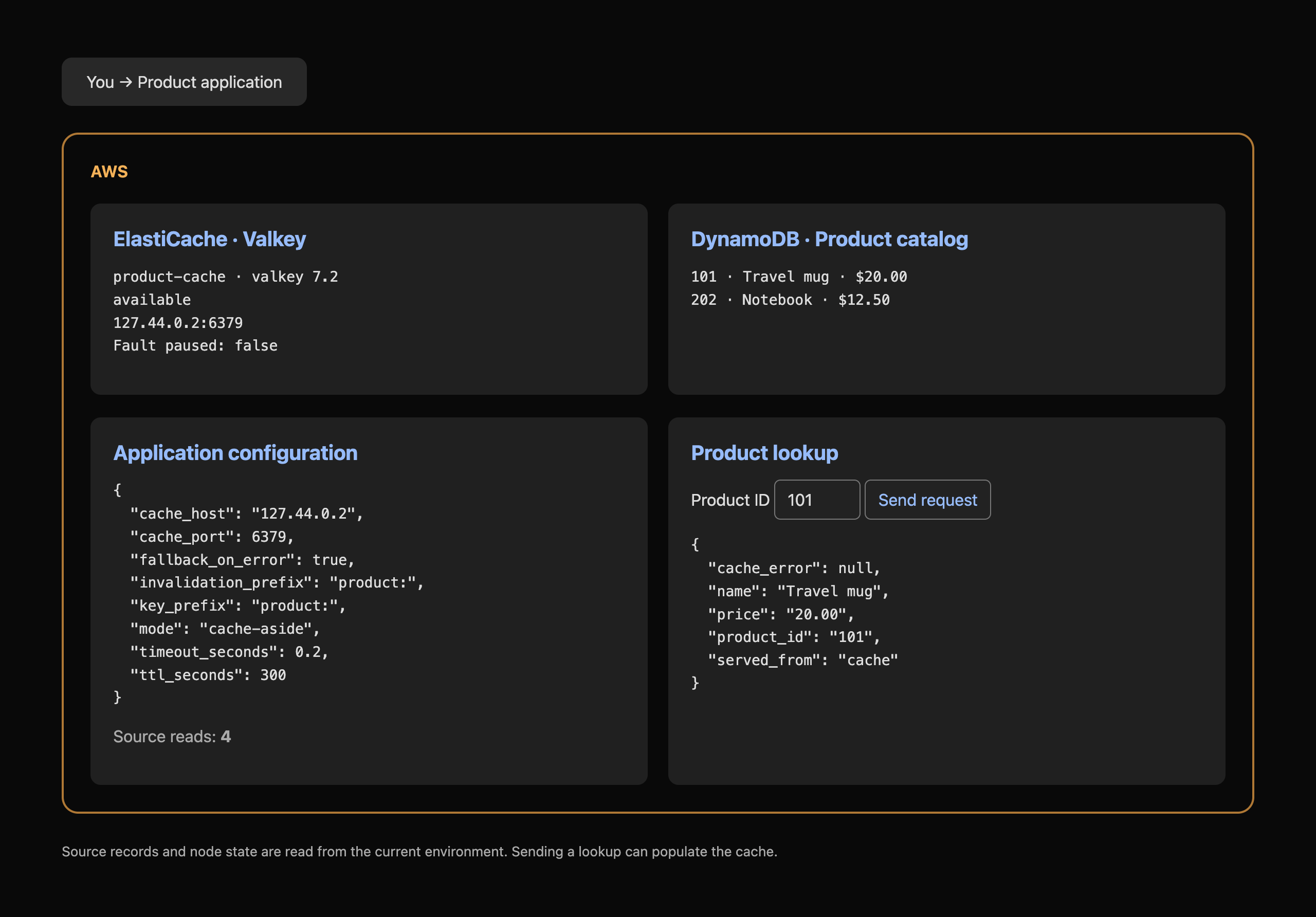
This first request returns served_from: source: the new cache has no value yet. Observe the source-read count in AWS View. Then repeat the same request:
curl -sS http://127.0.0.1:8080/api/products/101
This response returns served_from: cache, with the same product ID, name and price. The source-read count stays unchanged. If you previously sent a request from AWS View, the first Terminal request can already be a hit; compare two consecutive requests after the cache has been populated.
Read the actual stored cache value with the Valkey client:
valkey-cli -h "$CACHE_HOST" -p 6379 GET product:101
The JSON corresponds to the Travel mug source record. You have demonstrated reduced source accesses for this repeated lookup. These observations do not establish production latency, capacity or availability.
Leave the application and node available for the final verification. The independent training environment is disposable; in a real AWS account, remove unneeded caches to stop ongoing resource charges.
Summary
You created a single-node Valkey cache, connected a supplied product application and observed cache-aside misses and hits. The cached JSON matched the authoritative DynamoDB product, while repeated cache hits avoided another source read. Next, explore what happens when source data changes and how TTL and explicit invalidation keep responses fresh.
For further reading, see the AWS reference on Cache-aside data flow; Select a cache connection endpoint.


