Introduction
Fieldnote Audio Studio needs short listening previews of its recordings. You will make one three-second WAV, play it, and turn that command into a reusable Bash script. The prepared recordings are original synthetic sounds, not microphone recordings.
You should already know basic Bash arguments, conditions, loops, arrays and functions from Shell for Beginners. This lab explains the media options and quoting you need. FFmpeg is ready to use. The Workspace terminal and Listening Room page share this one container; each lab starts independently.
Make and Play One Preview
In this step, you will hear what a successful preview contains before writing a batch script.
Start in Workspace, which is prepared for UTF-8 filenames. Your working directory is the prepared studio. If a command reports a missing relative path, use pwd to see your current directory and return with this complete cd command. Keep all course work here.
cd /home/labex/project/audio-studio
ls input
You should see Morning bells.wav, 海辺.wav and -closing.wav. Each is an eight-second, mono WAV recording containing 16-bit PCM samples at 22050 samples per second. PCM stores the samples directly. We will preserve that format and keep only the beginning. Only non-hidden, immediate regular files ending in lowercase .wav are inputs; this project does not recursively search subfolders or handle arbitrary codecs.
First create single, a directory for individual experiments. mkdir -p creates it if needed and accepts an existing directory.
mkdir -p single
In the next command, -i identifies the input, -t 3 limits the output to three seconds, and -c:a pcm_s16le selects signed 16-bit PCM audio. Options describe the following input or output, so their positions matter. -v error hides routine progress while keeping errors. -nostdin prevents FFmpeg from reading terminal input for interactive commands, which also makes it safer inside loops. The final path names the output.
Double quotes keep a path containing spaces together as one argument. A leading ./ or an absolute directory prefix also keeps a filename beginning with - from being mistaken for an option. Use a new output file: FFmpeg normally refuses to overwrite an existing file when standard-input interaction is disabled.
ffmpeg -nostdin -v error -i "input/Morning bells.wav" -t 3 -c:a pcm_s16le "single/Morning bells.wav"
A successful conversion prints nothing at this log level. $? is the previous command's native exit status: zero means success, and nonzero means failure. Read it immediately; running another command replaces it.
printf 'Conversion exit: %s\n' "$?"
Expect Conversion exit: 0. This status says the conversion ran successfully; playback will test that the file is usable.
Switch to the Listening Room tab and reload the page. Under First preview, press the play control for Morning bells. Listen to the changing tones, drag the seek control into the clip, and confirm that it ends at three seconds. Select Download WAV to save that same file. The room reads only your actual output files; it cannot fill in missing audio from the library. Return to Workspace to continue.
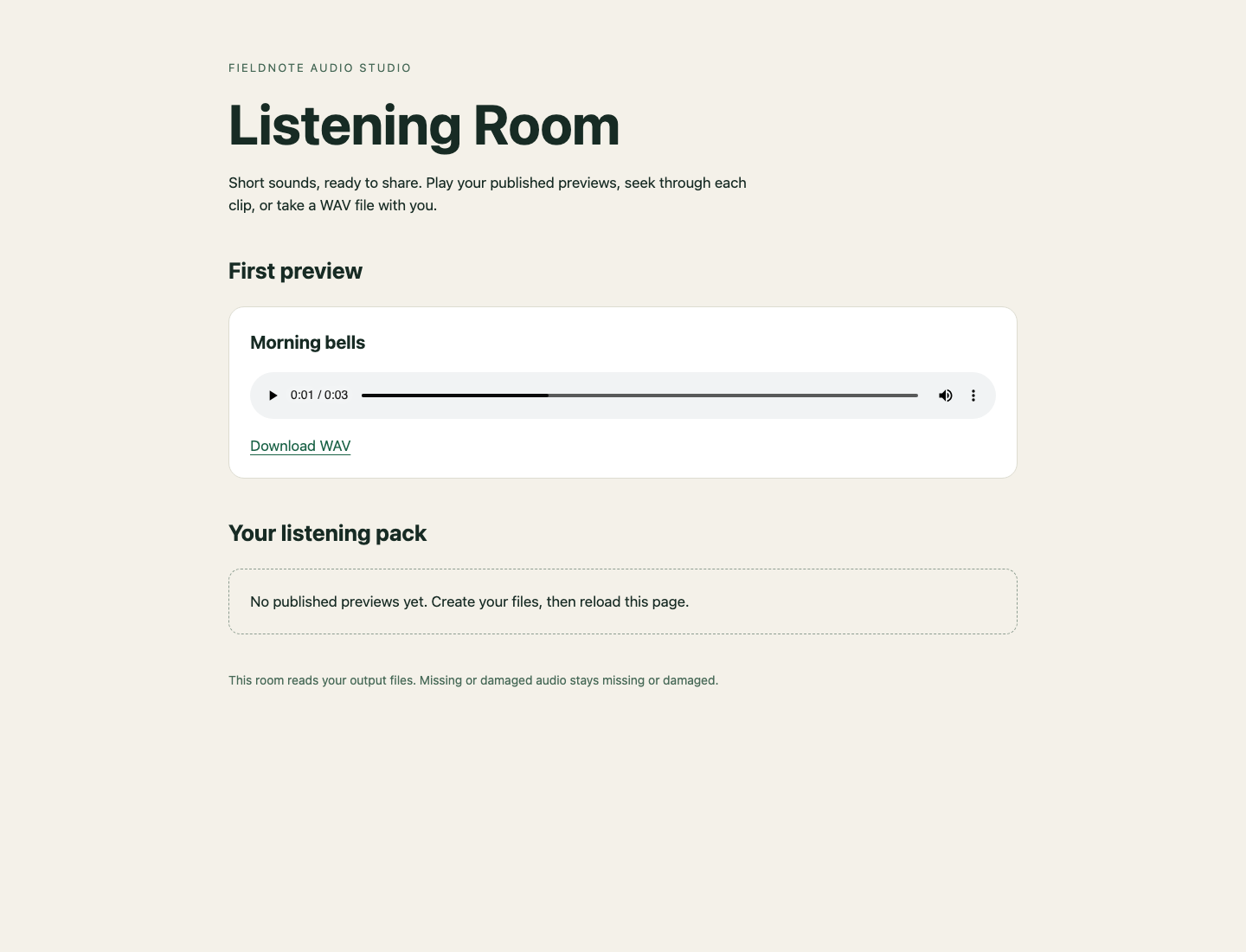
Look under First preview for the play/seek control and Download WAV link.
If you mistyped the input path, correct the quoted name after checking ls input, then run the command again. If an unwanted experiment already occupies the output name, remove only that exact experiment with rm -- "single/Morning bells.wav" before retrying. -- ends command options; it does not mean “delete everything.” Keep library, archive, notes.txt and scratch-other unchanged throughout this lab.
Give the Conversion a Reusable Function
In this step, you will pass input, output and duration values to the same conversion instead of editing its command for every recording.
Start in Workspace, in /home/labex/project/audio-studio. A function gives a name to a group of commands. Inside make_preview, $1, $2 and $3 are that function's arguments. The script receives its own arguments and forwards them in order. Quoting "$1" preserves each complete path, including spaces and Unicode.
The following here-document writes a small script. cat > preview-one.sh replaces that script file. <<'BASH' takes the following lines as literal text until a line containing only BASH; quoting the delimiter stops your current shell from expanding $1 while saving the script. The first line selects Bash when a script is launched as a program. We will explicitly run it with bash here.
cat > preview-one.sh <<'BASH'
#!/usr/bin/env bash
make_preview() {
  ffmpeg -nostdin -v error -i "$1" -t "$3" -c:a pcm_s16le "$2"
}
make_preview "$1" "$2" "$3"
BASH
Use the function to make a different two-second preview. 2 is a duration argument, not part of either filename.
bash preview-one.sh "input/海辺.wav" "single/海辺.wav" 2
printf 'Conversion exit: %s\n' "$?"
Expect zero again. Reload Listening Room, play 海辺 under First preview, and notice that this clip ends at two seconds. Return to Workspace. The same function now works with different paths and durations; the next step adds a collection of inputs.
Process Every Recording
In this step, you will publish one new directory containing a preview for each input.
Start in Workspace. Our script accepts exactly three arguments: input directory, new output directory, and an integer duration from one through five seconds. For this first batch, supply existing, separate input and output-parent directories, and keep output outside input. An existing output must be refused so a new run cannot overwrite good work. Do not run two writers against the same output path. These checks are ordinary error handling, not a concurrent-writer guarantee.
Before writing it, read the new parts. realpath expands the existing input directory to an absolute path, which gives every input a safe directory prefix. shopt -s nullglob makes an unmatched *.wav expand to no items instead of a literal asterisk path. files=(...) stores the matches as an array; quotes around the directory preserve its spaces while the unquoted *.wav still matches filenames. ${#files[@]} counts array members, and "${files[@]}" passes each member separately.
$(command) captures a command's output. || exit 2 stops if that command fails. Between tests, || means OR: [ -e "$2" ] || [ -L "$2" ] accepts either kind of existing target as a reason to refuse it.
case chooses a branch; 1|2|3|4|5 allows one of those values. [ -e path ] tests whether a target exists, while -L also catches a dangling symbolic link. ${source##*/} removes the longest prefix ending in /, leaving the filename. if ! command takes the failure branch when the command returns nonzero. >&2 sends an explanation to the error stream, and exit 1 stops with failure.
Replace the prepared incomplete batch.sh with this first working batch. It is intended for the clean input in this lab. A conversion failure returns nonzero, but may leave a partial new directory; the next guided lab teaches how to prevent that publication.
cat > batch.sh <<'BASH'
#!/usr/bin/env bash
if [ "$#" -ne 3 ]; then
  printf 'Usage: batch.sh INPUT OUTPUT SECONDS\n' >&2
  exit 2
fi
case "$3" in 1|2|3|4|5) ;; *) exit 2 ;; esac
if [ -e "$2" ] || [ -L "$2" ]; then
  printf 'Output already exists\n' >&2
  exit 2
fi
input=$(realpath -- "$1") || exit 2
shopt -s nullglob
files=("$input"/*.wav)
if [ "${#files[@]}" -eq 0 ]; then
  printf 'No WAV inputs\n' >&2
  exit 1
fi
mkdir -- "$2" || exit 1
make_preview() {
  ffmpeg -nostdin -v error -i "$1" -t "$3" -c:a pcm_s16le "$2"
}
for source in "${files[@]}"; do
  name=${source##*/}
  if ! make_preview "$source" "$2/$name" "$3"; then
    printf 'Could not convert: %s\n' "$name" >&2
    exit 1
  fi
done
printf 'Published %s previews\n' "${#files[@]}"
BASH
Now make the three-second batch in the new previews directory. The published folder must contain exactly one matching WAV per input, with the original filenames and no extra files.
bash batch.sh input previews 3
Expect Published 3 previews. Reload Listening Room. Under Your listening pack, play all three clips, seek within them, and download one. Each lasts three seconds and contains the beginning of its own recording, including -closing. The single-file experiments remain separate.
Back in Workspace, deliberately repeat the command. This is an expected refusal, not a broken environment.
bash batch.sh input previews 3
printf 'Repeat exit: %s\n' "$?"
Expect Output already exists and Repeat exit: 2. Keep the good batch; choose another new output name for future experiments. The script can also fail clearly for an empty input instead of pretending it made a useful pack. You have a reusable batch; next you will improve what happens when one recording is damaged.
Summary
You made playable audio, preserved complete filenames with quotes, and combined a function and array loop into a reusable Bash batch. You read native exit statuses and refused to overwrite an existing listening pack. The next lab adds a staging directory so failed conversions cannot publish a partial new pack.