Introduction
Your team already has report storage managed by Terraform. Before adding automated deployments, you need a job that refuses badly formatted or structurally invalid configuration before it reaches planning.
You will configure two static gates, observe each gate stop a real job, and repair the configuration. You should already understand Terraform configuration, plan/state, basic Git, and shell exit statuses. The prepared environment needs no personal AWS account.
Certification Relevance
| Certification | Exam task | Practice |
|---|---|---|
| DevOps Engineer – Professional (DOP-C02) | Task 1.2 | Foundational practice in placing automated static checks before later delivery stages and stopping on failed exit statuses. |
Add Checks Before the Plan
In this step, you will connect static checks to a supplied sequential job. The existing bucket and report are background infrastructure: this lab must leave their data and Terraform state unchanged.
Use the Terminal interface. Enter the supplied Git repository and load its tool environment. source applies the prepared variables to your current shell; it does not deploy infrastructure.
cd /home/labex/project/report-delivery
source environment.sh
Inspect the resource configuration and current job stages. cat prints each file so that you can see what the job manages and what it runs.
cat main.tf pipeline.json
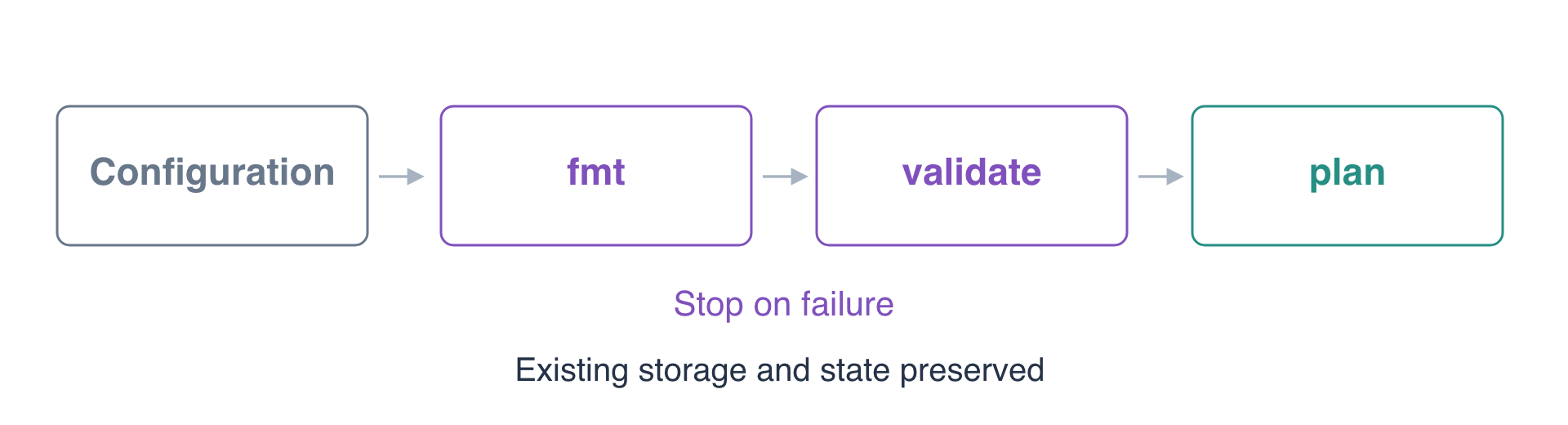
The bucket has a Purpose tag. The job currently has only a plan stage. A successful plan alone does not demonstrate that formatting and structural checks ran first.
terraform fmt -check checks Terraform's canonical formatting without rewriting files. terraform validate checks whether initialized configuration is internally consistent, including supported resource attributes. Neither proves that the configuration meets business requirements; module assertions follow in the next lab.
The supplied executor maps stage names to fixed Terraform commands and stops at the first error. Keep run-job.py unchanged: your task is to configure pipeline.json, not to rewrite the supplied executor. The checks confirm that the working entry point matches the supplied original before evaluating its behavior. Add both checks before planning. The here-document writes the JSON between its delimiters to pipeline.json; quoting EOF preserves its literal contents.
cat > pipeline.json <<'EOF'
{"stages":["fmt","validate","plan"]}
EOF
Run the job with Python's standard interpreter. This is an instructional local runner; its stages execute standard Terraform commands.
python3 run-job.py
Expect [fmt] native exit 0, [validate] native exit 0, and [plan] native exit 0. The plan reports no changes because the supplied infrastructure already matches its configuration. An error stops later stages. A plan with changes uses native exit 2, which the runner treats as a successful preview, never as permission to apply.
Inspect your change with Git. -- separates the path from command options.
git diff -- pipeline.json
The diff should show both new gates before plan. No apply stage exists in this job.
Stop on a Formatting Error
In this step, you will introduce a valid HCL expression with noncanonical spacing, then prove that the format gate stops the job before planning.
Append a small output block. >> appends to the existing file. The compact spacing is intentional; the output does not manage a new resource.
cat >> main.tf <<'EOF'

output "format_probe" {value="spacing"}
EOF
Run the job again. This command is expected to fail; the failure is the useful result.
python3 run-job.py
The first stage reports native exit 3 and lists main.tf. The job prints Job stopped; later stages did not run. There should be no [validate] or [plan] line. Formatting can be corrected without contacting AWS.
Inspect the exact proposed formatting changes. -diff shows them, while -check leaves the file unchanged.
terraform fmt -check -diff
This command also intentionally returns a nonzero exit status. Keep the formatting defect in place for this step's check; the next step repairs it.
Distinguish Formatting from Validity
In this step, you will repair formatting and then introduce a different error that only structural validation catches.
First let Terraform rewrite the spacing in place. Running fmt without -check performs the formatting change.
terraform fmt
The output lists main.tf. Confirm the repaired configuration passes the job.
python3 run-job.py
All stages should run. The extra output can make plan return native exit 2; it proposes an output change without applying it.
Now append a reference to an attribute that the S3 bucket resource does not export. This block uses canonical formatting, so it can pass the first gate.
cat >> main.tf <<'EOF'

output "missing" {
  value = aws_s3_bucket.reports.missing_attribute
}
EOF
Check formatting alone first.
terraform fmt -check
It returns zero with no output. Then run the complete job.
python3 run-job.py
Expect the format gate to pass, followed by validate native exit 1 and an Unsupported attribute diagnostic. There should be no plan-stage line. The expression is formatted correctly but refers to an unsupported attribute. Leave this error in place for the step check.
Repair the Configuration and Preserve the Environment
In this step, you will restore the known valid resource configuration, rerun the gated job, and verify that the report storage has not changed.
git restore -- main.tf restores only this file from the repository's starting commit. It removes both experimental outputs and keeps your separate pipeline.json changes.
git restore -- main.tf
Run the complete job again.
python3 run-job.py
All three stages should return native exit 0. The plan should report no changes. Passing static checks allows planning; it does not approve or apply a deployment.
Read the report directly from storage. - sends its contents to standard output rather than saving another local copy.
aws s3 cp s3://delivery-gates-reports/report.csv -
Expect:
quarter,total
Q1,320
Inspect the neighboring report that this exercise must preserve.
aws s3 cp s3://delivery-gates-neighbor/keep.txt -
It should still say preserve neighboring report. Review the final Git diff to confirm that your persistent change is the pipeline configuration.
git diff -- main.tf pipeline.json
Do not destroy either prepared bucket: they represent existing infrastructure owned by the team. The job has no deployment or saved-plan stage, so it leaves no new cloud resources or plan artifacts to clean up. The temporary output experiments have been removed by restoring main.tf. Keep your quality gates for the final check.
Summary
You built a sequential Terraform job with formatting and structural validation before planning. You observed a formatting failure and a separate unsupported-attribute failure stop later stages, then repaired the configuration and preserved the report data and state.
Static validity is one quality layer. In the next lab, executable module assertions check whether valid configuration produces the intended behavior. See the official fmt reference and validate reference for the checks used here.