Introduction
DAYMARK is a small café. At closing time, the team downloads a sales CSV for its ledger. A failed calculation must not replace the last complete file. You will first understand the totals, then complete a short Bash publishing wrapper; the calculation program is supplied.
Basic terminal familiarity is enough. Commands and shell syntax are explained before use. Start in Daymark, the real website on port 8081; use Workstation, prepared in /srv/daymark-sales, for commands. The data is synthetic, and no installation or external account is needed.
Understand and Calculate the Close
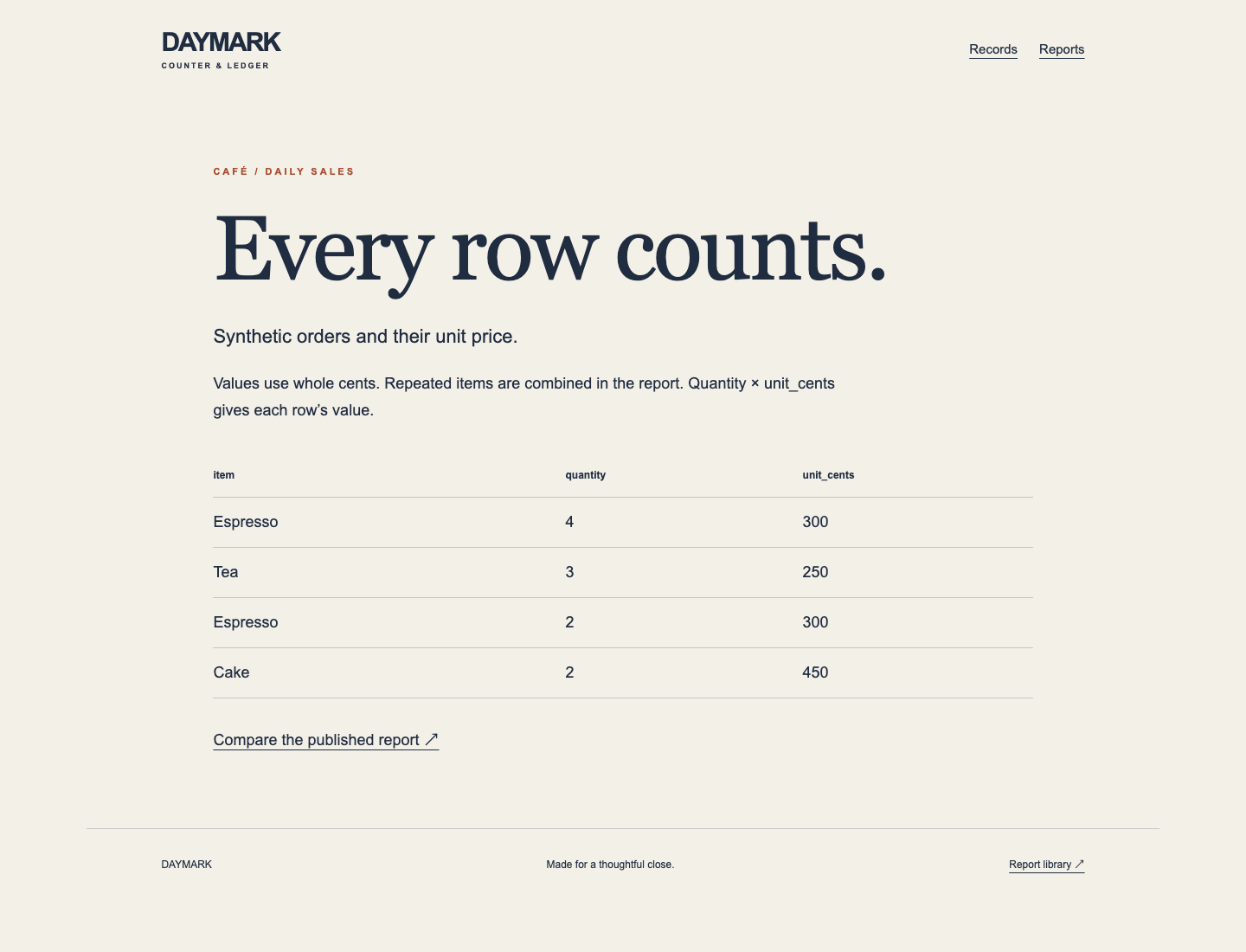
In this step, you will compare the café's source orders with a real candidate export. Start in Daymark. Open View source records ↗. The four source rows describe 6 Espresso at 300 cents, 3 Tea at 250 cents and 2 Cake at 450 cents: 11 items and 3450 cents in total. A cent is one hundredth of a currency unit; whole cents avoid rounding ambiguity. Repeated item rows must be combined.
Open Reports and Download latest CSV ↓. This saves an actual CSV file. CSV means comma-separated values; its first row names the columns. The initial file is a previous close with TOTAL,1,100. It must stay available until a complete replacement exists. Return home with DAYMARK.
Switch to Workstation. pwd prints the working directory; ls lists files and cat prints a text file. A relative path is resolved from your current directory.
pwd
Expect /srv/daymark-sales.
ls
cat orders.csv
The rows match the website. python3 runs the supplied calculator. Its absolute path works regardless of your current directory. > redirects its standard output into a file, replacing that file before the program runs. Use a separate candidate, never the published report:
/usr/bin/python3 /opt/labex/d10/summarize.py orders.csv > candidate.csv
cat candidate.csv
item,quantity,value_cents
Cake,2,900
Espresso,6,1800
Tea,3,750
TOTAL,11,3450
The source uses unit price; the report uses combined quantity and total value. An exit status of zero means success; nonzero means failure. $? expands to the previous command's status, so read it immediately after the command of interest. echo prints text:
/usr/bin/python3 /opt/labex/d10/summarize.py fixtures/broken.csv > rejected.csv
echo $?
Expect Export failed: ... and 1. This is intentional. cat rejected.csv would show a header, even though calculation failed: partial output is not a valid report. The existing download still says TOTAL,1,100 because you wrote only separate candidates. If a path fails, use pwd and ls, return with cd /srv/daymark-sales, and retry the candidate command. cd changes directory. Keep source orders and the existing report.
Publish Only After Success
In this step, you will replace the unsafe wrapper and demonstrate both preservation and fresh recovery. Start in Workstation. The wrapper accepts two arguments: the input CSV and the publication path. Read it:
cat publish.sh
Its direct > can truncate the published file before a failed calculation finishes. Instead, create a temporary file beside the destination, write successfully, then rename it. On the same filesystem, the rename replaces the visible filename atomically: readers see either complete old bytes or complete new bytes. This does not provide database transactions or protection from disk loss.
Bash runs the small wrapper. set -e stops on a failed ordinary command; -u rejects unset variables. $1 and $2 are the two arguments. name=value assigns a shell variable without spaces around =; $(command) captures command output. Quotes preserve spaces in paths. mktemp creates a unique file from the XXXXXX suffix. trap ... EXIT removes leftover temporary bytes on either success or failure. chmod 644 permits the owner to write and everyone to read. mv -fT replaces the exact destination filename; -T rejects a destination directory rather than moving a file inside it. printf prints the publication details; id -u prints the actual numeric user and sha256sum identifies file bytes.
cat > publish.sh replaces only your wrapper. The quoted SH begins a here-document: paste through the final SH on its own line. The quotes preserve the dollar signs literally.
cat > publish.sh <<'SH'
#!/bin/bash
set -eu
input=$1
output=$2
tmp=$(mktemp "${output}.XXXXXX")
trap 'rm -f "$tmp"' EXIT
/usr/bin/python3 /opt/labex/d10/summarize.py "$input" > "$tmp"
chmod 644 "$tmp"
mv -fT "$tmp" "$output"
printf 'Published %s uid=%s cwd=%s sha256=' "$output" "$(id -u)" "$PWD"
sha256sum "$output"
SH
The prepared account daymark-report owns reports/; it may write reports while the website only reads them. sudo -u runs as that account. /bin/bash is absolute; the wrapper need not have executable permission when explicitly passed to Bash.
sudo -u daymark-report /bin/bash /srv/daymark-sales/publish.sh orders.csv /srv/daymark-sales/reports/sales.csv
cat reports/sales.csv
Expect the complete TOTAL,11,3450 report. cp copies a file; overwrite only this exercise's orders.csv. Preserve its original fixture. Then deliberately pass malformed input:
cp fixtures/broken.csv orders.csv
sudo -u daymark-report /bin/bash /srv/daymark-sales/publish.sh orders.csv /srv/daymark-sales/reports/sales.csv
echo $?
Expect the intentional failure and 1. Switch to Daymark, reload Reports, download again and confirm TOTAL,11,3450 remains. A failed attempt must neither publish a header nor remove the previous file.
Return to Workstation. Recover with a new valid close containing two additional Tea. It must produce 13 items and 3950 cents, not leave the older report forever:
cp fixtures/next.csv orders.csv
sudo -u daymark-report /bin/bash /srv/daymark-sales/publish.sh orders.csv /srv/daymark-sales/reports/sales.csv
cat reports/sales.csv
Expect Tea,5,1250 and TOTAL,13,3950. In Daymark, reload Records and Reports and download again; source and report now agree. If permission is denied, check the exact output path and repeat the sudo -u daymark-report command; do not grant world-write permission. If the wrapper has a typo, replace it with the complete here-document and retry. The temporary file is created beside the output so the final rename stays on one filesystem.
Summary
You practiced complete CSV publication, meaningful failure status and recovery. A scheduled report is useful only when its actual identity, trigger and business totals agree. This single-instance exercise uses synthetic data and a short training schedule; it is not a full production reporting platform.