Introduction
A contributor proposes a code change with a title and description. A build job turns that metadata into a preview artifact. Continuous integration (CI) means running such jobs automatically when changes arrive. A runner is the program that carries out the job. Here you start a small supplied local runner yourself.
All people and events are synthetic. The runner uses real Bash in a disposable container, with no network or deployment credentials. The word production in release.conf is a local test value: it never deploys anything. This workshop models text substitution and shell execution, not a hosted CI platform's triggers or permissions. The CI Workshop terminal is your maintenance workspace; Topology explains the flow and displays actual run channels when refreshed.
You will run an ordinary build, trace a script injection, edit two small files, and retest exact metadata handling. Basic terminal familiarity is enough; the required JSON and Bash syntax is taught before use.
Run an Ordinary Build
In this step, you will see the expected business result before investigating the problem: the exact contributor title becomes an artifact, and the release channel stays preview.
Select the CI Workshop tab in the lab interface to begin this step.
Switch to the CI Workshop tab. pwd prints your current directory; ls lists its files. The workspace is /home/labex/project/ci-workshop.
Switch to the CI Workshop tab before running the following command.
pwd
ls
cat prints a text file. A JSON object uses braces around named fields; a colon connects each field name to its value. JSON strings use double quotes. Inside a string, \n represents a line break. Read the ordinary event:
cat events/ordinary.json
Its title is Improve search results. body is a multiline description. These values are data supplied by a contributor, so a build must not trust them as commands.
Read the small job definition and its script:
cat job.json
cat build.sh
| Item | Meaning in this local runner |
|---|---|
script |
The Bash filename to run, currently build.sh |
env |
A mapping of process environment names to strings; currently empty {} |
{{event.title}} |
Replace this exact placeholder with the event's title before Bash starts |
{{event.body}} |
The same replacement for the description |
artifact.txt |
Output metadata file created by the build |
release.conf |
Per-run channel initialized to preview |
Bash reads shell instructions. TITLE="..." assigns a shell variable; do not put spaces around =. "$TITLE" expands that variable as one argument while preserving spaces and line breaks. printf '%s' writes one string without adding a newline. The single quotes keep %s literal. > redirects output into a file, replacing its previous contents. The semicolon separates two commands. set -euo pipefail makes common command, unset-variable, and pipeline failures stop this script; it does not prevent injection.
ci is the supplied local runner command. run takes an event name (without .json) and a new output-directory name. Every run starts with a fresh preview configuration. Run the ordinary event:
ci run ordinary first
Expect channel=preview and exit=0. Exit zero means Bash finished successfully. Inspect the generated script, artifact, and configuration with show:
ci show first
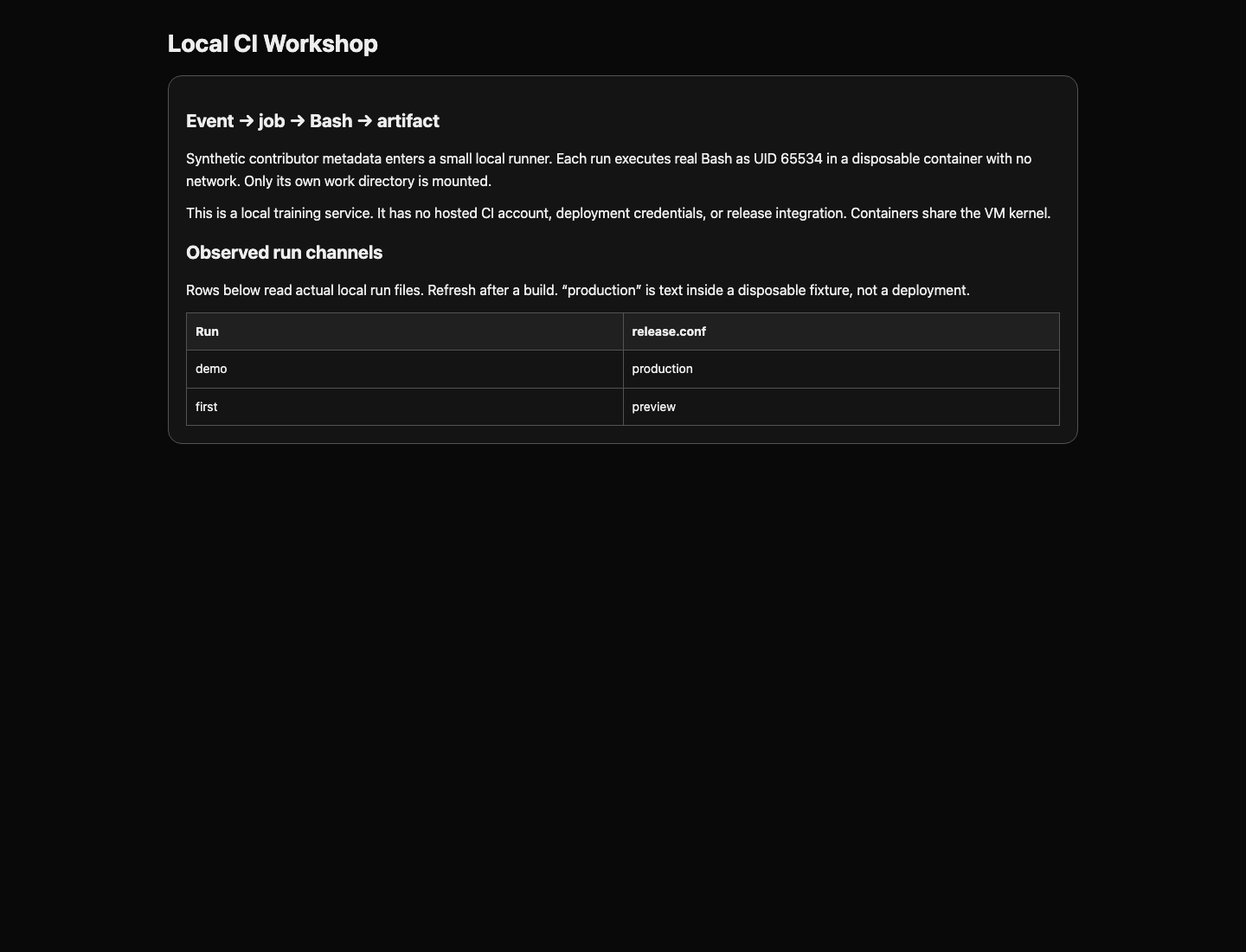
The artifact appears as a JSON string, "Improve search results", so invisible line breaks can be displayed later. This is actual file content, not a simulated success flag. The final section must show preview. Switch to the Topology tab and refresh: its first row reads that same configuration file.
If you repeat run with first, the existing-directory error is intentional: old evidence is not overwritten. Choose another new name such as first-again. A failed run also keeps its generated script and build.log under runs/NAME for diagnosis.
Trace the Dangerous Substitution
In this step, you will observe how contributor data becomes executable code and changes the channel inside one isolated demonstration run.
Select the CI Workshop tab in the lab interface to begin this step.
The flow is event → job → generated shell source → Bash → artifact. The dangerous moment is the replacement before Bash parses quotes. Double quotes protect variable expansion inside an already parsed command; they cannot protect a raw value inserted into the source text before parsing.
Read the supplied harmless demonstration event:
Switch to the CI Workshop tab before running the following command.
cat events/hostile.json
The title contains a double quote, then a semicolon, printf, another semicolon, and #. In Bash, the quote ends the original quoted string, the semicolon starts a new command, and # starts a comment through the end of that line. Its printf changes only this run's synthetic release.conf. JSON's \" encodes a quote in a string; it does not make that quote safe when the runner later inserts it into shell source.
Run the event in a new workspace:
ci run hostile demo
ci show demo
Expect channel=production even though the runner initialized the channel to preview. In generated.sh, locate the inserted printf between the semicolons. Bash really ran that command. The artifact may contain only Update: the remainder became syntax, rather than title data. This is the defect you will repair.
The demo directory is separate from first, and neither run changes job.json or build.sh. Switch to the Topology tab and refresh the page to compare their actual channels. A production row means a mutated fixture, never a real release. Do not execute the event text manually in your maintenance shell.
The general risk is documented in GitHub's script injection explanation. Our placeholder spelling and job format are intentionally smaller than GitHub Actions; this lab demonstrates the shared substitution-before-parsing mechanism.
Pass the Value as Data
In this step, you will keep contributor text out of shell source and preserve spaces, quotes, and multiple lines.
Select the CI Workshop tab in the lab interface to begin this step.
An environment variable is a named string given to a new process. The runner's env mapping can set one directly, without generating a shell assignment. In JSON, a mapping is another object inside braces. Set BUILD_TITLE from {{event.title}}, then let Bash expand "$BUILD_TITLE" at runtime. Bash does not reinterpret quote, semicolon, $(), or backtick characters inside that expanded value as new commands. Do not use eval or pass the value to bash -c: those would parse it again.
We will replace two short files using here-documents. cat > filename <<'JSON' writes the following lines into that file until a line containing only JSON. The quoted delimiter prevents your maintenance shell from expanding $ or other syntax in the text. Copy the complete block, including the closing delimiter. It replaces the whole file, so it is also a recovery method after a typo.
Switch to the CI Workshop tab before running the following command.
cat > job.json <<'JSON'
{
  "script": "build.sh",
  "env": {
    "BUILD_TITLE": "{{event.title}}"
  }
}
JSON
Now replace the script. The BASH delimiter has the same literal-writing purpose. The script uses the environment variable directly; there is no contributor placeholder inside it.
cat > build.sh <<'BASH'
set -euo pipefail
printf '%s' "$BUILD_TITLE" > artifact.txt
printf 'channel='; cat release.conf
BASH
Read back both files with the same cat command taught earlier. A missing comma or brace causes a JSON error; a misspelled environment name causes an unset-variable error. Replace the relevant complete block and retry. An old run is evidence from the old script, so use a new name:
ci run ordinary repaired
ci show repaired
The generated script now contains "$BUILD_TITLE", not the title's characters. The artifact still contains Improve search results, and the channel is preview.
Read the punctuation and multiline fixtures before testing:
cat events/quotes.json
cat events/multiline.json
\n in the JSON string represents a real line break; the last \n must also survive. An apostrophe in O'Brien and double quotes inside a title are legitimate data. The same mapping can pass the event's multiline body: the field reference becomes {{event.body}}, while the quoted shell-variable rule stays the same. This is the mechanism you will reuse for release notes in the challenge.
ci test normal runs your unchanged submitted job and script against ordinary, punctuation, and multiline events in disposable scratch directories. It compares exact artifact bytes and checks preview. It deletes only those scratch directories, leaving your submission and saved runs unchanged.
ci test normal
Expect one exact metadata; channel=preview line per fixture. Stripping punctuation, flattening newlines, hardcoding a title, rejecting every event, or skipping the build fails this useful-function check. A failure names the fixture; read it and correct your two files before retrying.
Retest the Build Boundary
In this step, you will confirm that the same repaired job preserves normal metadata and prevents the demonstrated side effect.
Select the CI Workshop tab in the lab interface to begin this step.
Run the hostile fixture again under a new output name:
Switch to the CI Workshop tab before running the following command.
ci run hostile repaired-hostile
ci show repaired-hostile
The artifact must now contain the entire hostile title as text. The semicolons and quotes are visible inside the JSON-string display, and release.conf stays preview. The old demo evidence remains unchanged because it belongs to another workspace.
A second fixture contains $() and backticks, both shell command-substitution forms when they appear in shell source. Within an expanded, double-quoted environment value, their characters remain data. Read that fixture:
cat events/substitution.json
Run all five fixtures with the same submitted files:
ci test all
Expect ordinary, quotes, multiline, hostile, and substitution cases to preserve exact metadata and preview, followed by the scratch-cleanup message. This checks actual Bash execution and output files. It does not grade a log sentence or an invented secure=true result. The built-in completion check repeats these scratch tests without modifying your job, script, or saved runs.
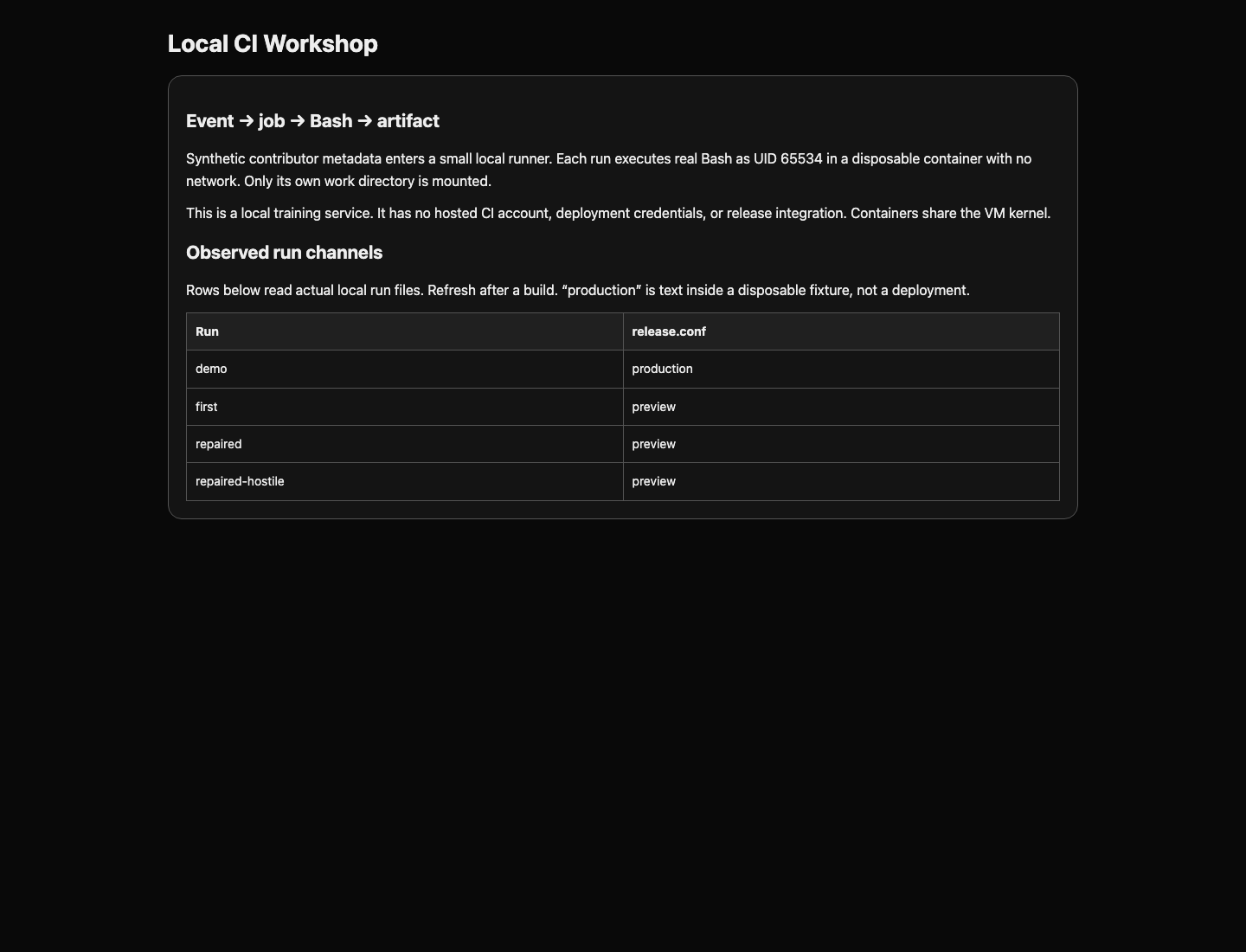
If only the hostile case fails, inspect whether any event placeholder remains in the shell file or whether the variable is reparsed. If punctuation or multiline cases fail, check that you use printf '%s' with a double-quoted variable. Do not delete troublesome inputs: legitimate metadata handling is part of the result. Switch to the Topology tab and refresh the page to see the repaired-hostile run alongside the historical demo.
Summary
You traced contributor metadata through a local runner into real Bash, reproduced a configuration mutation inside an isolated run, and repaired the data boundary with an environment mapping and quoted expansion. Exact-output tests preserved normal punctuation and multiline content as well as the preview channel. Next, apply the same reasoning to a release notes job.