Introduction
A report was edited outside Terraform. Your team needs an observation job that identifies the difference, distinguishes it from an execution failure, and leaves the decision to repair in the reviewed delivery workflow.
You will observe a matching environment, make a controlled outside edit, repeat the observation without repairing it, and exercise an invalid job input. You will then repair the store through a separate concrete plan, review and application. The supplied observation action runs native planning with detailed exit codes and records results; it has no automatic apply step.
You should understand saved plans, reviewed application, state and environment isolation, and shell exit statuses. This lab starts independently with two existing report stores and a separate neighboring object. Its desired release inputs and quality gates are already prepared and must remain unchanged.
Certification Relevance
| Certification | Exam task | Practice |
|---|---|---|
| DevOps Engineer – Professional (DOP-C02) | Task 2.1 | Foundational IaC change-management practice: observe actual differences and errors before a separately reviewed repair. |
Observe a Matching Environment
In this step, you will create an observation request for an explicit source revision and environment, then interpret a genuine no-change result.
Enter the prepared repository and load its tools.
cd /home/labex/project/report-release
source environment.sh
Read the desired release and quality stages.
cat release.auto.tfvars.json pipeline.json
Both delivery-release-preview and delivery-release-review currently contain release one report. Terraform manages each bucket and its report through a separate environment state. delivery-release-neighbor/keep.txt is unrelated data. Preserve the supplied Terraform files, release inputs, lock, tests and quality stages; your editable JSON job requests are separate from the desired Terraform configuration.
Record the current baseline commit for this job and the later reviewed repair.
git rev-parse HEAD > selected-revision.txt
Build the observation request with jq. -n starts without an input document, and --arg revision supplies a string safely to the JSON expression. The resulting request explicitly selects preview and the recorded source revision.
jq -n --arg revision "$(cat selected-revision.txt)" '{revision: $revision, environment: "preview"}' > observation.json
Read the request.
cat observation.json
It should contain the full commit identifier and environment: preview. Run the supplied observation action.
python3 delivery.py observe observation.json
Expect native Terraform exit 0 and classification: no_changes. The desired configuration currently matches the observed target. This result concerns the selected module and environment, not the health of every system.
The action exports the selected source and runs native terraform plan -detailed-exitcode without a saved output plan or apply. It records the actual status and business-state fingerprints. No changes is useful evidence; it does not authorize later mutation.
Read the current report directly from storage.
aws s3 cp s3://delivery-release-preview/report.txt -
Expect release one report.
Distinguish Drift from an Execution Error
In this step, you will create a known outside edit and show that repeated observation does not repair it. You will also produce a genuine native input-validation error, which must not be classified as either a clean environment or detected drift.
Prepare a small replacement report locally. printf writes the text and its final newline.
printf 'outside edit\n' > outside-report.txt
Upload it to the existing preview object's key through AWS CLI. This intentionally changes only the report bytes outside Terraform; it does not update the desired source or Terraform's business state.
aws s3 cp outside-report.txt s3://delivery-release-preview/report.txt --content-type text/plain
Observe the unchanged source again. This command intentionally returns exit 2.
python3 delivery.py observe observation.json
Expect classification: changes_detected and a proposed update to restore the report. Native 2 means a successful plan found differences; it is not a provider or execution failure. Unlike the saved-plan generation command from the earlier lab, this observation command deliberately propagates the native status for callers to classify.
Repeat the exact job. This command intentionally returns exit 2 again.
python3 delivery.py observe observation.json
The difference should remain because neither observation applies the proposal. Read the actual object after both runs.
aws s3 cp s3://delivery-release-preview/report.txt -
It must still say outside edit. The job reports drift without silently writing desired data back or overwriting business state. Temporary native locks and ordinary access logs are coordination effects, not a repair.
Create a separate invalid request. report_override is a supplied observation-only input for exercising an invalid run without changing the committed source. An empty report violates the module's existing validation rule. The original valid request remains unchanged.
jq '. + {report_override: ""}' observation.json > invalid-observation.json
Run that request. This command intentionally returns native exit 1.
python3 delivery.py observe invalid-observation.json
Expect classification: execution_error and The report input must not be empty. This is the intended Terraform validation failure. A network or provider failure would also require investigation; it must never be reported as no changes or treated as successful drift detection.
Return to the original valid request. This command intentionally returns exit 2 because the outside edit has not been repaired.
python3 delivery.py observe observation.json
Read the actual report again.
aws s3 cp s3://delivery-release-preview/report.txt -
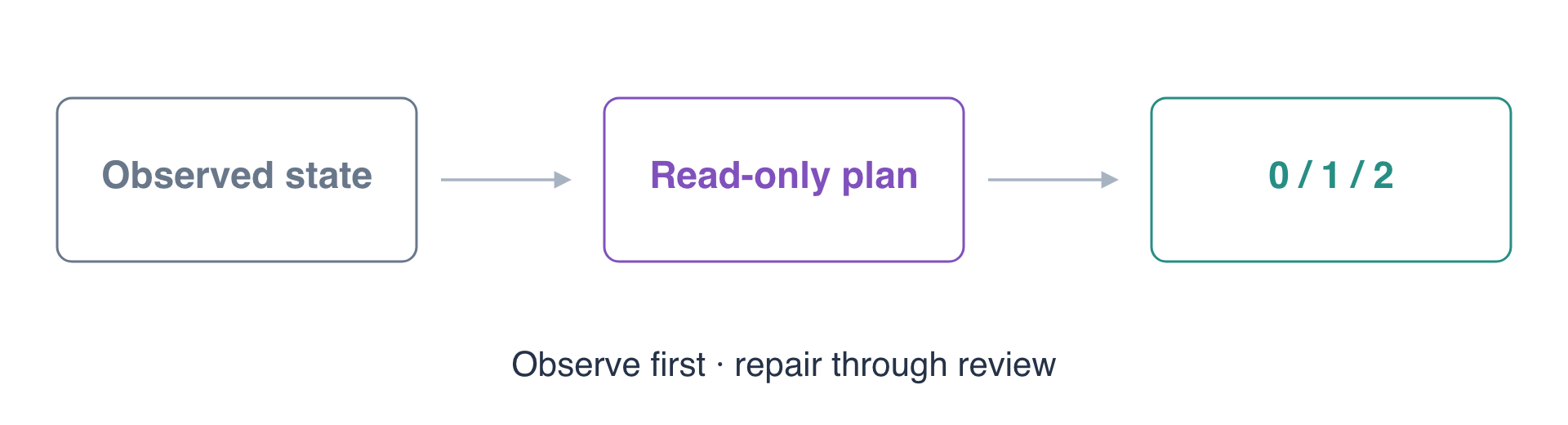
Expect outside edit. The repeated valid runs and invalid run have not repaired the object, changed the baseline configuration or overwritten business state. The three native outcomes are distinct: 0 for no changes, 2 for detected changes, and 1 for an execution error.
Repair Through Review and Observe Again
In this step, you will hand the known difference to the normal delivery workflow. Observation has supplied information; the separate plan/review/apply sequence makes the repair explicit.
Generate a concrete repair artifact for the same selected baseline and preview environment.
python3 delivery.py plan repair-baseline --revision "$(cat selected-revision.txt)" --environment preview
Expect the quality gates to pass and native plan 2 to identify the report update. The delivery command returns 0 because it successfully generated the artifact. The source inputs still request the original report; do not edit them to hide the outside change.
Inspect the actual proposal and context.
python3 delivery.py inspect repair-baseline
Confirm it targets delivery-release-preview/report.txt and restores the baseline report. The selected revision, lock and environment must match the repair you intend to authorize.
Record the review.
python3 delivery.py review repair-baseline --revision "$(cat selected-revision.txt)" --environment preview
Apply that reviewed binary plan through the supplied entry point.
python3 delivery.py apply repair-baseline --revision "$(cat selected-revision.txt)" --environment preview
Expect native apply exit 0. This is the deliberate repair; the observation action itself has not applied anything.
Run the original observation once more.
python3 delivery.py observe observation.json
Expect native exit 0 and classification: no_changes. The desired source and actual target now agree. This final observation must leave the repaired business-state bytes unchanged.
Read the restored report.
aws s3 cp s3://delivery-release-preview/report.txt -
Expect release one report. Check the neighboring environment and unrelated data.
aws s3 cp s3://delivery-release-review/report.txt -
Expect release one report there too.
aws s3 cp s3://delivery-release-neighbor/keep.txt -
Expect preserve release neighbor. Keep the restored existing stores, state and job evidence for assessment. No separate infrastructure stack was created. You have kept observation repeatable and read-only while routing the actual repair through an explicit reviewed artifact.
Summary
You configured a source-specific observation job and distinguished native no-change 0, detected-change 2 and execution-error 1 results. Repeated observations retained the actual outside edit and business state. A separate reviewed saved plan performed the repair, after which observation returned to no changes while preserving the other environment and neighboring data.
Observation and repair have different responsibilities. Read diagnostics and classify errors before deciding what to change. See the official detailed exit-code reference for the native statuses used here.