Introduction
V03 turned a question into an embedding and retrieved nearby help articles. A real support system usually serves more than one customer, however, and semantic similarity alone must never decide which customer's documents a caller may see.
This lab adds two search boundaries. A Vectorize namespace is a partition inside one index; searching one namespace excludes vectors in every other namespace before similarity ranking begins. A metadata filter then narrows that customer's partition by a field such as category. You can think of the namespace as choosing the correct filing cabinet and the category filter as choosing one drawer inside it.
Neither mechanism authenticates a person. The application must first validate a login, token or other identity signal and derive the namespace on the server. To keep the exercise safe and repeatable, this Worker uses two public synthetic session labels that stand in for already-validated sessions. They are teaching fixtures, not real credentials or a complete authentication system. A request is never allowed to choose its own customer or namespace.
You will deploy one disposable Worker with Workers AI and Vectorize bindings. Four synthetic articles deliberately include the same password text in two customer namespaces. Live embeddings make the search realistic, while exact namespace, category and ID checks prove isolation without grading a model's exact scores. You will also test an authorized empty result and reject an attempted scope override before it can call either cloud service.
If you entered this course directly, first complete Connect LabEx to Your Cloudflare Account. V01–V03 are also prerequisites: they introduce compatible indexes, asynchronous mutations and semantic retrieval.
The tiny index and bounded BGE Small requests fit the documented Workers Free allocations; Workers Paid is not required. Local or deployed model calls still consume the account's shared Workers AI daily allocation, so stop instead of repeatedly retrying if that allocation is unavailable.
Setup installs Node.js 22.22.0 and project-local Wrangler 4.132.0 in /home/labex/project/scoped-vector-search. It supplies deterministic tests and independent read-only checks, but it does not authorize Wrangler, create an index, deploy a Worker, run inference or seed cloud data.
Authorize and Name the Scoped Search Resources
In this step, you will authorize the fresh VM and describe one Worker plus its paired Vectorize index in ordinary Wrangler configuration.
Enter the prepared project and confirm the pinned CLI:
cd /home/labex/project/scoped-vector-search
npx wrangler --version
Expect 4.132.0. Device authorization lets the VM receive a temporary OAuth grant without receiving your Cloudflare password. The requested scopes cover account identity, the disposable index, Worker deployment and the Workers AI binding used for embeddings:
npx wrangler login --device --browser=false --scopes account:read user:read workers:write workers_scripts:write workers_kv:write ai:write
npx wrangler whoami --json
Open the displayed link in your browser, enter the current code and approve the intended learning account. Back in the terminal, confirm loggedIn: true, authType: OAuth Token and the account name before copying its ID.
Generate one random suffix, then derive the index name from the Worker name. This ownership pattern makes later cleanup precise:
RUN="labex-c08-v04-$(openssl rand -hex 6)"
INDEX="$RUN-docs"
printf 'Worker: %s\nIndex:  %s\n' "$RUN" "$INDEX"
Replace YOUR_ACCOUNT_ID with the ID shown by whoami. A binding gives Worker code a local name for a Cloudflare service: AI will create embeddings and DOCUMENTS will query the exact index named by index_name.
cat > wrangler.jsonc <<JSON
{
  "\$schema": "./node_modules/wrangler/config-schema.json",
  "name": "$RUN",
  "account_id": "YOUR_ACCOUNT_ID",
  "main": "src/index.js",
  "compatibility_date": "2026-09-16",
  "compatibility_flags": ["nodejs_compat"],
  "workers_dev": true,
  "preview_urls": false,
  "observability": { "enabled": true },
  "ai": { "binding": "AI", "remote": true },
  "vectorize": [
    { "binding": "DOCUMENTS", "index_name": "$INDEX", "remote": true }
  ]
}
JSON
The file names the intended resources but creates nothing yet. Keeping identity and ownership explicit before a write is especially important in a shared learning account.
Build a Server-Scoped Search Worker
In this step, you will implement the boundary before deploying it.
The x-lab-session header uses two public labels only to simulate the result of an earlier authentication layer. resolveSession maps that validated context to a namespace on the server. The request body may choose a query and an allowed category, but it may not name a customer or namespace. In a production application, replace these labels with a properly verified session or identity provider; a namespace is data organization, not authentication.
The four documents include identical password text for blue and green customers. That makes the security result easy to see: similarity cannot distinguish the copies, so only server-controlled scope can keep them separate.
cat > src/index.js <<'JS'
const MODEL = "@cf/baai/bge-small-en-v1.5";
const POOLING = "cls";
const DIMENSIONS = 384;
const ALLOWED_CATEGORIES = new Set(["account", "billing", "files"]);
const SESSION_CONTEXTS = Object.freeze({
  "blue-session": Object.freeze({ customer: "blue", namespace: "customer-blue" }),
  "green-session": Object.freeze({ customer: "green", namespace: "customer-green" })
});

const DOCUMENTS = [
  {
    id: "blue-password",
    namespace: "customer-blue",
    category: "account",
    title: "Reset a password",
    text: "Reset an expired or forgotten password to regain access to your account."
  },
  {
    id: "blue-invoice",
    namespace: "customer-blue",
    category: "billing",
    title: "Download an invoice",
    text: "Download an invoice or receipt for a completed payment."
  },
  {
    id: "green-password",
    namespace: "customer-green",
    category: "account",
    title: "Reset a password",
    text: "Reset an expired or forgotten password to regain access to your account."
  },
  {
    id: "green-upload",
    namespace: "customer-green",
    category: "files",
    title: "Upload a PDF",
    text: "Upload a PDF document and troubleshoot file size or format errors."
  }
];

function json(value, status = 200) {
  return Response.json(value, { status, headers: { "cache-control": "no-store" } });
}

export function resolveSession(label) {
  const context = SESSION_CONTEXTS[label];
  if (!context) throw new Error("session_invalid");
  return context;
}

export function parseSearchInput(value) {
  if (!value || typeof value !== "object" || Array.isArray(value)) throw new Error("invalid_json");
  for (const key of ["customer", "customerId", "namespace"]) {
    if (Object.prototype.hasOwnProperty.call(value, key)) throw new Error("scope_override_not_allowed");
  }
  const query = typeof value.query === "string" ? value.query.trim() : "";
  const category = typeof value.category === "string" ? value.category.trim() : "";
  if (!query || query.length > 200) throw new Error("query_required");
  if (!ALLOWED_CATEGORIES.has(category)) throw new Error("category_invalid");
  return { query, category };
}

export function validateEmbeddingBatch(result, expectedCount) {
  const vectors = result?.data;
  if (!Array.isArray(vectors) || vectors.length !== expectedCount || result?.shape?.[1] !== DIMENSIONS) {
    throw new Error("incompatible embedding batch");
  }
  for (const vector of vectors) {
    if (!Array.isArray(vector) || vector.length !== DIMENSIONS || !vector.every(Number.isFinite)) {
      throw new Error("invalid embedding vector");
    }
  }
  return vectors;
}

async function embed(env, texts) {
  const result = await env.AI.run(MODEL, { text: texts, pooling: POOLING });
  return validateEmbeddingBatch(result, texts.length);
}

async function seed(env) {
  const vectors = await embed(env, DOCUMENTS.map((document) => document.text));
  const records = DOCUMENTS.map((document, index) => ({
    id: document.id,
    namespace: document.namespace,
    values: vectors[index],
    metadata: {
      category: document.category,
      title: document.title,
      model: MODEL,
      pooling: POOLING
    }
  }));
  const mutation = await env.DOCUMENTS.upsert(records);
  console.log(JSON.stringify({ event: "scoped_documents_seeded", count: records.length, mutationId: mutation.mutationId }));
  return json({ mutationId: mutation.mutationId, count: records.length, model: MODEL, dimensions: DIMENSIONS, pooling: POOLING }, 202);
}

async function search(request, env) {
  let context;
  try {
    context = resolveSession(request.headers.get("x-lab-session") ?? "");
  } catch (error) {
    return json({ error: "session_invalid" }, 401);
  }

  let input;
  try {
    input = parseSearchInput(await request.json());
  } catch (error) {
    return json({ error: error instanceof Error ? error.message : "invalid_json" }, 400);
  }

  const [queryVector] = await embed(env, [input.query]);
  const result = await env.DOCUMENTS.query(queryVector, {
    topK: 3,
    namespace: context.namespace,
    filter: { category: input.category },
    returnMetadata: "all"
  });
  const matches = result.matches.map((match) => ({
    id: match.id,
    score: match.score,
    namespace: match.namespace,
    title: match.metadata?.title,
    category: match.metadata?.category
  }));
  console.log(JSON.stringify({
    event: "scoped_search",
    customer: context.customer,
    namespace: context.namespace,
    category: input.category,
    returnedCount: matches.length
  }));
  return json({
    customer: context.customer,
    namespace: context.namespace,
    category: input.category,
    candidateCount: result.matches.length,
    matches
  });
}

export default {
  async fetch(request, env) {
    const url = new URL(request.url);
    if (request.method === "POST" && url.pathname === "/seed") return seed(env);
    if (request.method === "POST" && url.pathname === "/search") return search(request, env);
    return json({ error: "not_found" }, 404);
  }
};
JS
Run the deterministic tests. Their in-memory bindings prove that the Worker constructs both query boundaries from server-side context without spending cloud quota:
node --test test/worker.test.mjs
Expect six passing tests. Generate binding types from the real configuration, then bundle without deploying:
npx wrangler types
npx wrangler deploy --dry-run --outdir /tmp/v04-dry-run
The generated file should contain AI: Ai and DOCUMENTS: VectorizeIndex. The dry run proves that source and configuration bundle together; it does not create or test either cloud resource.
Create the Filterable Index and Deploy
In this step, you will create the compatible index, prepare the category field for filtering and deploy the Worker only after that preparation is processed.
A vector may store metadata without making it searchable. A metadata index tells Vectorize which field to organize for filter-first queries. It must exist before the document vectors are inserted, or those earlier records will not participate in that metadata filter.
Create a 384-dimensional cosine index matching BGE Small. --update-config=false keeps Wrangler from rewriting the explicit binding you already reviewed:
npx wrangler vectorize create "$INDEX" --dimensions=384 --metric=cosine --update-config=false
Now enqueue preparation of the string field category and preserve its mutation identifier:
set -o pipefail
npx wrangler vectorize create-metadata-index "$INDEX" \
  --propertyName=category \
  --type=string 2>&1 | tee .labex/category-index-output.txt
META_MUTATION=$(grep -Eo '[0-9a-fA-F]{8}-[0-9a-fA-F-]{27}' .labex/category-index-output.txt | tail -n 1)
if [ -z "$META_MUTATION" ]; then
  printf '%s\n' 'No metadata mutation ID was returned; fix the command before continuing.' >&2
else
  printf '%s\n' "$META_MUTATION" | tee .labex/category-mutation.txt
fi
An accepted mutation is queued work, not completed work. Write one bounded read-only waiter that you will reuse after seeding. It requires three consecutive reads of the same mutation and vector count so a briefly stale read cannot become the lesson's final evidence:
cat > scripts/wait-for-vectorize.mjs <<'JS'
import { execFileSync } from "node:child_process";
import { readFileSync } from "node:fs";

const [indexName, mutationFile, expectedText] = process.argv.slice(2);
const mutationId = readFileSync(mutationFile, "utf8").trim();
const expectedCount = Number(expectedText);
if (!/^[0-9a-f-]{36}$/i.test(mutationId)) throw new Error("mutation file has no UUID");
if (!Number.isInteger(expectedCount) || expectedCount < 0) throw new Error("expected count is invalid");
const wrangler = "./node_modules/wrangler/bin/wrangler.js";
let consecutiveMatches = 0;

for (let attempt = 1; attempt <= 120; attempt += 1) {
  const output = execFileSync(process.execPath, [wrangler, "vectorize", "info", indexName, "--json"], { encoding: "utf8" });
  const info = JSON.parse(output);
  if (String(info.processedUpToMutation) === mutationId && info.vectorCount === expectedCount) consecutiveMatches += 1;
  else consecutiveMatches = 0;
  if (consecutiveMatches === 3) {
    console.log("mutation " + mutationId + " is consistently readable with " + expectedCount + " vectors");
    console.log(JSON.stringify(info, null, 2));
    process.exit(0);
  }
  await new Promise((resolve) => setTimeout(resolve, 2000));
}
throw new Error("mutation " + mutationId + " was not stable within four minutes");
JS
node scripts/wait-for-vectorize.mjs "$INDEX" .labex/category-mutation.txt 0
The mutation can be processed before the separate list view catches up. Use a bounded read-only loop so the lesson waits for the visible category row instead of treating one stale list response as failure:
for attempt in {1..15}; do
  METADATA_INDEXES=$(npx wrangler vectorize list-metadata-index "$INDEX" 2>&1)
  if grep -Eq 'category.*String' <<<"$METADATA_INDEXES"; then
    break
  fi
  sleep 2
done
printf '%s\n' "$METADATA_INDEXES"
grep -Eq 'category.*String' <<<"$METADATA_INDEXES" || {
  printf '%s\n' 'The category metadata index is processed but not yet visible; rerun this read-only check.' >&2
  exit 1
}
Expect category with type String. Finally, deploy the Worker whose DOCUMENTS binding points to this prepared index:
set -o pipefail
npx wrangler deploy 2>&1 | tee .labex/deploy-output.txt
DEPLOY_URL=$(sed -nE 's#.*(https://[^[:space:]]+\.workers\.dev).*#\1#p' .labex/deploy-output.txt | tail -n 1)
if [ -z "$DEPLOY_URL" ]; then
  printf '%s\n' 'No workers.dev URL was returned; fix deployment before continuing.' >&2
else
  printf '%s\n' "$DEPLOY_URL" | tee .labex/deploy-url.txt
fi
The index is still empty. Deployment connects the bindings; it does not create document embeddings automatically.
Seed Two Customer Namespaces
In this step, you will create live embeddings and store each record in exactly one customer namespace with its category metadata.
A namespace belongs to the vector record itself. The two password records deliberately contain identical text but live in different partitions. category is separate metadata, so one record can belong to the blue namespace and the account category at the same time.
Call the fixed seed endpoint once. The corpus is controlled by the server, so the request body is empty:
DEPLOY_URL=$(cat .labex/deploy-url.txt)
curl --fail-with-body --silent --show-error \
  -X POST "$DEPLOY_URL/seed" \
  -H 'content-type: application/json' \
  --data '{}' | tee .labex/seed-response.json
node -e '
  const value = JSON.parse(require("fs").readFileSync(".labex/seed-response.json", "utf8"));
  if (!/^[0-9a-f-]{36}$/i.test(value.mutationId)) throw new Error("seed mutation is missing");
  require("fs").writeFileSync(".labex/seed-mutation.txt", value.mutationId + "\n");
  console.log("accepted " + value.count + " scoped vectors in mutation " + value.mutationId);
'
Expect count: 4, 384 dimensions, cls pooling and a mutation UUID. Wait for that exact mutation and count rather than guessing how many seconds the service needs:
node scripts/wait-for-vectorize.mjs "$INDEX" .labex/seed-mutation.txt 4
for attempt in {1..15}; do
  VECTOR_LIST=$(npx wrangler vectorize list-vectors "$INDEX" --count=10 2>&1)
  if grep -q 'blue-password' <<<"$VECTOR_LIST" &&
     grep -q 'blue-invoice' <<<"$VECTOR_LIST" &&
     grep -q 'green-password' <<<"$VECTOR_LIST" &&
     grep -q 'green-upload' <<<"$VECTOR_LIST"; then
    break
  fi
  sleep 2
done
printf '%s\n' "$VECTOR_LIST"
for id in blue-password blue-invoice green-password green-upload; do
  grep -q "$id" <<<"$VECTOR_LIST" || {
    printf 'The processed vector %s is not visible in the list yet; rerun this read-only check.\n' "$id" >&2
    exit 1
  }
done
The inventory should contain blue-password, blue-invoice, green-password and green-upload. IDs connect matches back to source documents; the namespace and category determine whether an otherwise similar record is eligible for a query.
Prove Customer and Category Isolation
In this step, you will run the same semantic question as two customers, then test an authorized empty result and an unsafe override.
Start with the blue synthetic session and the account category:
curl --fail-with-body --silent --show-error \
  -X POST "$DEPLOY_URL/search" \
  -H 'content-type: application/json' \
  -H 'x-lab-session: blue-session' \
  --data '{"query":"My password expired","category":"account"}' \
  | tee .labex/blue-account.json
The response should report customer: blue, namespace: customer-blue and only blue-password. Now send the identical question with the green session:
curl --fail-with-body --silent --show-error \
  -X POST "$DEPLOY_URL/search" \
  -H 'content-type: application/json' \
  -H 'x-lab-session: green-session' \
  --data '{"query":"My password expired","category":"account"}' \
  | tee .labex/green-account.json
This time only green-password is eligible. The document text is identical, so this difference comes from the namespace selected by the validated session—not from the embedding model or a lucky score.
Next, ask the blue session for the files category. A highly relevant green upload article exists, but the blue namespace contains no file article:
curl --fail-with-body --silent --show-error \
  -X POST "$DEPLOY_URL/search" \
  -H 'content-type: application/json' \
  -H 'x-lab-session: blue-session' \
  --data '{"query":"Upload a PDF","category":"files"}' \
  | tee .labex/blue-files-empty.json
Expect candidateCount: 0 and matches: []. Empty is the correct authorized answer; borrowing a relevant record from another namespace would be a data leak.
Finally, try to override the namespace from the request body:
curl --silent --show-error \
  -o .labex/override-response.json \
  -w 'HTTP %{http_code}\n' \
  -X POST "$DEPLOY_URL/search" \
  -H 'content-type: application/json' \
  -H 'x-lab-session: blue-session' \
  --data '{"query":"Upload a PDF","category":"files","namespace":"customer-green"}'
cat .labex/override-response.json
Expect HTTP 400 and scope_override_not_allowed. The Worker rejects the field before embedding or Vectorize query work. A client may request an allowed category, but only trusted server logic maps identity to a customer namespace.
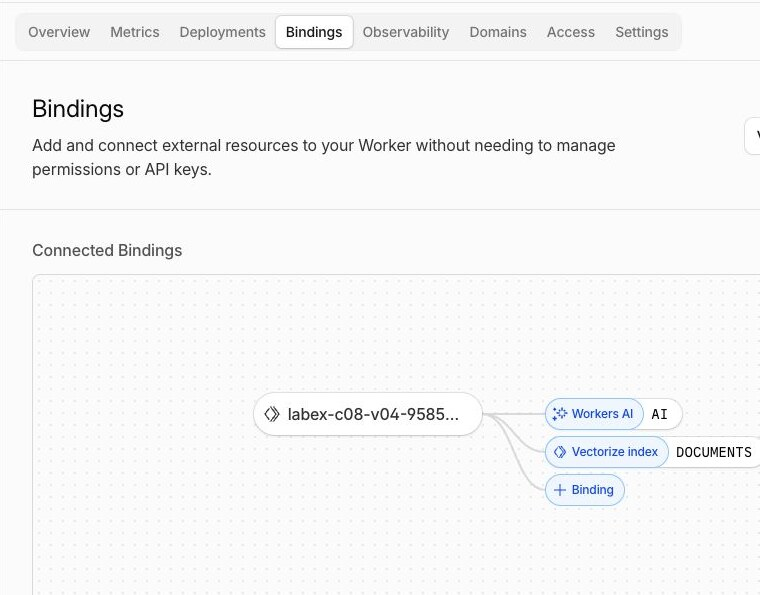
Open Workers & Pages → your labex-c08-v04-... Worker → Bindings. Confirm that AI points to Workers AI and DOCUMENTS points to the exact disposable Vectorize index. This visual relationship explains how env.AI and env.DOCUMENTS in the code reach managed services; the independent checks still prove the exact binding identities.
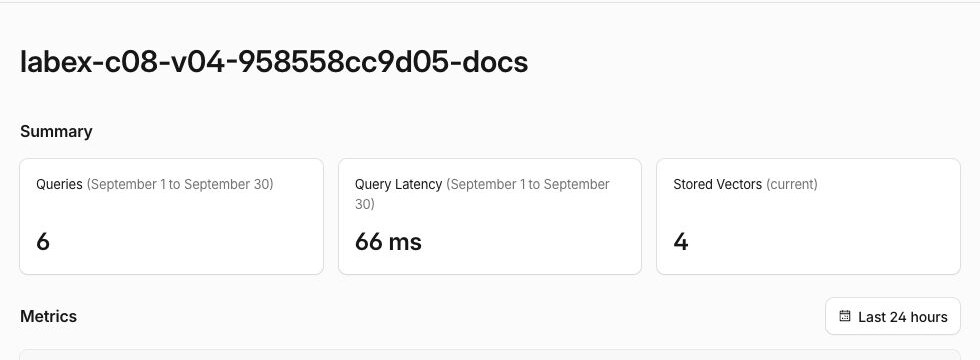
Then open AI → Vectorize → the matching -docs index. The current vector count should eventually become four, and query metrics should begin to reflect the scoped searches. Dashboard counters can lag; the authenticated record reads and HTTP responses remain authoritative for exact IDs, namespaces and categories.
If Workers Logs are available, open the Worker's Observability → Logs view and inspect a scoped_search entry. It records only the synthetic customer label, namespace, category and returned count—not the question text or session label. Structured, privacy-bounded logs help diagnose which server-selected scope ran without copying sensitive request content.
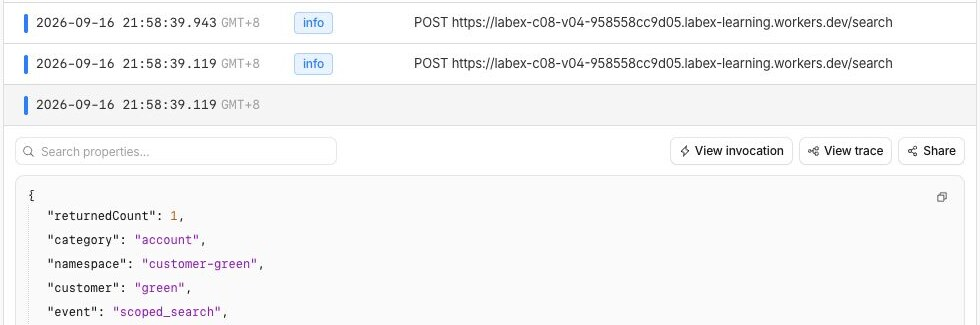
These screenshots are focused examples from one disposable test run. Your random resource name, timestamps, latency and query total will differ; compare the binding names, current vector count and field relationships rather than copying the example values.
Remove the Scoped Search Resources
In this step, you will remove the disposable Worker and index, then prove their absence while Wrangler is still authorized.
Recover the exact names from wrangler.jsonc so cleanup does not depend on variables from an earlier terminal session:
RUN=$(node -p 'JSON.parse(require("fs").readFileSync("wrangler.jsonc", "utf8")).name')
INDEX=$(node -p 'JSON.parse(require("fs").readFileSync("wrangler.jsonc", "utf8")).vectorize.find((item) => item.binding === "DOCUMENTS").index_name')
printf 'Worker: %s\nIndex: %s\n' "$RUN" "$INDEX"
Confirm that both values start with your unique labex-c08-v04-... prefix. Delete the Worker first so no deployed code retains the binding, then delete only its paired index:
npx wrangler delete --name "$RUN" --force
npx wrangler vectorize delete "$INDEX" --force
Save a successful authenticated inventory and check the exact name:
npx wrangler vectorize list --json > .labex/indexes-after-cleanup.json
node -e '
  const rows = JSON.parse(require("fs").readFileSync(process.argv[1], "utf8"));
  if (rows.some((row) => row.name === process.argv[2])) throw new Error("lab index still exists");
  console.log("lab index is absent");
' .labex/indexes-after-cleanup.json "$INDEX"
Complete this step before logout. A network or authorization failure is inconclusive; the assessment independently requires successful account reads and exact-name absence.
Log Out of the Learning VM
In this step, you will remove this VM's temporary Wrangler authorization. The cloud resources are already absent and the authenticated cleanup check has passed:
npx wrangler logout
npx wrangler whoami --json
Expect loggedIn: false. The Cloudflare Dashboard browser session is separate and remains available to your learning account.
Summary
You added two independent eligibility checks to semantic retrieval. A validated synthetic session selected one customer namespace on the server, and an indexed category field narrowed that partition before Vectorize ranked results. Identical password documents proved that similarity alone cannot enforce customer isolation, while the blue files query showed that an authorized empty result is safer than borrowing a relevant record from another customer.
You also rejected client-supplied customer and namespace overrides before inference, inspected the real binding, index and privacy-bounded log relationships in the Dashboard, removed the disposable Worker and index while authorized, and then logged out. V05 will reuse this safe retrieval boundary to assemble bounded source evidence before a language model answers.