Introduction
V01 stored identified vectors, and V02 kept those records current. This lab adds the missing read path: a person types a question, the application turns that text into a compatible vector and asks Vectorize which stored documents point in the nearest directions.
This is semantic search. It compares meaning-oriented embeddings instead of requiring the query to repeat an article's exact words. The query and stored documents must use the same model, 384 dimensions and cls pooling. A Vectorize similarity score helps rank compatible vectors for one query; it is not a universal confidence percentage or proof that an article answers the question.
You will build one disposable Worker with two Cloudflare bindings. AI sends short text to the Cloudflare-hosted @cf/baai/bge-small-en-v1.5 embedding model. DOCUMENTS writes and queries one disposable Vectorize index. The Worker exposes a fixed /seed operation for three synthetic help articles and a /search operation that accepts a query, topK and an optional minimum score. topK means “return at most this many nearest candidates,” not “these candidates are definitely relevant.”
This is the third Vectorize lab. If you entered directly, first complete Connect LabEx to Your Cloudflare Account, then complete V01 and V02 so index compatibility, stable IDs and asynchronous mutations are familiar.
Vectorize and Workers AI both have Free allocations. This lab stores three tiny vectors and makes only a few short embedding requests. It does not require Workers Paid. Local or deployed inference still consumes the shared Workers AI daily allowance, so stop instead of repeatedly retrying if the model or free allocation is unavailable.
Setup installs Node.js 22.22.0 and project-local Wrangler 4.132.0 in /home/labex/project/vector-search. It supplies deterministic tests and independent checks, but it does not authorize Wrangler, call a model, create an index, deploy a Worker or seed cloud data.
Authorize and Name the Search Resources
In this step, you will authorize the fresh VM and create one configuration that names the Worker and its paired Vectorize index.
Enter the prepared project and confirm the pinned CLI:
cd /home/labex/project/vector-search
npx wrangler --version
Expect 4.132.0. Wrangler uses a device flow so your password never enters the VM. Request account identity, Worker, Vectorize and Workers AI access for this disposable exercise:
Wrangler separates the index operation from script deployment and cleanup checks. Request workers:write for Vectorize, workers_scripts:write for the Worker, workers_kv:write for Wrangler's dependency-safe deletion check and ai:write for the model binding:
npx wrangler login --device --browser=false --scopes account:read user:read workers:write workers_scripts:write workers_kv:write ai:write
npx wrangler whoami --json
Confirm loggedIn: true and the intended learning account. Generate one random suffix, then derive both resource names from it so cleanup cannot confuse them with unrelated resources:
RUN="labex-c08-v03-$(openssl rand -hex 6)"
INDEX="$RUN-docs"
printf 'Worker: %s\nIndex:  %s\n' "$RUN" "$INDEX"
Replace YOUR_ACCOUNT_ID with the selected account's actual ID. A binding is the name through which Worker code receives a managed Cloudflare service. AI will provide model inference; DOCUMENTS will provide the exact Vectorize index named by index_name.
cat > wrangler.jsonc <<JSON
{
  "\$schema": "./node_modules/wrangler/config-schema.json",
  "name": "$RUN",
  "account_id": "YOUR_ACCOUNT_ID",
  "main": "src/index.js",
  "compatibility_date": "2026-09-16",
  "workers_dev": true,
  "preview_urls": false,
  "observability": { "enabled": true },
  "ai": { "binding": "AI", "remote": true },
  "vectorize": [
    { "binding": "DOCUMENTS", "index_name": "$INDEX", "remote": true }
  ]
}
JSON
The configuration names resources but does not create them. That separation lets you inspect the intended ownership boundary before anything changes in the account.
Build the Bound Search Worker
In this step, you will implement the fixed document seed and the learner-facing search endpoint before deploying any code.
The three source documents stay in application code because Vectorize stores vectors and metadata, not the complete article system of record. /seed embeds this fixed corpus once. /search embeds one validated query, asks Vectorize for the nearest topK candidates and applies minScore afterward. The returned metadata helps the application turn vector IDs back into useful references.
cat > src/index.js <<'JS'
const MODEL = "@cf/baai/bge-small-en-v1.5";
const POOLING = "cls";
const DIMENSIONS = 384;

const DOCUMENTS = [
  {
    id: "password-reset",
    category: "account",
    title: "Reset an expired password",
    text: "Reset an expired or forgotten password to regain access to your account."
  },
  {
    id: "upload-pdf",
    category: "files",
    title: "Upload a PDF",
    text: "Upload a PDF document and troubleshoot file size or format errors."
  },
  {
    id: "billing-receipt",
    category: "billing",
    title: "Download a billing receipt",
    text: "Download a receipt for a completed invoice or payment."
  }
];

function json(value, status = 200) {
  return Response.json(value, { status, headers: { "cache-control": "no-store" } });
}

export function validateEmbeddingBatch(result, expectedCount) {
  const vectors = result?.data;
  if (!Array.isArray(vectors) || vectors.length !== expectedCount || result?.shape?.[1] !== DIMENSIONS) {
    throw new Error("incompatible embedding batch");
  }
  for (const vector of vectors) {
    if (!Array.isArray(vector) || vector.length !== DIMENSIONS || !vector.every(Number.isFinite)) {
      throw new Error("invalid embedding vector");
    }
  }
  return vectors;
}

export function parseSearchInput(value) {
  const query = typeof value?.query === "string" ? value.query.trim() : "";
  const topK = value?.topK === undefined ? 3 : value.topK;
  const minScore = value?.minScore === undefined ? 0 : value.minScore;
  if (!query || query.length > 200) throw new Error("query_required");
  if (!Number.isInteger(topK) || topK < 1 || topK > 3) throw new Error("topk_invalid");
  if (typeof minScore !== "number" || !Number.isFinite(minScore) || minScore < 0 || minScore > 1) throw new Error("minscore_invalid");
  return { query, topK, minScore };
}

async function embed(env, texts) {
  const result = await env.AI.run(MODEL, { text: texts, pooling: POOLING });
  return validateEmbeddingBatch(result, texts.length);
}

async function seed(env) {
  const vectors = await embed(env, DOCUMENTS.map((document) => document.text));
  const records = DOCUMENTS.map((document, index) => ({
    id: document.id,
    values: vectors[index],
    metadata: {
      category: document.category,
      published: true,
      title: document.title,
      model: MODEL,
      pooling: POOLING
    }
  }));
  const mutation = await env.DOCUMENTS.upsert(records);
  console.log(JSON.stringify({ event: "documents_seeded", count: records.length, mutationId: mutation.mutationId }));
  return json({ mutationId: mutation.mutationId, count: records.length, model: MODEL, dimensions: DIMENSIONS, pooling: POOLING }, 202);
}

async function search(request, env) {
  let input;
  try {
    input = parseSearchInput(await request.json());
  } catch (error) {
    return json({ error: error instanceof Error ? error.message : "invalid_json" }, 400);
  }
  const [queryVector] = await embed(env, [input.query]);
  const result = await env.DOCUMENTS.query(queryVector, { topK: input.topK, returnMetadata: "all" });
  const matches = result.matches
    .filter((match) => Number.isFinite(match.score) && match.score >= input.minScore)
    .map((match) => ({
      id: match.id,
      score: match.score,
      title: match.metadata?.title,
      category: match.metadata?.category
    }));
  console.log(JSON.stringify({ event: "documents_retrieved", candidateCount: result.matches.length, returnedCount: matches.length, topK: input.topK }));
  return json({ model: MODEL, dimensions: DIMENSIONS, pooling: POOLING, candidateCount: result.matches.length, matches });
}

export default {
  async fetch(request, env) {
    const url = new URL(request.url);
    if (request.method === "POST" && url.pathname === "/seed") return seed(env);
    if (request.method === "POST" && url.pathname === "/search") return search(request, env);
    return json({ error: "not_found" }, 404);
  }
};
JS
Run the deterministic tests. They replace both bindings with small in-memory fixtures, so they check validation and control flow without consuming AI or Vectorize quota:
node --test test/worker.test.mjs
Expect five passing tests. Then generate binding types and ask Wrangler to bundle the Worker without deploying it:
npx wrangler types
npx wrangler deploy --dry-run --outdir /tmp/v03-dry-run
The generated type file should contain both AI: Ai and DOCUMENTS: VectorizeIndex. A dry run proves the module and configuration bundle together; it does not prove that the cloud services exist.
Create the Index and Deploy Both Bindings
In this step, you will create the empty compatible index, then deploy the Worker that receives both managed bindings.
The embedding model returns 384 numbers. Cosine distance compares their direction, so create one index with the same immutable contract:
npx wrangler vectorize create "$INDEX" --dimensions=384 --metric=cosine --update-config=false
Deploy the Worker only after the index exists, because Cloudflare must resolve the configured DOCUMENTS binding to a real resource:
set -o pipefail
npx wrangler deploy 2>&1 | tee .labex/deploy-output.txt
Wrangler should list both bindings and print the workers.dev URL. Save the exact URL rather than reconstructing a subdomain by guesswork:
DEPLOY_URL=$(sed -nE 's#.*(https://[^[:space:]]+\.workers\.dev).*#\1#p' .labex/deploy-output.txt | tail -n 1)
if [ -z "$DEPLOY_URL" ]; then
  printf '%s\n' 'No workers.dev URL was returned; fix the deployment before continuing.' >&2
else
  printf '%s\n' "$DEPLOY_URL" | tee .labex/deploy-url.txt
fi
At this point the index is intentionally empty. Deployment connects services; it does not embed or seed documents automatically.
Seed Live Document Embeddings
In this step, you will call the fixed /seed operation once, record its mutation and wait until all three model embeddings are readable.
The Worker sends the three short document texts to BGE Small in one batch. It validates the returned shape, attaches stable IDs and useful metadata, then upserts the records. Call it with an empty JSON object because the corpus is server-controlled:
curl --fail-with-body --silent --show-error \
  -X POST "$DEPLOY_URL/seed" \
  -H 'content-type: application/json' \
  --data '{}' | tee .labex/seed-response.json
Expect HTTP 202 data containing count: 3, 384 dimensions, cls pooling and a mutation UUID. The accepted mutation is asynchronous, so create the same bounded stability check used in earlier labs. execFileSync runs the pinned Wrangler process, while readFileSync reads the saved seed response; they come from different built-in Node.js modules:
cat > scripts/wait-for-vectorize.mjs <<'JS'
import { execFileSync } from "node:child_process";
import { readFileSync } from "node:fs";

const indexName = process.argv[2];
const seed = JSON.parse(readFileSync(".labex/seed-response.json", "utf8"));
const mutationId = seed.mutationId;
if (!/^[0-9a-f-]{36}$/i.test(mutationId)) throw new Error("seed response has no mutation ID");
const wrangler = "./node_modules/wrangler/bin/wrangler.js";
let consecutiveMatches = 0;

for (let attempt = 1; attempt <= 120; attempt += 1) {
  const output = execFileSync(process.execPath, [wrangler, "vectorize", "info", indexName, "--json"], { encoding: "utf8" });
  const info = JSON.parse(output);
  if (info.processedUpToMutation === mutationId && info.vectorCount === 3) consecutiveMatches += 1;
  else consecutiveMatches = 0;
  if (consecutiveMatches === 3) {
    console.log(`mutation ${mutationId} is consistently readable with three vectors`);
    console.log(JSON.stringify(info, null, 2));
    process.exit(0);
  }
  await new Promise((resolve) => setTimeout(resolve, 2000));
}
throw new Error(`mutation ${mutationId} was not readable within four minutes`);
JS
node scripts/wait-for-vectorize.mjs "$INDEX"
The three matching reads protect the visible result from a briefly stale replica. List the stable application IDs after the waiter succeeds:
npx wrangler vectorize list-vectors "$INDEX" --count=10
The inventory should contain password-reset, upload-pdf and billing-receipt. Their actual values came from the live Cloudflare-hosted model rather than the deterministic teaching vectors used in V01 and V02.
Retrieve and Interpret Similar Articles
In this step, you will send one strong password question, inspect two nearest candidates and distinguish ranking from an explicit empty result.
Ask for topK: 2. Vectorize may examine the whole small index, but it returns at most two nearest candidates. The first result should be the password article because the query and article share a strong meaning even though their exact wording differs:
curl --fail-with-body --silent --show-error \
  -X POST "$DEPLOY_URL/search" \
  -H 'content-type: application/json' \
  --data '{"query":"My old password expired and I cannot sign in","topK":2}' \
  | tee .labex/password-search.json
node -e '
  const value = JSON.parse(require("fs").readFileSync(process.argv[1], "utf8"));
  console.table(value.matches);
' .labex/password-search.json
Expect two rows ordered by descending score, with password-reset first. Read scores comparatively: a larger value is nearer for this compatible query and index, but 0.8 does not mean “80% correct.” topK also does not apply a relevance threshold.
Now ask an unrelated question and set minScore: 1. Vectorize still returns three candidates to the application, but the application removes every candidate below the threshold:
curl --fail-with-body --silent --show-error \
  -X POST "$DEPLOY_URL/search" \
  -H 'content-type: application/json' \
  --data '{"query":"volcanic basalt crystallization","topK":3,"minScore":1}' \
  | tee .labex/empty-search.json
Expect candidateCount: 3 and matches: []. An empty match list is an explicit application decision, not proof that the index has no vectors.
Finally, send empty input:
curl --silent --show-error \
  -o .labex/empty-input.json \
  -w 'HTTP %{http_code}\n' \
  -X POST "$DEPLOY_URL/search" \
  -H 'content-type: application/json' \
  --data '{"query":""}'
cat .labex/empty-input.json
Expect HTTP 400 and query_required. Validation happens before the model or database call, so bad input does not spend inference or query capacity.
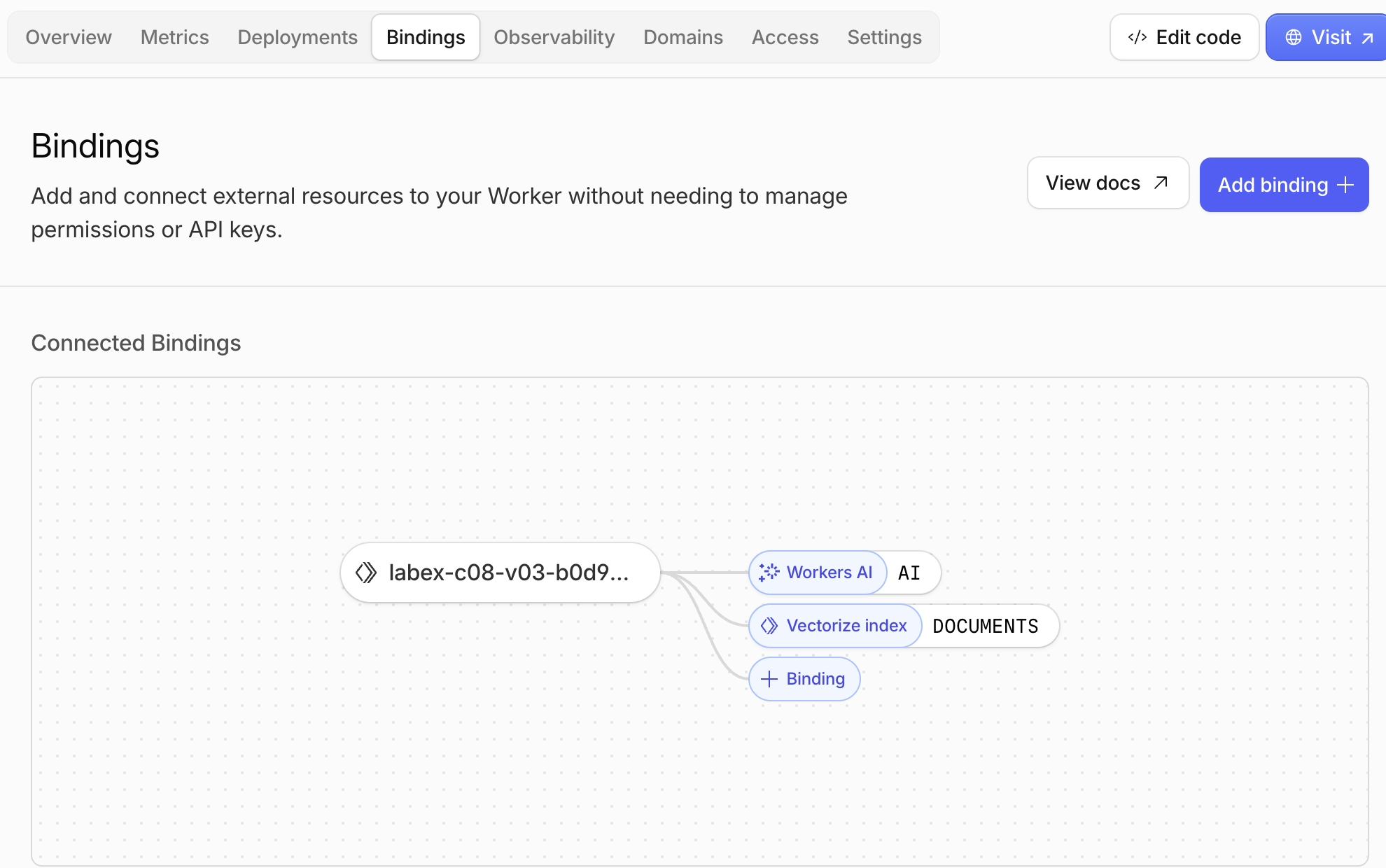
Open Workers & Pages → your labex-c08-v03-... Worker → Bindings. A binding gives Worker code a safe name for another Cloudflare service. Here, AI is the name used by env.AI to run the embedding model, while DOCUMENTS is the name used by env.DOCUMENTS to query this exact Vectorize index.
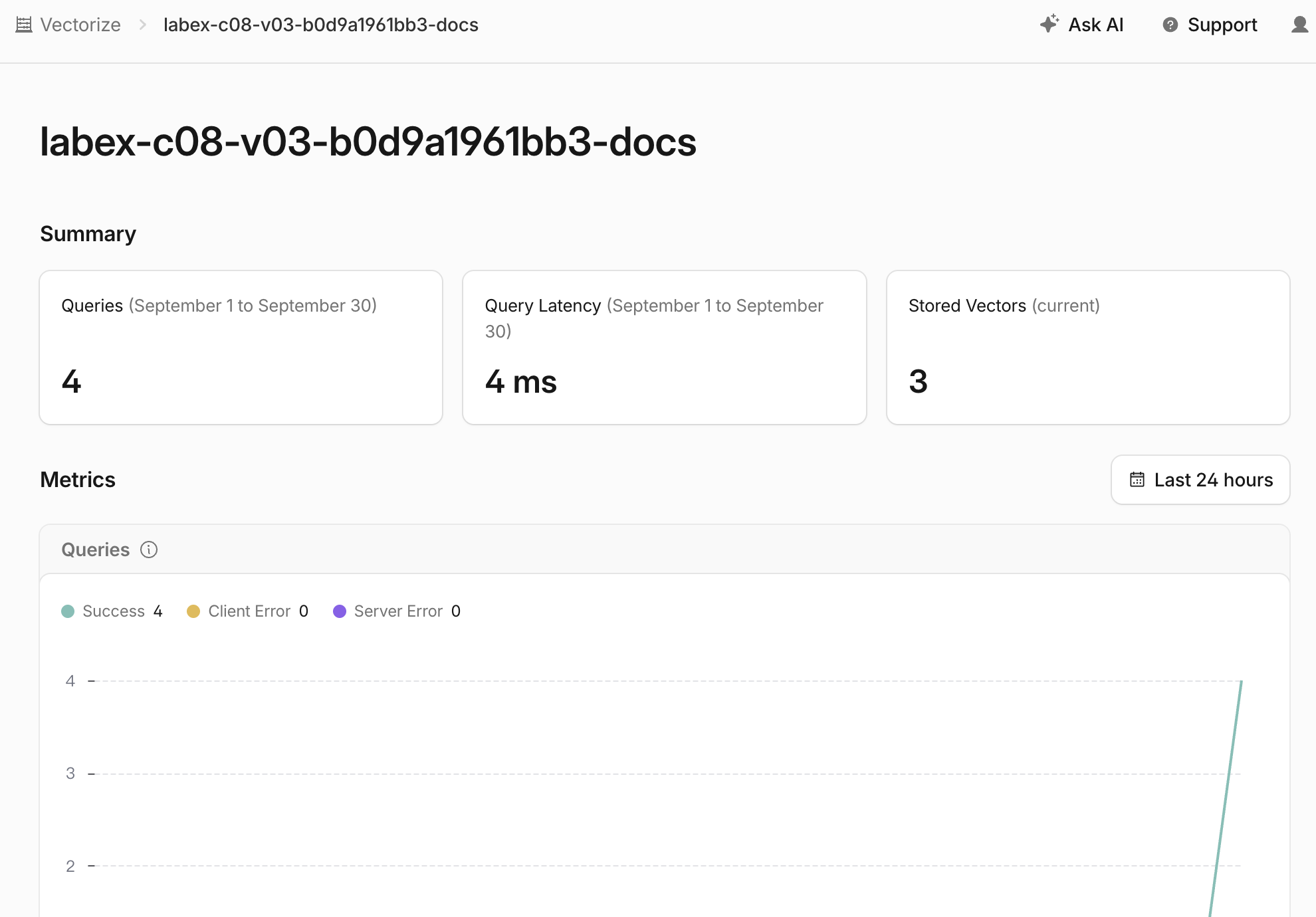
Next, open AI → Vectorize → the matching -docs index. The summary should show three current vectors: one for each help article you seeded. The query total can be different from the example because every successful search adds another query, including repeated checks.
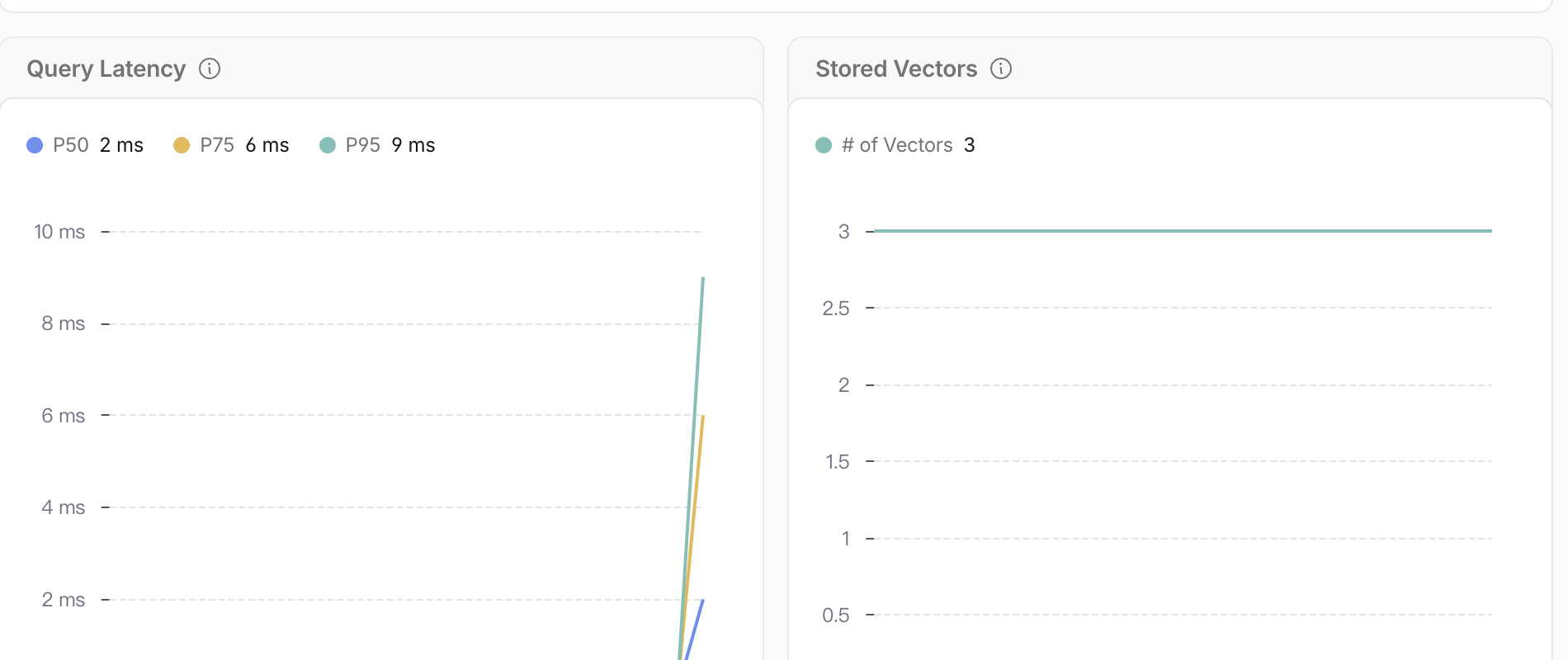
Scroll to Metrics. P50, P75, and P95 are latency percentiles: for example, P95 means 95% of successful queries finished in that time or less. These numbers describe speed, not how relevant a match is. The Stored Vectors chart should remain at three while you only search and do not add or remove documents.
Dashboard counters can lag behind the terminal by a few moments. Treat the API responses, returned IDs, and independent checks as the authoritative result; use the Dashboard to connect those results to the resources you can see and operate.
Remove the Search Worker and Index
In this step, you will delete both disposable cloud resources and prove their absence while Wrangler is still authorized. Logout is a separate final step because the cleanup check needs read access to Cloudflare.
First, recover the exact names from wrangler.jsonc. This makes cleanup safe even if you opened a new terminal and its earlier RUN and INDEX variables no longer exist:
RUN=$(node -p 'JSON.parse(require("fs").readFileSync("wrangler.jsonc", "utf8")).name')
INDEX=$(node -p 'JSON.parse(require("fs").readFileSync("wrangler.jsonc", "utf8")).vectorize.find((item) => item.binding === "DOCUMENTS").index_name')
printf 'Worker: %s\nIndex: %s\n' "$RUN" "$INDEX"
Confirm that both values begin with your unique labex-c08-v03-... prefix before deleting anything.
Delete the Worker first so no deployed code retains a binding to the index:
npx wrangler delete --name "$RUN" --force
Delete only the paired index, then save a successful authenticated inventory for the cleanup assessment:
npx wrangler vectorize delete "$INDEX" --force
npx wrangler vectorize list --json > .labex/indexes-after-cleanup.json
node -e '
  const rows = JSON.parse(require("fs").readFileSync(process.argv[1], "utf8"));
  if (rows.some((row) => row.name === process.argv[2])) throw new Error("lab index still exists");
  console.log("lab index is absent");
' .labex/indexes-after-cleanup.json "$INDEX"
Complete the step now, before logout. The assessment independently reads Cloudflare and rejects authentication or network failure as evidence of deletion.
Log Out of the Learning VM
In this step, you will remove this VM's temporary Wrangler authorization. The cloud resources are already gone and the authenticated cleanup check has passed, so it is now safe to log out:
npx wrangler logout
npx wrangler whoami --json
Expect loggedIn: false. The Cloudflare Dashboard browser session is separate and remains available to your learning account.
Summary
You built a Worker that uses one model contract for both stored document embeddings and live query embeddings, seeded three stable IDs into Vectorize and waited for the real asynchronous mutation. You used topK to bound candidates, interpreted scores as relative ranking signals, returned metadata instead of raw vectors and produced an explicit empty result after application thresholding. Finally, you confirmed both cloud bindings in the Dashboard, removed the disposable Worker and index while still authorized, and then logged out of the VM.
V04 will add server-controlled customer namespaces and metadata filters so a semantically similar record is returned only when it also belongs to the authorized search scope.